

Automated document workflows use software to capture, extract, route, approve, and store documents so your team moves paperwork faster, with fewer errors and a complete audit trail. The core outcome is speed paired with accountability: what used to take a stack of emails and a filing cabinet now takes minutes and leaves a record of every step. The rest of this guide covers the technology, the rollout steps, real workflow examples, and the metrics that prove it worked.
TL;DR:
- Automated document workflows offer significant speed and accuracy improvements, especially in high-volume, manual, and error-prone processes like accounts payable.
- The most effective automation projects start with mapping key processes, designing detailed exception handling, and running small pilots before scaling.
- Proper integration, data quality, and change management are vital; poor document quality or poor user training can cause project failures.
- Security measures such as role-based access, encryption, and immutable audit trails are essential for compliance and audit readiness.
- Partnering with an outsourced IT provider can streamline implementation, ongoing support, and ensure rapid response to workflow issues.
Table of Contents
- What Are Automated Document Workflows?
- What Business Outcomes Should You Expect?
- What Technology Powers Document Automation?
- How Do You Implement Automated Document Workflows?
- What Do Real Automated Workflows Look Like?
- How Do You Keep Automated Workflows Secure and Compliant?
- Which KPIs Actually Prove Automation Is Working?
- What Goes Wrong, and How Do You Fix It?
- How Mavericks Office Solutions Supports Document Automation Projects
- Where To Start If You’re Serious About This
- Ready to Pilot Document Automation With a Managed Partner?
- Sources
- FAQ
What Are Automated Document Workflows?
An automated document workflow moves a document through a defined sequence without a person manually keying data, routing files by hand, or chasing signatures. The typical sequence looks like this: capture, extract, route, approve, sign, archive. A document enters the system (scanned, emailed, or uploaded), software pulls the relevant data, business rules send it to the right person or system, someone approves it if needed, a signature gets captured electronically, and the final version lands in storage with a timestamp attached to every action.
This is narrower than business process automation (BPA), which covers entire operational processes, some of which involve no documents at all, such as inventory reordering or customer support ticket routing. Document workflow automation is the subset of BPA focused specifically on paper and digital files: invoices, contracts, HR forms, purchase orders, compliance filings. You reach for document-specific tools when the bottleneck is a form or a file. You reach for broader BPA when the bottleneck is a whole business process that happens to touch a document along the way.
Most automated document workflows fall into one of four structural patterns:
- Sequential workflows move a document through a fixed, linear chain (submit, review, approve, file) where each step waits for the last one to finish.
- Parallel workflows send a document to multiple people or systems at once, such as a contract that needs legal and finance sign off simultaneously.
- Rule-based workflows route documents according to conditional logic, like sending any invoice over $5,000 to a director instead of a supervisor.
- State-machine workflows track a document through defined states (draft, pending, approved, archived) and allow it to move backward, not just forward, which matters for anything that gets rejected and resubmitted.
Knowing which pattern your process actually follows matters before you shop for tools. A vendor’s demo often shows a clean sequential flow, but if your approval chain has exceptions and rework loops, you need state-machine logic or you’ll be fighting the software within a month.
What Business Outcomes Should You Expect?
The honest answer is that outcomes scale with volume and manual effort per document, not with the size of your company. A five-person accounting team processing 800 invoices a month can see returns just as fast as a 200-person finance department, because the math is the same: fewer manual touches per document times more documents equals more hours saved.
Three outcomes show up consistently across implementations:
- Faster cycle time. Documents that once sat in an inbox for days move through routing and approval in hours because the system, not a person’s calendar, decides who sees it next.
- Fewer manual touches. Data that used to get retyped from a PDF into a spreadsheet, then into an accounting system, gets extracted once and passed downstream automatically.
- Higher accuracy. Rule-based validation catches mismatched totals or missing fields before a document reaches a human, which cuts the rework that manual processing generates.
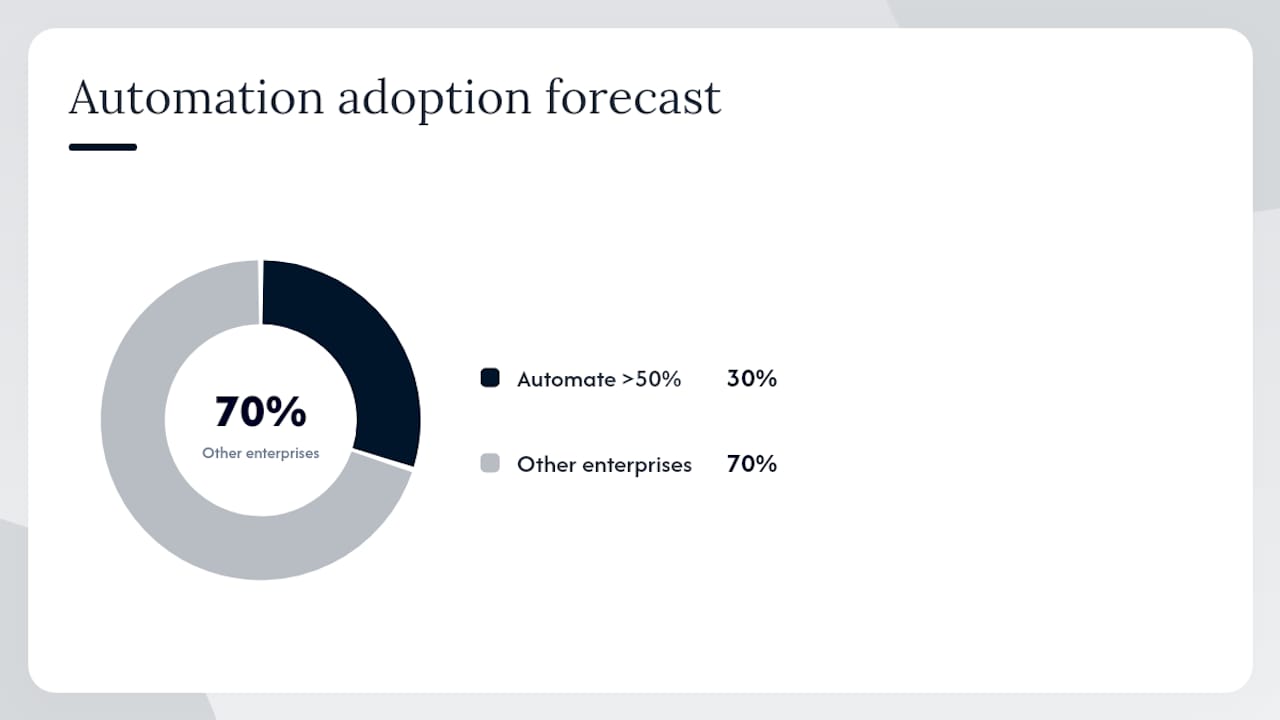
Automation adoption is accelerating industry-wide. Gartner projects that a significant share of enterprises will automate more than half of their network activities by 2026 [30% of enterprises].. This is a signal that document and process automation is moving from early-adopter territory to baseline expectation.
Compliance and audit readiness are the other half of the value case, and they get less attention than speed does. When routing, approvals, and archiving happen through software instead of email threads, every action gets logged automatically: who touched the document, when, and what they changed. That immutable trail is what an auditor or regulator actually wants to see, and it’s far harder to produce reliably from a shared inbox than from a system built to log it by default.
ROI shows up fastest where three conditions overlap: high document volume, significant manual effort per document, and a high exception or error rate today. A process with low volume and few errors won’t justify the investment quickly. A high-volume process riddled with manual data entry and frequent mistakes, like accounts payable at a growing company, tends to pay back the fastest because every touchpoint removed compounds across hundreds or thousands of documents a month.
What Technology Powers Document Automation?
Understanding the building blocks matters because vendor pitches tend to blur them together, and you need to know which piece solves which problem before you sign a contract.
Intelligent Document Processing (IDP) and OCR form the extraction layer. Optical character recognition (OCR) converts a scanned image or PDF into machine-readable text. IDP goes further, using machine learning to identify specific fields, like a vendor name, invoice number, or total due, and pull them into structured data. Every IDP tool assigns a confidence score to each extracted field. High-confidence extractions flow straight through; low-confidence ones get flagged for a human to check. That human-in-the-loop step is not a weakness in the system. It’s what keeps a single misread digit from becoming a $10,000 payment error.

Orchestration platforms are where you define the actual flow logic, the routing rules, approval chains, and conditional branches. Low-code and no-code builders, similar in spirit to Microsoft’s Power Automate, let operations staff build and adjust these flows without writing custom code, which matters because the person who understands the approval process is usually not a developer.
Templates and eSignature handle document generation and closing the loop. Dynamic templates populate contracts or offer letters with data pulled from a CRM or HR system, apply conditional clauses (different termination language for different states, for instance), and route the finished document for electronic signature.
Connectors and APIs tie the whole thing to your systems of record. A workflow that extracts invoice data but can’t post it to your ERP has only solved half the problem. Integration with your ERP, CRM, and accounting platform is what turns extracted data into a closed transaction rather than another spreadsheet to reconcile by hand.
- Assign confidence thresholds per field, not just per document, since a wrong invoice total matters more than a wrong purchase order note.
- Build a fallback path for anything below your threshold: a review queue, not a rejected transaction.
- Combine a prebuilt extraction model with a custom-trained one when your document formats vary widely across vendors.
- Test connectors against your actual ERP version before committing, since integration gaps show up fastest at the handoff point.
Pro Tip: When invoice extraction confidence comes back low on a key field, route that document to a short human review queue and feed the corrected data back into your model. That feedback loop is what turns a mediocre extraction model into a genuinely accurate one over a few months, rather than leaving accuracy flat forever.
How Do You Implement Automated Document Workflows?
Skipping straight to tool selection is the single most common reason document automation projects stall. Map the work first. Pick the tool second.
- Pick your first process using an impact versus effort lens. Score your candidate processes (invoice processing, contract approval, onboarding paperwork) on document volume, manual hours spent, and error rate. Start with the process that scores high on impact and low on integration complexity, not the one that sounds most impressive to leadership.
- Map the process end to end, including every exception. Document who touches the file, at what point, and under what condition it takes a different path. If an invoice over a certain dollar amount needs a second approver, write that rule down before you automate around it. Skipping this step is the most common mistake in the entire playbook: teams design for the happy path and get blindsided by the 20% of documents that don’t follow it.
- Build a tool-selection checklist before you take a single demo. At minimum, confirm integration compatibility with your existing ERP or CRM, data governance and access controls, security certifications, and what training or onboarding support comes with the contract.
- Design a pilot with a defined sample size and success criteria before you launch it. A pilot running for four to six weeks against 100 to 300 documents is usually enough to surface real exceptions without dragging the project out. Decide in advance what “success” means: touchless processing rate, cycle time reduction, error rate, whatever matters most for that process.
- Train the people who will actually use it, not just the ones who approved the budget. The staff processing exceptions daily need to understand why the system routed a document a certain way, not just how to click approve.
- Scale deliberately, one process at a time. Once the pilot hits its success criteria, expand to adjacent document types or departments rather than automating everything simultaneously. A phased rollout means a mistake in your second process doesn’t undo the trust you built in the first.
Pro Tip: Keep your pilot’s sample size intentionally small and its metrics intentionally simple. A lightweight, well-scoped pilot with a small sample and one or two clear success measures gets you to a real answer, and stakeholder buy-in, far faster than a sprawling six-month proof of concept.
What Do Real Automated Workflows Look Like?
Abstract descriptions of “capture, extract, route” only click once you see them applied to an actual document type.
Invoice processing is the workflow most companies automate first, and for good reason: the steps are well understood and the payoff is measurable. A vendor invoice arrives by email or scan, an IDP tool extracts the vendor name, amount, line items, and due date, and the system validates that data against a purchase order. If everything matches within tolerance, the invoice routes for approval automatically; if it doesn’t, it lands in an exception queue for a human. Once approved, the data posts directly into the ERP for payment. IBM’s breakdown of this lifecycle notes that automating these stages reduces processing bottlenecks and improves vendor relationships, since suppliers get paid on a predictable schedule instead of whenever someone gets around to keying in the invoice.
Contract generation and signature workflows typically trigger from a CRM event, a deal closing, for instance, and pull in customer data to populate a template automatically. Conditional logic swaps in different clauses based on deal size, region, or product line, and the finished contract routes through legal and finance for parallel approval before going out for signature.
- Onboarding packets generate offer letters, benefits forms, and policy acknowledgments automatically when HR marks a candidate as hired, with signed documents feeding directly into records retention and triggering system access provisioning.
- Procurement workflows route purchase requisitions through approval chains based on dollar thresholds, then generate purchase orders automatically once approved.
- Shipping and compliance documents, like bills of lading or safety certifications, benefit from the same capture-and-validate pattern, particularly where a missing field can hold up a shipment at a dock or a border.
How Do You Keep Automated Workflows Secure and Compliant?
Security has to be designed into a document workflow from the start, not bolted on after a near miss. Retrofitting access controls onto a live system is far harder than building them in from day one.
Ask any vendor about access control and encryption before you ask about features. Documents should be encrypted both in transit and at rest, and access should be role-based, meaning a warehouse clerk shouldn’t be able to open a signed employment contract just because both live in the same platform.
- Access control: role-based permissions that limit who can view, edit, or approve specific document types.
- Encryption: data encrypted both in transit and at rest, not just one or the other.
- Retention policies: automatic archiving and deletion schedules that match your industry’s legal requirements, not a default the vendor picked.
- Immutable audit trails: a log of every action taken on a document that cannot be edited or deleted after the fact.
- Vendor contract clauses: data processing agreements that specify where your data is stored, who can access it, and what happens to it if you cancel the contract.
An immutable, timestamped audit trail is what separates a defensible compliance posture from a hopeful one. Regulators and auditors don’t want your explanation of what probably happened; they want a record that shows exactly what did.
Design patterns matter here too. Minimize data exposure by only extracting the fields a downstream system actually needs, rather than pulling and storing an entire document’s contents when a handful of fields would do. Secure the handoff points between systems specifically, since that’s typically where a document sits briefly in an unencrypted format during a transfer between your IDP tool and your ERP. If your document pipeline touches financial or personal data, pairing your automation rollout with a cybersecurity review closes gaps that a workflow tool alone won’t catch.
Which KPIs Actually Prove Automation Is Working?
Four metrics tell the real story, and finance and operations leaders both care about them for different reasons.
- Cycle time: the total elapsed time from document intake to final resolution, measured before and after automation to show the actual speed gain.
- Touchless processing rate: the percentage of documents that move from intake to completion with zero manual intervention, the single best indicator of how well your extraction and rules are tuned.
- Exception rate: the percentage of documents that get flagged for human review, which should trend downward as your models improve.
- Cost per document: total processing cost (software, labor, overhead) divided by document volume, the number that ultimately justifies the spend to finance.
Estimating savings starts with your current cost per document processed manually, including the labor time for data entry, routing emails, and chasing approvals. Multiply that by monthly volume, subtract your new automated cost per document, and you get a rough monthly savings figure. Divide your implementation cost by that monthly savings and you have a payback period, usually the number that gets a project approved or shelved.
Build separate dashboard views for finance and operations. Finance wants cost per document and payback period front and center. Operations wants cycle time and exception rate, since those are the levers they can actually pull day to day. A finance-focused ROI framework built specifically around accounts payable makes this easier to present to a CFO who wants numbers, not narrative.
What Goes Wrong, and How Do You Fix It?
Most automation projects don’t fail because the software is bad. They fail because the rollout ignored a predictable problem.
- Integration gaps with legacy systems: older ERPs and accounting platforms sometimes lack modern APIs. The fix is usually a middleware connector or, in stubborn cases, a phased data migration rather than forcing a direct integration that isn’t there.
- Poor document quality causing low-confidence extraction: blurry scans, inconsistent vendor formats, and handwritten notes all trip up IDP tools. Sample your worst documents before launch, train a custom model on them if volume justifies it, and route anything under threshold to a review queue rather than letting bad data flow through silently.
- Weak change management: a system nobody trained on gets ignored or worked around within weeks. Assign clear ownership for the new process, train the people doing daily exception handling, and roll out in phases so early wins build momentum instead of a single high-stakes launch.
- Underestimating exception handling: teams design for the clean, straightforward document and get blindsided by the ones that don’t fit the pattern, which are often 15 to 20% of total volume in a typical accounts payable process.
Pro Tip: If your internal IT team is already stretched thin managing infrastructure and security, a managed services partner or a fractional IT leader can scope and run the automation pilot for you, so the project doesn’t compete with the rest of your team’s workload for attention.
How Mavericks Office Solutions Supports Document Automation Projects
Mavericks Office Solutions runs as an outsourced IT department for small and medium businesses, which puts document automation squarely inside its lane rather than as an add-on service. Managed IT, cybersecurity, managed print, and VoIP all connect to the same infrastructure a document workflow depends on: the network it runs on, the printers and scanners where paper documents enter the system, and the phone systems that trigger approval calls when a document gets flagged.
Two things separate the operational side of this work: 24/7 monitoring and a help desk with rapid response times. When an automated workflow breaks at 9 PM because a connector failed, that response time is the difference between a documented, tracked fix and a Monday-morning scramble.
Document-automation work is typically scoped in three stages: a pilot to prove the concept on one process, managed operation of the resulting workflow, and ongoing support as volume grows or new document types get added.
Where To Start If You’re Serious About This
Map one process this week. Don’t wait for a perfect list of every workflow you could automate; pick the single highest-volume, highest-error process you have, invoice processing is usually it, and write down every step, every approver, and every exception it currently hits. Then set two or three success metrics before you talk to a single vendor. The most common mistake I see is skipping exception design entirely: teams build for the clean document and get ambushed by the messy 20%. Run a small pilot, measure it honestly, and expand only once it proves itself.
— Jeffrey
Ready to Pilot Document Automation With a Managed Partner?
If your team is weighing whether to build this internally or find a partner who can run the whole thing, Mavericks Office Solutions gives you a way to skip the trial-and-error phase entirely. Instead of hiring a specialist or piecing together five different vendor contracts, you get one outsourced IT partner who already manages the infrastructure your workflow depends on, the network, the scanners, the phone system that fires off approval calls.

Mavericks Office Solutions can scope a document automation pilot alongside your existing managed IT services, pairing it with the cybersecurity controls your compliance team will ask about and the managed print setup where your paper documents likely originate. Because Mavericks already runs 24/7 monitoring and a USA-based help desk with response times under 12 minutes, an automated workflow that breaks overnight gets a real person on it fast, not a support ticket sitting in an offshore queue. If you want a partner to pilot, integrate, or operate your document workflows going forward, reach out through Mavericks Office Solutions to scope your first project.
Sources
For the technical details behind invoice extraction, Microsoft’s AI Builder documentation walks through the prebuilt invoice model and confidence threshold settings referenced earlier. IBM’s overview of automated invoice processing covers the full capture-to-posting lifecycle in more depth. Wrike’s implementation guide and FlowForma’s guide both offer additional frameworks for mapping and standardizing workflows. For enterprise-scale IDP use cases, see Automation Anywhere’s document automation product page.
- Automated invoice processing — IBM
- Document workflow automation: Examples, benefits, and a step-by-step guide — Wrike
FAQ
What Is Document Workflow Automation?
Document workflow automation is software that captures, extracts, routes, approves, and archives documents without manual data entry or hand-routing, cutting cycle time and reducing errors along the way.
What Are the Four Types of Document Workflows?
The four main patterns are sequential (linear, step-by-step), parallel (multiple approvers at once), rule-based (routing determined by conditional logic), and state-machine (documents that move between defined states, including backward for rework).
How Do You Automate Documentation?
Start by mapping your highest-volume, highest-error process end to end, including exceptions, then select a tool with IDP or OCR extraction, orchestration for routing rules, and integration with your ERP or CRM, and pilot it on a small document sample before scaling.
How Long Does It Take to See ROI From Document Automation?
ROI timing depends on document volume and manual effort per document rather than company size; high-volume processes with significant manual entry and error rates, like accounts payable, tend to pay back fastest.
Can a Managed IT Partner Run Document Automation for Us?
Yes. Mavericks Office Solutions scopes these projects in stages, piloting a single process, managing the resulting workflow, and supporting it as volume or document types grow, so your internal team doesn’t have to own it alone.