

SIP trunking connects your PBX to the public phone network over the internet, replacing physical copper or ISDN lines with virtual voice channels you can scale up or down on demand. For IT teams tired of provisioning delays and per-line costs, that shift means faster deployment, lower monthly bills, and one connection that carries voice, video, and messaging. If you manage phone systems or you’re evaluating voice vendors, this is the technology reshaping your options.
TL;DR:
- Successful SIP trunk deployment requires thorough testing of interoperability, NAT configurations, and firewall settings before switching to avoid call disruptions.
- Choosing a provider involves evaluating SLA guarantees, codec compatibility, failover options, and clear E911 procedures, not just cost or speed of setup.
- Adequate bandwidth calculation, QoS prioritization, and disabling SIP ALG on network devices are critical to ensure call quality during and after migration.
- Migration planning should include inventorying existing lines, parallel testing, and staged cutover to prevent service outages and validate call clarity.
- Security measures like encryption, an SBC, and detailed monitoring are essential to meet compliance standards and safeguard voice traffic over SIP trunks.
Table of Contents
- What Is SIP Trunking, Exactly?
- How Does SIP Trunking Work?
- SIP Trunking vs VoIP vs PRI: What’s the Real Difference?
- What Business Benefits Does SIP Trunking Deliver?
- How Much Bandwidth Does SIP Trunking Need?
- Is SIP Trunking Secure Enough for Compliance Needs?
- Why Is My SIP Trunk Having Call Quality Issues?
- How Do You Choose the Right SIP Trunk Provider?
- What Does a SIP Trunk Migration Checklist Look Like?
- Where Managed IT Support Fits Into Your SIP Trunking Rollout
- What SMB Decision-Makers Get Wrong About SIP Trunking
- Sources
- FAQ
What Is SIP Trunking, Exactly?
SIP trunking uses the Session Initiation Protocol to connect an on-premises or cloud-hosted PBX to the internet, letting it place and receive calls without a physical line running to the building. The “trunk” here is a logical bundle of voice channels, not a cable. Instead of paying for a fixed number of copper pairs from the phone company, you’re leasing capacity from an internet telephony service provider (ITSP) that scales as your call volume changes. That distinction, virtual trunk versus physical circuit, is the single most important thing to understand before you evaluate a provider.
A few terms come up constantly once you start shopping for SIP trunks, and getting them straight now saves confusion later:
- SIP (Session Initiation Protocol): the signaling standard that sets up, manages, and tears down a call session.
- IP-PBX: a phone system that routes calls over your network instead of dedicated phone wiring.
- PSTN: the traditional public switched telephone network your calls ultimately connect to when reaching landlines or mobile numbers.
- DID (Direct Inward Dialing): a phone number assigned to a person or department without requiring a separate physical line.
- SIP channel: one simultaneous call path, the unit providers used to size and price your trunk.
Understanding SIP trunking starts here, because every architecture and pricing decision downstream builds on these five concepts.
How Does SIP Trunking Work?
A call leaving your office follows a specific path: your PBX hands it to a session border controller (SBC), the SBC passes it to your ITSP, and the ITSP routes it onto the PSTN or to another SIP endpoint. Two separate streams travel that path. SIP signaling carries the setup information (who’s calling, what codec to use, when the call ends), while RTP (Real-time Transport Protocol) carries the actual audio. They can even take different network routes, which is why troubleshooting a SIP trunk sometimes means chasing two problems instead of one.
The SBC is the piece most IT teams underestimate. It sits at the network edge, handling security, protocol translation, and NAT traversal so your internal PBX doesn’t have to expose itself directly to the internet. Architecturally, expect to plan around:
- Transport protocol: UDP is common and lightweight, TCP is more reliable for larger payloads, and TLS adds encryption for signaling.
- Codec negotiation: your PBX and the ITSP agree on how audio gets compressed, which affects both bandwidth and call quality.
- Trunk versus channel: the trunk is the overall connection; channels are the concurrent calls it can carry, and you size that number based on peak usage, not average usage.
- Failover routing: trunks should register with a backup ITSP endpoint or route, so a single point of failure doesn’t take down every phone line at once.
SIP trunking architecture typically bundles these pieces so businesses can add channels without running new wiring, which is the practical payoff of moving away from fixed physical circuits.
SIP Trunking vs VoIP vs PRI: What’s the Real Difference?
VoIP is the umbrella technology for making calls over an IP network. SIP trunking is the specific delivery method that uses SIP to connect your PBX to the PSTN, making it a subset of VoIP rather than a competing category. If you’ve been asking “sip trunk vs VoIP,” the honest answer is that you’re not choosing between two rivals. You’re choosing SIP trunking as one implementation of the broader VoIP concept.
The more useful comparison is against PRI (Primary Rate Interface) circuits, the legacy digital lines many businesses still pay for:
- Provisioning speed: PRI circuits often take weeks to install; SIP trunks can go live in days once network readiness is confirmed.
- Channel granularity: PRI locks you into blocks of 23 channels; SIP trunks let you add or remove single channels as needed.
- Cost structure: PRI pricing is fixed regardless of usage, while SIP trunking often follows metered or channel-based models that flex with demand.
If you’re weighing sip trunking vs hosted PBX or sip trunk vs cloud PBX, remember that SIP trunks pair with an on-premises PBX you still own and maintain, while hosted or cloud PBX shifts that hardware and management to a provider entirely.
What Business Benefits Does SIP Trunking Deliver?
Cost is usually the first thing decision-makers ask about, and the savings are real once you cross a certain call volume. SMBs see the clearest financial advantage at moderate-to-high concurrent call volumes, or when consolidating multiple office locations under a single carrier relationship instead of separate local contracts at each site.
Beyond cost, the operational benefits tend to matter more day to day:
- Elastic scalability: add channels for a seasonal hiring spike or a new office without waiting on a physical line installation.
- Geographic number flexibility: get local numbers in cities where you have no physical office, useful for sales teams or regional support lines.
- Multimedia support: SIP trunks carry voice, video, and messaging over the same connection, which simplifies your unified communications strategy.
- Built-in resilience options: failover routing and redundant carrier paths reduce the risk of a single outage silencing your phone lines entirely.
For businesses juggling multiple locations, that consolidation alone often justifies the migration before the per-minute savings even get counted.
How Much Bandwidth Does SIP Trunking Need?
Bandwidth planning is where good intentions meet bad math, and it’s the number one reason early SIP deployments sound choppy. Voice codecs determine how much data each call consumes, and you need to budget for overhead, not just the raw codec rate.
- Calculate per-call bandwidth. G.711, the higher-quality codec, uses roughly 87 to 100 kbps per call once you add RTP, UDP, and IP header overhead. G.729 compresses further, running about 24 to 40 kbps per call with the same overhead included.
- Multiply by peak concurrent calls, not total extensions. A 50-person office rarely has 50 simultaneous calls; size for your actual busy-hour peak.
- Reserve headroom for data traffic. Voice should never compete with a large file transfer or video conference on the same uncapped connection.
- Configure QoS to prioritize voice. Tag SIP and RTP traffic with DSCP values (commonly EF, or 46, for voice) and configure priority queueing on your router so voice packets jump the line ahead of bulk data.
- Confirm interoperability before cutover. Not every PBX and ITSP combination plays nicely out of the box. Check the provider’s interop and certification documentation, watch for SIP header handling quirks, and disable SIP ALG on routers and firewalls, since it frequently corrupts SIP packets instead of helping them.
- Run a full test call checklist. Confirm trunk registration, place inbound and outbound test calls, and verify two-way audio flows cleanly before going live.
Pro Tip: Disable SIP ALG on your firewall and router before your first test call. It’s the single most common cause of mysteriously broken calls during a new SIP trunk deployment, and most IT teams don’t think to check it until hours into troubleshooting.
Is SIP Trunking Secure Enough for Compliance Needs?
SIP trunking can meet strict security and compliance standards, but only if you configure it that way. The protocol itself doesn’t guarantee protection. IETF guidance recommends running trunks over TCP and using mutual TLS for authentication whenever confidentiality and integrity matter, which for most businesses handling customer data means always.
A few controls belong on every deployment checklist:
- Encrypt signaling and media with SIP over TLS and SRTP rather than leaving calls in plain text.
- Deploy an SBC for topology hiding, rate limiting, and fraud detection, so your internal network architecture isn’t exposed to every call attempt hitting your trunk.
- Confirm E911 handling in writing. Emergency-call routing and location-data responsibility often sit with the provider, but confirming exactly how they supply location information protects you from a compliance gap you didn’t know existed.
- Enable logging and monitoring for call detail records, and clarify lawful intercept responsibilities in your contract if you operate in a regulated industry.
Mavericks Office Solutions builds E911 verification into every VoIP deployment for exactly this reason. A detailed walkthrough of E911 requirements is worth reviewing before you sign with any provider.
Why Is My SIP Trunk Having Call Quality Issues?
One-way audio, dropped registrations, and jittery calls are the three complaints that show up most during early SIP trunk deployments, and each one has a fairly predictable cause.
- One-way or no audio usually means asymmetric routing. Signaling reaches the carrier fine, but RTP media takes a different path and gets blocked by a firewall or NAT device. Check your NAT configuration and confirm the correct RTP port range is open.
- Registration failures point to firewall or ALG interference. Verify SIP ALG is disabled and that your PBX can reach the provider’s SIP servers on the required ports.
- Jitter and choppy audio usually trace back to QoS. Confirm DSCP tagging is actually being honored end to end, not just configured on paper, and rule out bandwidth contention from other traffic.
- For carrier escalation, capture evidence up front. Pull SIP traces and packet captures (pcap) with accurate timestamps before you call support. Carriers move faster with hard data than with a description of “the call sounded weird.”
How Do You Choose the Right SIP Trunk Provider?
Provider selection is where most of the long-term risk in a SIP trunking project actually lives, since a bad choice here means renegotiating contracts and re-testing your entire environment later. Compare providers on more than sticker price.
- SLA terms: what uptime guarantee do they commit to, and what credits apply if they miss it?
- Codec support and interop matrices: ask for documented compatibility with your specific PBX vendor and firmware version, not a generic “we support SIP” claim.
- Pricing model: channel-based (fixed capacity) versus metered (pay per minute) fits different call volume patterns, so match the model to your actual usage.
- E911 handling: get written confirmation of how location data is provisioned and routed, and get it before contract signature, not after.
- Failover architecture: ask how the provider handles a regional outage on their end, not just yours.
- Porting timelines: number porting can take days to weeks depending on your existing carrier; get a realistic timeline in writing.
Red flags worth walking away from include vague answers about E911 routing, no documented interop testing process, and support tiers that route every issue through a general queue with no escalation path.
What Does a SIP Trunk Migration Checklist Look Like?
A clean cutover comes down to sequencing. Rushing the order of operations is how businesses end up with a weekend of dead phone lines.
- Inventory existing lines and numbers. Document every DID, extension, and call flow before you touch anything.
- Confirm bandwidth and QoS readiness. Run the capacity math from your peak concurrent call count and verify DSCP tagging works on your actual network hardware.
- Build your numbering and dial plan. Map old extensions and DIDs to the new trunk configuration before cutover day.
- Run parallel testing. Keep your old lines active while testing inbound and outbound calls on the new trunk simultaneously.
- Execute the cutover with failover configured. Update dial plans, confirm registration, and don’t disconnect the old service until the new one proves stable.
- Validate and hand off. Monitor call quality for at least a week, confirm your SLA terms are being met, and document a support runbook for your team.
Where Managed IT Support Fits Into Your SIP Trunking Rollout
The technical pieces of SIP trunking, from bandwidth math to E911 verification, are exactly where a 24/7 monitored help desk earns its keep, catching a misconfigured firewall port or a failed registration before your team notices dropped calls. Mavericks Office Solutions handles staging, interop testing, and porting timelines as part of its VoIP and unified communications support, backed by a USA-based help desk with average response times under 12 minutes.
What SMB Decision-Makers Get Wrong About SIP Trunking
The conventional advice on SIP trunking treats it as a pure cost-cutting exercise, and that framing undersells what actually matters. Yes, moving off PRI circuits saves money at moderate call volumes. But the research consistently points to a different bottleneck: interoperability testing, not pricing, is what determines whether a deployment goes smoothly. A short staging period catches the overwhelming majority of early cutover problems before they become production outages.
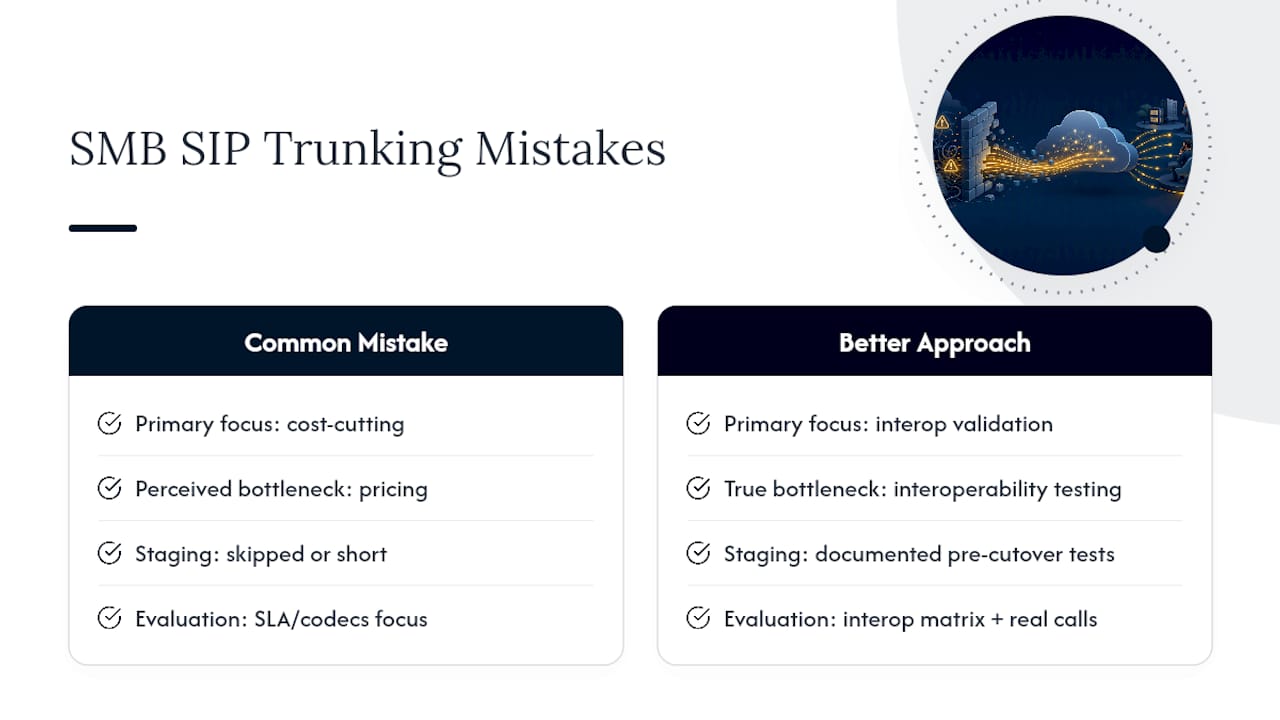
Most businesses skip that step because it feels like an unnecessary delay when a provider promises a fast setup. That’s backwards. The provider evaluation questions about SLAs and codec support matter less than getting a documented interop matrix and running real test calls, with real NAT configurations and real firewall rules, before committing to a cutover date.
If you take one thing from this explainer, prioritize the technical validation over the contract negotiation. A cheaper trunk with untested interop will cost you more in support tickets, dropped calls, and lost credibility with customers than the monthly savings were ever worth. Get the architecture right first. Negotiate price second.
— Jeffrey
Sources
- SIP Trunking vs VoIP: Key Differences & Which to Choose? — TechTarget
- What is SIP Trunking? — AWS
- What is a Session Initiation Protocol (SIP) Trunk Anyway? — IETF draft
- What is SIP Trunking? — Twilio
FAQ
What Is SIP Trunking and How Does It Work?
SIP trunking uses the Session Initiation Protocol to connect your PBX to the internet, replacing physical phone lines with virtual channels that route calls through an SBC to an ITSP and then onto the PSTN.
What Is the Difference Between VoIP and SIP Trunking?
VoIP is the broad technology category for making calls over an IP network, while SIP trunking is a specific delivery method within VoIP that connects a PBX to the phone network using the SIP protocol.
What Are Some Common SIP Trunking Problems?
The most frequent issues are one-way audio caused by asymmetric RTP routing, registration failures from SIP ALG interference or blocked firewall ports, and jitter from inadequate QoS configuration.
Does SIP Trunking Work with Any Phone System?
Not automatically. Your PBX and the SIP trunk provider need documented interoperability, since codec support, SIP header handling, and NAT traversal vary by vendor and require testing before a production cutover.