
Most VoIP call quality issues trace back to four fixable things: missing Quality of Service (QoS) marking, packet loss above 0.5%, a mismatched or transcoded codec, and Wi-Fi standing in for a wired connection that should exist. Fix those four before you touch anything else. Enable end-to-end DSCP EF (46) tagging, get packet loss under 0.5%, standardize on Opus or G.711 rather than letting calls bounce between codecs, and move any desk phone or softphone that matters onto Ethernet.
Before you change a single setting, run these checks. Each takes under two minutes:
- Pull MOS and RTCP stats from the last few problem calls in your PBX or SBC dashboard.
- Confirm DSCP 46 is actually present on RTP packets, not just configured on paper.
- Capture a 60-second PCAP during a live or reproduced issue.
- Run an Ookla Speedtest from the affected endpoint, not just the server room.
- Check which codec actually negotiated on the call, not which one you configured.
Pro Tip: The single most common QoS failure isn’t a missing config, it’s a firewall or carrier that rewrites or strips DSCP markings at the WAN edge. Your internal network can be perfectly tagged and still lose it all the moment traffic crosses the demarcation point.
Key Takeaways
Fixing VoIP call quality requires enforcing DSCP EF (46) at every network hop, keeping packet loss under 0.5%, standardizing on Opus or G.711, and using wired Ethernet wherever call quality is critical.
| Point | Details |
|---|---|
| Prioritize packet loss first | A 1% loss rate costs roughly 0.3 to 0.5 MOS points, more damage per unit than latency. |
| Verify QoS survives every hop | DSCP EF (46) must persist from endpoint through firewall to carrier handoff, not just at the switch. |
| Match symptoms to evidence | Choppy audio means check RTCP loss and jitter; one-way audio means check the RTP media path and NAT. |
| Change one variable at a time | Apply a single fix, re-measure MOS and RTCP, then log the result before moving to the next change. |
| Get managed voice support | Mavericks Office Solutions provides proactive QoS configuration, multi-WAN routing, and continuous MOS monitoring for business VoIP. |
Table of Contents
- How VoIP Data Travels and the Metrics That Actually Matter
- Matching Symptoms to Root Causes
- A Step-by-Step Troubleshooting Workflow
- Network-Level Causes and the Fixes That Actually Work
- Why Wi-Fi Causes Unpredictable Voice Problems
- Endpoint, PBX, and SIP Configuration Checks
- Tools for Monitoring, Testing, and Diagnosing Quality
- Setting Targets to Prevent Regression
- What to Send Your VoIP Provider or MSP When You Escalate
- Why QoS Discipline Beats Chasing Complaints
- How Mavericks Office Solutions Handles Voice Quality for You
- Frequently Asked Questions
- Sources
How VoIP Data Travels and the Metrics That Actually Matter
Voice traffic moves as a stream of small, timestamped packets over the Real-time Transport Protocol (RTP), while a parallel channel called RTCP (RTP Control Protocol) reports on how that stream performed. Every RTCP Sender Report and Receiver Report carries the numbers you need: jitter, cumulative packet loss, and round-trip timing. Most PBX platforms also roll this data into a per-call record with a calculated Mean Opinion Score (MOS), so you rarely need to dig into raw RTCP unless the CDR data looks wrong.
MOS scores run on a 1 to 5 scale, and the thresholds matter more than the concept:
- MOS 4.0 and above: toll quality, indistinguishable from a landline call.
- MOS 3.5 to 4.0: acceptable, though attentive users will notice minor artifacts.
- MOS below 3.0: poor, users will complain unprompted.
| Metric | Good | Marginal | Problem |
|---|---|---|---|
| One-way latency | Under 150 ms | 150 ms | Over 150 ms |
| Jitter | Under 30 ms | 30 ms | Over 30 ms |
| Packet loss | Under 0.5% | 0.5% | Over 0.5% |
ITU-T Recommendation G.114 sets the one-way delay ceiling at roughly 150 ms before conversations start feeling awkward, with speakers talking over each other. Packet loss does more damage per unit than latency does: 1% packet loss typically costs 0.3 to 0.5 MOS points, which means even a “minor” 3% loss rate can drag a toll-quality call down into complaint territory. Chase loss before you chase latency.
Matching Symptoms to Root Causes
Users don’t report “packet loss.” They report “choppy” or “robotic” or “I could hear them, they couldn’t hear me.” Translating those complaints into a technical starting point saves you from guessing.
- Choppy or garbled audio usually points to packet loss or jitter exceeding buffer capacity. Check the RTCP loss percentage and jitter field first.
- Robotic or metallic-sounding voice often means a codec mismatch or transcoding between legs, sometimes combined with moderate packet loss.
- One-way audio almost always traces to an RTP media path problem: NAT traversal, a firewall blocking the return path, or a Session Description Protocol (SDP) negotiation error.
- Echo typically comes from a hybrid analog-to-digital boundary (an analog phone or gateway) or, less often, an acoustic issue on a speakerphone.
- Noticeable delay points to high one-way latency, frequently from a satellite link, an overloaded VPN tunnel, or excessive jitter buffer depth.
- Dropped calls suggest registration timeouts, session timer mismatches, or an unstable WAN link dropping SIP signaling mid-call.
This symptom-to-cause mapping matches the five-area diagnostic framework TelcoBridges uses: packet loss, jitter, one-way delay, codec or transcoding artifacts, and echo. Confirm each hypothesis with real evidence, not assumption. For choppy audio, that means the RTCP loss and jitter fields. For one-way audio, pull the SBC’s call trace and check whether the RTP stream is flowing in both directions. For echo, listen for whether it’s consistent (points to a hybrid gateway) or intermittent (points to acoustics).
A Step-by-Step Troubleshooting Workflow
Run this sequence in order. Skipping steps to jump straight to a fix is how teams end up changing five settings and still not knowing which one worked.
- Isolate the problem. Reproduce the call if possible. Note the exact timestamp, direction (inbound or outbound), and whether it’s a single call or a pattern affecting multiple users.
- Pull the numbers. Collect per-call MOS, RTCP loss and jitter, and the CDR entry from your PBX or SBC.
- Capture a PCAP. Grab 60 to 120 seconds of packet capture during the issue, ideally from the SBC interface where you can see both call legs.
- Confirm codec behavior. Check what codec actually negotiated on each leg and whether any transcoding hop occurred between them.
- Apply one fix. Change a single variable at a time. Don’t touch QoS, codec policy, and firmware in the same maintenance window.
- Re-measure. Pull fresh MOS and RTCP data after the change and compare against your baseline.
- Log it. Record what changed, when, and what the before/after numbers were.
Before escalating anything to a provider or vendor, have this ready:
- One or two specific call timestamps with caller and callee numbers.
- A MOS snapshot from those calls.
- The RTCP report showing loss, jitter, and round-trip time.
- The SBC’s SIP trace for the affected call.
- Your PCAP file.
- A Speedtest result run from the affected location during the issue window.
That verification loop, one change, one re-measurement, matters more than any individual fix. Teams that change three things at once and declare victory when quality improves usually can’t repeat the fix six months later when it happens again.
Network-Level Causes and the Fixes That Actually Work
Here’s what surprises most IT teams: gigabit internet rarely fixes voice problems. Voice uses a tiny fraction of available bandwidth (about 80 to 100 Kbps per call with G.711, less with Opus or G.729), so raw throughput is rarely the bottleneck. Jitter and packet loss are the real killers, and both are caused by contention, not capacity.
That’s why routing voice over the lowest-jitter circuit rather than the highest-bandwidth one is standard practice for any multi-WAN setup.
QoS configuration is where most of the real fix lives:
| Traffic type | DSCP marking | Purpose |
|---|---|---|
| RTP media | EF (46) | Highest priority, minimizes jitter |
| SIP signaling | CS3 or AF31 | Priority below media, above data |
| General data | Default (0) | Best effort |
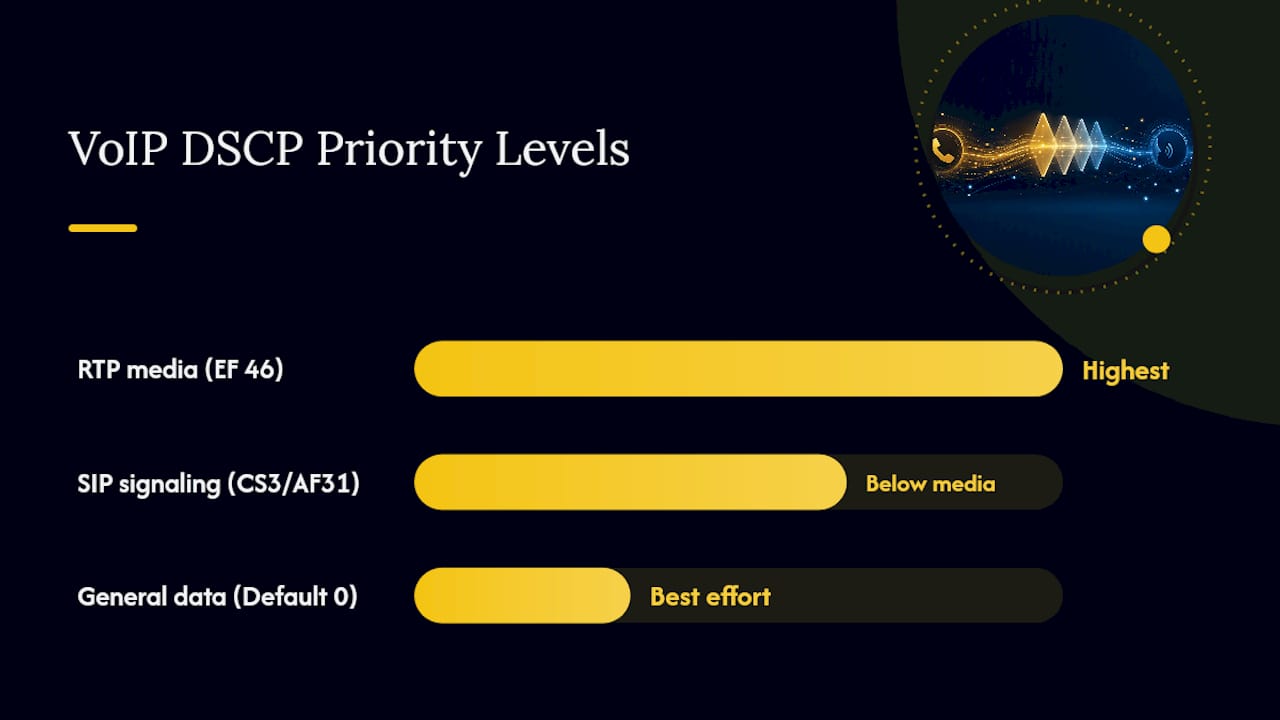
Map DSCP to 802.1p/CoS values at Layer 2, set trust boundaries correctly on access switches (a shockingly common miss, many switches default to “trust none” and silently rewrite every marking to zero), and confirm your firewall or WAN edge device preserves DSCP rather than stripping it on the way out. DSCP EF applied consistently at every hop is the single highest-leverage network fix available, but it only works if every hop honors it. One untrusted switch or one carrier that rewrites markings at ingress undoes the entire chain.
For bandwidth planning, budget per concurrent call rather than aggregate throughput: roughly 100 Kbps for G.711 including overhead, less for Opus at typical bitrates. Ten concurrent calls need about 1 Mbps of reserved, prioritized headroom, not 10 Mbps of best-effort bandwidth sitting in the same queue as backups and video calls. Enable Forward Error Correction (FEC) where your platform supports it, particularly on links with any history of loss.
Pro Tip: Validate DSCP survival across every hop with a simple tcpdump or Wireshark capture at each network boundary. If the marking is present at the switch but gone by the time it hits the WAN router, you’ve found your access switch’s trust setting problem.
Why Wi-Fi Causes Unpredictable Voice Problems
Wireless VoIP fails in ways wired connections don’t, and it’s rarely about signal strength. Radio interference from microwaves and neighboring networks, channel congestion in dense office environments, and client roaming between access points all introduce jitter spikes that a wired connection simply doesn’t experience. Airtime contention, multiple devices competing for the same radio slot, adds further unpredictability that no amount of QoS tagging on the client side can fully compensate for. For consistent latency in a professional setting, wired Ethernet remains the standard.
When wireless voice is unavoidable, these steps make it workable:
- Put voice traffic on a dedicated SSID and VLAN, separate from general data and guest Wi-Fi.
- Prefer 5 GHz over 2.4 GHz for lower interference and more available channels.
- Plan access point capacity for concurrent call volume, not just coverage area.
- Use enterprise WPA2 or WPA3 authentication rather than a shared pre-shared key.
- Map channel assignments deliberately to avoid overlap between adjacent APs.
- Enable airtime fairness and tune transmit power to avoid one device dominating a cell.
Pro Tip: For contact center agents and anyone on back-to-back calls all day, force wired Ethernet as a hard policy rather than a suggestion. Wireless can work for occasional calls, but agents taking 40+ calls a shift will surface every intermittent Wi-Fi problem your network has.
Endpoint, PBX, and SIP Configuration Checks
A surprising share of “network” complaints turn out to be configuration issues sitting on the endpoint or PBX. Work through these before you assume the network is guilty.
On the endpoint: verify codec priority order matches your policy, check phone firmware is current, test headset hardware directly (a failing microphone mimics packet loss symptoms), and confirm session timer values aren’t causing premature call drops.
On the PBX or SBC: check what codec actually negotiated on each call leg, since a mismatch between legs forces transcoding that degrades quality even when both codecs are individually fine. Look for SIP Application Layer Gateway (ALG) interference on routers and firewalls, a frequent cause of one-way audio and registration flapping. Verify SIP TLS certificates haven’t expired and that SRTP keys match on both ends if you’re running encrypted media.
On the firewall and NAT layer: confirm your RTP port range is fully open and forwarded, check for symmetric NAT (which breaks many SIP ALG implementations), and watch for asymmetric routing where outbound and inbound media take different paths. A quick router or switch CLI check on interface counters and DSCP remarking rules will often surface the issue faster than a packet capture.
Tools for Monitoring, Testing, and Diagnosing Quality
Different tools answer different questions, and using the wrong one wastes time.
- Ookla Speedtest gives you a fast baseline read on throughput and latency from the affected endpoint, useful as a first pass but not a substitute for real call analysis.
- Wireshark, working from a PCAP capture, is where you go when RTCP and CDR data disagree or don’t tell the full story.
- RTCP and MOS dashboards built into your UC platform or phone system are your day-to-day monitoring layer.
- SBC SIP traces show you the signaling handshake, useful for registration and one-way audio issues.
For a Wireshark session, filter on rtp, right-click a packet and choose Decode As RTP if it isn’t auto-detected, then check the sequence numbers for gaps (loss) and the RTP timestamp deltas for irregular spacing (jitter). The RTCP Receiver Report fields give you cumulative loss and interarrival jitter directly, which is often faster than counting sequence gaps by hand.
To build a complete evidence packet: capture a 60 to 120 second PCAP from the SBC interface, pull the RTCP SR/RR data, grab the SIP trace, run a Speedtest during the issue window, and if possible get a screenshot of the client’s audio device level meters to rule out a hardware problem.
Setting Targets to Prevent Regression
Fixing a problem once doesn’t mean it stays fixed. Set concrete targets and monitor against them continuously:
- MOS at or above 4.0 for toll quality across your primary trunks.
- Packet loss held under 0.5% sustained.
- Jitter under 30 ms.
- One-way latency under 150 ms wherever the network topology allows it.
Build these into recurring maintenance: scheduled firmware updates on phones and gateways, periodic DSCP validation across the full path (not just at the switch, all the way to the carrier handoff), and monthly PCAP spot checks on your busiest trunks. Ask your carrier directly whether they preserve DSCP markings end to end. Many rewrite or strip them at ingress without telling you, quietly undoing your internal QoS work.
Set dashboard alerts for MOS drops and packet-loss spikes rather than waiting for a help desk ticket. Azure Communication Services documentation recommends continuous media-statistics collection specifically because intermittent problems rarely show up in a single snapshot check. Catching a degrading trend before users notice is the entire point of ongoing monitoring.
What to Send Your VoIP Provider or MSP When You Escalate
When internal troubleshooting hits a wall, the speed of resolution depends almost entirely on what you hand over. A vague “calls sound bad sometimes” ticket sits in a queue. A ticket with exact evidence gets worked immediately.
Include these in your escalation:
- Exact timestamps to the second, not “sometime this morning.”
- Caller and callee numbers and call direction.
- The SBC call trace for that specific call.
- Your PCAP snippet covering the issue window.
- RTCP statistics: loss, jitter, round-trip time.
- The MOS score if your platform calculated one.
- A Speedtest result from the same location and timeframe.
- Any configuration changes made in the prior 48 hours.
Most carriers and providers can locate a call in their logs with just the timestamp, direction, and either number, so lead with those. Ask directly whether your carrier preserves DSCP markings across their network or rewrites them at ingress. If they do rewrite markings, ask for that in writing. It matters for future troubleshooting and for holding them accountable if voice quality degrades again. If you’re planning a provider switch as part of resolving a chronic issue, understand what’s involved in porting your existing numbers before you commit to a timeline.
Why QoS Discipline Beats Chasing Complaints
Enforcing DSCP EF at every hop and monitoring MOS centrally isn’t glamorous work, but it’s the difference between fixing a problem once and refighting it every quarter. Most IT teams I’ve seen get pulled into VoIP firefighting because they treat each complaint as a one-off instead of asking whether their QoS policy actually survives contact with the real network, switch trust settings, firewall rules, and carrier handoffs included.
Central monitoring changes that equation. A team watching MOS trends catches degradation before the help desk ticket arrives, which is a fundamentally different posture than reactive troubleshooting. That’s the discipline behind managed voice services done properly: fewer repeated incidents, not just faster fixes when they happen.
How Mavericks Office Solutions Handles Voice Quality for You
Chasing DSCP settings across switches, firewalls, and carrier handoffs isn’t a one-time project, it’s an ongoing discipline most internal IT teams don’t have the bandwidth to maintain alongside everything else on their plate. Mavericks Office Solutions runs that discipline as a managed service: proactive QoS configuration and validation across every hop, multi-WAN voice routing that prioritizes the lowest-jitter path automatically, and continuous MOS and RTCP monitoring that catches degradation before your staff notices it.

If you’re dealing with recurring call quality complaints right now, bring what you’ve already collected, recent SBC logs, PCAP captures, MOS samples, and any Speedtest results, and our team can pinpoint the root cause faster with that evidence in hand. Explore managed VoIP and UCaaS support or start with a broader managed IT services conversation if voice is one symptom of a larger network issue. For additional telecom strategy context beyond voice quality specifically, PhoneNumbers Store’s guide for business telephony decision makers covers infrastructure planning worth reviewing alongside your VoIP audit.
Frequently Asked Questions
What causes most VoIP call quality issues?
Packet loss, jitter, and one-way latency cause the vast majority of VoIP call quality issues, usually from missing QoS marking, Wi-Fi instability, or codec mismatches between call legs.
What is a good MOS score for VoIP calls?
A MOS of 4.0 or above indicates toll quality. Scores between 3.5 and 4.0 are acceptable, while anything below 3.0 will generate user complaints.
How do I fix one-way audio on VoIP calls?
Check the RTP media path first: look for NAT traversal problems, SIP ALG interference on the firewall, and SDP negotiation errors in the SBC call trace.
Should I use Wi-Fi or wired Ethernet for VoIP?
Wired Ethernet is the standard for business voice because it avoids the interference, roaming, and airtime contention that make Wi-Fi jitter unpredictable. Reserve Wi-Fi for occasional or low-volume calling.
What DSCP value should I use for VoIP traffic?
Mark RTP media with DSCP EF (46) and SIP signaling with CS3 or AF31, and confirm every switch, firewall, and WAN device along the path honors those markings rather than rewriting them.
Sources
For definitions, thresholds, and deeper diagnostic detail, consult ITU-T Recommendation G.114 for latency standards, the SIPSymposium MOS and QoS guides for codec ceilings and scoring, Microsoft’s Azure Communication Services troubleshooting documentation for diagnostic APIs, and the TelcoBridges diagnostic guide for the five-area failure framework. RFCs for RTP and RTCP are available through the IETF datatracker for teams building custom monitoring.
- ITU-T Recommendation G.114
- Troubleshoot web VoIP quality in Azure Communication Services | Microsoft Learn
- VoIP call quality issues: How to diagnose the five failure areas and fix them | TelcoBridges