

Security awareness training is any structured program that teaches employees to recognize and respond to cyber threats, with the goal of changing behavior, not just checking a compliance box. Real programs measure whether people report phishing emails and use multi-factor authentication, not whether they clicked “complete” on a slideshow.
If you’re starting today, here’s your immediate action list:
- Run a baseline phishing simulation this week to see where your organization actually stands before you build anything.
- Enroll every employee in multi-factor authentication (MFA) on email and any system holding sensitive data. This closes the single biggest gap fast.
- Assign a 10-15 minute onboarding module to new hires covering phishing, password hygiene, and how to report suspicious activity.
- Pick two metrics to track from day one: phishing click rate and reporting rate. Everything else can wait.
- Set a 30-day review date to check what worked, what didn’t, and what needs adjusting before you scale further.
You don’t need a finished curriculum to start. You need a baseline, a reporting habit, and a calendar reminder to check progress.
Key Takeaways
Effective security awareness training requires role-based content, recurring phishing simulations, measurable behavioral metrics, and visible leadership participation to actually change how employees act.
| Point | Details |
|---|---|
| Start with a baseline | Run a phishing simulation before building any curriculum so you know your real starting point. |
| Track behavior, not completion | Watch click rates, reporting rates, and time-to-remediate instead of completion percentages. |
| Tailor content by role | Finance, HR, engineering, and non-desk workers face different threats and need different modules. |
| Use a maturity model to benchmark | The SANS Security Awareness Maturity Model helps you show leadership real progress over time. |
| Consider a managed partner | Mavericks Office Solutions integrates training, simulations, and remediation into one accountable service. |
Table of Contents
- What Does Security Awareness Training Cover?
- Which Topics Should Every Training Program Include?
- How Should You Deliver Security Training?
- How Do You Build a Program From Scratch?
- Which Metrics Actually Prove the Training Works?
- What Standards Govern Security Awareness Training?
- How Long Does It Take and What Does It Cost?
- Should You Build In-House, Buy Content, or Hire a Managed Provider?
- What Does a 30/60/90-Day Launch Checklist Look Like?
- Why Culture Beats One-Off Training
- How Mavericks Office Solutions Supports Your Training Program
- Where to Read More on Security Awareness Standards
- Frequently Asked Questions
- Sources
What Does Security Awareness Training Cover?
A complete program covers phishing and social engineering, password hygiene and MFA, device and remote-work security, safe data handling, and increasingly, AI-era threats like deepfake voice calls and QR-code phishing. That scope has grown considerably in the last few years. What used to be “don’t click suspicious links” now includes recognizing AI-generated voice clones impersonating your CFO and spotting manipulated invoices sent through legitimate-looking vendor accounts.
People often use “awareness,” “training,” and “education” interchangeably, but they serve different purposes in a mature program. Confusing them is why so many companies end up with an annual video nobody remembers by March.
| Term | Goal | Delivery Cadence | How You Measure It |
|---|---|---|---|
| Awareness | Keep threats top of mind | Ongoing (posters, emails, nudges) | Engagement with reminders, recall in spot-checks |
| Training | Build specific skills | Scheduled modules (onboarding, quarterly) | Completion rates, quiz scores, simulation results |
| Education | Build deep understanding for specialized roles | Role-based, less frequent | Certifications, applied competency in audits |
Most organizations only build the middle column, “training,” and wonder why behavior doesn’t stick. Awareness is the drumbeat that keeps training from fading; education is reserved for people whose jobs demand it, like IT admins or finance staff handling wire transfers.
Pro Tip: *Write your program goals as observable behaviors, not as completion percentages.
Which Topics Should Every Training Program Include?
Every program needs a core set of modules regardless of company size or industry. These are the topics that show up in nearly every serious phishing incident or breach report:
- Phishing and business email compromise: how attackers spoof addresses, urgency tactics, and lookalike domains.
- Social engineering: pretexting, tailgating into buildings, and manipulation over the phone.
- Password hygiene and MFA: passphrase practices, password managers, and why MFA should be non-negotiable.
- Device and remote-work security: securing home networks, public Wi-Fi risks, and lost or stolen device protocols.
- Data classification and handling: knowing what counts as sensitive and how to share it safely.
- Incident reporting: making the “report this” button as easy to find as the “reply” button.
Role matters here. Finance teams need deep training on invoice fraud and wire transfer verification because they’re the direct target of business email compromise scams. HR staff need modules on resume-based malware and fake job applicant attachments. Engineering teams need secure coding awareness and credential handling for repositories. Non-desk workers, like warehouse or retail staff, need shorter, mobile-friendly content focused on physical security and point-of-sale scams rather than email threats they rarely encounter.
A modern syllabus also has to address AI-era tactics. Attackers now use voice cloning to impersonate executives in deepfake fraud calls, QR codes (“quishing”) to bypass email filters entirely, and MFA push-bombing, where attackers spam approval requests until an exhausted employee taps “accept” by mistake. These topic priorities show up repeatedly in 2026 industry guidance, and skipping them leaves an obvious gap for the newest attack methods.

How Should You Deliver Security Training?
The best programs mix formats rather than relying on one. Microlearning works for reinforcement, simulations work for testing real behavior, and workshops work for building deeper skill in high-risk roles.
- Microlearning: short 3-5 minute lessons delivered monthly, strong for retention, low admin overhead, but hard to use alone for measuring skill depth.
- Simulated phishing, smishing, and vishing: fake attack emails, texts, and calls sent to employees, excellent for measuring real behavior, but requires careful setup to avoid feeling punitive.
- Hands-on workshops: live sessions for high-risk teams like finance or IT, strong for complex scenarios, but expensive to scale across a whole company.
- Role-based deep dives: focused content for specific job functions, high relevance, but takes more effort to build and maintain than generic content.
- Just-in-time modules: short lessons triggered right after a mistake, like clicking a simulated phishing link, highly effective for behavior change, but only works if your platform supports automated triggers.
For onboarding, a mix of a short foundational course, like the modular options available through Coursera’s cybersecurity training, paired with your first simulated phishing test in the employee’s first month, works well. For ongoing reinforcement, monthly microlearning plus quarterly simulations keeps the topic alive without becoming background noise. Incident-triggered remediation, assigning a short refresher the moment someone clicks a bad link, tends to change behavior faster than any scheduled module ever will.
Pro Tip: If you can only afford one investment beyond email filtering, choose simulated phishing over a content library. Watching what employees actually do under pressure teaches you more than what they say they’d do on a quiz.
How Do You Build a Program From Scratch?
Building a program that actually changes behavior follows a defined sequence, and skipping steps is the most common reason programs fail within the first year.
- Baseline assessment: run an initial phishing simulation and a short knowledge survey before building anything. You need to know your starting point.
- Audience segmentation: group employees by role and risk level, finance and IT typically need more depth than general staff.
- Curriculum mapping: match topics to segments, using NIST’s lifecycle guidance as a framework for role-based learning and continuous improvement.
- Pilot: launch with one department or location first to catch friction points before a company-wide rollout.
- Launch: roll out to the full organization with clear leadership communication about why the program exists.
- Continuous simulation: schedule recurring phishing and social engineering tests, not a single annual event.
- Governance: assign someone ownership of reviewing metrics and updating content quarterly.
Timing matters as much as sequence. New hires should complete their first module within 30 days of start date. Simulated phishing should run monthly or, at minimum, quarterly, and content itself needs a review every quarter to reflect new attack methods.
- Track reporting rates weekly during the first 90 days to catch early friction.
- Review phishing click rates after every simulation, not just at year-end.
- Measure time-to-remediate for anyone who fails a simulation or misses a deadline.
Which Metrics Actually Prove the Training Works?
Completion rates tell you almost nothing about whether behavior changed. The metrics that matter track what people actually do when a real threat lands in their inbox.
Phishing click rate remains the most-watched number, but reporting rate matters just as much, arguably more. A low click rate paired with a low reporting rate might just mean people are ignoring email entirely rather than engaging safely. Mean time to report shows how quickly your team spots and flags a threat, which directly affects how fast your IT team can contain it.
| Metric | How to Measure It | What Good Looks Like for SMBs |
|---|---|---|
| Phishing click rate | Percentage of simulation recipients who click a link | Trending downward quarter over quarter |
| Reporting rate | Percentage who report the simulation instead of ignoring it | Rising steadily as culture matures |
| Mean time to report | Average time between delivery and employee report | Shrinking toward minutes, not hours |
| Remediation completion rate | Percentage completing assigned retraining after a failure | Close to 100% within 7 days of assignment |
| People-risk score | Composite score blending click, report, and completion data | Improving trend across consecutive quarters |
Guidance from Adaptive Security’s 2026 program review makes a similar point: shift away from completion percentages and toward behavioral outcomes, because completion tells you someone watched a video, not that they’d recognize a real attack.
To show leadership real progress, benchmark your program against a maturity model instead of reporting raw numbers in isolation. The SANS Security Awareness Maturity Model ranks programs from nonexistent to compliance-focused to fully embedded in culture, giving you language to describe where you are and what the next stage requires.
What Standards Govern Security Awareness Training?
Several frameworks shape what auditors and regulators expect from a documented training program, and knowing them helps you build evidence as you go rather than scrambling before an audit.
- NIST Special Publication 800-50 Rev. 1 lays out a full lifecycle approach for building cybersecurity and privacy learning programs, covering everything from needs assessment to measurement.
- ISO 27001 requires documented awareness training as part of its Annex A controls, tying training records directly to certification audits.
- HIPAA mandates security awareness training for anyone handling protected health information, and HHS guidance describes annual, role-based training with specific documentation expectations for staff and contractors.
- PCI DSS requires training for anyone touching cardholder data, with formal records tying training to specific roles.
Audit evidence usually comes down to three things: mapping each training module to a specific control, keeping completion and simulation records for as long as your compliance framework requires, and collecting role-based attestations signed by employees in sensitive positions. None of this replaces legal advice specific to your industry, but building these habits early saves considerable stress before an audit.
How Long Does It Take and What Does It Cost?
Most organizations can launch a working pilot within 30 days and reach a mature, steady-state program within 90 to 120 days. That timeline assumes you’re not building custom content from scratch, which stretches things considerably.
Typical rollout timeline:
- Days 1-30: baseline phishing test, pilot group selected, foundational content assigned to new hires.
- Days 30-60: company-wide launch, first full simulation cycle, leadership communication sent.
- Days 60-90: second simulation cycle, first quarterly content review, metrics reported to leadership.
- Steady state: monthly microlearning, quarterly simulations, quarterly content and policy reviews.
Budget depends heavily on whether you build in-house or buy a managed solution. Key cost drivers include:
- Content licensing for pre-built curriculum libraries.
- Phishing simulation tooling and the platform running it.
- Learning management system (LMS) hosting and administration time.
- Contractor or internal trainer hours for workshops.
- Reporting and analytics setup for leadership dashboards.
- Localization costs if you operate across multiple languages or regions.
Per-user licensing for basic content platforms tends to run modestly per seat annually, while a fully managed program with simulations, reporting, and remediation workflows costs more but removes the administrative burden entirely. For most small organizations, the highest return comes from investing first in simulated phishing and a working reporting button, since phishing remains the leading attack vector small businesses face, ahead of investing in polished video content nobody watches twice.
Should You Build In-House, Buy Content, or Hire a Managed Provider?
The right delivery model depends on your internal capacity, not just your budget. Here’s how the three options actually compare for a small or medium organization:
| Approach | Capability Needed | Speed to Value | Scalability |
|---|---|---|---|
| Build in-house | Dedicated staff time, content design skill | Slow, months to build properly | Limited by internal bandwidth |
| Buy content only | Someone to administer the LMS and simulations | Fast for content, slow for measurement | Scales content easily, not analysis |
| Managed provider | Minimal internal effort | Fast, often live within weeks | Scales with the organization automatically |
For most small and medium businesses without a dedicated security team, a managed provider tends to produce better behavior-change outcomes because someone is actually watching the metrics every month instead of a static dashboard nobody checks. That single point of accountability, not the content itself, is usually what separates programs that stick from ones that fade after quarter one.
If you’re evaluating providers, ask these questions before signing anything; to enhance your team’s skills, consider investing in digital risk and fraud awareness training that tailors content to roles and raises awareness effectively:
- What behavioral metrics do you report, and how often?
- Can content be tailored by role, not just by department name?
- Which simulation channels do you support beyond email, like SMS or voice?
- How is employee data handled and stored, and for how long?
- What’s the remediation workflow when someone fails a simulation?
- What response times and service level agreements (SLAs) apply to reporting and support?
Watch for red flags too: providers who can only report completion percentages, platforms with no simulation capability beyond email, and vague answers about data privacy. If a sales rep can’t explain their remediation workflow in one sentence, that’s a program built for compliance checkboxes, not actual risk reduction.
What Does a 30/60/90-Day Launch Checklist Look Like?
Here’s a concrete sequence you can follow whether you’re launching a new program or fixing one that’s stalled.
First 30 days:
- Run a baseline phishing simulation across all employees.
- Enroll every account in MFA, prioritizing email and financial systems first.
- Configure your LMS or training platform and assign onboarding content to new hires.
- Send a leadership communication explaining why the program exists and what’s expected.
Days 30-60:
- Launch the pilot simulation to your highest-risk department (usually finance or executive assistants).
- Review pilot results and adjust content based on what confused people.
- Roll out company-wide training assignments with a firm completion deadline.
Days 60-90:
- Run your second full phishing simulation.
- Report your first real metrics, click rate, reporting rate, remediation completion, to leadership.
- Schedule your first quarterly content review.
A consistent remediation workflow ties the whole thing together:
- Detect: simulation or real attempt flags a click or risky action.
- Report: employee or system flags the incident.
- Classify: IT or security team determines severity and root cause.
- Remediate: assign a short, targeted refresher module tied to the specific mistake.
- Retrain: retest the same employee in a future simulation to confirm the lesson stuck.
Why Culture Beats One-Off Training
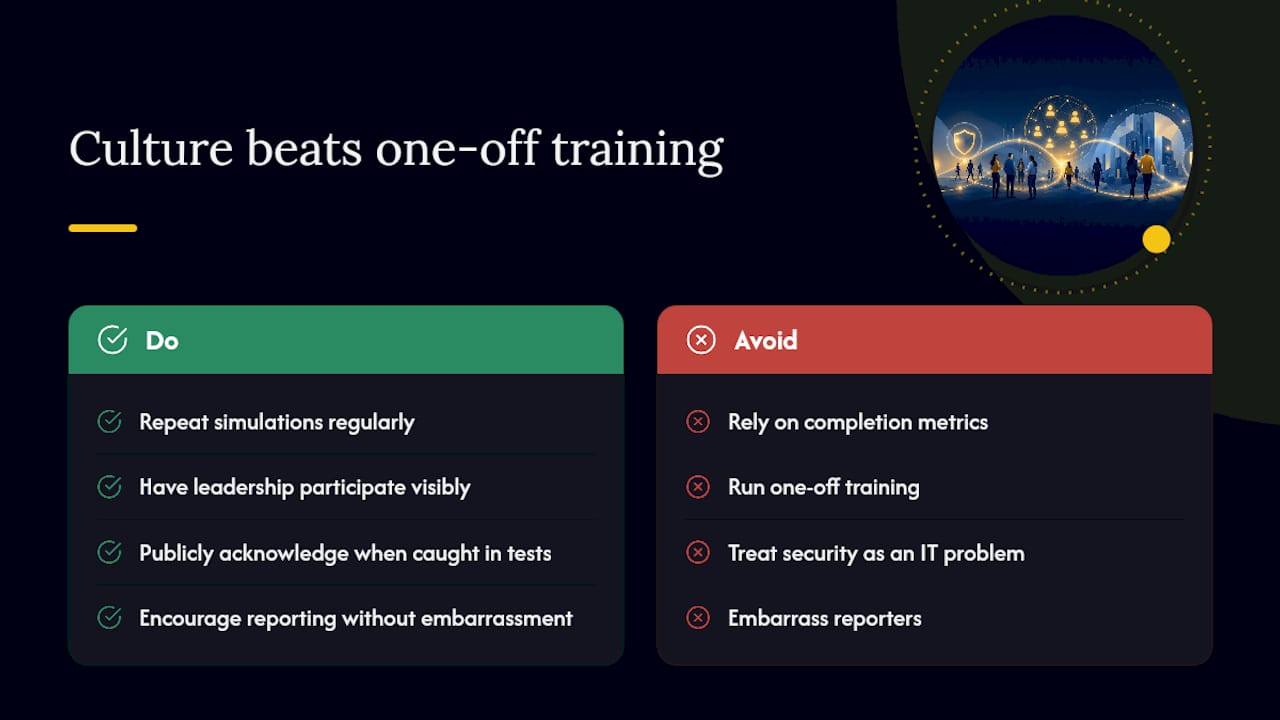
Completion metrics feel good in a board meeting, but they don’t tell you whether your organization is actually safer. A company can hit 100% completion on annual training and still get hit by a wire transfer scam the following month, because watching a video and pausing before clicking “send” under real pressure are two entirely different skills. Sustainable behavior change comes from repetition, visible leadership participation, and a reporting culture where employees don’t feel embarrassed for flagging a mistake.
One pattern shows up consistently across organizations that see real improvement: leadership participates in the same simulations as everyone else, and executives publicly acknowledge when they personally get caught by a test. That visible humility does more to normalize reporting than any poster campaign. Organizations that pair role-based simulations with genuine leadership buy-in tend to see reporting rates climb steadily, because employees stop treating security as an IT problem and start treating it as a shared responsibility. Reinforcing verification habits until they become automatic, described well in SANS’ own research on awareness training, is what separates a program that sticks from one that fades by spring.
In the first 90 days, leaders should do one visible thing: participate in the same phishing simulation as every other employee, and if they get caught, say so publicly. That single act tells the whole organization the program is real, not theater. Attackers already understand this dynamic, which is exactly why AI-driven social engineering attacks increasingly target executives directly, betting that a title alone will keep someone from double-checking.
How Mavericks Office Solutions Supports Your Training Program
Running a training program alongside daily IT operations stretches most small teams thin, which is exactly the gap Mavericks Office Solutions was built to close. As your single outsourced IT department, Mavericks Office Solutions integrates phishing simulations, LMS setup, and 24/7 monitoring into the same relationship that already handles your network and endpoint security, so training doesn’t sit as a separate, forgotten project.

That single-vendor setup solves the exact problem this article keeps circling back to: measurement without follow-through. When a simulation flags a risky click, the same team that built the test can also remediate the account, adjust firewall rules, or investigate a compromised credential, all without you coordinating between three different vendors. Benefits worth noting:
- Faster rollout since simulations plug into infrastructure Mavericks Office Solutions already manages.
- Measurable outcomes reported by a USA-based help desk with an average response under 12 minutes, not an offshore call center reading from a script.
- One point of accountability for both the training program and the technical remediation that follows a failed test.
If you’re ready to move past annual checkbox training, explore Mavericks Office Solutions’ cybersecurity services to see how training fits into a broader managed security program, or reach out to schedule a consultation and get your baseline phishing simulation scheduled this month.
Where to Read More on Security Awareness Standards
- NIST Special Publication 800-50 Rev. 1: the federal lifecycle framework for building a cybersecurity and privacy learning program from the ground up.
- HHS Security Awareness and Training guidance: a real-world example of annual, role-based training requirements tied to compliance documentation.
- SANS End User Security Awareness Training: the source of the maturity model referenced throughout this article, useful for benchmarking your own program.
- Microsoft Cybersecurity Awareness resources: curated toolkits and learning paths for building a security-first culture across different audiences.
- CrowdStrike’s employee training guide: practical guidance specifically aimed at small businesses building their first mandatory training program.
Frequently Asked Questions
What is the main goal of security awareness training?
The main goal is behavior change, getting employees to recognize threats and act correctly under pressure, not simply to complete a course or pass a quiz.
How often should employees complete security awareness training?
Most effective programs run monthly microlearning content paired with quarterly phishing simulations, plus an annual compliance refresher for audit purposes.
What’s a realistic budget for a small business training program?
Costs vary based on whether you buy content only or use a managed provider, but the highest return typically comes from investing in phishing simulation tools before spending heavily on video content libraries.
Do employees need different training based on their role?
Yes. Finance staff need deeper training on invoice fraud and wire verification, while general staff need broader phishing and password hygiene coverage tailored to their actual exposure.
How do I know if my training program is actually working?
Track phishing click rates, reporting rates, and time-to-remediate over multiple quarters. A downward trend in clicks paired with a rising reporting rate is the clearest signal of real progress.
Sources
- NIST Special Publication 800-50 Revision 1: Building a Cybersecurity and Privacy Learning Program
- Hhs
- Cybersecurity Awareness: Education and Resources | Microsoft Security
- Creating an Employee Cybersecurity Training Program | CrowdStrike
Recommended
- Cybersecurity – Mavericks Office Solutions
- 7 AI Cybersecurity Mistakes Your Business Is Making – Mavericks Office Solutions
- AI Models Just Hacked Another Company on Their Own — Why Cybersecurity Has Never Mattered More – Mavericks Office Solutions
- Why Every Ohio Small Business Needs a Cybersecurity Plan in 2026 – Mavericks Office Solutions