

A remote access policy is the written set of rules that governs how employees, contractors, and vendors connect to your network from outside the office, and its job is to limit risk through least privilege, strong authentication, device checks, and continuous monitoring. Done right, it tells every remote user exactly what they can touch, from what device, and how you will know if something goes wrong. The minimum bar: multi-factor authentication, device compliance checks, and centralized logging.
TL;DR:
- Most remote devices should be limited to scoped access, with unmanaged BYOD devices restricted to non-sensitive web applications.
- Multi-factor authentication is mandatory for all remote sessions, and device compliance checks must be enforced before granting connection.
- Regular auditing of remote monitoring tools is essential to prevent abuse and detect malicious activity, especially involving legitimate RMM software.
- Remote access infrastructure should be patched on a fixed cadence, and access permissions must be reviewed quarterly to reduce insider and outsider risks.
- Policies should clearly define device tiers and access levels, aligning them with device verification status and implementing strict controls for unmanaged devices.
Table of Contents
- Scope and the Remote Access Methods You Need to Cover
- Risks Your Policy Has to Address Head-On
- The Core Components Every Policy Must Spell Out
- Matching Access Levels to Device Risk
- Turning the Policy Into a Working Document
- How Mavericks Approaches Remote Access Policy in Practice
- What Most Policy Advice Gets Backward
- Getting Your Remote Access Policy Off the Page and Into Operation
- FAQ
- Sources
Scope and the Remote Access Methods You Need to Cover
Before writing a single clause, define who the policy applies to: full-time staff, contractors, and the managed service providers who touch your systems remotely. Each group may need a different method, and your policy should name them explicitly rather than leaving the choice implicit.
- VPN connects a remote device to your internal network and works well for straightforward access, but it often grants more network reach than a user actually needs.
- VDI (virtual desktop infrastructure) keeps data on a hosted desktop instead of the local device, which helps when you cannot fully trust the endpoint.
- RDP gives direct control of a remote machine and should be restricted to jump hosts rather than exposed to the open internet.
- ZTNA (Zero Trust Network Access) evaluates each request individually based on identity and device health, addressing the blind spots that flat VPN access creates, according to joint guidance on modern network access.
- RMM tools give IT providers remote control for support, but the same reach makes them a frequent target for abuse.
Risks Your Policy Has to Address Head-On
A policy that only lists approved tools misses the point. It needs to name the specific failure modes attackers exploit so the controls that follow make sense.
- Lateral movement across the network after a single remote session is compromised, often invisible without proper telemetry.
- Malicious use of legitimate RMM software, including portable executables run outside normal change windows.
- Unmanaged BYOD devices missing endpoint detection and current patches, creating an entry point nobody is watching.
- Credential theft through phishing, plus compromise of a third party or MSP with standing access to your environment.
Multiple campaigns documented by CISA have involved attackers abusing legitimate remote monitoring and management software to gain and keep access inside victim networks. The agency’s advisory on RMM abuse recommends auditing RMM tools regularly and blocking the portable executable versions attackers favor, since those bypass standard installation and logging.
The Core Components Every Policy Must Spell Out
A remote access policy earns its keep through specific, enforceable clauses, not general statements about taking security seriously. Build the document around these pieces.
- Access rules: grant least privilege by default, assign permissions by role, and use just-in-time elevation for anything sensitive instead of standing admin rights.
- Authentication and identity: require multi-factor authentication on every remote session, centralize logins through single sign-on, and reserve certificate-based authentication for service accounts and automated connections.
- Device posture and network access control: check for active endpoint detection, current patch levels, and disk encryption before a device is allowed to connect, consistent with the device checks described in NIST’s telework and BYOD security guidance.
- Network segmentation and server placement: route administrative access through jump servers, and place remote access servers at the network perimeter where they can be hardened and watched closely, a placement NIST recommends specifically to reduce exposure.
- Logging, monitoring, and incident response: capture authentication events, session activity, and file access, retain the logs long enough to support an investigation, and name who reviews them.
- Patch management and change control: keep remote access infrastructure, VPN gateways, and RMM agents on a fixed patch cadence, with changes documented and approved rather than applied ad hoc.
Pro Tip: Write each clause as a testable statement, something an auditor or a new hire could check against reality, rather than a vague commitment to “secure remote access.”
For the authentication piece specifically, a detailed MFA and password policy checklist can save you from drafting those requirements from scratch.
Matching Access Levels to Device Risk
Not every device deserves the same trust, and your policy should say so in plain terms. A workable model sorts devices into three tiers and ties each one to a specific access ceiling.
- Organization-owned and managed devices get the broadest access, since they run MDM, EDR, and enforced encryption that IT can verify at any time.
- Contractor and vendor devices get access scoped to the specific systems they support, usually through a jump host rather than a direct network connection.
- Unmanaged BYOD devices get the narrowest access, often limited to web-based applications with no local data storage, or blocked entirely from sensitive systems.
NIST’s telework guidance backs this structure directly, recommending that organization-issued devices receive broader access than personal devices precisely because they can be verified and controlled. Enforcement comes down to a short list of tools: conditional access policies that check device compliance before granting a session, MDM enrollment as a prerequisite for anything beyond basic tier access, and jump hosts that keep unmanaged devices away from direct administrative connections.
Turning the Policy Into a Working Document
Writing the policy is the easy part. Operationalizing it is where most organizations stall, so work through drafting and rollout as two distinct phases.
- Define scope: list every user group, device type, and third-party vendor who needs remote access.
- Assign owners: name who approve access requests, who reviews logs, and who owns patch cadence.
- Select allowed methods: document which of VPN, VDI, ZTNA, or RDP is approved for which use case.
- Set device rules: specify the minimum posture (patch level, EDR, encryption) each tier must meet.
- Document exceptions: require a written, time-limited approval process for any deviation from the standard.
- Pilot before full rollout: test the policy with one department, fix what breaks, then expand.
A few operational details belong in the document itself, not just in a binder on a shelf:
- Logging ownership and retention period, stated explicitly rather than left to default settings.
- Patch cadence for VPN gateways and remote access servers, with a maximum allowable delay.
- Access review schedule, typically quarterly, to catch accounts that should have been revoked.
- Contract language for MSPs covering who patches what, who monitors what, and notification timelines after an incident, a gap CISA’s guidance for MSP customers flags as a common weak point.
Sample clauses worth copying directly: “Multi-factor authentication is required for all remote sessions without exception.” “Access is granted on a least-privilege basis and reviewed quarterly.” “Vendor and MSP accounts must use dedicated credentials, logged separately from internal user accounts.” For the patching piece, a step-by-step patch management framework lays out a workable cadence in detail.
How Mavericks Approaches Remote Access Policy in Practice
Some managed IT service providers act as outsourced IT departments for small and mid-sized businesses, linking policy drafting closely to day-to-day system operations. That connection matters because a policy nobody enforces is just a document.
- A local help desk may provide real-time support for questions that arise once a policy is implemented.
- Cybersecurity services often cover monitoring and detection, ensuring logging requirements in policy correspond to practical oversight.
- Fractional IT leadership can assist decision-makers in adapting cybersecurity guidance into tailored policy clauses rather than generic templates.
- Support for secure remote work rollouts typically runs on a 30 to 90 day timeline, covering MFA deployment, device enrollment, and the initial access review.
What Most Policy Advice Gets Backward
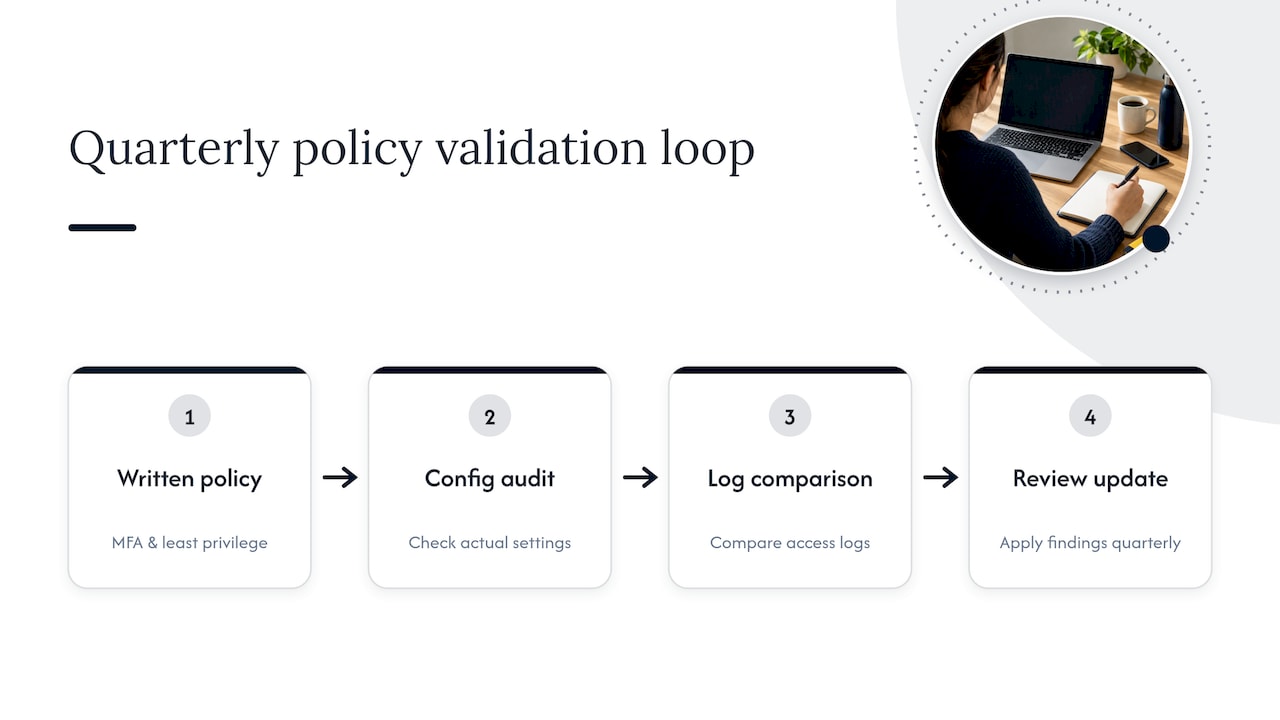
Most guidance on this topic treats the written policy as the finish line. It is the starting line. A document that lists MFA and least privilege but never gets checked against actual configurations is worse than no policy at all, because it creates a false sense of coverage. The organizations that get this right treat the policy as a living checklist, something reviewed quarterly against real access logs, not a PDF signed once and filed away.
The device-tiering piece is also underrated. Plenty of businesses write authentication rules in detail and skip the harder question of what a personal laptop should never be allowed to touch. That gap is where BYOD risk actually lives.
If you are starting from nothing, prioritize two things before anything else: get MFA on every remote connection this month, and write down, in one page, which devices can reach which systems. Everything else in a full policy builds on those two decisions, and most of the risk reduction comes from getting them right first.
— Jeffrey
Getting Your Remote Access Policy Off the Page and Into Operation
Drafting a policy is one project. Enforcing it, month after month, across every employee and vendor connection, is a different kind of work, and it is the part most internal IT teams run out of time for.

Mavericks Office Solutions handles both sides as part of a single engagement. Managed IT Services cover the day-to-day enforcement, including patch cadence and access reviews, while Cybersecurity services add the monitoring layer your logging clauses depend on. MFA rollout across Microsoft 365 and other core systems typically moves fast, and most clients see secure remote work fully operational within 30 to 90 days of starting. If you are ready to turn a policy document into something your team actually follows, start with a discovery call through the Managed IT Services page.
FAQ
Can you provide an example of a remote work policy?
A typical remote work policy states who can work remotely, which devices and connection methods are approved (VPN, VDI, or ZTNA), and what security requirements apply, such as mandatory MFA and current patch levels. It usually also defines consequences for violations and names who approves exceptions.
Can someone remotely access my computer without my permission?
Unauthorized remote access to a computer is possible if credentials are stolen through phishing or if remote access software is installed without consent, which is why CISA’s guidance on securing remote access software recommends inventorying every tool with remote connection capability. Legitimate remote access always requires your knowledge and, in a business setting, documented authorization.
Can you give me an example of an access control policy?
An access control policy typically assigns permissions by role rather than by individual, grants the minimum access needed for a job function, and requires periodic review of who has access to what. It often pairs with guidance on structuring access control approaches for both physical and digital systems.
Can you give me an example of a security policy?
A security policy generally covers acceptable use, password and authentication requirements, data handling rules, and incident response steps, with remote access treated as its own section or as a linked companion document. Organizations often model these sections on NIST’s telework and BYOD framework, which ties access levels to device management status.