

Most small businesses should deploy some form of data loss prevention (DLP) now, not after a breach. Start with data discovery and classification, then choose a SaaS-first or managed DLP model depending on your staff capacity. If you have fewer than 10 people handling IT, a managed DLP service is almost always the faster, lower-risk path.
At a glance — three triggers that mean you need DLP today:
- You handle customer PII, payment card data, or protected health information
- Employees use personal devices, cloud file sharing, or external email to move work files
- A compliance framework (HIPAA, PCI DSS, or state privacy law) applies to your business
Immediate next steps:
- Inventory where sensitive data lives (file servers, cloud drives, email, endpoints)
- Verify that verified, tested backups exist before you configure any enforcement policies
- Contact a managed service provider (MSP) for a scoped discovery conversation
Table of Contents
- What data loss prevention means for a small business
- Why SMBs deploy DLP: the concrete problems it solves
- Where data loss actually happens in SMB workflows
- Core DLP capabilities every SMB should demand
- SMB-ready features and deployment choices
- What DLP won’t reliably stop and how to cover the gaps
- How to choose a DLP approach for your SMB
- High-level implementation steps for an SMB DLP deployment
- When a managed DLP from Mavericks Office Solutions makes sense
- Mavericks Office Solutions: your managed DLP starting point
- Sources
What data loss prevention means for a small business
DLP is the set of tools and policies that find sensitive data, classify it, and enforce rules about where it can go. For a small business, that means four practical functions: discovering where regulated or confidential data sits, labeling it by type, blocking or alerting on risky transfers, and logging what happened for reporting.
The term covers a lot of ground. At the lightweight end, it is a policy in Microsoft 365 that flags a Social Security number in an outbound email. At the heavier end, it is an agent on every endpoint that monitors clipboard activity, USB ports, and browser uploads. Most SMBs land somewhere in the middle.
Three data categories every SMB should treat as sensitive:
- Personally identifiable information (PII): names, addresses, Social Security numbers, driver’s license numbers
- Payment data: credit card numbers, bank account details, anything in scope for PCI DSS
- Proprietary business documents: contracts, pricing models, employee records, trade secrets
DLP is not a replacement for backups, multi-factor authentication (MFA), or endpoint detection and response (EDR). It is one layer in a stack. A business that deploys DLP without verified backups and MFA has protected the wrong perimeter first.
The shared responsibility model that cloud providers like AWS describe makes this concrete: the cloud vendor secures the infrastructure, but your business is responsible for the data inside it. DLP is how you exercise that responsibility at the content level.
Why SMBs deploy DLP: the concrete problems it solves
The honest reason most small businesses start looking at DLP is a near-miss or a compliance audit, not a proactive security review. That is understandable, but it means the decision often comes too late.
Real risks that DLP directly addresses:
- An employee emails a spreadsheet of customer records to a personal Gmail account before resigning
- A misconfigured SharePoint folder exposes confidential contracts to anyone with the link
- A vendor’s compromised account uploads malware to a shared drive, and the file spreads before anyone notices
- A staff member accidentally attaches the wrong file to a client email
The ESET SMB Cyber Readiness Index reports that data loss, operational disruption, and financial impact are the top three concerns among SMBs globally, underscoring the importance of a strong digital presence for SMB growth, and that a high percentage of North American SMBs now carry cyber insurance. Cyber insurance underwriters increasingly ask whether DLP controls are in place before quoting a premium, which means DLP has a direct cost-reduction argument beyond breach prevention.
Compliance is the other driver. HIPAA requires covered entities to implement technical safeguards that prevent unauthorized access to electronic protected health information. PCI DSS requires controls around cardholder data environments. State privacy laws in California, Virginia, and Ohio add their own requirements. DLP policies that enforce classification and blocking rules provide documented evidence that those safeguards exist.
Statistic to know: The ESET SMB Cyber Readiness Index found that data loss and operational disruption rank as the top financial concerns for SMBs, and cyber insurance adoption among North American SMBs has climbed significantly as a direct response to that risk.
Where data loss actually happens in SMB workflows
Most DLP vendors talk about endpoints and email. Those matter, but they are not where most SMB data leaks start. The real map is wider.
- Email (outbound): The most common accidental leak vector. Wrong recipient, wrong attachment, or a departing employee forwarding files to a personal account.
- Cloud collaboration apps (SharePoint, Google Drive, OneDrive): Misconfigured sharing permissions are the silent killer. A folder set to “anyone with the link” can expose thousands of files with no alert.
- Endpoint devices: USB drives, local downloads, and screen captures. Harder to monitor without an agent, but high-risk for intentional exfiltration.
- Removable media: USB sticks remain a practical exfiltration tool, especially in manufacturing or healthcare environments where staff move between workstations.
- SaaS integrations: Third-party apps connected to your Microsoft 365 or Google Workspace tenant can inherit broad data access. OAuth tokens granted years ago are rarely reviewed.
- Misconfigured backups: Backup jobs that write unencrypted data to a public S3 bucket or an unsecured NAS are a DLP problem disguised as an IT operations problem.
- Insider actions: Not always malicious. A well-meaning employee who copies client data to a personal Dropbox “for convenience” creates the same exposure as a bad actor.
Pro Tip: Run a free sharing audit in Microsoft 365 or Google Workspace once a quarter. Both platforms have built-in reports that show externally shared files and folders. It takes under 30 minutes and routinely surfaces exposures that no one knew existed. The Microsoft 365 features your team probably isn’t using include several of these audit tools.
Core DLP capabilities every SMB should demand
Not every DLP product is built for a 50-person company with one IT generalist. The capabilities below separate tools that work in an SMB environment from those that require a dedicated security team to operate.
Discovery and inventory: The tool must scan cloud drives, file servers, and email archives and produce a readable report of where sensitive data lives. For file servers, that means supporting SMB/CIFS shares and common cloud storage APIs. Without discovery, you are writing policies for data you cannot see.
Automated classification: Manual tagging does not scale. Look for prebuilt classifiers for common data types (SSNs, credit card numbers, HIPAA identifiers) and the ability to add custom rules for your proprietary document formats. Contextual rules, such as flagging a file that contains both a name and a bank account number, catch what pattern matching alone misses.
Enforcement options: Alerting is the minimum. Blocking, quarantine, and copy-to-secure-location are what you need when a policy violation is confirmed. The remediation workflow matters as much as the capability itself. If fixing a violation requires a ticket to a vendor’s professional services team, that is a red flag.
Reporting that a non-specialist can read: Dashboards that require a SIEM analyst to interpret are not SMB-ready. You need incident summaries, trend lines, and policy violation counts that a business owner or IT generalist can act on without a decoder ring.
How these map to SMB constraints:
- Limited staff means you need prebuilt policy templates, not a blank canvas
- Mixed cloud and on-prem environments require a tool that handles both without separate consoles
- Low false-positive rates matter more for small teams because every alert that needs manual review consumes time you do not have
The Gartner DLP market guide is a practical starting point for understanding which vendors position for SMB versus enterprise buyers. Enterprise-first products often carry implementation complexity and licensing costs that make them impractical for smaller organizations.
| Capability | Why it matters for SMBs |
|---|---|
| Discovery across cloud and on-prem | You cannot protect data you have not found |
| Prebuilt classifiers | Reduces setup time from weeks to days |
| Blocking and quarantine | Alerting alone does not stop a breach in progress |
| Readable reporting | Enables non-specialists to manage the program |
| Low false-positive rate | Preserves staff time and avoids alert fatigue |
SMB-ready features and deployment choices
The deployment model you choose shapes how much ongoing effort DLP requires. There is no universally right answer, but there is a right answer for your environment.
SaaS/cloud DLP integrates directly with Microsoft 365, Google Workspace, or Salesforce. Setup is faster, there is no agent to deploy, and the vendor handles updates. The trade-off is that coverage stops at the cloud boundary. Files on a local file server or a USB drive are invisible to a cloud-only policy.
Endpoint agent DLP installs software on each device and monitors local activity: clipboard, USB ports, browser uploads, and print jobs. It covers the gaps that cloud DLP misses, but it adds agent management overhead and can affect device performance if not tuned correctly.
Email gateway DLP inspects outbound and inbound email for sensitive content before it leaves or enters your environment. This is often the highest-ROI starting point for SMBs because email is the most common accidental leak channel.

CASB (Cloud Access Security Broker) sits between your users and cloud apps, enforcing policies across multiple SaaS platforms simultaneously. It is more powerful than per-app DLP settings but adds cost and complexity that many SMBs are not ready for in the first deployment.
When managed DLP makes sense: If your team does not have a dedicated security role, a managed DLP service delivered through an MSP removes the operational burden. The MSP handles agent deployment, policy tuning, alert triage, and reporting. You get the protection without the headcount.
Pro Tip: If you use SharePoint on-premises or need to index SharePoint Online via a file share path, enabling WebDAV and using UNC paths is the standard approach for DLP scanning. Per Symantec/Broadcom’s technical documentation, you need to start the WebClient service and map the UNC path before the indexer can reach the document library. Test this in a non-production environment before enabling automated scanning.
What DLP won’t reliably stop and how to cover the gaps
DLP is a strong control for content-based risks. It is a weak control for everything else. The 2025 Verizon DBIR SMB snapshot makes this clear: social engineering and system intrusion remain the dominant breach vectors for small businesses, and neither is stopped by a content inspection policy.
What DLP consistently misses:
- Social engineering: A phishing email that tricks an employee into handing over credentials bypasses every DLP rule. The data leaves through a legitimate authenticated session.
- Stolen credentials: Once an attacker has valid login credentials, they look like an authorized user. DLP sees authorized access, not a breach.
- Encrypted exfiltration: Data uploaded to an encrypted channel or a personal cloud account that the DLP tool cannot inspect moves freely.
- Insider sabotage: A determined insider who understands the monitoring rules can work around them. DLP deters opportunistic behavior, not sophisticated intent.
- Tooling blind spots: Printers, fax machines, and physical document handling are outside most DLP scopes entirely.
How to close the gaps:
Pair DLP with endpoint detection and response (EDR) to catch behavioral anomalies that content inspection misses. Add MFA on every account, especially email, to reduce the value of stolen credentials. The SMB Cybersecurity Framework ranks MFA, verified backups, and anti-fraud verification rules as the three highest-impact, lowest-cost controls for small businesses.
Pro Tip: Start DLP in alert-only mode for the first 30 days. Review every alert manually, then tune policies to eliminate false positives before switching to blocking mode. A policy that blocks legitimate business activity on day one destroys user trust and generates pressure to disable the entire program.
How to choose a DLP approach for your SMB
The selection process does not need to be complicated. Follow these steps in order.
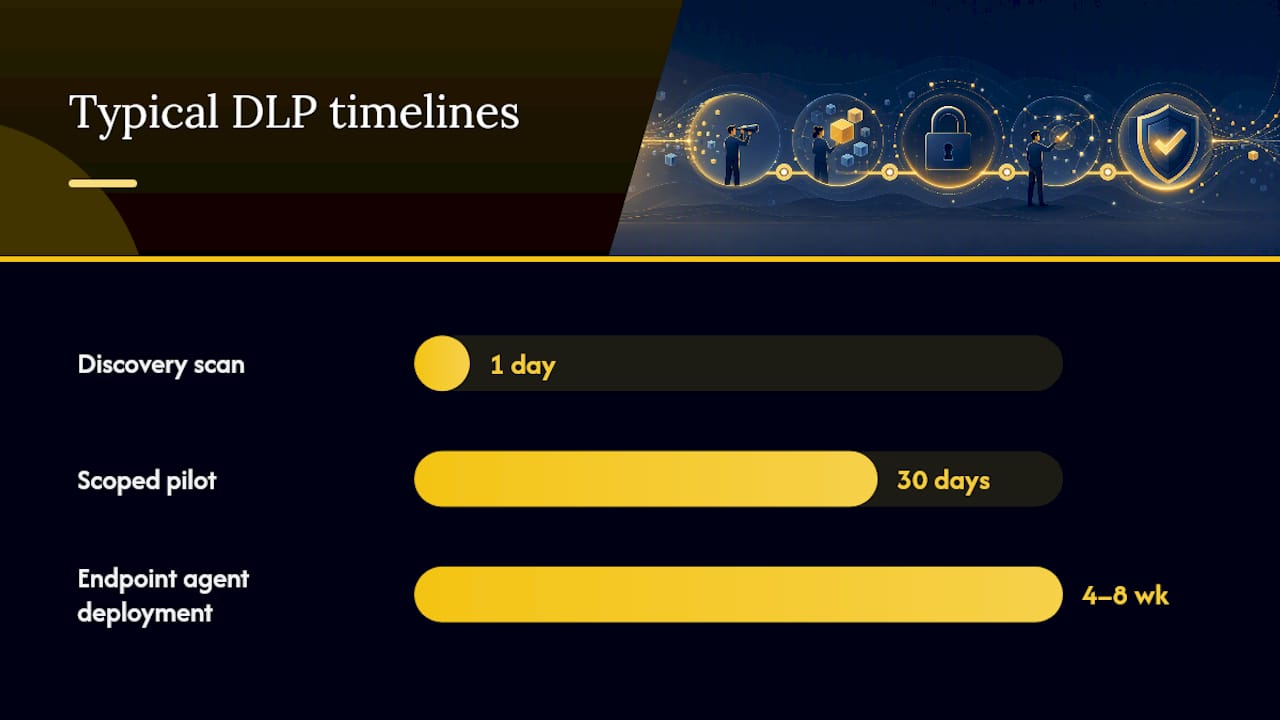
- Map your data first. Before evaluating any vendor, know what sensitive data you have and where it lives. A one-day discovery exercise using built-in Microsoft 365 compliance tools or a free trial scan is enough to start.
- Define your top three risk scenarios. Email exfiltration? Cloud misconfiguration? USB removal? Prioritize the deployment model that addresses those scenarios directly.
- Run a scoped pilot. Deploy on a single department or data type for 30 days in alert-only mode. Measure false-positive rates and alert volume before expanding.
- Tune policies before enforcing. Blocking policies that fire on legitimate activity cause more damage than the risk they prevent.
- Roll out in stages. Start with the highest-risk users or data types, then expand.
Questions to ask any vendor or MSP before signing:
- Which data sources do you support natively (Microsoft 365, Google Workspace, SMB/CIFS file shares, specific SaaS apps)?
- What does the remediation workflow look like, and does it require professional services to configure?
- What credentials does the scanning agent require, and are write-access credentials for remediation stored separately?
- What is your average alert response time, and what does your SLA cover?
- How long does a typical SMB deployment take from contract to active monitoring?
Red flags to walk away from:
- Implementation requires weeks of professional services before any scanning begins
- Licensing is priced per data source with no SMB tier
- The vendor cannot demonstrate a working policy in your environment during a proof of concept
- Agent overhead is high enough to require hardware upgrades on existing endpoints
Cost and timeline guidance: Cloud-native DLP integrated with Microsoft 365 or Google Workspace is the lowest-cost entry point and can be active within days. Endpoint agent deployments for a 25–50 person company typically take 4–8 weeks from kickoff to full coverage. Managed DLP through an MSP usually falls into a monthly per-seat fee that covers deployment, tuning, and monitoring together.
Pro Tip: Ask the MSP or vendor specifically about credential requirements for file share remediation. Per Symantec/Broadcom’s Network Protect documentation, remediation actions like copy and quarantine require separate write-access credentials from the read-only scanning account. Conflating the two is a common setup error that causes automated remediation to fail silently.
High-level implementation steps for an SMB DLP deployment
A DLP rollout does not have to be a six-month project. For most SMBs, a phased approach over 8–12 weeks is realistic.
- Data inventory (weeks 1–2): Scan cloud drives, file servers, and email archives. Document what sensitive data exists and where. This step is owned by internal IT or your MSP.
- Classification rules (week 3): Configure classifiers for your priority data types. Start with prebuilt templates for PII and payment data, then add custom rules for proprietary documents.
- Low-impact pilot (weeks 4–5): Deploy in alert-only mode for one department or one data type. Review every alert. Identify false positives and adjust thresholds.
- Policy tuning (week 6): Refine rules based on pilot findings. The goal is a false-positive rate low enough that alerts are actionable, not noise.
- Staged rollout (weeks 7–10): Expand coverage to additional departments and data sources. Add blocking policies for the highest-risk scenarios only.
- Monitoring and incident playbooks (weeks 11–12): Establish a weekly alert review cadence. Document what happens when a policy violation is confirmed: who investigates, who decides, and how the incident is logged.
The AWS data protection guidance for SMBs emphasizes that backup and recovery testing (RPO/RTO) must run in parallel with any DLP program. DLP prevents unauthorized data movement; backups recover data after a ransomware event or accidental deletion. Both are required.
Sample KPIs to measure success:
| KPI | What it tells you |
|---|---|
| False-positive rate | Whether policies are tuned correctly |
| Mean time to alert review | Whether your team can keep up with alert volume |
| Policy violations by category | Where the highest-risk behavior is concentrated |
| Incidents escalated to response | Whether DLP is catching real events, not just noise |
When a managed DLP from Mavericks Office Solutions makes sense
If your business has fewer than 10 people handling IT, or no dedicated security role at all, the managed DLP path removes the operational burden that makes self-managed deployments fail. Mavericks Office Solutions delivers managed cybersecurity services that include DLP as part of a layered security program, not as a standalone product you configure once and forget.
What the managed approach covers:
- Initial data discovery and classification scoped to your environment
- Policy configuration using prebuilt templates tuned for your industry
- Ongoing alert triage and weekly reporting in plain language
- Policy updates as your data environment changes (new SaaS apps, new employees, new compliance requirements)
- Integration with EDR, MFA enforcement, and email security as part of a unified security stack
Mavericks’ help desk averages under 12 minutes on response time, which matters when a DLP alert fires at 2 PM on a Tuesday and your team needs to know whether to act immediately or wait for the weekly review.
Managed DLP works best when the SMB retains ownership of the policy decisions — what to block, what to alert on, and what to allow — while the MSP handles the operational execution. That division keeps you in control without requiring a full-time security analyst on your payroll.
Pro Tip: When working with an MSP on DLP, ask for a monthly policy review meeting in your contract. The threat environment changes, your data environment changes, and policies that were well-tuned at launch drift out of alignment within six months without a formal review cadence.
The case for managed DLP: a field perspective
The most common mistake SMBs make with DLP is treating it as a product purchase rather than an ongoing program. A tool configured once and left alone generates alert fatigue within 90 days, and alert fatigue leads to the tool being quietly disabled. The businesses that get real value from DLP are the ones that treat it as a living program: regular policy reviews, quarterly discovery scans, and someone accountable for acting on alerts.
For most SMBs, that accountability belongs with an MSP, not an internal generalist who is already managing helpdesk tickets, backups, and vendor relationships. The managed approach is not a concession to limited resources. It is the operationally correct choice for organizations where security is a function, not a department.
Mavericks Office Solutions: your managed DLP starting point
Running DLP as a managed program, not a one-time setup, is exactly what Mavericks Office Solutions is built for. As your outsourced IT department, Mavericks handles the discovery, classification, policy tuning, and alert monitoring that make DLP effective long-term, without adding headcount to your payroll.

A discovery call with Mavericks covers your current data environment, the compliance frameworks that apply to your business, and a realistic timeline and cost estimate for a managed DLP deployment. You leave the call knowing what you have, what is at risk, and what it takes to fix it. Reach out through the managed IT services page or the cybersecurity services page to schedule that conversation.
Key Takeaways
SMBs that handle PII, payment data, or regulated information should deploy DLP now, starting with data discovery and a SaaS-first or managed model, then layering in endpoint and email controls as the program matures.
| Point | Details |
|---|---|
| Start with discovery | Scan cloud drives, file servers, and email before writing a single policy. |
| Back up before enforcing | Verified, tested backups must exist before any blocking policy goes live. |
| Enforce MFA alongside DLP | Stolen credentials bypass content inspection; MFA closes that gap. |
| Choose managed DLP if staff-limited | An MSP-delivered program prevents alert fatigue and policy drift. |
| Mavericks Office Solutions | Provides managed DLP and cybersecurity as a full outsourced IT program for SMBs. |
Sources
- ESET SMB Cyber Readiness Index 2026 (ESET)
- What you need to develop a data protection strategy for your small or medium business (AWS SMB blog)
- SMB Cybersecurity Framework — Practitioner Edition
Recommended
- Best Business Password Manager for SMBs: 2026 Guide – Mavericks Office Solutions
- Microsoft 365 Backup: What Ohio SMBs Need to Know – Mavericks Office Solutions
- Small Business Cybersecurity: A Michigan Owner’s Playbook – Mavericks Office Solutions
- Endpoint Detection and Response: What IT Leaders Must Know – Mavericks Office Solutions