

If your business accepts credit or debit cards, the Payment Card Industry Data Security Standard (PCI DSS) applies to you. Full stop. Size does not create an exemption. Your first move: document exactly how you accept payments, then ask your acquiring bank or payment processor which Self-Assessment Questionnaire (SAQ) they require.
Here is the short action plan:
- Confirm your payment architecture. Know whether card data touches your systems, your provider’s systems, or both.
- Identify your merchant level. Most small businesses are Level 4, which means self-assessment rather than a costly on-site audit.
- Pick the right SAQ. The SAQ type follows directly from how you accept payments.
- Complete the SAQ and any required ASV scans. Sign the Attestation of Compliance (AOC) and submit it to your acquirer.
The PCI Security Standards Council publishes free merchant resources to help you define scope and controls at every step.
Key Takeaways
PCI DSS applies to every business that accepts card payments, and your payment architecture determines how much compliance work you actually face each year.
| Point | Details |
|---|---|
| Architecture is everything | A hosted checkout keeps you in SAQ A; storing or touching card data pushes you into SAQ D. |
| Most SMBs are Level 4 | Level 4 merchants validate via SAQ and ASV scans, not a costly on-site QSA audit. |
| Realistic annual cost | Tokenization-first Level 4 merchants typically spend $300–$2,500 per year plus 10–30 hours of internal time. |
| Ongoing controls matter | Quarterly ASV scans, annual SAQ submission, MFA, patching, and staff training keep compliance current. |
| Mavericks Office Solutions | Managed IT and cybersecurity services handle the continuous controls that make annual SAQ completion straightforward for Ohio SMBs. |
Table of Contents
- Which small businesses need PCI compliance?
- What are the PCI merchant levels, and which one are you?
- The 12 PCI DSS requirements explained simply
- How to become PCI compliant: a step-by-step path
- How to reduce your PCI scope with hosted payments and tokenization
- Common PCI compliance mistakes small businesses make
- How to maintain ongoing PCI compliance
- What to ask your payment vendor and where to find approved lists
- When should you hire a QSA, ASV, or managed IT partner?
- The case for keeping PCI scope small from day one
- Mavericks Office Solutions makes PCI compliance manageable for Ohio SMBs
- Sources
Which small businesses need PCI compliance?
PCI DSS applies to every entity that stores, processes, or transmits cardholder data, regardless of annual revenue or transaction volume. A sole proprietor running a food truck with a card reader has the same baseline obligation as a regional retailer processing thousands of transactions a day.
What changes is the validation burden, not the obligation itself.
Understanding your cardholder data environment (CDE)
Your CDE is every system, device, or process that touches card data. That includes:
- Point-of-sale (POS) terminals and card readers
- E-commerce checkout pages or payment forms
- Virtual terminals accessed through a browser
- Call center processes where staff key in card numbers
- Backups, spreadsheets, or paper receipts that store card numbers
- Any network segment connected to the above
The PCI SSC Small Merchant Guide is direct about the stakes: breached small businesses often close quickly, with a large proportion shutting down within six months of a significant breach. The guide recommends outsourcing card processing to a PCI-compliant provider and using PCI-approved devices as the two fastest ways to reduce that risk.
Pro Tip: The fastest way to shrink your CDE is to make sure card data never touches your own systems. A hosted checkout page or a tokenized integration keeps your servers out of scope entirely.
What are the PCI merchant levels, and which one are you?
Merchant levels determine how you validate compliance, not whether you comply. The card brands (Visa, Mastercard, etc.) set these levels based on annual transaction volume.
- Level 1: More than 6 million transactions per year across all channels, or any merchant that has experienced a breach. Requires an annual on-site audit by a Qualified Security Assessor (QSA) and a Report on Compliance (RoC).
- Level 2: 1 million to 6 million transactions per year. Annual SAQ plus quarterly ASV scans.
- Level 3: 20,000 to 1 million e-commerce transactions per year. Annual SAQ plus quarterly ASV scans.
- Level 4: Fewer than 20,000 e-commerce transactions per year, or up to 1 million transactions across all other channels. Annual SAQ; ASV scans required when internet-facing systems are in scope.
Most small merchants fall into Level 4 and qualify for the SAQ-based validation path rather than a full QSA audit. That distinction matters practically: a well-scoped SAQ A can take a few hours to complete, while a QSA-led RoC can run tens of thousands of dollars.
One caveat: your acquiring bank can impose stricter requirements than the card brand minimums. Some acquirers require quarterly ASV scans even for Level 4 merchants. Confirm the specific requirements with your acquirer before assuming the baseline applies.
The 12 PCI DSS requirements explained simply
PCI DSS v4.x (the current active version, following the retirement of v3.2.1 in March 2024) organizes security controls into 12 requirements. Here is what each one means for a small business:
-
Install and maintain network security controls. Configure a firewall between your internet connection and any system that touches card data. For most small businesses, this means a properly configured router/firewall and a separate network segment for your POS.
-
Apply secure configurations to all system components. Change default passwords on every device and disable services you do not use. A card terminal shipped with “admin/admin” credentials is an open door.
-
Protect stored account data. Do not store sensitive authentication data (full card numbers, CVVs, PINs) after authorization. If you must store primary account numbers (PANs), encrypt or truncate them.
-
Protect cardholder data with strong cryptography during transmission. Use TLS 1.2 or higher for any page or API that handles card data. Unencrypted card data sent over public networks is a direct compliance failure.
-
Protect all systems and networks from malicious software. Deploy antivirus or anti-malware on every system in scope and keep it updated. This includes POS workstations and any laptop used to access payment systems.
-
Develop and maintain secure systems and software. Apply security patches promptly. For web-based payment integrations, monitor third-party scripts for unauthorized changes.
-
Restrict access to system components and cardholder data by business need to know. Only staff who genuinely need access to payment systems should have it. Limit permissions to the minimum required for each role.
-
Identify users and authenticate access to system components. Every user gets a unique ID. Multi-factor authentication (MFA) is required for all administrative access to the CDE and for remote access. A password manager helps enforce strong, unique credentials across your team.
-
Restrict physical access to cardholder data. Lock server rooms and storage areas. Inspect card terminals regularly for skimming devices. Log who accesses physical areas where card data is handled.
-
Log and monitor all access to system components and cardholder data. Maintain audit logs and review them regularly. This requirement often triggers additional validation steps because many small businesses have no logging in place.
-
Test security of systems and networks regularly. Quarterly external vulnerability scans by an Approved Scanning Vendor (ASV) are required when internet-facing systems are in scope. Penetration testing is required annually for some SAQ types and for Level 1 merchants.
-
Support information security with organizational policies and programs. Maintain a written security policy, conduct annual staff security training, and keep a vendor contact list with documented responsibilities.
How to become PCI compliant: a step-by-step path
The validation workflow is more linear than most owners expect. Work through these steps in order.
Step 1: Discovery
- List every way you accept card payments: in-person terminal, e-commerce checkout, phone orders, invoicing links.
- Inventory every system that touches card data: POS hardware, web server, payment gateway, backups.
- Call or email your acquiring bank and ask: “What merchant level am I, and which SAQ do you require?”
Step 2: Choose the correct SAQ
The SAQ type follows your payment architecture, not your preference. Here is a concise mapping:
| SAQ Type | Who it fits |
|---|---|
| SAQ A | Card-not-present merchants using a fully hosted checkout (no card data on your server or page) |
| SAQ A-EP | E-commerce merchants with a partially outsourced checkout where your page loads payment scripts |
| SAQ B | Merchants using only imprint machines or standalone dial-out terminals; no electronic storage |
| SAQ B-IP | Merchants using standalone IP-connected terminals that are PCI-approved and isolated |
| SAQ C-VT | Merchants keying card data into a virtual terminal on an isolated, dedicated computer |
| SAQ C | Merchants with a payment application connected to the internet but no electronic storage |
| SAQ D | All other merchants; the most complex SAQ, covering the full 12 requirements |
The PCI SSC SAQ completion page provides the official forms and instructions for each type.
Step 3: Schedule ASV scans if required
If any internet-facing system is in scope, quarterly external vulnerability scans by an ASV are required for most SAQ types. Your acquirer often accepts the ASV report as part of validation. Book your first scan before you complete the SAQ so you can remediate any findings.
Step 4: Remediate
Fix high-risk ASV findings before resubmitting. Enable logging, enforce MFA on all admin accounts, update firewall rules, and collect written evidence for each SAQ answer (screenshots, configuration exports, policy documents).
Step 5: Submit
Complete the SAQ, sign the Attestation of Compliance (AOC), and submit both to your acquirer or through their compliance portal. Some acquirers have an online portal; others accept email. Confirm the submission method with your bank.
Cost and time reality check
For a Level 4 merchant using a tokenization-first, hosted-checkout architecture, realistic annual cash costs fall in the $300–$2,500 range, plus 10–30 hours of internal time. SAQ-D paths are materially more expensive because they cover the full control set and typically require outside help for evidence collection and gap remediation.
How to reduce your PCI scope with hosted payments and tokenization
Your payment architecture is the single highest-ROI decision you make for PCI compliance. Getting it right at setup costs almost nothing. Migrating later, after you have built an embedded checkout into your site, can be disruptive and expensive.
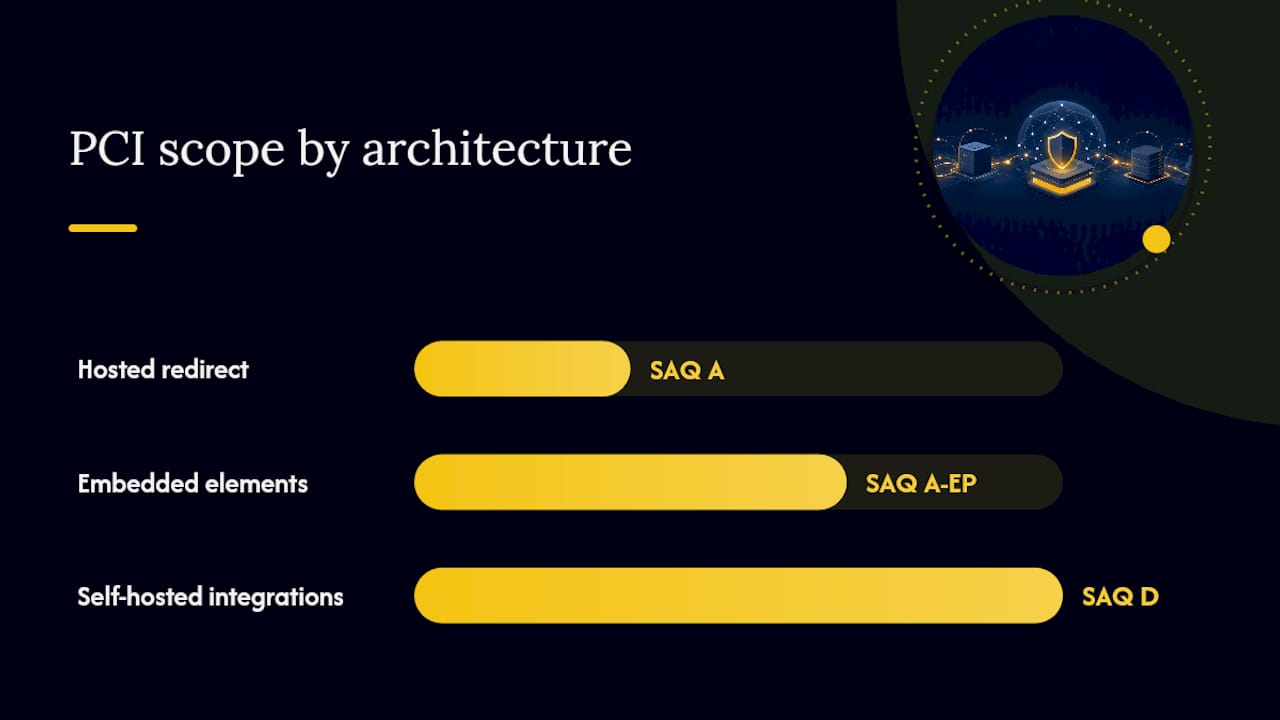
Three architecture tiers and their scope consequences
- Hosted redirect (e.g., Stripe Checkout, Square’s hosted page, PayPal’s standard checkout): Your site redirects the customer to the provider’s page for card entry. Card data never touches your server or your page’s DOM. This is SAQ A territory for most merchants.
- Embedded payment elements (iframes or JavaScript widgets): Your page loads a payment form hosted by the provider inside an iframe or via a script. If implemented correctly with strict Content Security Policy (CSP) controls, this can stay in SAQ A-EP. If your server serves or modifies the script, scope expands significantly.
- Self-hosted or card-data-storing integrations: Your server handles card data directly, or you store card numbers in a database or spreadsheet. This pushes you into SAQ D and the full 12-requirement control set.
Integration checklist for staying in SAQ A
- Use the provider’s hosted checkout URL, not an embedded form on your own page.
- Confirm the provider is on the PCI SSC’s list of validated payment applications.
- Never pass card numbers through your server, even temporarily.
- Disable any server-side logging that could capture card data in query strings or POST bodies.
- For WooCommerce or Shopify merchants, review security plugin configurations that can help harden your platform and reduce scope exposure.
The provider misconception
Using Stripe, Square, or PayPal does not remove your merchant obligations. Integration mistakes, such as hosting payment forms or handling card data on your own server, can expand your scope to SAQ A-EP or SAQ D regardless of which provider you use. The provider is responsible for their own infrastructure. You are responsible for how you integrate with it.
Pro Tip: Prefer a hosted redirect or server-side token exchange over any pattern where your page’s JavaScript touches card field values. That one architectural choice keeps your entire web server out of scope.
Common PCI compliance mistakes small businesses make
These are the errors that most reliably cause scope creep, failed ASV scans, or breach exposure. Each one has a straightforward fix.
-
Embedding payment forms incorrectly. Loading a payment library directly on your server-rendered page, or modifying the provider’s script, pulls your server into scope. Fix: switch to a hosted redirect checkout, or implement a strict Content Security Policy and confirm your integration qualifies for SAQ A-EP.
-
Storing card numbers in spreadsheets or backups. This is more common than most owners admit. A customer service rep copies a card number into a notes field; a backup job captures it. Fix: stop storing cardholder data immediately, audit your backups and CRM for stored card numbers, and securely delete any copies you find.
-
Assuming provider compliance equals merchant compliance. Your Stripe or Square account being PCI-compliant does not mean your integration is. Fix: verify your integration mode against the SAQ mapping table above, and document in writing which party is responsible for each control.
-
Weak vendor management and default credentials. Default passwords on POS terminals and routers are a known attack vector. Fix: rotate all default credentials on day one, apply MFA to every admin account, and maintain a vendor contact list with documented security responsibilities. A vendor risk management program formalizes this process.
-
Ignoring third-party scripts on checkout pages. A compromised analytics or chat script on your checkout page can skim card data even when your payment form is hosted. Fix: audit every script on pages adjacent to checkout, use CSP headers, and monitor for unauthorized script changes.
How to maintain ongoing PCI compliance
Compliance is not a one-time project. The controls that keep you compliant require a recurring calendar, not a single sprint.
Quarterly obligations
- Run ASV scans on all internet-facing, in-scope systems if required by your SAQ type or acquirer.
- Review and remediate any findings before the next scan cycle.
- Review access logs for anomalies and confirm no unauthorized accounts exist.
Annual obligations
- Complete and sign your SAQ and AOC, then submit to your acquirer.
- Conduct a formal staff security training session covering phishing, physical terminal security, and card data handling.
- Review and update your written security policy.
- Inspect POS terminal firmware and update to current versions.
Continuous controls
- Apply operating system and application patches within your defined patch window (30 days for critical patches is a common standard).
- Enforce MFA on all remote access and administrative accounts. A cybersecurity plan that includes MFA and patching schedules covers most of this automatically.
- Maintain audit logs for at least 12 months, with the most recent three months immediately accessible.
- Physically inspect card terminals at the start of each business day for signs of tampering or skimming devices.
Incident response basics
Keep a one-page incident response plan that answers: who do you call first (your acquirer, then your payment provider), how do you isolate affected systems, and where is your evidence that card data was not stored in your environment. That last point, documented proof of scope limitation, can significantly reduce breach fallout and potential fines.
What to ask your payment vendor and where to find approved lists
Before signing with any payment vendor or adding a new terminal, get answers to these questions in writing:
- Who stores card data, and where?
- Who is responsible for encryption and tokenization?
- Are you listed on the PCI SSC’s Validated Payment Application list or PTS device list?
- Who is responsible for ASV scans and penetration testing on your infrastructure?
- Can you provide your current Attestation of Compliance (AOC)?
- What is your breach notification process and timeline?
Where to verify vendor and device status
- PCI SSC PTS Device List: The PCI SSC maintains the List of PCI Approved PTS Devices, which confirms whether a terminal or PIN entry device has been validated. Only use terminals on this list.
- Validated Payment Applications: The PCI SSC also publishes a list of validated payment software. Confirm your payment application appears on it before deploying.
- Payment brand registries: Visa and Mastercard each maintain their own lists of registered service providers. Search for your gateway or processor by name to confirm their registration status.
When a vendor provides an AOC, check the date. An AOC older than 12 months may indicate a lapsed validation. Ask for the most recent version and confirm it covers the services you are using.
When should you hire a QSA, ASV, or managed IT partner?
Most Level 4 small merchants can complete PCI compliance without a QSA. But there are clear situations where outside help is not optional.
When you need a QSA
- You are a Level 1 merchant and a formal Report on Compliance is required.
- Your scope is large or complex (multiple locations, mixed payment channels, legacy systems).
- You have experienced a breach and your acquirer requires a formal forensic investigation and RoC.
When to use an ASV
Any time your SAQ type or acquirer requires quarterly external vulnerability scans, you need an ASV. You cannot self-perform these scans; they must come from a vendor on the PCI SSC’s approved ASV list. ASV scans typically cost $100–$300 per scan for a small-business scope.
When a managed IT or cybersecurity partner makes sense
For most small merchants, the value of a managed partner is not the compliance paperwork itself. It is the continuous controls that make the paperwork easy: patching, MFA enforcement, log monitoring, and evidence collection. A managed partner who handles these controls year-round means your annual SAQ completion takes hours, not weeks.
Specific scenarios where a managed partner pays for itself quickly:
- You are on SAQ D and need help documenting all 12 requirements.
- You failed an ASV scan and need remediation support.
- You have multiple locations with different payment architectures.
- You want someone to coordinate vendor AOC collection and maintain your compliance calendar.
Pro Tip: Most small merchants only need outside help for SAQ D or for remediating ASV findings. If you use a hosted checkout and qualify for SAQ A, a managed IT partner can make annual compliance nearly effortless by maintaining the underlying controls automatically.
The case for keeping PCI scope small from day one
Most of the PCI compliance pain small businesses experience is self-inflicted, and it usually traces back to a single architectural decision made years earlier without thinking about compliance at all. A developer embeds a payment library directly on the checkout page because it was faster. A customer service rep starts keying card numbers into a virtual terminal on a shared workstation. A backup job silently captures card data in a log file.
Each of those choices, individually, is understandable. Collectively, they push a merchant from SAQ A (a few hours of self-attestation) into SAQ D (a multi-week project with potential outside costs). The compliance burden is not proportional to business size. It is proportional to how much card data touches your environment.
The merchants who handle PCI compliance most efficiently are not necessarily the most security-sophisticated. They are the ones who made a deliberate architecture choice early: redirect customers to a hosted payment page, use tokenization for recurring billing, and never let card data touch their own servers. That choice, made once, pays dividends every year at renewal time.

The Small Merchant Guide frames it plainly: outsource card processing and use approved devices. That is not a compliance shortcut. It is the correct architecture for a business that wants to stay open after a security incident.
Mavericks Office Solutions makes PCI compliance manageable for Ohio SMBs
PCI compliance requires continuous controls, not just an annual form. Mavericks Office Solutions gives Ohio small businesses a concrete advantage: a single managed IT partner who handles the technical controls that make SAQ completion fast and ASV scans clean.

The typical engagement starts with a discovery session to map your payment architecture and identify your CDE. From there, Mavericks Office Solutions handles the controls that matter most: MFA enforcement, patch management, log monitoring, and ASV scan coordination. When your annual SAQ comes due, the evidence is already collected. The managed IT and cybersecurity services cover the full control stack, from endpoint protection to incident response, with a local help desk that responds in under 12 minutes on average.
For merchants who need policy support or a fractional security leadership perspective, fractional IT services provide executive-level guidance without a full-time hire. Contact Mavericks Office Solutions to schedule a discovery call and get a clear picture of your current PCI scope.
Sources
Use these official sources to download SAQ forms, verify vendor status, and stay current on PCI DSS requirements.
- PCI Security Standards Council – Protect Payment Data with Industry-driven Security Standards, Training, and Programs
- Pcicompliance
- PCI Compliance Cost for Small Business: 2026 Numbers
This article is general information, not a substitute for advice from a qualified financial advisor. Consult a qualified financial professional about your own circumstances before acting on anything here.