
Yes, VoIP can be secure for a small business, but only if you treat it like the network asset it is. Enforce multifactor authentication on every admin account, segment voice traffic onto its own VLAN with dedicated firewall rules, and require TLS and SRTP encryption for signaling and media. Assign one person to own phone-system security, then schedule a review within a few months.
TL;DR:
- Default credentials must be changed immediately to prevent attackers from easily accessing your VoIP system.
- Enforce multi-factor authentication on all admin and portal accounts to significantly reduce the risk of account takeover.
- Use dedicated voice VLANs and specify SIP and RTP ports to limit exposure and prevent compromised devices from reaching your call servers.
- Require TLS and SRTP encryption for signaling and media streams to protect calls without adding excessive latency.
- Assign a dedicated owner for VoIP security and conduct regular reviews of logs, patches, and network configuration to stay ahead of threats.
Table of Contents
- VoIP Security Small Business Threats You Can’t Ignore
- Priority Best Practices: The Checklist to Act On Now
- Designing Your Network for Secure VoIP
- Locking Down Admin Portals and User Access
- Which Protocols Actually Protect Your Calls
- Monitoring and Incident Response When Something Goes Wrong
- Mapping Your Checklist to DHS and NIST Guidance
- When DIY Isn’t Enough: A Provider’s View
- How Mavericks Office Solutions Secures Your Phone System
- Sources
- FAQ
VoIP Security Small Business Threats You Can’t Ignore
Toll fraud is the threat that hits your wallet fastest. Criminals who steal SIP credentials or exploit a misconfigured PBX can route thousands of dollars in international calls through your account overnight, often discovered only when the bill arrives. Eavesdropping is quieter but just as damaging: unencrypted signaling and media let attackers on the same network segment listen to calls or harvest credentials passed over SIP registration.
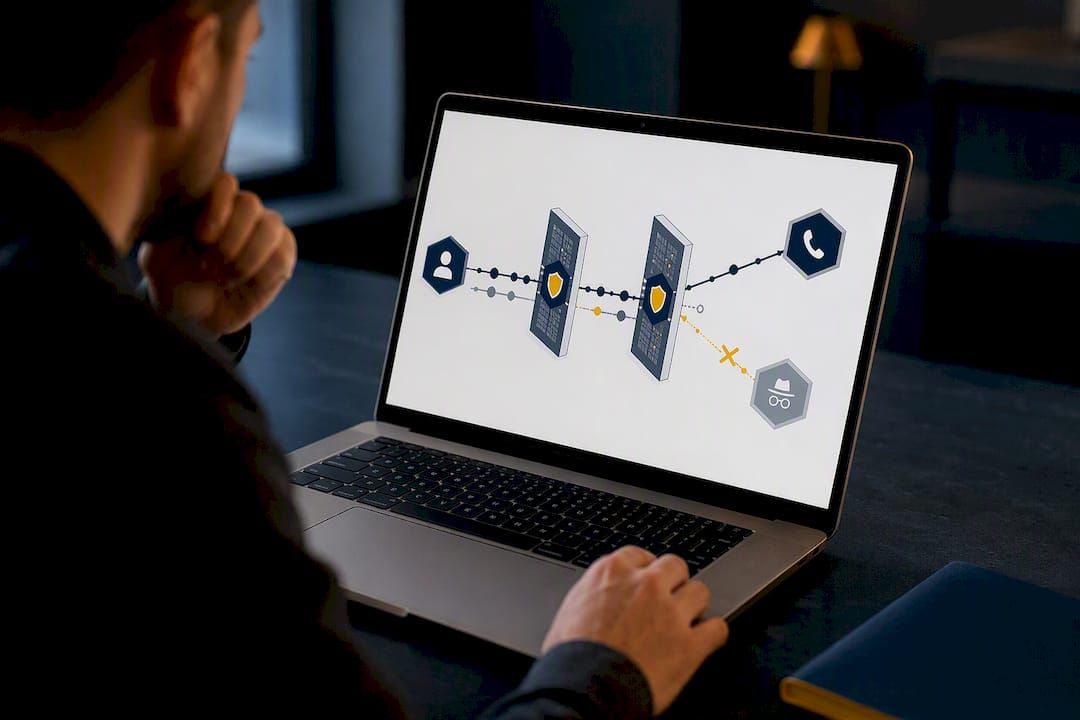
Denial-of-service attacks flood your voice trunk with junk traffic, degrading call quality or knocking phones offline entirely during business hours. Vishing rounds out the list. Attackers impersonate vendors or executives to trick help-desk staff into resetting passwords or forwarding calls to numbers they control.
The common thread across all four: they exploit gaps most businesses do not know they have.
- Toll fraud drains revenue through compromised trunks and stolen credentials.
- Eavesdropping exposes call content and metadata on unencrypted networks.
- DoS attacks degrade or disable service during peak hours.
- Vishing bypasses your firewall entirely by targeting people.
Priority Best Practices: The Checklist to Act On Now
Fixing VoIP security is less about buying new technology and more about closing doors you left open by default. Work through these in order.
- Change every default credential today. Admin portals, phones, and gateways often ship with the same factory password across an entire product line, and attackers know it.
- Turn on multi-factor authentication wherever it’s available. MFA cuts account takeover risk dramatically and should apply to every admin and portal login without exception.
- Disable services you’re not using. International calling, unused SIP trunks, and legacy provisioning protocols like TFTP and FTP are common entry points; replace them with SFTP or a secure provisioning workflow.
- Set a patch schedule. Firmware updates for phones, gateways, and the PBX itself should run monthly at minimum, not “whenever someone remembers.”
- Review call logs monthly. Look for spending spikes, after-hours activity, and calls to unfamiliar international destinations.
- Put spending alerts and dialing restrictions in place. A cap on international or premium-rate calls limits the damage even if credentials leak.
- Train staff on vishing. Require written verification, not a phone call, before anyone processes a number port, call-forwarding change, or admin reset.
Pro Tip: Put the written-verification rule in your employee handbook, not just a Slack message. Social engineers count on rules that live only in someone’s memory.
Designing Your Network for Secure VoIP
Your voice traffic needs its own lane. Building a dedicated voice VLAN keeps phones and softphones off the same broadcast domain as guest Wi-Fi and general office traffic, so a compromised laptop can’t easily reach your call servers.
From there, configure firewall rules specifically for VoIP rather than relying on generic settings. SIP signaling typically runs over UDP or TCP ports 5060 and 5061, while media streams need a defined RTP port range, commonly 10000 to 20000, though your vendor may specify something different. Anything exposing SIP to the public internet benefits from a session border controller or an equivalent service your provider manages, since it screens malformed and malicious SIP traffic before it reaches your PBX.
- Create a voice VLAN and restrict cross-VLAN access to only what’s needed.
- Define explicit SIP and RTP port rules instead of leaving broad ranges open.
- Use an SBC or provider-managed equivalent for any internet-facing SIP trunk.
- Weigh encryption against call quality: heavier encryption can add latency, which is why NIST recommends gateway-level encryption when endpoints can’t handle the processing load without degrading calls.
That gateway-level approach matters because not every desk phone or softphone can run strong encryption without a performance hit, and a dropped call is its own kind of security failure.
Locking Down Admin Portals and User Access
The admin portal is the single highest-value target in your entire phone system. Whoever controls it can reroute calls, change voicemail greetings to intercept messages, or open the door to toll fraud with one settings change.
Require MFA on every admin and portal account without exception, including accounts your provider set up during onboarding. Apply least-privilege roles so billing and number-porting permissions are separate from general system administration. Restrict web-based management access to trusted IP addresses or a VPN, and enforce session timeouts so an unattended login doesn’t stay open all afternoon.
- Require MFA on all admin and portal logins, no carve-outs for “trusted” staff.
- Separate billing and porting permissions from day-to-day admin access.
- Limit management console access to trusted IPs or VPN connections.
- Force password rotation and eliminate default credentials immediately after setup.
Pro Tip: Ask your provider whether MFA is enforced by default or opt-in. Opt-in settings have a way of never getting opted into.
Which Protocols Actually Protect Your Calls
Encryption only works if it’s turned on, and a surprising number of VoIP deployments run unencrypted by default. Require TLS for SIP signaling and SRTP, or DTLS-SRTP, for the media stream itself. Ask your vendor point blank whether these are the default configuration or something you have to request.
RFC 8862 formalizes best practice here, requiring DTLS-SRTP support and pairing it with the STIR framework to verify caller identity and reduce spoofing. If your endpoints can’t support SRTP, the fallback is gateway-level IPsec or requiring a VPN connection for remote softphone users.
- Require TLS for signaling and SRTP/DTLS-SRTP for media on every call path.
- Ask vendors whether encryption is on by default or requires configuration.
- Use gateway-level IPsec or a mandatory VPN when endpoints can’t run SRTP natively.
- Request documentation on key management and FIPS-validated cryptography where it applies.
Monitoring and Incident Response When Something Goes Wrong
Watch your call detail records for outbound spikes, after-hours dialing, and calls to unusual international destinations, then automate alerts and spending caps so you’re not the last to know. When something looks wrong, act fast.
- Lock the admin account and rotate every credential tied to the system.
- Pull the call detail records covering the suspicious window.
- Contact your provider’s fraud or security line directly, not general support.
- Run a root cause review afterward and close the specific gap that let it happen.
Mapping Your Checklist to DHS and NIST Guidance
Government guidance gives small businesses a documented standard to point to, whether you’re answering a client’s security questionnaire or negotiating a vendor contract.
| Checklist Item | Guidance Source | Maintenance Cadence |
|---|---|---|
| Encrypt signaling and media | DHS 4300A Attachment Q5 | Verify quarterly |
| Disable TFTP/FTP provisioning | DHS Appendix A checklist | Confirm at setup, recheck annually |
| Patch firmware and PBX software | NIST SP 800-58 | Monthly |
| Review configuration management | DHS Appendix A / NIST SP 800-58 | Monthly |
| Physically secure gateways and PBX hardware | DHS Appendix A | Annual audit |
When you’re vetting a provider or writing an RFP, ask directly: Is encryption on by default? Is MFA enforced or optional? What’s the SLA for fraud monitoring alerts? Who’s liable for fraudulent charges run up before you catch them? A provider that hesitates on any of those questions is telling you something.
When DIY Isn’t Enough: A Provider’s View
If your business doesn’t have someone assigned to watch the phone system, you don’t have a security plan. You have a hope. That’s the real gap I see: not missing technology, but missing ownership. A managed provider earns its cost by shortening the time between “something looks wrong” and “someone’s already fixing it,” which is the entire game in fraud response. At Mavericks Office Solutions, that means one accountable team handling the network, the phones, and the monitoring instead of three vendors pointing at each other. Before you decide either way, assign an owner, put vendor security answers in writing, and budget for real monitoring, not just a support contract.
— Jeffrey
How Mavericks Office Solutions Secures Your Phone System
Most small businesses don’t need another vendor. They need one that actually answers the phone when something breaks. Mavericks Office Solutions runs managed UCaaS and VoIP with 24/7 monitoring and a 100% USA-based help desk that averages under 12 minutes to respond, so a fraud alert or a dropped trunk doesn’t sit in a queue overnight.

Beyond the phone system itself, Mavericks handles the firmware patching, MFA rollouts, and VLAN and firewall configuration this article just walked you through, plus the fraud monitoring and incident response that catches a compromised account before it turns into a five-figure phone bill. That’s paired with broader managed IT services so your voice security isn’t managed in isolation from the rest of your network. If your current setup is running on default settings and hope, visit the UCaaS / VoIP page or reach out for a security audit to see exactly where the gaps are.
Sources
For readers who want the source material, DHS Attachment Q5 covers the full VoIP checklist, NIST SP 800-58 details protocol-level recommendations, and RFC 8862 defines the media confidentiality profile referenced throughout this guide.
FAQ
Is VoIP Suitable for Small Businesses?
Yes. VoIP is suitable for small businesses when configured with encryption, network segmentation, and MFA, and it typically costs less than traditional phone lines while offering more flexibility. The risks described in this guide are manageable with the checklist above, not a reason to avoid VoIP.
Can Law Enforcement Track a VoIP Call?
Law enforcement can trace VoIP calls through call detail records and provider cooperation, similar to how traditional phone tracing works, though the process depends on the provider’s data retention and legal jurisdiction. This is a separate question from security. Encrypting your calls protects against criminals intercepting them, not against lawful investigation.
What Is the Best VoIP Phone System for a Small Business?
The best system for most small businesses is a managed VoIP platform that includes encryption by default, MFA enforcement, and active fraud monitoring rather than a bare-bones self-managed setup. Mavericks Office Solutions offers managed UCaaS/VoIP built around that model, with pricing available on request.
What Are the Downsides of VoIP?
The main downsides are dependence on internet connectivity for call quality and exposure to VoIP-specific threats like toll fraud, eavesdropping, and denial-of-service attacks if the system isn’t secured properly. Most of these downsides are addressed directly by the network segmentation, encryption, and monitoring steps covered earlier in this guide.
How Often Should I Review My VoIP Security Setup?
Review call logs and spending alerts monthly, patch firmware at least monthly, and run a full configuration and physical security audit annually. That cadence matches the maintenance schedule mapped to DHS and NIST guidance above.