

A usable technology roadmap for SMB operations ties 3 to 5 business outcomes to 3 to 7 prioritized initiatives, phased across a 12 to 36 month period. The first move isn’t buying software. It’s a short inventory sweep of what you already run, followed by picking the single business outcome you’ll fund first. Expect measurable results, like hours saved or fewer support tickets, within a few months.
TL;DR:
- Small businesses should keep their technology initiatives limited to three to seven priorities that directly impact specific measurable outcomes within 3 to 9 months.
- Conduct a quick, one-week inventory of existing hardware, software, shadow IT, and security vulnerabilities before choosing initiatives to ensure accurate prioritization.
- Build a phased, 12 to 36 month plan with clear foundation, core, optimization, and continuous improvement stages, scheduling major changes outside busy revenue months.
- Assign a dedicated internal owner and establish regular review sessions to ensure adoption, alignment, and adaptability of the roadmap over time.
- Outsourcing ongoing support and strategic IT tasks to providers like Mavericks Office Solutions can prevent stalls and ensure continuous progress along the roadmap.
Table of Contents
- What Is a Technology Roadmap and Why Does Your SMB Need One?
- How to Assess Your Current Technology Setup
- Turning Business Goals Into 3 to 7 Prioritized Initiatives
- Setting the 12 to 36 month phased timeline
- Budgeting and KPIs That Justify Every Dollar
- Getting Your Team to Actually Adopt the Roadmap
- Where Roadmaps Break, and How to Keep Yours Alive
- How Mavericks Office Solutions Supports Roadmap Execution
- Planning for What Goes Wrong Along the Way
- A Quick-Start Note From Jeffrey
- Get Roadmap Execution Without Building an IT Department
- Sources
- FAQ
What Is a Technology Roadmap and Why Does Your SMB Need One?
A technology roadmap is a phased plan that connects IT decisions to business results. It is not a shopping list of software you’d like to own. A shopping list says “buy a new server.” A roadmap says “reduce order processing time significantly over the year, and here’s the sequence of systems that gets us there.”
The distinction matters because most small businesses already overspend on tools nobody fully uses. Gartner frames roadmaps as alignment tools that map every initiative to a business outcome, which is exactly the discipline that keeps budgets from leaking into unused licenses.
Building one pays off in ways owners feel quickly:
- Fewer emergency IT calls, because you replace aging systems before they fail
- Tighter budget discipline, since every dollar maps to a named outcome
- Faster onboarding, because new hires step into documented, standardized systems
- Room to scale, because you’re not rebuilding your stack every time you add staff
A 12 to 36 month horizon works because it forces two different planning muscles. You lock the next 12 months in real detail. Years two and three stay a loose sketch, revised quarterly as your business changes.
How to Assess Your Current Technology Setup
You cannot prioritize what you haven’t counted. Before writing a single initiative, spend one focused week cataloging what you already run. This isn’t a months-long audit. It’s a fast sweep that gives you enough visibility to schedule near-term changes with confidence, an approach Mindcore’s SMB roadmap guide backs as sufficient for most small operations.
Run the inventory in this order:
- List every system in use — hardware, software subscriptions, licenses, and cloud accounts, department by department.
- Capture four fields per item: the owner, the renewal date, the annual cost, and what else depends on it.
- Interview department leads about tools they use that IT never approved. This is how you surface shadow IT, the unsanctioned apps and file shares that create real security blind spots.
- Flag anything without multi-factor authentication, anything unpatched, and any system storing customer or financial data without documented backups.
Shadow IT hides in plain sight. A marketing team paying for a design tool on someone’s personal card, a sales rep syncing customer data to a free cloud drive. Each one is a potential entry point for an attacker and a compliance gap you didn’t know existed.
Pro Tip: Ask each department “what tool would break your day if it disappeared?” That single question surfaces more shadow IT than a formal survey ever does.
Turning Business Goals Into 3 to 7 Prioritized Initiatives
Start with outcomes, not technology. Pull your leadership team into a room and agree on 3 to 5 outcomes that matter most to your business: faster fulfillment, lower support costs, better data security, or improved customer retention. Tempo’s technology roadmap framework recommends this exact range because fewer outcomes force real focus, and more than five splits attention until nothing moves.
Score each candidate initiative against four criteria:
- Impact — does it move a named business metric, or just feel modern?
- Urgency — will delay cost you money, customers, or security exposure?
- Complexity — how many systems, vendors, or approvals does it touch?
- Dependencies — does it require another initiative to finish first?
Rank everything, then cut the list to 3 to 7 initiatives. That ceiling isn’t arbitrary. It keeps your team from splintering focus across a dozen half-finished projects. Tempo’s guidance points to a 3 to 9 month window for showing measurable impact on each one, which gives leadership a checkpoint to see the plan working before committing to the next phase.
Setting the 12 to 36 month phased timeline
Sequencing turns your prioritized list into a calendar your team can actually absorb. Microsoft’s digital transformation roadmap guidance recommends phased execution over a single big push, and that logic holds especially well for SMBs with lean IT staff.
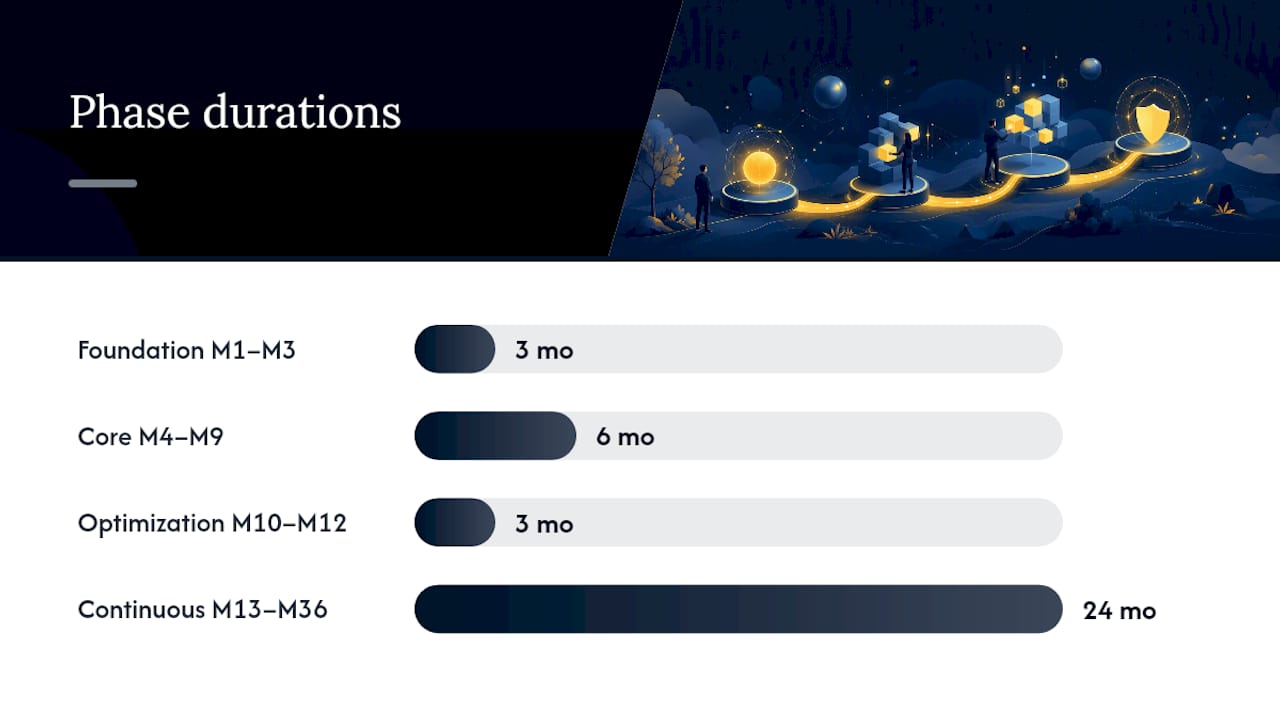
A workable structure breaks into four phases:
- Foundation (months 1 to 3) — close security gaps, finish the inventory, retire anything unsupported.
- Core (following several months) — deploy the initiatives tied to your top two or three outcomes.
- Optimization (months 10 to 12) — refine what’s live, train stragglers, measure against your KPIs.
- Continuous improvement (months 13 to 36) — revisit priorities quarterly as the business shifts.
Three sequencing rules keep this realistic. Avoid rolling out major changes during your busiest revenue months. Keep one quarter as a buffer between phases so delays don’t cascade. And security or patching work always jumps the queue, regardless of what else is scheduled.
A sample year might run: Q1 security hardening and MFA rollout, Q2 cloud migration for core files, Q3 phone system upgrade, Q4 measurement and planning for year two. Network capacity deserves a look here too. The Ethernet Alliance’s 2026 roadmap points to enterprise adoption of 2.5G, 5G, and 10GBASE-T connections, worth factoring in if your Year 2 plans include heavier cloud use or AI-driven tools.
Budgeting and KPIs That Justify Every Dollar
Every initiative on your roadmap needs a real cost breakdown, not a rough guess. Build each budget line around licensing fees, implementation labor, staff training time, and the lost productivity hours during transition. Leadership pushes back on vague numbers. They rarely push back on a number tied to a metric they already track.
Match each initiative to a KPI that operations already cares about:
- Manual hours saved per week, tracked before and after rollout
- System uptime percentage, especially for anything customer-facing
- New-hire onboarding time, from day one to full productivity
Tempo’s framework recommends targeting measurable impact within 3 to 9 months of launch. That window gives you a real number to bring back to the budget conversation.
Structure the ask in phases rather than one lump request. Present Phase 1’s cost with its KPI target, show the projected savings, then request Phase 2 funding once Phase 1 delivers. A CFO says yes to a phased ask with proof points far more often than to a year of spending upfront.
Getting Your Team to Actually Adopt the Roadmap
A roadmap that lives in a slide deck changes nothing. Adoption depends on ownership, training, and a review rhythm that keeps the plan alive instead of shelved after the kickoff meeting.
- Assign an internal owner for the roadmap, even part time. If you lack technical depth in-house, a fractional CIO can carry the strategic decisions while your team handles daily operations.
- Pilot before you roll out. Test each initiative with one department or a small group before pushing it company-wide.
- Train before you flip the switch, not after. Support tickets spike hardest in week one if training happens after launch.
- Communicate the “why.” Staff adopt tools faster when they understand the business outcome, not just the new interface.
- Set a governance cadence: weekly check-ins on active projects, monthly updates to leadership, and a full quarterly roadmap review to reprioritize as the business shifts.
Gartner’s roadmap guidance treats this review cadence as the mechanism that keeps a roadmap useful past its first draft.
Pro Tip: Put the quarterly review on the calendar before you finish the roadmap’s first draft. A review with no fixed date almost never happens.
Where Roadmaps Break, and How to Keep Yours Alive
Most SMB roadmaps fail for the same handful of reasons. Objectives stay vague (“modernize IT”) instead of tied to a number. Stakeholders disagree quietly instead of aligning up front, then undermine the plan mid-year. Teams overcomplicate the initial phase, trying to fix everything at once instead of sequencing. Or the plan ignores scalability, solving this year’s headcount without a thought for next year’s.
The fixes are straightforward if you apply them early:
- Write every initiative in outcome language, never feature language
- Cap active initiatives at 3 to 7 so focus doesn’t fracture
- Protect sequencing discipline, resist the urge to jump the queue for a pet project
- Revisit assumptions about growth every quarter, not once a year
Call in outside help when your internal team lacks the bandwidth to run both daily support and strategic planning at once. That’s usually the signal a fractional IT leadership arrangement solves better than hiring internally.
How Mavericks Office Solutions Supports Roadmap Execution
Building the plan is half the work. Running it, patching systems, monitoring uptime, training staff, is the other half, and it’s where most SMBs stall. Mavericks Office Solutions operates as an outsourced IT department built to carry that execution load.
Services that map directly onto roadmap phases include:
- Cybersecurity coverage for MFA rollout, monitoring, and incident response
- Cloud Hosting and UCaaS / VoIP for infrastructure phases tied to remote work or growth
- vCIO & Fractional IT Leadership for the strategic layer when internal bandwidth runs thin
A typical engagement pairs an internal owner, often the office manager or operations lead, with Mavericks handling technical delivery. Your team keeps decision-making close to the business; Mavericks keeps the systems running underneath it.
Planning for What Goes Wrong Along the Way
Every roadmap needs a contingency layer, because vendors slip deadlines, budgets get squeezed mid-year, and staff turnover can strand a project halfway through. Build risk planning into the roadmap itself rather than treating it as a separate document nobody opens.
Start by rating each initiative’s risk exposure alongside its priority score. A cloud migration touching customer data carries different stakes than a phone system upgrade, even if both take similar effort. For higher-risk initiatives, document a rollback plan before you start, not after something breaks. Know how you’d revert to the old system if the new one fails validation.

Budget contingency matters just as much as technical contingency. Build a one-quarter buffer between phases, mentioned earlier for sequencing, and it does double duty here: it absorbs delays without forcing you to compress training or skip testing.
Vendor risk deserves its own line item. If a single vendor supports a system your whole operation depends on, document what happens if that vendor raises prices sharply, gets acquired, or shuts down. A second-source option, even an informal one, costs little to identify now and can save weeks later.
Finally, revisit risk assumptions at the same quarterly cadence as the roadmap review. A risk that seemed minor in Q1 can become the biggest threat on the plan by Q3, especially around cybersecurity, where new threats surface faster than most SMB IT teams can track alone.
A Quick-Start Note From Jeffrey
Run the one-week inventory this week. Pick one outcome. Schedule a 90-day quick win around it. If your team lacks the bandwidth to run both support and strategy, a fractional CIO closes that gap fast.
— Jeffrey
Get Roadmap Execution Without Building an IT Department
Most SMBs that build a solid roadmap hit the same wall: they don’t have the staff to run it alongside daily support tickets. Mavericks Office Solutions solves that specific gap. As a 100% USA-based, local Ohio help desk with average response times under 12 minutes, Mavericks acts as your outsourced IT department, covering managed IT, cybersecurity, cloud hosting, voice, and print, so your roadmap’s Foundation and Core phases don’t stall waiting on an offshore ticket queue.

If your first outcome involves closing security gaps, start with Cybersecurity services covering MFA and monitoring. If it’s infrastructure, Managed IT Services can carry the Core phase rollout. And if your internal team needs the strategic layer without a full-time hire, Fractional CIO support fills that seat. Reach out to map your first 90-day initiative against Mavericks’ service lineup and get a plan built around what your business actually needs next quarter, not a generic template. For a broader look at how automation fits into your initiative list, the marketing automation checklist for SMBs is worth a look too.
Sources
- Tempo: Technology roadmap guide
- Microsoft — Creating your digital transformation roadmap: a comprehensive 10-step guide
- Gartner — Why and how to create and use technology roadmaps
- Ethernet Alliance — 2026 Ethernet Roadmap
FAQ
How Many Initiatives Should an SMB Roadmap Include?
Most SMB roadmaps work best with 3 to 7 prioritized initiatives at any given time. Fewer initiatives keep teams focused and let you measure impact within 3 to 9 months instead of spreading effort too thin.
How Long Should a Technology Roadmap Cover?
A practical horizon runs a 12 to 36 month period, with the first 12 months detailed and years two and three sketched loosely. Revisit the full plan every quarter so it stays aligned with actual business changes.
Who Should Own the Roadmap Inside a Small Business?
An internal owner, often an operations lead or office manager, should hold day-to-day accountability for the roadmap. Many SMBs pair that internal owner with a technical delivery partner, such as fractional IT leadership through Mavericks Office Solutions, to handle execution.
How Often Should the Roadmap Be Reviewed?
Gartner recommends a regular governance cadence for roadmap reviews. Most SMBs run regular check-ins on active projects, updates to leadership, and a quarterly review to reprioritize initiatives.
What Does Mavericks Office Solutions Charge for Managed IT Services?
Pricing for Managed IT Services is not published and depends on the scope of systems and support your business needs. Current pricing details are available directly through Mavericks Office Solutions.