

The right managed IT provider is the one that passes four filters before you ever discuss price: a written SLA with severity-based response and resolution times, a security baseline that includes EDR and enforced MFA, a documented onboarding plan, and a contract you can exit without losing your own data. Before scheduling a single sales call, confirm each candidate can produce tested backup restore evidence and a real SLA document. Then scope your environment and build a shortlist of three to five providers to evaluate side by side.
TL;DR:
- Providers should produce tested backup restore evidence and a clear SLA document before discussing pricing or scope.
- A comprehensive scope document must include user counts, locations, core applications, privileged accounts, compliance needs, and legacy systems.
- Use a weighted scorecard focusing on SLA, security, compliance, technical depth, onboarding, references, and price, disqualifying providers failing basic requirements early.
- Pricing models vary (per user, per device, flat rate, hybrid), but all include hidden costs like support outside office hours, onboarding, and hardware markups.
- Contracts should specify response and resolution times for different issue severity levels, with clear exit clauses tied to SLA failure and offboarding commitments.
Table of Contents
- What Managed IT Means and Which Service Model Fits You
- How Do You Scope Your Needs Before Requesting Proposals?
- The Eight-Criteria Scorecard for Comparing MSP Proposals
- What Pricing Models Should You Expect, and Where Do Costs Hide?
- Which Contract Clauses and SLA Terms Actually Protect You?
- What Should a 30 to 60 Day Onboarding Plan Include?
- How Mavericks Office Solutions Measures Up Against This Checklist
- What Experienced IT Leaders Wish Buyers Knew
- Get an SLA Sample and Onboarding Plan From Mavericks Office Solutions
- Sources
- FAQ
What Managed IT Means and Which Service Model Fits You
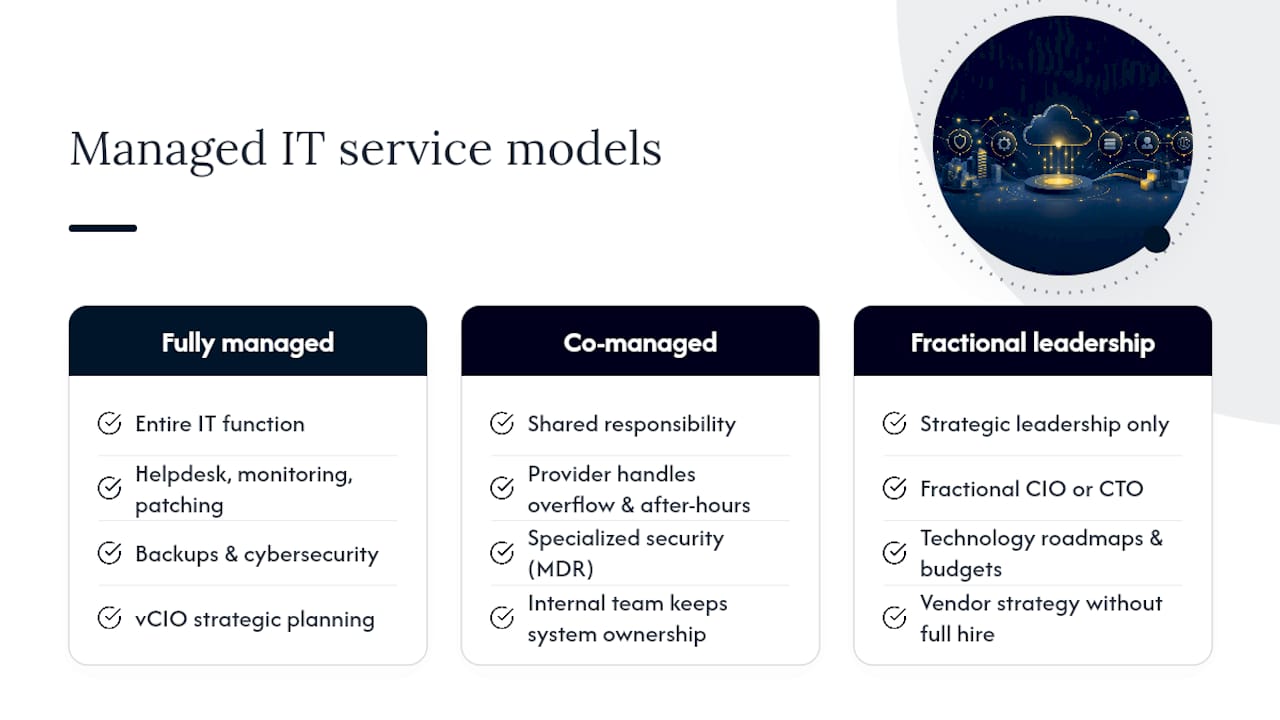
“Managed IT” covers a wider range of arrangements than most buyers realize, and picking the wrong one wastes months. A fully managed provider takes over the entire IT function: helpdesk, monitoring, patching, backups, cybersecurity, and strategic planning through a virtual CIO (vCIO). This model suits companies with no internal IT staff, or with one generalist stretched too thin to handle security and infrastructure at the same time.
Co-managed IT splits responsibility. Your internal team keeps ownership of certain systems or projects while the provider handles helpdesk overflow, after-hours monitoring, or specialized security work like managed detection and response. Companies with a small IT department that needs backup coverage or deeper security expertise tend to land here.
Fractional or outsourced IT leadership solves a different problem entirely: strategic gaps, not staffing gaps. A fractional CIO or CTO sets technology roadmaps, budgets, and vendor strategy without a full executive hire. This works well for a 40-person company that needs someone thinking about cloud migration and compliance but doesn’t need that person five days a week.
A useful gut check is this: if your current pain point is “nobody answers the phone when something breaks,” you need fully managed helpdesk and monitoring. If your pain point is “we don’t know if we’re spending our IT budget on the right things,” you need vCIO involvement regardless of which support model you choose. Confusing these two needs is why so many companies sign an MSP contract and still feel stuck a year later, still lacking direction even though tickets get closed faster. Mavericks Office Solutions’s outsourced IT department model breaks these categories down by cost and structure if you want a side-by-side view before scoping your own RFP.
How Do You Scope Your Needs Before Requesting Proposals?
You cannot compare quotes fairly if every provider is bidding on a different picture of your environment. Before sending an RFP, build an inventory that gives every candidate the same starting point.
At minimum, document:
- Total user count and device count, broken out by desktop, laptop, mobile, and server
- Physical locations, including any with limited bandwidth or no on-site staff
- Core applications and integrations, especially line-of-business software that isn’t off-the-shelf
- Privileged accounts and admin access points across your network, cloud, and SaaS tools
- Compliance frameworks that apply to you, such as HIPAA for healthcare data or PCI DSS for anyone processing card payments
- Legacy systems that can’t simply be patched or replaced, and any data residency requirements tied to contracts or regulation
The HHS guidance on HIPAA responsibilities is worth reading directly if healthcare data touches any part of your operation. Business associate obligations extend to your MSP, not just to you, and a provider who can’t speak fluently about that split is telling you something.
Once the inventory is done, define success criteria in numbers, not adjectives. Instead of asking for “fast support,” specify a Recovery Time Objective (RTO) and Recovery Point Objective (RPO) for critical systems, a maximum first-response time by severity level, and a required cadence for quarterly business reviews (QBRs). Put these numbers directly into your RFP. A provider that pushes back on quantifying them before you’ve even signed anything is unlikely to hit those numbers once you have.
The Eight-Criteria Scorecard for Comparing MSP Proposals
A weighted scorecard turns MSP selection from a gut-feel decision into a repeatable process, and it protects you from choosing based on the smoothest sales pitch in the room. A structured scorecard reduces the bias toward whichever rep was most personable and forces every comparison back onto measurable commitments.
Score each candidate on these eight criteria:
- SLA and contract flexibility (weight: 20%) — Written response and resolution commitments by severity, plus your ability to exit without penalty if they’re missed.
- Security baseline (weight: 18%) — EDR deployed on every endpoint, MFA enforced (not just offered), and tested backup restores with documented logs.
- Compliance and certifications (weight: 12%) — Relevant attestations like SOC 2, plus direct experience with your regulatory framework.
- Technical depth in your stack (weight: 12%) — Named competency with the specific platforms you run, not generic cloud experience.
- Onboarding plan quality (weight: 10%) — A written 30 to 60 day plan with milestones, not a vague promise to “get you set up.”
- Helpdesk performance data (weight: 10%) — Actual metrics from the last quarter, not marketing claims about response time.
- References and reputation (weight: 10%) — Verified conversations with current clients of similar size and industry.
- Price and total cost of ownership (weight: 8%) — Deliberately weighted lowest and scored last.
That last point deserves emphasis: price goes last for a reason. Comparing dollar figures before normalizing scope and scoring security is the single most common mistake buyers make, because a cheap quote from a provider missing half your security baseline isn’t actually cheaper. It’s a different, riskier product wearing the same label. Score the first seven criteria, then bring price into the conversation only among finalists whose scope and security already match.
Build in disqualification rules before you start scoring, so you’re not tempted to rationalize a bad fit later. Any provider that fails to produce a written SLA gets removed from consideration immediately. Any provider that can’t demonstrate tested, documented backup restores gets removed. Any provider whose contract has no exit clause tied to SLA failure gets removed, regardless of how strong the rest of their proposal looks. A provider willing to walk away from those terms rather than negotiate them is telling you exactly how enforceable their promises will be after the ink dries.
Pro Tip: Score every proposal against the exact same weighted rubric on the exact same day. Scoring providers a week apart, after separate calls, lets recency bias and rapport quietly override your own numbers.
The SerenIT evaluation framework recommends running this entire process, from RFP to reference checks to negotiated exit terms, over four to eight weeks. That timeline feels slow when you’re dealing with daily IT frustration, but it’s shorter than the disruption of switching providers again eighteen months from now.
What Pricing Models Should You Expect, and Where Do Costs Hide?
Managed IT providers price their services in a handful of common structures, and each fits a different kind of business. Per-user pricing charges a flat monthly rate per employee regardless of how many devices they use, which works well for companies with a straightforward one-device-per-person setup. Per-device pricing charges by endpoint instead, which suits environments with lots of shared workstations, kiosks, or unmanned servers where user counts don’t reflect the real workload. Flat-rate or tiered pricing bundles a fixed set of services into one monthly number, offering predictability but requiring you to read the fine print on what’s actually included. Hybrid models mix these approaches, often billing per user for helpdesk and per device for monitoring and patching.
Watch for costs that live outside the base quote:
- After-hours or weekend support, often billed at a premium rate above standard tickets
- Onboarding or setup fees, which can run into the thousands depending on environment complexity
- Project work outside the managed scope, like a server migration or office move
- Additional licensing for security tools, backup storage beyond a set limit, or compliance reporting
- Hardware procurement markups on routers, switches, or replacement devices
To compare quotes fairly, normalize each proposal to a single monthly number that includes every recurring line item, then separately list one-time and variable costs side by side. If a provider won’t itemize these costs clearly during the sales process, that’s a preview of how their monthly invoices will read once you’re a client.
Which Contract Clauses and SLA Terms Actually Protect You?
An SLA only means something if it’s written in a way that creates consequences when it’s missed. The most important structural piece is severity-based timing: Priority 1 issues (full outage, security incident) should carry a documented first-response target measured in minutes, not hours, with a similarly aggressive resolution target. Priority 2 issues (significant but non-critical) can carry a looser window, and Priority 3 (minor, non-urgent) looser still. Get all three tiers defined in writing before you sign, not described verbally in a sales call.
Beyond response times, negotiate these contract elements directly:
- Term length and auto-renewal — Avoid multi-year terms that auto-renew silently; require active written consent to renew.
- Exit rights tied to SLA failure — You should be able to leave without penalty after a defined pattern of missed commitments, not just at contract end.
- Data portability and offboarding assistance — The contract should require the provider to hand back your data, documentation, and admin credentials in a usable format within a set number of days.
- Service credits — Missed SLA targets should trigger a defined credit against your invoice, not just an apology email.
- Reporting requirements — Monthly or quarterly reports covering ticket volume, response times, and resolution times should be a contractual obligation, not a courtesy.
Tying SLA failures to real termination rights or service credits is what turns an SLA into an enforceable commitment rather than an aspirational document that sits in a drawer. The NCSC’s guidance on choosing a managed service provider makes a similar point about responsibility matrices: contracts that leave patching and backup verification duties ambiguous are the ones that fail silently.
Pro Tip: Ask for the exit clause in writing before you ask about pricing tiers. A provider’s willingness to negotiate how you leave tells you more about their confidence in their own service than anything in the sales deck.
What Should a 30 to 60 Day Onboarding Plan Include?
Onboarding is where a lot of MSP relationships either build trust fast or start eroding it. A serious provider gives you a written plan with actual milestones, not a general timeline. Expect a discovery phase that documents your full environment, followed by agent deployment across endpoints and servers, then a formal documentation handover so you know exactly what’s been configured and why.
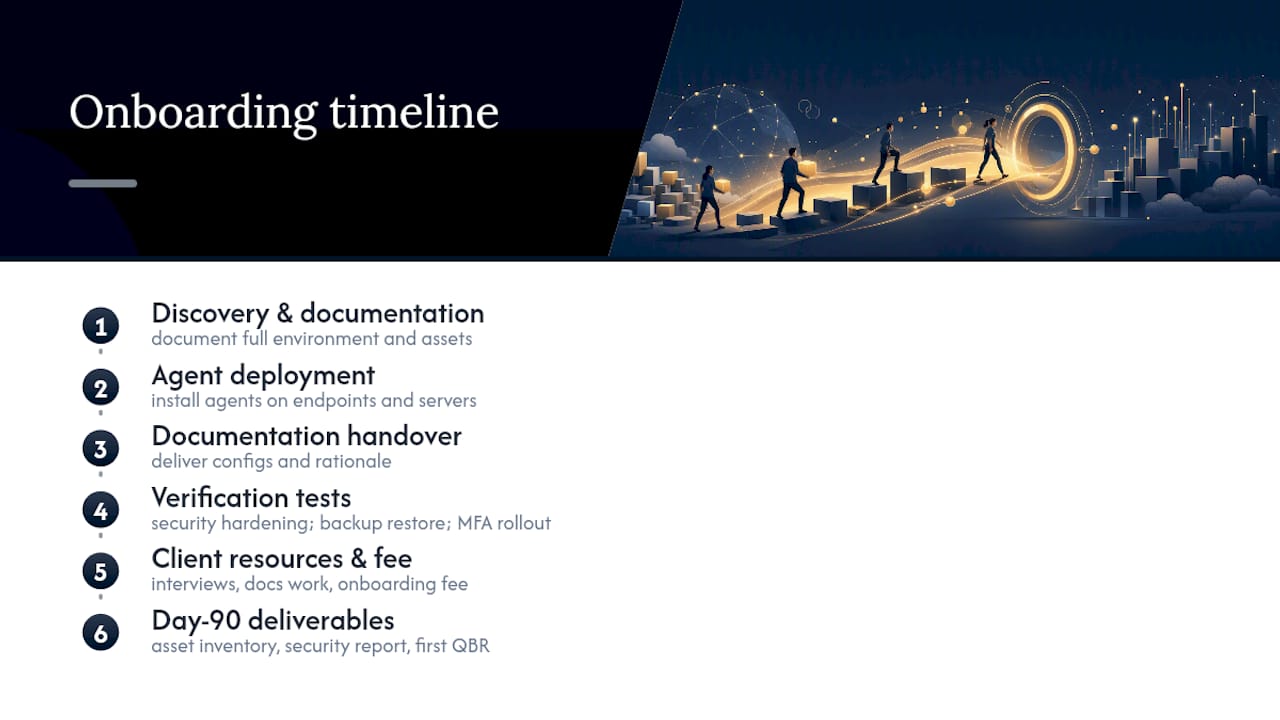
Three tests should happen during onboarding, not months later: baseline security hardening across all endpoints, a live backup restore test to confirm recovery actually works, and verification that MFA has been rolled out across every account it’s supposed to cover. Normalizing onboarding scope with a written 30 to 60 day plan before signing is one of the clearest predictors of whether a provider will manage the relationship proactively or reactively.
Expect some onboarding fee or resource commitment on your end during this window, usually tied to documentation gathering and staff availability for interviews. By day 90, you should have a completed asset inventory, a security baseline report, and your first QBR scheduled.
How Mavericks Office Solutions Measures Up Against This Checklist
Mavericks Office Solutions runs its help desk entirely from the United States, with an average response time under 12 minutes, backed by 24/7 monitoring and managed detection and response coverage. That combination fits small and medium businesses that want one provider handling IT support, cybersecurity, voice systems, and print management instead of juggling separate vendors. If you’re building your own scorecard from this article, Mavericks Office Solutions can provide the SLA documentation, sample reporting, and tested restore evidence described above for direct comparison against any other provider on your shortlist.
What Experienced IT Leaders Wish Buyers Knew
Ask for sample invoices and tested restore logs before signing anything. Never compare price before scope and security are equal. Co-managed fits best when you already have IT staff worth keeping; fully managed fits when you don’t.
— Jeffrey
Get an SLA Sample and Onboarding Plan From Mavericks Office Solutions
Most SMBs don’t need a bigger IT department. They need one partner who already runs helpdesk, security, voice, and print under a single contract instead of four separate vendor relationships and four separate invoices to chase down every month. Mavericks Office Solutions was built as an outsourced IT department for small and medium businesses, with a USA-based help desk and monitoring that doesn’t stop at 5 p.m.

If you’re running the scorecard from this article, put Mavericks Office Solutions through the same test. Request a sample SLA and reporting pack, walk through a scoping call, or ask what a 30 to 60 day onboarding plan looks like for your environment. Start with the managed IT services page to see what’s included, then request the diligence artifacts directly. You’ll have real documents to score against every other proposal on your list, not just a sales pitch.
Sources
Cross-check claims against primary sources: HHS for HIPAA obligations, PCI Security Standards Council for card-data handling, and request the matching SOC 2 report or restore logs directly from any provider you’re vetting.
- HHS — HIPAA: Laws & Regulations
- PCI Security Standards Council
- How to Evaluate an MSP in 2026: The Complete Business Owner’s Guide | SerenIT
- How to Evaluate an MSP: The 15-Point Vendor Selection Checklist (2026) | MSP Directory
FAQ
How Do You Choose the Right Managed IT Service Provider?
Score candidates against a weighted checklist covering SLA terms, security baseline, technical fit, onboarding plan, references, and price, in that order. Disqualify any provider that can’t produce a written SLA or tested backup restore evidence before comparing pricing.
What Are Some Reputable Managed IT Services Providers?
Reputable providers are best identified by what they can document, not by name recognition: a USA-based help desk, published response time averages, tested restore logs, and third-party security attestations. Mavericks Office Solutions publishes an average help desk response time under 12 minutes and runs 24/7 monitoring as part of its managed IT offering.
How Much Does a Managed Service Provider Cost?
Managed IT pricing typically runs per user, per device, flat rate, or a hybrid of these, with the right structure depending on your device-to-employee ratio and service needs. Mavericks Office Solutions does not publish flat pricing online; current rates are available by requesting a scoping call through its managed IT services page.
Who Is the Biggest IT Managed Services Provider in the USA?
Market size varies by how “managed services” is defined and which segment is measured, and no single verified ranking applies across every business size and region. For SMB buyers, provider fit, response time data, and security baseline matter more than overall market size.
How Many Providers Should Be on My Shortlist?
Three to five providers gives you enough range to compare proposals without making the evaluation process unmanageable. A structured 4 to 8 week evaluation timeline covering RFP, scoring, and reference checks works well for a shortlist of that size.