

Secure your network and identity layer first, then fix your meeting rooms, then your collaboration base, then desk booking, then analytics. In that order, because each layer depends on the one before it: a video bar on a shaky Wi-Fi network fails the same way a booking app fails when nobody trusts the calendar behind it. Get the sequence backward and you’ll spend a budget cycle patching symptoms instead of solving the actual problem.
TL;DR:
- Most hybrid work technology should be built in a specific order, starting with network and security before addressing collaboration and meeting room systems.
- For rooms under 12 seats, all-in-one video bars are the fastest and easiest solution, but larger or irregular rooms benefit from modular AV setups that are easier to upgrade.
- Hybrid networks require sufficient capacity, segmentation, and zero trust security measures, including multi-factor authentication and endpoint management, to prevent failures and breaches.
- Desk booking and occupancy analytics tools must integrate with existing calendars and focus on metrics like occupancy rate and desk churn to justify real estate decisions.
- Effective hybrid management involves initial telemetry, pilot programs, and a managed IT partner to ensure tools work reliably and support accessibility for all employees.
Table of Contents
- Building the Right Hybrid Work Technology Stack
- How Should You Equip Hybrid Meeting Rooms?
- What Network and Security Foundations Does Hybrid Work Require?
- Do Desk Booking and Occupancy Tools Actually Pay Off?
- Setting Governance for Hybrid Collaboration Platforms
- Your 30/60/90 Day Plan for Hybrid Technology
- Employee Experience and Digital Wellbeing in Hybrid Work
- Making Hybrid Technology Accessible to Everyone
- The One Move Managers Skip and Shouldn’t
- Getting Hybrid Technology Right Without Building an IT Department
- Sources
Building the Right Hybrid Work Technology Stack
Hybrid work technology isn’t one product category. It’s a stack of interdependent systems, and treating any single piece as “the fix” is how IT budgets get burned on tools nobody uses. About 64% of organizations now operate with a hybrid model, according to Zoom’s research, which means the stack below isn’t a nice-to-have for a minority of companies. It’s the baseline most of your competitors are already running.
Here’s how the categories break down and what each one is actually responsible for:
- Collaboration platforms (chat, comments, and files in apps) carry asynchronous work. They need single sign-on integration with your identity provider so access doesn’t depend on someone remembering a fourth password.
- UCaaS/VoIP systems replace desk phones with cloud calling, SMS, and presence status tied to one number per employee regardless of location. Integration with your calendar system determines whether “do not disturb” actually works.
- Video conferencing and meeting room systems are the layer most hybrid teams judge you on, fairly or not, because a bad video call is visible in real time to every participant.
- Room AV endpoints (cameras, mics, speakers, codecs) are hardware, not software, and they age differently. Budget for replacement cycles, not just licensing renewals.
- Desk booking and workplace management tools solve the “is anyone even in the office” problem and typically plug into Outlook or Google Calendar for scheduling.
- Occupancy analytics turns badge swipes, Wi-Fi connections, and sensor data into real estate decisions. This is the category most companies skip and most regret skipping.
- Endpoint management keeps laptops, phones, and room devices patched and compliant no matter which network they’re on that day.
- Automation and AI assistants now handle meeting transcription, task extraction, and basic scheduling, reducing the administrative tax hybrid meetings otherwise create.
For a team under 50 people, you can run a minimal kit: one collaboration suite, one UCaaS provider, a handful of video bars, and a simple booking app. Above 200 employees across multiple sites, you need dedicated occupancy analytics, centralized endpoint management, and a network architecture that can segment traffic by department and device type. The mistake most growing companies make is buying the small-team stack and never revisiting it as headcount triples.
How Should You Equip Hybrid Meeting Rooms?
Meeting equity, meaning remote participants get the same visual and audio experience as people in the room, depends more on hardware placement than on brand names. Get this wrong and remote employees may start opting out of video entirely, which quietly erodes collaboration long before anyone flags it as a technology problem.
You have two real procurement paths:
- All-in-one video bars. A single unit with camera, mic array, and speakers mounted below or above the screen. Faster to install, easier to manage remotely, and usually the right call for rooms under 12 seats.
- Modular systems. Separate camera, ceiling mic array, and dedicated codec. More expensive and harder to install, but it scales better in large or oddly shaped rooms and lets you upgrade one component without replacing the whole unit.
Meeting equity depends heavily on room AV and network quality, and the devices and network changes that reduce participant exclusion should be the first budget line item, ahead of software licensing. Camera placement at eye level, not above a screen looking down, prevents the “talking to the ceiling” effect that makes remote attendees disengage. Acoustic panels on hard walls cut echo that mic arrays otherwise struggle to filter out. And every room device needs Quality of Service tagging on your network so video traffic doesn’t compete with a large file transfer happening two floors away.
Pro Tip: Standardize on one room AV platform across every location before you scale past three offices. Mixed vendors mean mixed remote management tools, and that complexity multiplies faster than the office count does.
Lifecycle planning matters as much as the initial purchase. Room hardware typically runs 5 to 7 years before camera resolution or codec compatibility becomes a real limitation, so negotiate warranty terms and firmware update commitments into the contract, not as an afterthought.
What Network and Security Foundations Does Hybrid Work Require?
Hybrid work technology fails at the network layer more often than at the application layer, and most IT teams diagnose it backward. Enterprise Wi-Fi needs enough capacity to handle simultaneous video calls from every conference room plus every laptop on the floor, not just the headcount the building was designed for a decade ago. Network segmentation keeps guest traffic, IoT devices, and corporate systems on separate paths so one compromised device can’t reach payroll data.
Cisco frames the modern hybrid office as a smart building that ties sensors, building automation, networking, and video into one system rather than treating each as a standalone purchase.
Zero trust network access, often shortened to ZTNA, has become the standard replacement for traditional VPNs because it verifies identity and device health on every connection request instead of granting broad network access after one login. Home networks remain a frequent weak point in hybrid environments, which is why enterprise Wi-Fi standards and centralized device management now need to extend past the office walls entirely.
Practical mitigations that actually reduce risk:
- Enforce multi-factor authentication on every remote login, not just VPN access.
- Push conditional access policies that check device compliance before granting resource access.
- Manage endpoints centrally so a lost laptop can be wiped remotely regardless of location.
- Segment guest and IoT traffic away from core business systems on separate VLANs.
Monitoring closes the loop. Meeting quality telemetry, device health dashboards, and clear incident routing let your help desk catch a degrading access point before three departments start complaining about dropped calls. Without that telemetry layer, pilots fail to diagnose root causes when meeting quality complaints start piling up, because nobody can tell if the problem is the room, the network, or the internet connection an employee is calling in from.
Do Desk Booking and Occupancy Tools Actually Pay Off?
Workplace management platforms solve a coordination problem that email chains and shared spreadsheets never could: knowing who’s actually coming in, on which day, and to which desk. Common hybrid workplace platforms include desk booking, presence tracking, and workplace analytics, and the ones that get adopted are the ones that plug directly into a calendar system employees already check every morning.
Expect a decent platform to include:
- Desk and room booking synced with your identity provider so permissions match org structure automatically.
- Interactive floor plans and, in some setups, QR code kiosks for walk-up check-ins that don’t require opening an app.
- Visitor management that notifies hosts and logs building access for security purposes.
- Analytics dashboards tracking occupancy rate, peak-day utilization, and desk churn over time.
Three metrics tell you almost everything: occupancy rate (percentage of available desks booked), peak utilization (your busiest day, which determines how much space you actually need), and desk churn (how often the same desk turns over in a week). Review these monthly, not quarterly. Real estate decisions move slowly, but usage patterns shift within a single fiscal quarter, especially after a policy change.
Adoption fails when booking feels like extra work. Tools that integrate directly into Teams, Outlook, or Google Calendar get used; standalone apps requiring a separate login get ignored within a month. Start with one pilot floor, keep booking rules simple, and expand once that group is actually using it daily.
Setting Governance for Hybrid Collaboration Platforms
Synchronous tools like video calls and instant messaging suit decisions that need real-time back-and-forth. Asynchronous tools, shared documents, recorded updates, project boards, suit work that doesn’t need everyone online at once. Most hybrid teams default to synchronous for everything, which is exactly backward: it fills calendars and burns out the people juggling time zones.
Governance prevents the sprawl that kills collaboration tools before they deliver value:
- Consolidate licensing. Audit which teams pay for overlapping platforms doing the same job under different names.
- Standardize naming conventions. A channel or folder structure that makes sense to the person who created it but nobody else defeats the purpose of shared work.
- Set retention and compliance basics. Know how long chat logs and shared files persist before legal or compliance asks and you don’t have an answer.
- Establish meeting etiquette. Cameras on or off, agenda required, no-meeting blocks. Small rules, big impact on burnout.
Roll out new tools the same way every time: pilot with one department, train before launch rather than after complaints start, measure adoption at 30 days, then optimize based on what that group actually struggled with.
Your 30/60/90 Day Plan for Hybrid Technology
Treating hybrid work as an ongoing operational program, with clear metrics and named owners, produces measurably better outcomes than deploying tools ad hoc and hoping adoption follows.
- Days 1 to 30: Baseline your network capacity, audit current Wi-Fi and security gaps, and pilot AV upgrades in two to three meeting rooms.
- Days 31 to 60: Launch a collaboration platform pilot with one department, consolidate overlapping licenses, and start tracking meeting quality telemetry.
- Days 61 to 90: Roll out training organization-wide, expand desk booking beyond the pilot floor, and set a recurring review cadence for occupancy and utilization data.
Track four numbers monthly: occupancy rate, meeting quality complaints, average ticket turnaround for AV or network incidents, and license utilization across your collaboration stack.
Pro Tip: If your help desk can’t tell you the average response time for an AV ticket right now, that’s the first gap to close, before you buy another piece of hardware.
A managed IT partner typically brings 24/7 monitoring, AV procurement help, and defined service level response times to hold the whole plan accountable.
Employee Experience and Digital Wellbeing in Hybrid Work
Technology that measures productivity without measuring burnout is only doing half its job. Hybrid work technology increasingly includes wellbeing signals alongside performance metrics, and managers who ignore that half tend to see attrition spikes they can’t explain from the usage dashboards alone.
Calendar analytics that flag back-to-back meeting stretches, focus-time blocking built into scheduling tools, and notification management that respects working hours across time zones all fall under this category now. A collaboration platform that lets someone set a status showing they’re heads-down and unavailable does more for sustainable hybrid work than another dashboard tracking hours logged.
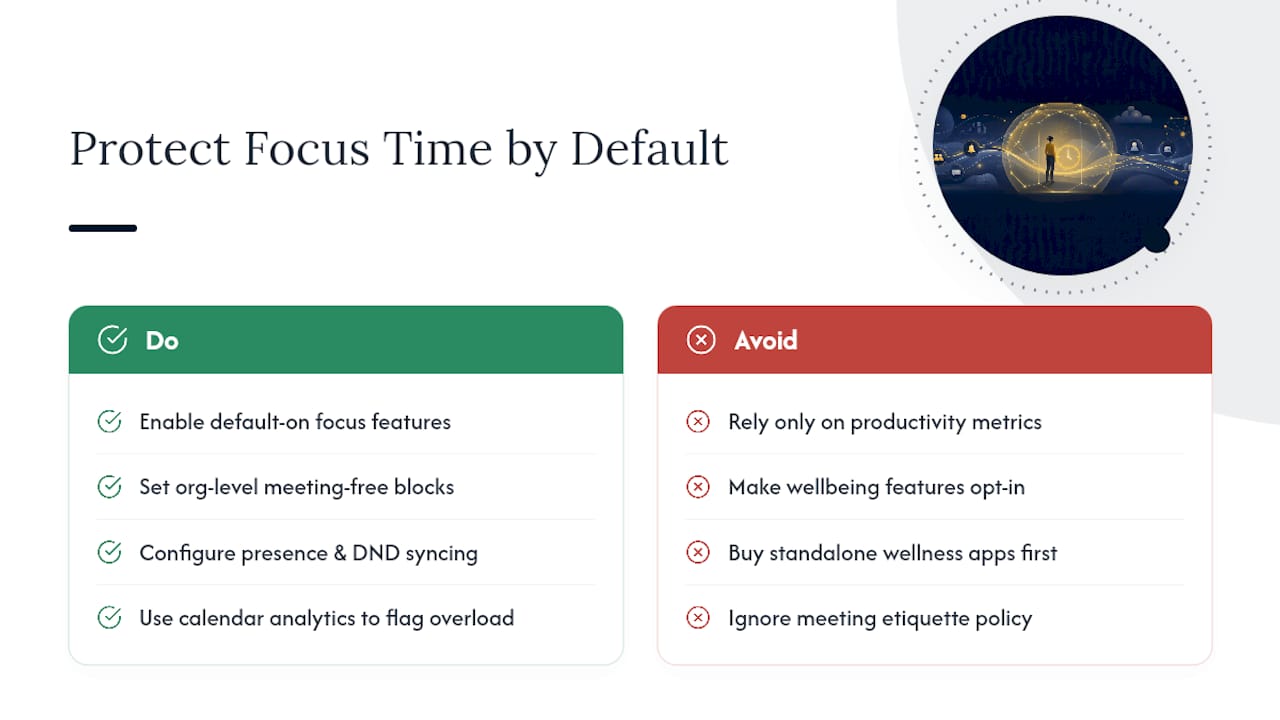
Digital wellbeing tools work best when they’re default-on, not opt-in. Employees rarely turn on a focus-time feature buried in settings, but they will use it if it’s already active and easy to adjust. The same logic applies to meeting-free blocks: set them at the organizational level first, then let individual teams override where genuinely necessary.
The manager’s job here isn’t picking the fanciest wellbeing app on the market. It’s making sure the tools already in your stack, calendar systems, chat platforms, meeting software, are configured to protect focus time rather than erode it by default. A UCaaS platform with smart presence and do-not-disturb syncing, paired with sensible meeting etiquette from your governance policy, solves more of the burnout problem than a standalone wellness app ever will.
Making Hybrid Technology Accessible to Everyone
Accessibility in hybrid work technology isn’t a compliance checkbox tucked into a procurement form. It’s the difference between a meeting where every participant can follow along and one where certain employees quietly disengage because the tools weren’t built with them in mind.
Live captioning, now standard in most major video conferencing platforms, should be turned on by default rather than left as a setting employees have to discover and enable themselves. Screen reader compatibility matters for any collaboration platform or booking tool you select, and it’s worth testing before rollout rather than after an employee flags it. Room AV setups need camera framing and lighting that work for participants who rely on lip reading or sign language interpretation, which means fixed wide-angle cameras sometimes serve better than aggressive auto-zoom features.
Desk booking and wayfinding tools should account for mobility needs directly in the floor plan data, flagging which desks and rooms are wheelchair accessible rather than leaving that information to word of mouth. Color contrast in dashboards and booking apps affects employees with visual impairments in ways that rarely surface in a typical product demo.
None of this requires a separate accessibility budget line. It requires asking the right question during procurement: does this tool work for every employee, not just the majority. Building that question into your evaluation checklist for every category in the stack, from video conferencing to workplace management, catches gaps before they become employee complaints.

The One Move Managers Skip and Shouldn’t
Most hybrid rollouts fail from missing telemetry, not missing tools. Before buying anything new, instrument what you already have and run one focused pilot. That single move surfaces your real bottleneck faster than any new platform will.
— Jeffrey
Getting Hybrid Technology Right Without Building an IT Department
Mavericks Office Solutions works as the single outsourced IT department behind that entire checklist, network baseline, security monitoring, UCaaS/VoIP, endpoint management, and AV procurement support, instead of you juggling separate vendors for each layer. Most hybrid rollouts stall because network, security, and communications get purchased from three different companies that don’t talk to each other when something breaks.

With 24/7 monitoring and a USA-based help desk, Mavericks Office Solutions closes the gap between “we bought the tools” and “the tools actually work reliably” without requiring you to hire that expertise in-house. That includes support for the UCaaS and VoIP systems your hybrid teams rely on daily, alongside network and cybersecurity coverage built around zero trust principles. If your current setup has you fielding AV complaints, chasing three vendors for one outage, or guessing at your network’s actual capacity, start with a review of managed IT services to see where the gaps actually are before your next budget cycle locks in.