

An IT budget is the annual plan for what you spend on technology, from laptops and software subscriptions to cybersecurity and support. The single most useful thing you can do right now is build a basic inventory of your hardware, software, and data, then set aside funds to cover baseline security. Everything else in this guide builds from that starting point.
TL;DR:
- Building an inventory of hardware, software, and data helps small businesses allocate funds to baseline security and prevent costly emergencies.
- Recurring costs like subscriptions and support, and capital expenses such as hardware upgrades, must be separately tracked to manage cash flow and tax implications.
- Prioritizing cybersecurity controls, including multi-factor authentication and tested backups, reduces exposure to cyber threats and limit potential breach costs.
- Outsourcing IT can offer predictable costs and simplify vendor management, especially for small businesses lacking internal skills or scaling rapidly.
- Regularly reviewing metrics like system uptime, incident response time, and project ROI ensures the budget stays aligned with actual needs and minimizes waste.
Table of Contents
- What your IT budget actually covers
- Why IT budgeting matters for small businesses
- Step-by-step process to build your IT budget
- IT budget categories and typical allocation guidance
- Prioritizing cybersecurity: what to fund first
- When outsourcing IT makes budgeting easier
- Tracking, measuring ROI, and adjusting your budget
- Pragmatic advice for constrained small businesses
- How an outsourced IT partner simplifies your budget
- Sources
- FAQ
What your IT budget actually covers
An IT budget splits into two buckets: recurring costs and project or capital costs. Recurring costs are the subscriptions, licenses, and support contracts you pay monthly or annually, things like Microsoft 365, cloud storage, help desk support, and antivirus renewals. Project or capital costs are one-time or occasional purchases, such as new servers, a network overhaul, or a fleet of replacement laptops.
Small businesses typically need to track these line items:
- Hardware: computers, servers, networking equipment, printers.
- Software and subscriptions: productivity suites, industry-specific apps, licensing renewals.
- Cloud services: hosting, backup storage, data migration.
- Security: endpoint protection, firewalls, monitoring tools.
- Support: help desk contracts, break-fix repairs, managed services.
- Telecom: phone systems, internet service, mobile plans.
The distinction matters for cash flow. Operating expenses (OPEX) hit your budget as they happen and are fully deductible in the year you pay them. Capital expenses (CAPEX) often get depreciated over several years, which changes how they show up on your books and how you plan for replacement cycles. Knowing which bucket a purchase falls into helps you avoid surprises when tax season or a big equipment refresh rolls around.
Why IT budgeting matters for small businesses
A well-planned IT budget protects the things that keep your business running: uptime, employee productivity, customer trust, and your ability to meet compliance requirements. When technology fails or falls behind, the costs show up in more than one place. A ransomware incident, a server outage, or a data breach can halt operations for days and damage the confidence customers have in how you handle their information.
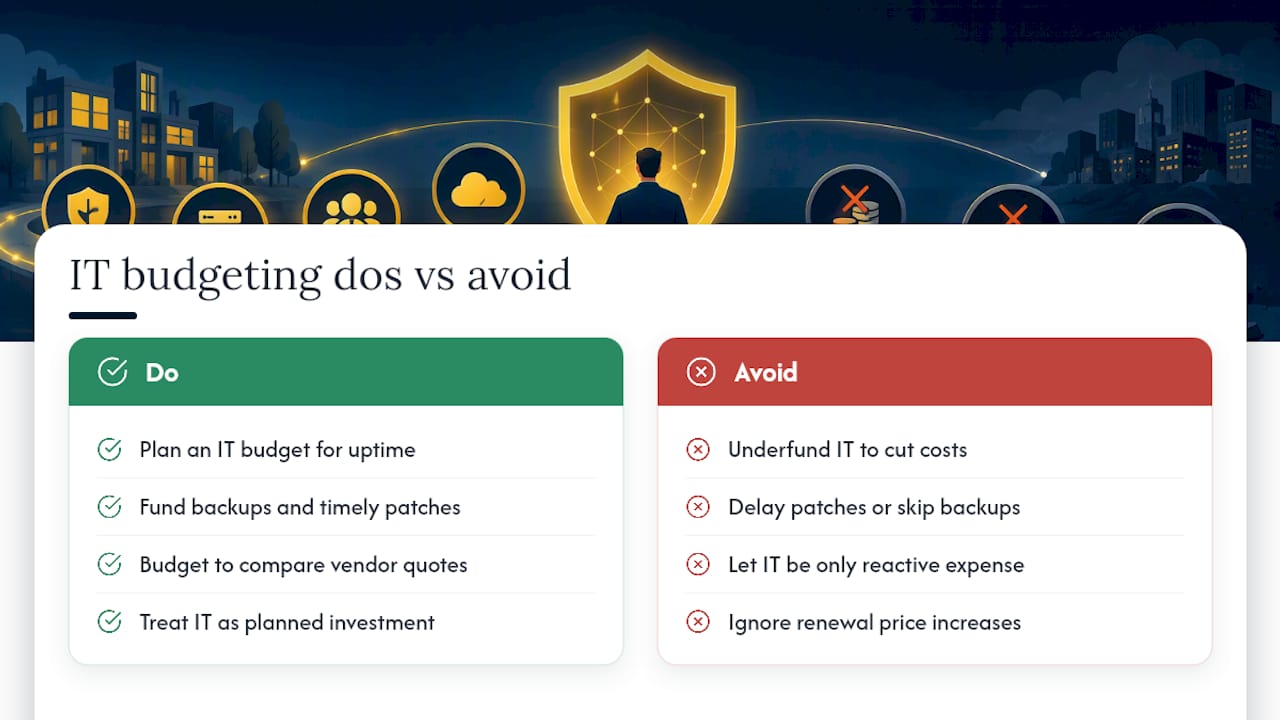
Underfunding IT rarely saves money in the long run. It tends to shift costs from planned, predictable line items into unplanned emergencies, which are almost always more expensive to fix. A skipped backup routine or a delayed patch can turn a minor glitch into a multi-day outage.
Budgeting also strengthens your negotiating position. When you know what you’re spending and why, you can compare vendor quotes on equal footing, question renewal price increases, and avoid paying for services you no longer need. A clear budget turns IT from a reactive expense into a planned investment that supports growth, whether that means opening a new location, hiring remote staff, or scaling up customer-facing systems.
Step-by-step process to build your IT budget
Building a realistic IT budget is less about guesswork and more about following a repeatable process. Here’s the order that works for most small businesses:
- Start with business goals and a high-value asset inventory. Before you assign a single dollar, list what you’re trying to accomplish this year and inventory the systems and data that matter most. NIST’s small business cybersecurity guidance recommends starting with this kind of context and offers sample asset-inventory tables to help you get organized.
- Review last year’s spend and existing contracts. Pull invoices, subscription renewals, and service agreements to see what you actually paid, not what you budgeted.
- List recurring expenses and upcoming projects separately. Recurring costs are predictable; projects need their own estimate and timeline.
- Prioritize by impact. Security fixes, systems that keep revenue flowing, and anything tied to compliance should sit above nice-to-have upgrades.
- Estimate costs and expected return. For each item, ask what it protects, saves, or enables, and whether the cost matches that value.
- Build a timeline. Stagger larger projects across quarters so cash flow stays manageable.
- Add contingency and plan for replacement cycles. Hardware wears out and software gets deprecated on its own schedule, not yours.
Once you’ve worked through those steps, translate them into concrete numbers:
- Set aside a contingency fund, often 10 to 15% of the total budget, for unplanned repairs or emergency response.
- Note depreciation schedules for major hardware purchases so replacement costs are not a surprise three years from now.
- Flag any contract renewal dates that fall mid-year so you can renegotiate before autopay kicks in.
- Mark which projects are tied directly to revenue, since those usually deserve funding priority over general upgrades.
This process works whether your total budget is a few thousand dollars or six figures. The steps stay the same. What changes is the scale of each line item and how much contingency you build in.
IT budget categories and typical allocation guidance
Once you’ve listed your priorities, it helps to sort spending into categories so you can see where the money actually goes. Most small business IT budgets break down into these areas:
- Hardware: computers, servers, networking gear, and peripherals, usually a smaller recurring share once your initial setup is complete.
- Software and cloud services: productivity tools, industry software, and hosting, often one of the largest and fastest-growing categories as businesses move more operations online.
- Security: endpoint protection, monitoring, firewalls, and assessments, a category that should grow, not shrink, as threats evolve.
- Support and managed services: help desk contracts, break-fix work, or a managed IT provider.
- Telecom: phone systems, internet service, and mobile plans.
- Print and office equipment: copiers, printers, and related supplies or service contracts.
There’s no universal percentage split that fits every business, since a professional services firm with light hardware needs looks very different from a manufacturer running specialized equipment. What matters more is the ratio between one-off project costs and predictable recurring costs, because that ratio determines how exposed you are to cash flow surprises. A good rule of thumb: if more than half your annual IT spend is unplanned, your budgeting process needs work, not just your numbers.
Reserves deserve their own line rather than getting absorbed into “miscellaneous.” A dedicated reserve, even a modest one, gives you room to react to a failed server or an urgent security patch without derailing other projects.
Prioritizing cybersecurity: what to fund first
Cybersecurity spending should follow a framework, not a guess. The NIST Cybersecurity Framework 2.0 organizes security work into six functions, Govern, Identify, Protect, Detect, Respond, and Recover, and small businesses can map budget line items directly to each one. Identify starts with your asset inventory. Protect covers access controls and training. Detect and Respond cover monitoring and incident planning. Recover covers backups and continuity.
If your budget is limited, fund these controls before anything else:
- Phishing-resistant multi-factor authentication on email and financial accounts.
- Regular backups with tested restores, not just backups that run and are never checked.
- Automatic patching for operating systems and business applications.
- Endpoint protection on every device that touches company data.
The U.S. Small Business Administration notes that many small businesses feel exposed to cyberattacks, and points to free or low-cost government resources, including CISA vulnerability scanning and the FCC Small Biz Cyber Planner, that can stretch a limited security budget further. The Federal Trade Commission also recommends adopting the NIST framework and budgeting for incident recovery planning and cyber insurance, since a breach without a response plan tends to cost far more than the plan itself would have.
Pro Tip: Review your subscription list once a year. Small businesses often keep paying for software nobody uses anymore, and that recovered budget can fund the security basics above.
A third-party risk assessment, even a basic one, is worth the line item. It shows you gaps you might not catch on your own and gives you a baseline to measure improvement against next year. For a deeper walkthrough of prioritization, see our Michigan owner’s cybersecurity playbook.
When outsourcing IT makes budgeting easier
Deciding whether to hire internally or outsource comes down to a few factors: whether you have the in-house skills to cover security and support, how much your business is scaling, what compliance requirements you’re under, and what response times you actually need. A single internal IT hire comes with salary, benefits, training, and the tools they need to do the job, costs that add up well beyond the base salary. A managed IT contract replaces that with one predictable monthly fee.
When you model the two options side by side, look at:
- Total cost of an internal hire versus the monthly fee for outsourced coverage.
- Onboarding time and setup costs either way.
- Ongoing monitoring and project work included versus billed separately.
- The service level agreement, specifically what response time is guaranteed.
Outsourcing shines when unpredictable costs are the real problem. NIST’s guidance on outsourcing notes that businesses should document desired outcomes, read reviews, and gather multiple quotes before committing, since value varies more than price alone suggests. As one example of how this plays out, a local, USA-based help desk with a quick average response time can keep support predictable and fast rather than routed through an offshore queue. For a fuller cost comparison, see how outsourced IT models stack up.
Tracking, measuring ROI, and adjusting your budget
A budget is only useful if you check it against reality. Review these metrics quarterly:
- Uptime: how often systems are available when employees need them.
- Mean time to resolution (MTTR): how long it takes to fix an issue once reported.
- Cost per user or device: a simple way to compare spending year over year.
- Incident frequency: how often security or system issues occur.
- Project ROI: whether a completed upgrade delivered the efficiency or protection it promised.
Set a trigger point for reallocating funds, for example, if support tickets spike or a subscription’s usage drops below a threshold, revisit that line item immediately rather than waiting for the annual review. Mid-year, audit your cloud and subscription costs specifically, since unused licenses and forgotten trials are some of the easiest dollars to recover. Proactive monitoring, covered in more detail in our downtime prevention playbook, also cuts down on the reactive costs that blow up a budget mid-year.
Pragmatic advice for constrained small businesses
The businesses that manage IT budgets well aren’t the ones with the biggest budgets, they’re the ones that start with an inventory and fund security basics before anything else. Waiting for a perfect, fully detailed plan usually means waiting too long. Measure what you can, adjust as you go, and avoid the common mistake of treating IT spending as one lump sum instead of prioritized categories. Progress beats perfection here.
— Jeffrey
How an outsourced IT partner simplifies your budget

Once you know your categories and priorities, the next question is who executes the plan. Managed IT typically covers onboarding, ongoing monitoring, help desk support, and a predictable monthly fee, which turns unpredictable repair bills into a line item you can actually plan around. It also simplifies vendor billing, since one contract can replace several scattered subscriptions and support agreements.
- Onboarding maps your existing assets and contracts into a clear starting point.
- Monthly fees replace the guesswork of emergency repair costs.
- One provider can consolidate IT, security, and support billing into a single invoice.
If you want a budget built around your actual environment rather than a generic template, Mavericks Office Solutions can put together a quote aligned to your priorities and your numbers.
Sources
- Small Business Cybersecurity: A Practical Guide
- NIST Cybersecurity Framework 2.0: Small Business Quick-Start Guide
- Strengthen your cybersecurity | U.S. Small Business Administration
- Cybersecurity for Small Business | Federal Trade Commission
FAQ
What is the best IT solution for a small business?
The right solution depends on your size, budget, and in-house skills, but most small businesses benefit from a combination of core software, baseline security controls, and either an internal IT contact or a managed service provider. There’s no single best option, only the one that matches your risk level and growth plans. Start with an asset inventory and build outward from there.
What is Dave Ramsey’s 50/30/20 rule?
The 50/30/20 rule is a personal budgeting framework, not an IT-specific one, that splits take-home income into 50% needs, 30% wants, and 20% savings or debt repayment. It is not designed for business technology spending and does not map cleanly onto IT budget categories. Small businesses are better served by category-based IT budgeting tied to business priorities.
What is the best budgeting software for small businesses?
There is no single tool that fits every small business, since needs vary by industry, team size, and existing accounting systems. Many businesses start with the budgeting features built into their existing accounting software and add a spreadsheet or dedicated IT asset management tool as their technology stack grows. The right choice depends on what you already use to track expenses.
What is the 70-10-10-10 budget rule?
Definitions of certain percentage-based budgeting rules vary depending on the source, and such rules are not standard in IT budgeting. For IT budgeting specifically, a category-based approach tied to business goals is the more reliable method.
How much should a small business spend on cybersecurity?
There’s no universal percentage that fits every small business, since exposure varies by industry and the sensitivity of the data you handle. Instead of chasing a specific number, fund the highest-impact controls first: multi-factor authentication, tested backups, automatic patching, and endpoint protection. The FTC recommends adopting the NIST framework as a starting structure rather than picking a fixed budget percentage in isolation.