

By the end of a new hire’s first day, their account should be provisioned, multi-factor authentication enrolled, their device functional, and access to core tools like email and chat already working. None of that happens on the fly. It requires provisioning work completed before the start date, built on least-privilege access and mandatory MFA from the first login.
TL;DR:
- IT provisioning should be completed before the employee’s first day, including account creation, device setup, and MFA enrollment, to avoid delays.
- A 30-day access review is a crucial security step that documents permissions and removes unnecessary or temporary access grants.
- Using role-based access templates and enforcing MFA during provisioning ensures consistent permissions and reduces security risks.
- Automating notifications and ownership for onboarding tasks minimizes breakdowns caused by late alerts or unclear responsibilities.
- Managed IT providers can streamline preboarding, security controls, and ongoing reviews, reducing in-house workload and improving onboarding security.
Table of Contents
- What IT onboarding covers and who owns each task
- Why IT onboarding matters for productivity, retention, and security
- The phased IT onboarding checklist: preboarding through 30 days
- Security and identity controls to build into onboarding
- Common onboarding mistakes and how to fix them
- How Mavericks Office Solutions runs secure IT onboarding
- One habit that fixes most onboarding problems
- Let Mavericks Office Solutions handle your IT onboarding
- Standards and guides worth keeping on file
- Sources
- FAQ
What IT onboarding covers and who owns each task
IT onboarding is the set of technical steps that turn a new hire into a working, secure employee: creating accounts, configuring devices, assigning access, delivering training, and verifying that everything functions before it matters. It is not a standalone event. It sits inside the broader onboarding program HR runs over the new hire’s first 90 days, where IT handles the technical foundation and HR handles culture, policy, and role clarity.
The two tracks fail independently but succeed together. HR can run a flawless orientation, but if the new hire can’t log in, the day is wasted. Clear ownership prevents that.
- HR notifies IT of a confirmed start date at least five business days out and supplies role, manager, and location details.
- IT owns account creation, device provisioning, MFA enrollment, and access configuration, typically with a service-level target of completing provisioning within two to three business days of HR’s notice.
- Hiring managers confirm role-specific software and system access before Day 1.
- Vendors or managed service providers execute the technical work when IT is outsourced, reporting completion back to HR and the hiring manager.
Handoffs break down when notification arrives late or when nobody owns the confirmation step. Naming a single owner for the IT onboarding checklist, even at a small company, is one of the more consistent recommendations in practical onboarding guidance for small businesses, which flags shared ownership as a common reason steps get missed.
Why IT onboarding matters for productivity, retention, and security
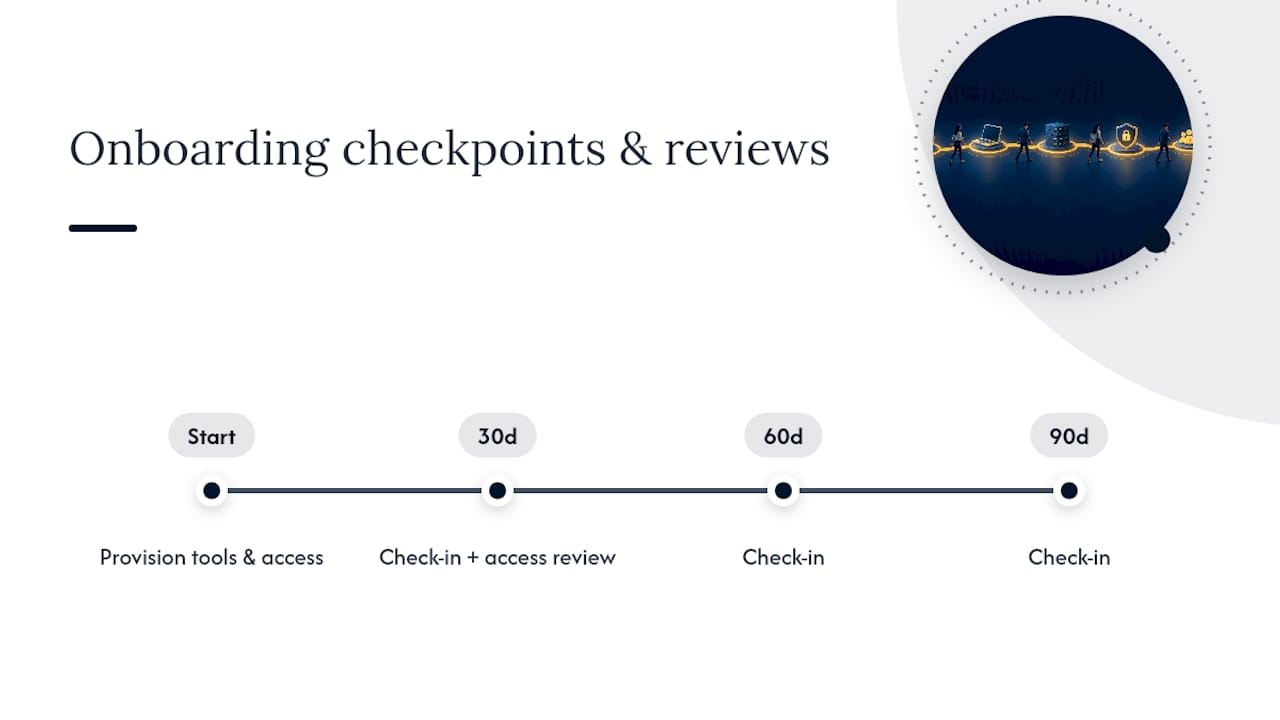
A new hire who spends their first morning waiting on a password reset forms an opinion about the company fast, and it isn’t a good one. Onboarding done well is not a single day but a process that unfolds over months. SHRM’s guidance on structured onboarding recommends check-ins at 30, 60, and 90 days to reinforce retention, and IT’s job is to keep tools and access current across that entire window, not just on the start date.
The security stakes are just as real. An account created without least-privilege limits, or left active after someone leaves, becomes an easy target for credential theft. That’s why compliance frameworks like SOC 2 and ISO 27001 expect organizations to document periodic access reviews rather than assume permissions stay correct on their own.
A 30-day access review is a documented best practice, not a formality: it gives you dated proof of who has access to what and why, which operational onboarding guides identify as evidence auditors specifically look for during SOC 2 and ISO reviews.
The phased IT onboarding checklist: preboarding through 30 days
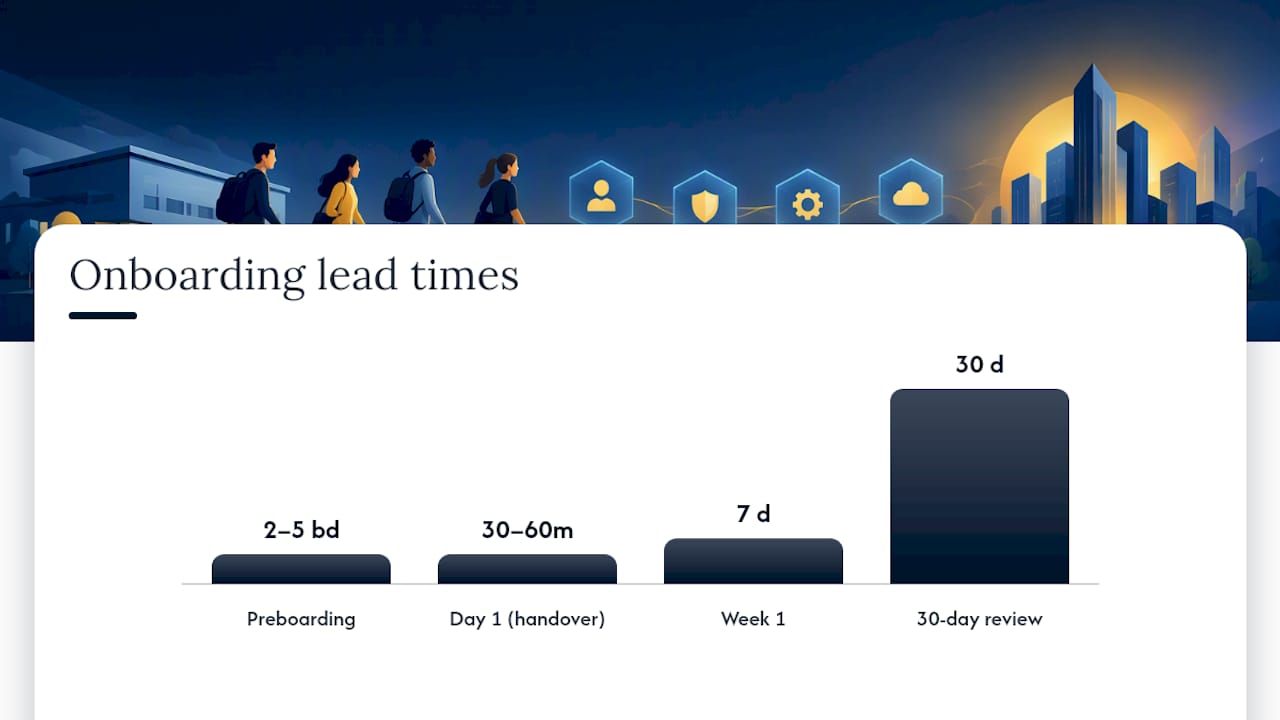
Treat onboarding as four phases with clear owners and deadlines. Day 1 should be a verification step, not a scramble to create accounts.
Preboarding (five to two business days before start date), owned by IT:
- Create the identity provider account and assign it to a role-based access template rather than building permissions from scratch.
- Allocate software licenses (email, collaboration tools, line-of-business apps) tied to the role template.
- Enroll the assigned device in your mobile device management (MDM) platform and apply the security baseline.
- Image and configure the device, then ship or stage it so it arrives before the start date.
- Confirm with the hiring manager that all role-specific systems are included in the access request.
Day 1 (first 30 to 60 minutes), owned by IT with HR support:
- Hand over the device already configured and MDM-enrolled.
- Walk the new hire through MFA enrollment before anything else, using a password manager to hand off any temporary credentials securely rather than over email or chat.
- Verify email, calendar, and chat are functioning and accessible.
- Introduce the new hire to the IT support channel and explain how to log a ticket.
Week 1, owned jointly by IT and the hiring manager:
- Confirm role-specific application access matches what was requested during preboarding.
- Verify VPN or remote access works if the role requires it.
- Track completion of mandatory security and systems training.
30-day access review, owned by IT:
- Document a review of the new hire’s permissions against their role template, removing anything granted temporarily during onboarding that’s no longer needed.
A Day 1 session that runs long is usually a symptom of preboarding that didn’t get finished. Guidance built around a three-phase onboarding model treats a quick, uneventful first day as the marker of a provisioning process that worked, and a chaotic one as a sign something upstream failed.
Pro Tip: Set a calendar trigger for the 30-day review the same day you provision the account, so it never depends on someone remembering.
Security and identity controls to build into onboarding
Every account you create during onboarding is a door into your systems, so the controls you apply at provisioning matter more than the ones you bolt on later.
- Enforce MFA at the moment of provisioning, before the new hire’s first login, and favor phishing-resistant methods where your systems support them. NIST SP 800-63B defines these tiers as Authentication Assurance Levels and recommends offering phishing-resistant authenticators starting at AAL2.
- Use role-based access control (RBAC) templates tied to HR events, so a new hire in a given role automatically receives the same permission set as their peers, no more and no less.
- Enroll every device in MDM and confirm it meets your security baseline in the management console before handing it over, rather than trusting a checklist.
- Log and monitor authentication events. NIST IR 8587 recommends treating access tokens as something to protect and monitor continuously, integrated with a zero trust approach rather than validated once and forgotten.
- Run the 30-day access review as your checkpoint for catching permissions that should have expired.
If resources are tight, prioritize in that order. MFA and RBAC first, MDM for devices next, monitoring and formal reviews as capacity allows is the sequence SMB-focused onboarding guidance recommends for companies that can’t do everything on day one. Our own MFA implementation guide and RBAC and access control breakdown walk through the first two steps in more detail.
Common onboarding mistakes and how to fix them
Most onboarding failures trace back to a handful of repeatable mistakes.
- Provisioning starts on Day 1 instead of before it. Fix this with a firm HR-to-IT notification SLA and automated triggers that kick off account creation as soon as a start date is confirmed.
- New hires get more access than their role needs. Enforce standard role templates and require a manager’s sign-off for anything beyond the template.
- MFA gets skipped or delayed. Build it into the provisioning checklist itself, not a follow-up task, and document a recovery process for locked-out accounts using a tool like a dedicated password manager.
- No single record tracks accounts and devices. Keep one onboarding ticket per hire that lists every account, license, and asset created, which also speeds up offboarding later.
- Remote hires get device delays. Maintain a spare device pool, build in shipping lead time, and confirm device receipt before the start date rather than on it.
Pro Tip: Automating the HR-to-IT handoff trigger, even with a simple ticketing rule, closes the single biggest gap between “onboarding checklist” and “onboarding that actually runs on time.”
How Mavericks Office Solutions runs secure IT onboarding
Some IT providers operate as an outsourced IT department for small and medium businesses, combining managed IT, cybersecurity, voice communications, and print management under one provider instead of several disconnected vendors.
- A help desk based in the USA handles onboarding support requests directly, aiming for quick response times.
- Our 10 Minute Microsoft 365 MFA Setup guide reflects the kind of fast, structured enrollment process we apply during client onboarding projects.
- Managing IT, cybersecurity, print, and voice through one provider can help ensure device provisioning, access setup, and support are coordinated through a single point of accountability rather than multiple vendors.
One habit that fixes most onboarding problems
If you take one thing from this guide, make preboarding non-negotiable. Every account, license, and device should be ready before the new hire’s first login, and the 30-day access review should be treated as a routine security checkpoint, not an afterthought triggered by an audit.
Name an owner for every single onboarding, in writing, and run one dry-run drill with a test account to confirm your runbook actually works before a real hire depends on it. Most gaps I’ve seen in onboarding processes come from assuming a checklist will execute itself.
— Jeffrey
Let Mavericks Office Solutions handle your IT onboarding
Running preboarding, MFA enrollment, RBAC templates, and 30-day reviews correctly takes consistent attention, which is hard to sustain in-house when IT is one of five jobs someone is juggling. Mavericks Office Solutions offers Managed IT Services that cover device provisioning, help desk support, and ongoing device management as a standing part of the relationship, not a one-time project.

Our Cybersecurity services layer identity and access controls, including MFA enforcement and monitoring, directly into the onboarding process, and our local Ohio help desk means new hires get support from a real person, not an offshore queue, from their first day. Businesses running Microsoft 365 environments can pair onboarding with our Microsoft 365 services for a single provider handling both identity and productivity tools.
If you want to see how this runs in practice, request a pilot onboarding walkthrough or schedule a discovery call through our Managed IT Services page.
Standards and guides worth keeping on file
For teams building or auditing an onboarding policy, these sources back the recommendations in this guide.
- NIST SP 800-63B defines authentication assurance levels and phishing-resistant MFA requirements.
- NIST IR 8587 covers token and access monitoring within a zero trust framework.
- SHRM’s onboarding research supports the 30/60/90 cadence for structured check-ins.
- SOC 2 and ISO 27001 frameworks both expect documented periodic access reviews, which is why the 30-day review should produce a dated record, not just a mental check.
- For automating the task triggers behind a preboarding workflow, this marketing automation checklist offers a useful structure, even though it’s written for a different function.
Sources
- NIST SP 800-63B: Digital Identity Guidelines (Authentication)
- NIST IR 8587: Guidance on tokens and assertions (2026)
- Effective onboarding should last months (SHRM)
- New Hire IT Setup Checklist: Everything IT Needs on Day One (CheckFlow)
- IT Onboarding: Checklist and Process Guide | FirstHR
FAQ
What are the five C’s of employee onboarding?
The five C’s, commonly cited in HR onboarding frameworks, are compliance, clarification, culture, connection, and check-back. IT onboarding supports compliance and clarification directly by making sure accounts, access, and training requirements are met from Day 1.
What is the 30-60-90 onboarding rule?
It’s a structured cadence of check-ins at 30, 60, and 90 days after a new hire starts, used to measure progress and catch problems early. SHRM recommends this staged approach because onboarding works better as a months-long process than a single event, and IT’s 30-day access review fits naturally into that first checkpoint.
What should be included on an IT onboarding checklist?
A complete checklist covers preboarding account creation, MFA enrollment, device provisioning and MDM enrollment, role-specific access setup, core tool verification, security training, and a 30-day access review. The checklist should also assign a clear owner and deadline for each task rather than listing items with no accountability.
What are the five stages of the onboarding process?
Common models describe preboarding, orientation, role-specific training, ongoing check-ins, and performance evaluation as the five stages. IT onboarding tasks, like provisioning and access verification, map primarily to preboarding and the early check-in stages, since that’s when technical readiness matters most.
Who should own IT onboarding tasks at a small business?
A single named owner, whether that’s an office manager, a senior technical employee, or an outsourced IT provider, should be responsible for the checklist. SMB-focused guidance points to shared or undefined ownership as a common reason onboarding steps get missed.