

A successful cloud migration follows a predictable sequence: assess readiness, inventory workloads, design a landing zone, select migration strategies, plan waves, execute with a tested rollback plan, and validate before declaring completion. The multi-stage lifecycle defined by Microsoft’s Cloud Adoption Framework (CAF) — prepare, assess, migrate, operate — gives every phase a clear owner and exit criteria. Use this cloud migration checklist as your planning spine, and supplement it with the downloadable templates linked throughout.
Your top-level checklist gates:
- Secure executive sponsorship and define a Cloud Center of Excellence (CCoE) or equivalent governance body
- Complete a full workload inventory with business owners, RTO/RPO targets, data sensitivity, and SLA requirements
- Map application dependencies and capture 30 days of baseline performance metrics
- Assign a migration strategy (one of the 7 Rs) to every workload before any wave begins
- Build and validate the landing zone: identity, networking, logging, and cost guardrails in place before workloads land
- Run a pilot wave with low-risk workloads and document lessons learned
- Execute final data sync, reduce DNS TTL, and complete pre-cutover validation
- Cut over with a tested rollback plan active and source environment kept live for at least one to two weeks
- Run functional, performance, and security tests post-cutover before closing the wave
- Hand off to operations with runbooks, monitoring dashboards, and an alerting baseline in place
Key risk signal: Dependency conflicts discovered during testing — not during planning — are among the most common causes of migration delays. Extended dependency mapping before wave planning directly reduces this risk.
Success metrics to approve a wave or declare completion:
- RTO and RPO targets met and tested
- Application response time within acceptable range of the pre-migration baseline
- Cost per workload within the approved TCO estimate
- Zero critical or high security findings from a post-cutover CSPM scan
- User acceptance testing (UAT) signed off by the business owner
- Rollback procedure tested and documented with a confirmed revert time
Key Takeaways
A successful cloud migration requires a validated landing zone, dependency-aware wave sequencing, and go/no-go gates at every phase — not just a technical checklist.
| Point | Details |
|---|---|
| Inventory before everything | Capture business owner, RTO/RPO, data sensitivity, and dependencies for every workload before planning waves. |
| Landing zone first | Build and validate identity, networking, logging, and cost guardrails before any workload migrates. |
| DNS TTL reduction | Lower DNS TTL to 300 seconds at least a few hours before cutover to prevent propagation delays. |
| Rollback must be tested | A rollback plan that hasn’t been tested in a non-production environment is not a real rollback plan. |
| Mavericks Office Solutions | Provides managed IT, cybersecurity, and fractional IT leadership for SMBs running cloud migration projects. |
Table of Contents
- Is your organization actually ready to migrate?
- How to inventory workloads and map dependencies before migration
- Which migration strategy fits each workload?
- How to design a landing zone that prevents security and cost problems
- How to plan data migration: replication, cutover, and validation
- How to plan migration waves and get approval at each gate
- How to execute the migration, test thoroughly, and roll back safely
- Security and compliance controls to apply throughout the migration
- Governance, tagging, cost controls, and your first 90-day optimization plan
- Operational readiness: runbooks, monitoring, and training before handoff
- How to monitor and optimize in the first 90 days after migration
- When should you hire an MSP instead of doing it yourself?
- Change management and stakeholder communication during migration
- Vendor lock-in risks and how to mitigate them
- Wave and batch approval: go/no-go decision criteria
- Common migration pitfalls and how US enterprises can avoid them
- What the conventional wisdom on cloud migration gets wrong
- Mavericks Office Solutions can manage your migration from assessment to operation
- Sources
Is your organization actually ready to migrate?
Most migration projects stall not because of technical complexity, but because the organizational foundation is missing. Before a single workload moves, verify these readiness gates.
Organizational and governance readiness
- Executive sponsorship: A named executive owns the migration program, has budget authority, and can resolve cross-department blockers.
- Cloud Center of Excellence (CCoE): A cross-functional team covering cloud architecture, security, finance, and operations. For smaller organizations, a single cloud architect with defined escalation paths can serve this role.
- Training plan: Role-specific learning paths identified for cloud architects, network engineers, security analysts, and FinOps practitioners before wave one begins.
- Change management process: A formal change advisory board (CAB) or equivalent review process for migration-related changes.
Skills and staffing gaps
Identify which roles you have in-house and which you need to contract or train:
Licensing, contracts, and regulatory review
Software licensing portability is a frequent surprise. Check every on-premises license for cloud use rights before assuming you can lift and shift. Review SaaS contracts for data residency clauses, third-party ISV compatibility with your target cloud platform, and any vendor agreements that restrict where data can be processed. For US enterprises, map each workload to its applicable regulatory framework — HIPAA for healthcare data, PCI DSS for cardholder data, FedRAMP for federal workloads — and confirm your target cloud provider holds the relevant authorizations.
Roles and responsibilities (RACI summary)
| Activity | Owner | Approver | Consulted | Informed |
|---|---|---|---|---|
| Migration strategy selection | Cloud architect | CTO / IT director | Security, FinOps | Business owners |
| Landing zone build | Cloud engineer | Cloud architect | Security | IT ops |
| Wave go/no-go decision | Migration PM | Executive sponsor | All workstream leads | Stakeholders |
| Security sign-off | Security engineer | CISO | Compliance | IT director |
| UAT sign-off | Business owner | IT director | QA | Migration PM |
AWS guidance for SMBs reinforces this point: pairing quick cloud provisioning with enforced guardrails from day one prevents the costly remediation that follows when security and cost controls are retrofitted after resources have already proliferated.
How to inventory workloads and map dependencies before migration
Skipping a thorough inventory is the single fastest way to create a failed wave. The CAF migration adoption plan template specifies exact fields to capture per workload — use it as your schema baseline.
Workload inventory schema
Capture these fields for every application, service, and data store in scope:
| Field | Description |
|---|---|
| Workload name | Canonical application or service name |
| Business owner | Named individual accountable for the workload |
| Environment | Production, staging, dev, or test |
| Data sensitivity | Public, internal, confidential, or regulated (HIPAA, PCI) |
| RTO / RPO | Recovery time and recovery point objectives |
| Current architecture | OS, runtime, database, and hosting model |
| Third-party integrations | APIs, ISVs, and external data feeds |
| Required SLA | Uptime percentage and maintenance window constraints |
| Migration strategy | Assigned R (Rehost, Replatform, etc.) |
| Target architecture | Cloud service, region, and resource type |
| Estimated monthly cost | Cloud cost estimate post-migration |
Export this table as a CSV or import it into your CMDB. The checklist approach recommended by Obsium aligns with this schema and adds post-migration optimization fields worth including from the start.
Dependency mapping
Automated discovery tools (network traffic analyzers, agent-based discovery platforms, and CMDB integrations) give you a starting map. Validate it manually by interviewing application owners — automated tools miss application-layer dependencies that don’t show up in network flows.
- Run discovery scans for a minimum of 30 days to capture monthly batch jobs and end-of-period processes.
- Build a dependency graph showing upstream and downstream connections for each workload.
- Identify shared infrastructure components (Active Directory, DNS, NTP, shared databases) that must migrate before or alongside dependent workloads.
- Capture network flows, port requirements, and firewall rules for each application tier.
Pro Tip: Check for hidden cron jobs, Windows Scheduled Tasks, and hard-coded IP addresses in application configuration files. These are the dependencies that automated discovery tools miss most often — and they cause the most painful post-cutover failures. A grep across config files and a review of Task Scheduler on every server takes less than an hour and prevents days of troubleshooting.
Capture 30 days of baseline CPU, memory, disk I/O, and network throughput per workload. These baselines become your post-migration validation benchmarks. Industry guides consistently show that dependency surprises surface most often during testing, not during planning — extended discovery windows reduce that risk significantly.
Which migration strategy fits each workload?
Not every workload deserves the same treatment. Applying the wrong strategy wastes budget on over-engineered refactors or creates technical debt through unnecessary lift-and-shifts.
The 7 Rs explained
- Rehost (lift and shift): Move the workload as-is to IaaS. Fastest time-to-cloud, lowest upfront cost, but carries legacy technical debt forward. Best for workloads with short remaining useful life or where speed is the priority.
- Replatform (lift and reshape): Make targeted optimizations — swap a self-managed database for a managed cloud database service — without changing the core architecture. Good balance of speed and modernization.
- Repurchase: Replace the workload with a SaaS equivalent. Common for CRM, HR, and email systems. Eliminates infrastructure management but requires data migration and user retraining.
- Refactor (re-architect): Redesign the application to use cloud-native services. Highest value long-term, highest effort and risk short-term. Reserve for workloads where scalability, resilience, or cost at scale justify the investment.
- Retire: Decommission workloads that are no longer needed. Every retired workload reduces migration scope and ongoing cost.
- Retain: Keep workloads on-premises, at least temporarily. Appropriate for workloads with regulatory constraints, recent capital investment, or high migration complexity relative to benefit.
- Relocate: Move to cloud infrastructure without changing the OS, application, or data — typically using hypervisor-level migration tools. Faster than rehost for VMware environments.
Lift and shift vs. refactor: choosing the right path
The lift-and-shift vs. refactor decision comes down to three variables: time-to-value, risk tolerance, and the workload’s remaining useful life. A workload you plan to replace in 18 months doesn’t justify a refactor. A customer-facing application with elastic demand and a five-year roadmap almost certainly does.
Decision criteria by service model:
- IaaS: Choose when you need OS-level control, have legacy applications that can’t run on managed services, or need a fast migration with minimal code changes.
- PaaS: Choose when you want to eliminate OS patching, can tolerate some application changes, and want managed scaling and availability.
- SaaS: Choose when a commercial product meets 80%+ of your requirements and the total cost of ownership beats building and operating your own instance.
Tooling categories to evaluate (not vendor comparisons):
- Agentless and agent-based discovery platforms for inventory and dependency mapping
- Block-level replication tools for server-to-cloud migration
- Database migration and schema conversion tools
- File sync and file share to SharePoint migration utilities for moving file server content to cloud collaboration platforms
- Orchestration and runbook automation tools for wave execution
Wave approval checkpoints tied to strategy
Before a wave begins, confirm that every workload in the wave has a documented migration strategy, an assigned target architecture, a cost estimate, and a named business owner who has reviewed the plan. Waves that start without these four items consistently overrun.

How to design a landing zone that prevents security and cost problems
The landing zone is the foundation everything else sits on. Build it wrong and you spend the next 12 months remediating configuration drift, over-privileged accounts, and surprise egress bills. AWS guidance for SMBs is direct: enforce IAM, logging, and cost guardrails at provisioning time rather than retrofitting them after resources proliferate.
Landing zone essentials checklist
- Management hierarchy: Management groups (Azure) or organizational units (AWS) structured by environment (production, non-production) and business unit.
- Subscription/account structure: Separate accounts or subscriptions for production, staging, dev, and shared services. Never mix production and non-production in the same account.
- Resource naming and tagging: Enforce a tagging policy at the resource group or account level. Required tags: environment, cost center, workload name, data classification, and owner.
- Logging and monitoring: Centralized log aggregation enabled from day one. Activity logs, resource logs, and security logs flowing to a SIEM or log analytics workspace before any workload lands.
- Deployment pipelines: Infrastructure-as-code (IaC) templates for all landing zone components. Manual console deployments in production are a configuration drift risk.
Identity and access management checklist
Weak IAM is the leading cause of cloud security incidents. Apply privileged access controls before any workload migrates.
- Enforce multi-factor authentication (MFA) for all human identities, with no exceptions for service accounts.
- Apply the principle of least privilege: every role and service principal gets only the permissions required for its specific function.
- Use short-lived credentials and service principals for migration tooling — revoke them immediately after each wave completes.
- Separate privileged access from day-to-day access. Privileged Identity Management (PIM) or equivalent just-in-time access for administrative roles.
- Audit all existing accounts before migration and remove or disable accounts that have not been used in 90 days.
Networking and connectivity
| Component | Requirement |
|---|---|
| Transit topology | Hub-and-spoke or AWS Transit Gateway for centralized routing |
| VPN / Direct Connect | Site-to-site VPN minimum; Direct Connect for latency-sensitive or high-volume workloads |
| Subnet segmentation | Separate subnets for web, application, and data tiers; no flat networks |
| Egress controls | Egress filtering and monitoring enabled; unexpected egress is a data loss risk |
| DNS | Private DNS zones for internal resolution; public DNS TTL reduction planned for cutover |
Sample tagging scheme
| Tag Key | Example Value | Purpose |
|---|---|---|
| Environment | prod / staging / dev | Cost allocation and policy enforcement |
| CostCenter | CC— | Chargeback and budget tracking |
| Workload | CRM-App | Per-workload cost visibility |
| DataClass | Confidential | Compliance and access policy |
| Owner | jsmith@company.com | Incident escalation |
How to plan data migration: replication, cutover, and validation
Data migration is where most teams underestimate complexity. The sequence matters: migrate data before compute when possible, and plan your final delta sync strategy before the cutover best practices window opens.
Data transfer patterns
- Online replication: Continuous replication from source to destination using database replication tools or file sync agents. Best for databases and file shares where near-zero data loss is required.
- Bulk transfer: One-time export and import for large datasets where replication overhead is impractical. Plan for the transfer window and validate checksums on arrival.
- Hybrid streaming: Combine bulk transfer for the initial seed with online replication for the delta. The most common pattern for large databases.
- Offline transfer: Physical media shipment for very large datasets or locations with limited bandwidth. Rare in US enterprise contexts but valid for multi-terabyte initial loads.
For file share to SharePoint migration specifically, map your existing folder structure to SharePoint site collections and document libraries before any data moves. SharePoint has path length limits and character restrictions that will break migrations if not addressed in advance.
Cutover planning
Lower your DNS TTL to 300 seconds at least 24–48 hours before the cutover window. This is one of the most consistently cited cutover best practices — rushing DNS changes with a high TTL means users stay pointed at the old environment for hours after you’ve switched. Test the destination environment using local hosts file redirection before touching DNS, so you can validate the full application stack without affecting any users.
Cutover validation: Verify checksums and row counts on all migrated data. Run application-level smoke tests against the destination before the DNS switch. Confirm backup jobs are running and the first backup has completed successfully.
Pre-cutover final sync checklist:
- Final incremental data sync completed and verified
- Checksums and row counts match between source and destination
- Application smoke tests passed on destination using hosts file
- DNS TTL already reduced to 300 seconds
- Rollback procedure reviewed and tested
- Business owner and on-call contacts notified of cutover window
- Monitoring and alerting active on destination environment
How to plan migration waves and get approval at each gate
Wave planning is where the cloud migration plan template becomes a living document. The goal is to sequence workloads so each wave is independently deployable, testable, and reversible.
Wave sequencing rules
- Pilot wave first: Select two to four low-risk, non-production or low-criticality workloads. The pilot wave’s purpose is to validate your tooling, runbooks, and landing zone — not to move business-critical systems.
- Dependency-aware grouping: Workloads with shared dependencies migrate in the same wave or in dependency order. Never migrate a dependent workload before its upstream dependency.
- Parallelism limits: Run no more than two to three waves in parallel. More than that overwhelms your operations team’s ability to monitor and respond to issues.
- Business-critical workloads last: Sequence high-criticality, high-complexity workloads after your team has built confidence through earlier waves.
Sample migration timeline
| Phase | Typical Duration | Key Deliverables |
|---|---|---|
| Prepare and assess | 4–8 weeks | Inventory, dependency map, readiness report |
| Landing zone build | 2–4 weeks | Validated landing zone, IaC templates |
| Pilot wave | 2–3 weeks | Pilot results, runbook updates, lessons learned |
| Migration waves | 4 weeks | Wave-by-wave cutover, validation reports |
| Stabilization | 4–6 weeks | Performance tuning, cost optimization, handoff |
Communication plan bullets
- Notify all affected business owners at least five business days before their workload’s wave begins.
- Send a cutover-day notification to end users with expected downtime window (if any) and support contact.
- Establish a dedicated incident channel (Slack, Teams, or equivalent) for each wave with all migration team members and escalation contacts.
- Post a status update at the start, midpoint, and completion of each cutover window.
- Document and distribute lessons learned within 48 hours of each wave completion.
Wave approval gates checklist
- All workloads in the wave have a documented migration strategy and target architecture
- Dependency mapping validated and upstream dependencies confirmed migrated or available
- Landing zone configuration reviewed and approved by security
- Rollback procedure documented and tested in a non-production environment
- Performance baseline captured and validation criteria defined
- Business owner sign-off on the migration window and UAT plan
- Monitoring and alerting configured for all workloads in the wave
How to execute the migration, test thoroughly, and roll back safely
Execution day is not the time to improvise. Every step should be in a runbook that a team member who wasn’t in the planning meetings could follow.
Cutover day runbook structure
- Confirm pre-cutover checklist complete (final sync, DNS TTL, monitoring active, contacts notified).
- Execute final data sync and verify completion.
- Validate destination environment using hosts file testing — confirm application functionality, database connectivity, and integrations.
- Switch DNS and confirm propagation.
- Run smoke tests against production DNS.
- Monitor error rates, latency, and resource utilization for a minimum of two hours post-cutover.
- Obtain business owner sign-off before closing the cutover window.
- Document any issues encountered and resolutions applied.
Testing checklist
- Functional tests: Verify all application features work as expected against the migrated environment.
- Performance tests: Compare response times and throughput against the pre-migration baseline. Flag any metric more than 10% outside baseline.
- Failover tests: Simulate a zone or instance failure and confirm the application recovers within the defined RTO.
- Security tests: Run a CSPM scan and confirm no critical or high findings. Verify that all network security group rules and firewall policies are correctly applied.
- Regression tests: Run the existing automated test suite against the migrated environment.
- UAT: Business owner validates key workflows in the production environment before sign-off.
Rollback playbook
- Keep the source environment live and fully operational for at least one to two weeks after cutover. Dedicated server migration guides consistently recommend this safety-net period.
- Document the exact steps to revert DNS to the source environment, including the TTL implications.
- Confirm that data written to the destination after cutover can be replicated back to the source if a rollback is triggered.
- Define the rollback decision criteria: who can authorize a rollback, under what conditions, and within what time window.
Pro Tip: Swing/parallel migrations — building the destination environment in parallel and validating with production-like traffic before cutting over — are the most reliable method for near-zero downtime. The planning cost is higher, but the risk of a failed cutover drops significantly. For any workload with a sub-one-hour RTO, parallel migration is worth the extra effort.
Security and compliance controls to apply throughout the migration
Security controls applied after migration are always more expensive than controls built in from the start. Treat the migration as a security improvement opportunity, not just a lift.
Core security checklist
- Encryption at rest enabled for all storage resources before any data lands in the cloud.
- Encryption in transit enforced for all application and database connections (TLS 1.2 minimum, TLS 1.3 preferred).
- Key management using a cloud-native key management service (KMS) with customer-managed keys for regulated workloads.
- Network segmentation enforced: no workload has direct internet access unless explicitly required and approved.
- Least-privilege IAM applied to every service account and human identity before workloads go live.
- SaaS security controls reviewed and applied for any SaaS workloads migrated or introduced during the project.
Compliance mapping
Tag every workload with its compliance posture at inventory time. Map the specific controls required for each framework to the workload before migration begins:
- HIPAA: Encryption, audit logging, access controls, and a signed Business Associate Agreement (BAA) with your cloud provider.
- PCI DSS: Network segmentation, encryption, vulnerability scanning, and access logging for cardholder data environments.
- FedRAMP: Use only FedRAMP-authorized cloud services for federal workloads. Confirm authorization status before selecting services.
Security risk signal: Misconfigured cloud storage and over-privileged IAM roles are among the most frequently cited causes of cloud security incidents. A CSPM scan immediately after landing zone build — before any workload migrates — catches configuration errors before they become production vulnerabilities.
Operational security during migration
- Use temporary, short-lived credentials for all migration tooling. Revoke them immediately after each wave.
- Log all migration tool activity to your centralized log store.
- Monitor for anomalous data transfer volumes during migration windows — large unexpected transfers can indicate a data loss event or a misconfigured replication job.
- Run a post-migration penetration test or third-party security assessment before declaring the migration complete for regulated workloads.
Governance, tagging, cost controls, and your first 90-day optimization plan
Cost overruns during migration are almost always caused by three things: duplicate running costs during the transition period, untagged resources that can’t be attributed to a budget, and over-provisioned instances that were sized for peak on-premises loads.
What to include in your TCO and migration budget
| Cost Category | What to Estimate |
|---|---|
| Cloud compute and storage | Right-sized instance costs for each workload |
| Egress fees | Data transfer out of cloud during migration and ongoing |
| Replication costs | Data replication service fees during migration window |
| Duplicate running costs | Source environment costs during parallel operation period |
| Migration tooling | Licensing or usage fees for migration and discovery tools |
| Training and certification | Role-specific cloud training for your team |
| Professional services | Architecture review, security assessment, or MSP engagement |
Guardrails to put in place before migration begins
- Set budget alerts at 80% and 100% of the approved monthly cloud spend for each workload.
- Enforce automated shutdown policies for non-production resources outside business hours.
- Require tags as a condition of resource creation using cloud policy enforcement (Azure Policy, AWS Service Control Policies).
- Define a rightsizing review cadence: 30 days after cutover, then quarterly.
First 90-day optimization checklist
- Rightsize instances based on actual utilization data from the first 30 days.
- Move infrequently accessed storage to lower-cost storage tiers.
- Evaluate reserved capacity or savings plans for stable, predictable workloads after 60 days of utilization data.
- Review and eliminate any orphaned resources (unattached disks, unused IP addresses, idle load balancers).
- Run a license optimization review: confirm you’re not paying for on-premises licenses and cloud licenses simultaneously.
Operational readiness: runbooks, monitoring, and training before handoff
A migrated workload that your team can’t operate confidently is a liability. Operational readiness is a go/no-go criterion, not an afterthought.
Runbook template items
Every workload handed off to operations needs a runbook covering:
- Common operational tasks: start/stop procedures, backup verification, certificate renewal, and patch application.
- Escalation matrix: who to contact for each type of incident, with phone numbers and response time expectations.
- Incident response playbook: steps to diagnose and resolve the five most likely failure scenarios for each workload.
- Disaster recovery procedure: step-by-step recovery from a zone failure, data corruption event, or complete environment loss.
Monitoring and observability checklist
- Metrics collected: CPU, memory, disk I/O, network throughput, application response time, and error rate for every workload.
- Dashboards: one operational dashboard per workload showing current status against SLA thresholds.
- Alert thresholds: defined and tested before cutover. Alerts fire before SLA breach, not after.
- Log retention: configured to meet compliance requirements (90 days minimum for most frameworks; one year for HIPAA).
- On-call rotation: defined and communicated before the first production wave.
Training plan by role
- Cloud administrators: Hands-on labs covering daily operations, cost management, and incident response in the target cloud platform.
- Security team: Training on CSPM tools, IAM review procedures, and cloud-specific threat detection.
- Help desk: Updated runbooks and escalation paths for cloud-hosted workloads. Outsourced help desk models can fill coverage gaps during the transition period.
- Business users: Communication on any workflow changes resulting from the migration, with a support contact for issues.
Staffing and support model options
In-house teams work well when you have certified cloud engineers, 24/7 on-call coverage, and a mature incident response process. A fractional model — a part-time cloud architect or virtual CTO — suits organizations that need strategic oversight without a full-time hire. Managed support through an MSP covers 24/7 monitoring, incident response, and ongoing optimization for teams that lack the internal depth. The right model depends on your team’s current skills, your workload criticality, and your risk tolerance.
How to monitor and optimize in the first 90 days after migration
The migration is complete when the workloads are running in the cloud. The migration is successful when they’re running efficiently, securely, and within budget 90 days later.
KPIs to track post-migration
- Availability: Uptime percentage against the defined SLA for each workload.
- Latency: Application response time compared to the pre-migration baseline.
- Cost per workload: Actual monthly cloud spend vs. the TCO estimate.
- Deployment frequency: How often changes are deployed to the migrated environment — a proxy for operational maturity.
- Security posture: Number of open critical and high findings from continuous CSPM scanning.
- Incident volume: Number of incidents per workload per month, trending down as the environment stabilizes.
Optimization roadmap
- Rightsize instances at 30 days using actual utilization data.
- Enable autoscaling for workloads with variable demand after confirming stability.
- Move cold storage to archive tiers after 60 days of access pattern data.
- Evaluate reserved instances or savings plans at 60–90 days for workloads with stable, predictable utilization.
- Run a license optimization review to eliminate duplicate on-premises and cloud licensing costs.
Continuous improvement cadence
Schedule a quarterly FinOps review covering cost trends, rightsizing opportunities, and reserved capacity utilization. Pair it with a quarterly security review covering CSPM findings, IAM access reviews, and compliance posture. Document the operational handoff — architecture diagrams, runbooks, and configuration baselines — and store them in a version-controlled repository accessible to the full operations team.
When should you hire an MSP instead of doing it yourself?
The DIY vs. MSP decision is a risk management question, not a cost question. The real cost of a failed migration or a post-migration security incident almost always exceeds the cost of professional support.
Decision criteria
- Internal skills: Do you have certified cloud architects, security engineers, and FinOps practitioners on staff? If not, the skills gap is the primary risk.
- Time-to-value: A managed migration with an experienced MSP typically completes faster than an internal team learning on the job.
- Compliance complexity: HIPAA, PCI, and FedRAMP compliance requirements add significant complexity. An MSP with documented compliance experience reduces that risk.
- 24/7 support: Cloud environments need 24/7 monitoring and incident response. If your team can’t provide that, an MSP fills the gap.
- Risk tolerance: How much downtime or data loss can your business absorb? Lower tolerance justifies higher investment in professional support.
MSP evaluation checklist
- Documented SLAs for incident response, including severity-tiered response times.
- Security certifications relevant to your compliance requirements (SOC 2 Type II, ISO 27001, HIPAA attestation).
- Demonstrated migration experience with workloads similar to yours in size and complexity.
- Local or US-based support staff — offshore call centers add latency to incident response that matters during a migration event.
- Clear landing zone and FinOps handover process: what do you own at the end of the engagement?
- References from clients who have completed migrations of comparable scope.
Pro Tip: Ask every MSP candidate specifically how they handle landing zone ownership at contract end. Some MSPs build the landing zone in their own management hierarchy, which creates a dependency that’s expensive to unwind. Insist on a landing zone built in your own tenant or account, with full administrative access from day one. This is the single most important question to ask before signing.
When evaluating whether your current IT model is ready for a migration project, the signs that you’ve outgrown break-fix IT support are often the same signs that a managed migration engagement makes more sense than a DIY approach.
Change management and stakeholder communication during migration
Technical execution is only half the migration. The other half is making sure your organization moves with the technology.
A change management plan starts with a stakeholder map: who is affected by each workload migration, what their concerns are, and how they prefer to receive information. Executive stakeholders want cost and risk summaries. IT operations teams want technical runbooks and escalation paths. End users want to know what’s changing, when, and who to call if something breaks.
Resistance to cloud migration often comes from teams who weren’t consulted during planning. Involve business owners in the workload inventory process — not just as data sources, but as decision-makers who approve the migration strategy for their workload. When a business owner has signed off on the RTO, the migration window, and the UAT criteria, they’re a partner in the migration rather than a potential obstacle.
Communication cadence matters as much as content. A weekly status update to all stakeholders during active migration waves, a pre-cutover notification five business days in advance, and a post-cutover summary within 24 hours of completion keeps everyone informed without creating noise. Document every communication in a shared log so there’s no ambiguity about what was communicated and when.
Training is part of change management. If the migration changes how users access an application — a new URL, a new authentication flow, or a new interface — that training needs to happen before cutover, not after. Post-cutover help desk volume spikes are almost always a sign that user communication and training were insufficient.
Vendor lock-in risks and how to mitigate them
Every cloud provider offers proprietary services that are faster to adopt than open alternatives. The trade-off is that deep adoption of proprietary services makes future portability expensive.
The most common lock-in vectors are proprietary database services, serverless compute platforms, cloud-specific networking constructs, and managed AI/ML services. None of these are inherently wrong choices — they often deliver real value. The risk is adopting them without a deliberate decision about the portability trade-off.
Mitigation strategies:
- Use open standards and open-source runtimes where the performance difference is negligible. Containerized workloads running on Kubernetes are more portable than workloads tied to a proprietary container service.
- Abstract cloud-specific APIs behind application-layer interfaces so the cloud provider can be swapped without rewriting business logic.
- Evaluate multi-cloud or hybrid architectures for workloads where portability is a genuine business requirement — but don’t add multi-cloud complexity for workloads where a single provider is clearly the right choice.
- Negotiate data egress terms in your cloud contract. Egress fees are the most concrete form of lock-in: they make moving data out of a cloud provider expensive enough to discourage migration.
- Review your cloud provider’s data portability commitments and export tools before committing to a long-term contract.
For file server to cloud migrations specifically, moving files to cloud storage using open formats and standard protocols (SMB, NFS, S3-compatible APIs) preserves more portability than migrating into proprietary document management systems with no export path.
Wave and batch approval: go/no-go decision criteria
A go/no-go gate is a formal checkpoint where the migration team and business stakeholders confirm that a wave is ready to proceed. Without defined criteria, go/no-go decisions become subjective — and subjective decisions under time pressure almost always favor proceeding when they shouldn’t.
Go/no-go criteria template
Technical readiness (all required):
- Dependency mapping complete and all upstream dependencies confirmed available in the target environment
- Landing zone configuration reviewed and approved by the security team
- Destination environment provisioned, configured, and tested in a non-production context
- Data replication verified: checksums and row counts match between source and destination
- DNS TTL reduced to 300 seconds at least 24 hours before the cutover window
- Rollback procedure documented, tested, and confirmed executable within the defined rollback window
- Monitoring and alerting active on the destination environment
Business readiness (all required):
- Business owner has reviewed and approved the migration window and expected downtime (if any)
- UAT plan defined with acceptance criteria and a named UAT lead
- End-user communication sent at least five business days before cutover
- Support contacts and escalation paths confirmed and distributed to all affected teams
Risk assessment (any “yes” triggers a hold):
- Are there unresolved critical or high security findings in the destination environment?
- Are there untested integrations with third-party systems?
- Has the rollback procedure not been tested?
- Is the business owner unavailable for UAT sign-off during the cutover window?
A wave that fails any required criterion does not proceed. A wave that triggers any risk hold requires a documented exception approved by the executive sponsor before proceeding.
Common migration pitfalls and how US enterprises can avoid them
The same mistakes appear in migration post-mortems across industries. Knowing them in advance is the cheapest form of risk mitigation.
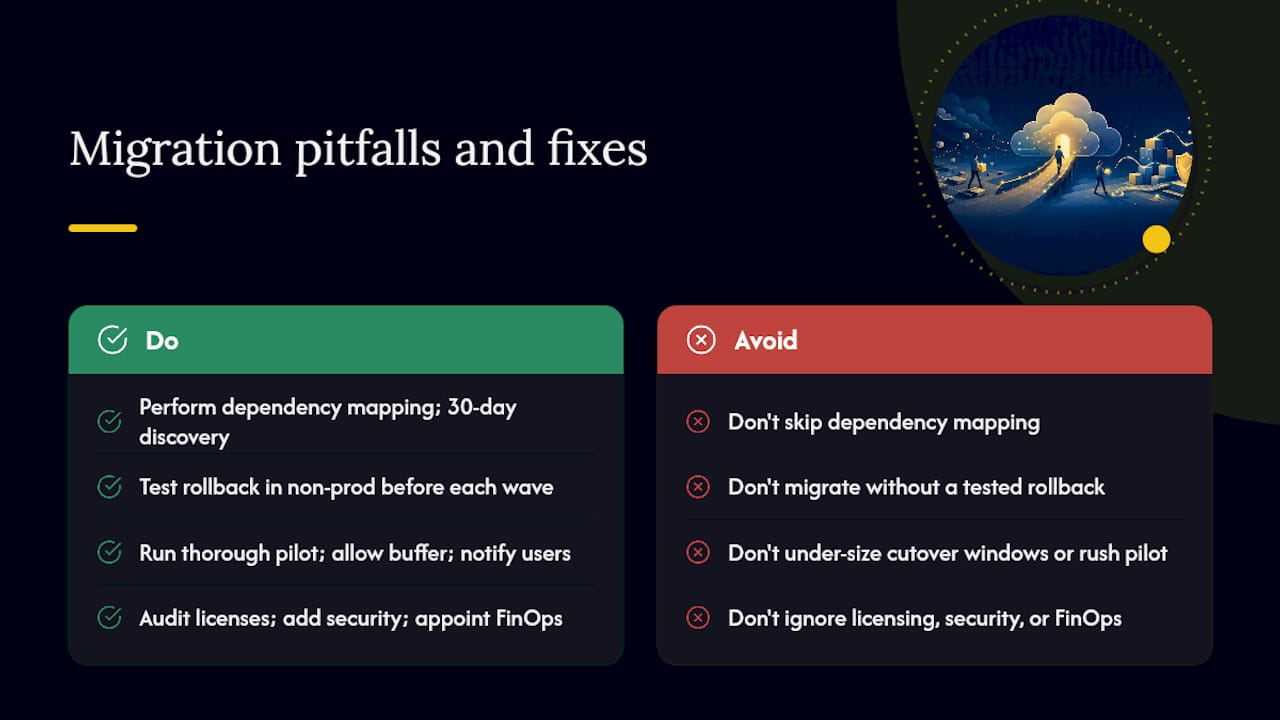
Pitfall 1: Skipping the dependency map. Teams that skip or rush dependency mapping discover the gaps during testing — when fixing them is expensive and disruptive. Extended discovery (30 days minimum) and manual validation with application owners are non-negotiable.
Pitfall 2: Migrating without a validated rollback plan. A rollback plan that hasn’t been tested is not a rollback plan. Test the revert procedure in a non-production environment before every wave.
Pitfall 3: Under-sizing the migration window. Cutover windows that are too short force teams to choose between completing the migration and completing the validation. Build in buffer — a two-hour window for a workload that takes 90 minutes to migrate leaves no room for unexpected issues.
Pitfall 4: Ignoring licensing portability. US enterprises frequently discover mid-migration that on-premises software licenses don’t include cloud use rights. Audit every license before the project begins, not after workloads have already moved.
Pitfall 5: Treating security as a post-migration task. CSPM scans, IAM reviews, and encryption configuration belong in the landing zone build phase, not the post-migration cleanup phase. Cybersecurity planning integrated into the migration lifecycle costs a fraction of remediating a breach after the fact.
Pitfall 6: No FinOps ownership. Cloud costs without an owner grow without limit. Assign a FinOps lead before the first wave and give them authority to enforce tagging, rightsizing, and budget alerts.
Pitfall 7: Rushing the pilot wave. The pilot wave exists to surface problems before they affect business-critical workloads. Teams that rush the pilot to hit a timeline miss the lessons that would have protected later waves.
Pitfall 8: Insufficient end-user communication. Users who don’t know a migration is happening call the help desk when things look different. A five-minute communication sent five days in advance prevents hours of support calls.
What the conventional wisdom on cloud migration gets wrong
Most cloud migration guides treat the technical checklist as the hard part and the organizational work as a soft add-on. The reality is the opposite.
The technical steps — inventory, landing zone, replication, cutover — are well-documented and repeatable. The organizational steps — getting executive sponsorship that actually holds, convincing application owners to participate in dependency mapping, and maintaining stakeholder alignment through a six-month migration program — are where projects actually fail. A technically perfect migration that the business didn’t buy into will face resistance at every wave.
The second thing guides consistently understate is the cost of the transition period. Running source and destination environments in parallel for one to two weeks per wave adds up. For a 20-wave migration program, that’s 20 to 40 weeks of duplicate running costs that need to be in the budget from day one. Teams that don’t account for this discover the overrun mid-program when it’s too late to adjust.
The third is the MSP evaluation question. Many IT leaders treat hiring an MSP as an admission of failure. The more useful frame is: what is the cost of the skills gap, and how does it compare to the cost of filling it professionally? For organizations without certified cloud architects on staff, a managed migration engagement often delivers faster time-to-value and lower total risk than building the skills internally while running a live migration program.
Mavericks Office Solutions can manage your migration from assessment to operation
Running a cloud migration while keeping your current environment stable is a significant operational load. Mavericks Office Solutions provides managed IT services, cybersecurity support, cloud hosting, and fractional IT leadership specifically designed for small and medium businesses that need enterprise-grade migration execution without building a full internal team.
A typical engagement starts with a discovery call covering your current environment, compliance requirements, and migration timeline. From there, Mavericks delivers a readiness assessment, a wave plan with defined go/no-go criteria, and a pilot wave scoped to your lowest-risk workloads. The local, US-based help desk — with an average response time under 12 minutes — stays available throughout every cutover window, so you’re never waiting on an offshore queue during a critical migration event. To start the conversation, reach out through the managed IT services page and request a discovery call.
Sources
These sources provide the frameworks, templates, and checklists referenced throughout this guide. Each one serves a specific purpose in the migration planning process.
- Migrate overview – Cloud Adoption Framework | Microsoft Learn
- Cloud migration checklist (AWS SMB resources)
- Server Migration Checklist: Move Websites to a New Server Without Downtime – Security-First Server Management Platform
- Cloud Migration Checklist | Steps for a Smooth Move
When using these templates in wave planning, map each template field to your own workload inventory schema before populating data. Templates used as-is without customization often miss organization-specific fields — compliance posture, internal cost center codes, and maintenance window constraints — that matter for go/no-go decisions.