

Most small and mid-size businesses pay $15–$50 per user per month for a hosted VoIP phone system, with the wide range driven by feature tier, seat count, and whether you need physical desk phones. Tech, hosted VoIP typically runs $10–$30 per user per month when businesses use existing computers and mobile devices rather than buying new hardware. Add advanced unified communications features, and that figure climbs to $30–$50+ per user per month at the enterprise tier.
Here is what that per-user monthly figure typically includes — and what it does not:
Included in the recurring per-user price:
- Unlimited domestic calling and inbound minutes
- Voicemail and voicemail-to-email
- Mobile and desktop softphone apps
- Basic auto-attendant and call routing
- Standard customer support access
Usually billed separately or as add-ons:
- Physical desk phones ($80–$300+ per unit)
- Number porting fees ($20–$50 per number)
- Toll-free numbers and inbound toll-free minutes
- International calling bundles
- Call recording storage beyond a base limit
- CRM integrations and advanced analytics modules
Budget alert: Your final monthly invoice will likely run 15–25% higher than the base per-user price once federal and state taxes, E911 fees ($0.30–$2.50 per line), and compliance surcharges (often $2–$4 per line for robocall mitigation) are added. Build that buffer into your budget from day one.
Key Takeaways
Most SMBs pay $15–$50 per user per month for hosted VoIP once taxes, fees, and add-ons are included, and one-time setup costs should be amortized over 12–36 months for an accurate monthly budget comparison.
| Point | Details |
|---|---|
| Core monthly range | Hosted VoIP runs $15–$50/user/month; budget an additional 15–25% for taxes and regulatory fees. |
| Amortize one-time costs | Divide hardware and setup costs by 12 or 36 months to compare vendors on true monthly cost, not sticker price. |
| Softphones cut upfront spend | Using existing devices instead of desk phones eliminates $80–$300 per unit in hardware costs. |
| Hidden fees are the real risk | Setup charges, overages, and compliance surcharges often push the real cost 20–40% above the advertised per-seat price. |
| Mavericks Office Solutions | Offers managed UCaaS with predictable monthly billing, a US-based help desk averaging under 12 minutes response time, and a pre-deployment network assessment. |
Table of Contents
- What factors actually drive your VoIP phone system cost?
- How much do typical VoIP pricing tiers actually include?
- What one-time and setup costs should you budget for?
- How to estimate your total monthly VoIP cost
- What hardware and network specs do you actually need to budget for?
- What risks and hidden costs should you plan for?
- Why VoIP typically costs less than a traditional landline
- How Mavericks Office Solutions simplifies VoIP budgeting for SMBs
- When to DIY and when to call a managed provider
- The bottom line on VoIP phone system costs for your business
- Sources
What factors actually drive your VoIP phone system cost?
The advertised per-seat price is rarely what you pay. Several variables shift the real number significantly, and understanding them gives you negotiating leverage before you sign anything.
- Seat count and volume tiers. Most providers charge more per user at low seat counts (under 10 seats) and offer meaningful discounts at 25+ seats. At 100+ seats, negotiating multi-year commitments can reduce list prices by 20–40%, making negotiation an explicit line item in your procurement process.
- Feature set. Basic calling plans cost far less than unified communications as a service (UCaaS) platforms with AI transcription, CRM connectors, and omnichannel contact center tools. Know which features you actually need before comparing quotes.
- Billing cadence. Monthly billing typically costs 15–20% more than annual prepay. If cash flow allows, annual contracts usually offer the better unit economics.
- Usage patterns. Heavy international calling, toll-free inbound volume, or high SMS usage can add $5–$15 per user per month in overages if you choose a plan without bundled minutes.
- Support tier. Standard support is usually included. Premium SLAs with guaranteed response times, dedicated account managers, or 24/7 live support often cost extra.
- Geography and regulatory fees. State and local taxes vary. E911 compliance fees are mandatory and appear as line items on every invoice. Some providers also charge robocall mitigation compliance fees.
- Device strategy. Bringing your own devices (softphones on existing computers and phones) eliminates hardware costs entirely. Buying or leasing desk phones adds $80–$300+ per unit upfront.
- Setup and professional services. Self-install works for small remote teams. Complex multi-site deployments with call routing, paging systems, or legacy PBX integration typically require paid professional services.
Pro Tip: Ask every vendor for a sample invoice from a current customer with a similar seat count. Published pricing rarely shows taxes, E911 fees, or compliance surcharges — a real invoice does.
How much do typical VoIP pricing tiers actually include?
Most cloud-based VoIP plans cluster in a midmarket band of $15–$30 per user per month, while advanced AI and omnichannel tiers commonly reach $30–$50+ per user per month. Here is how the three standard tiers break down in practice.
Entry tier ($10–$20/user/month)
Covers unlimited domestic calling, basic auto-attendant, voicemail-to-email, and mobile apps. Good for small teams that need a professional phone presence without complex routing. Call recording and CRM integrations are typically not included at this level.
Mid tier ($20–$35/user/month)
Adds call recording, video conferencing, team messaging, CRM integrations (Salesforce, HubSpot), and basic analytics. This is where most growing SMBs land. Entry plans cover unlimited domestic calling and mobile apps; mid-tier plans add CRM integrations, call recording, and analytics.
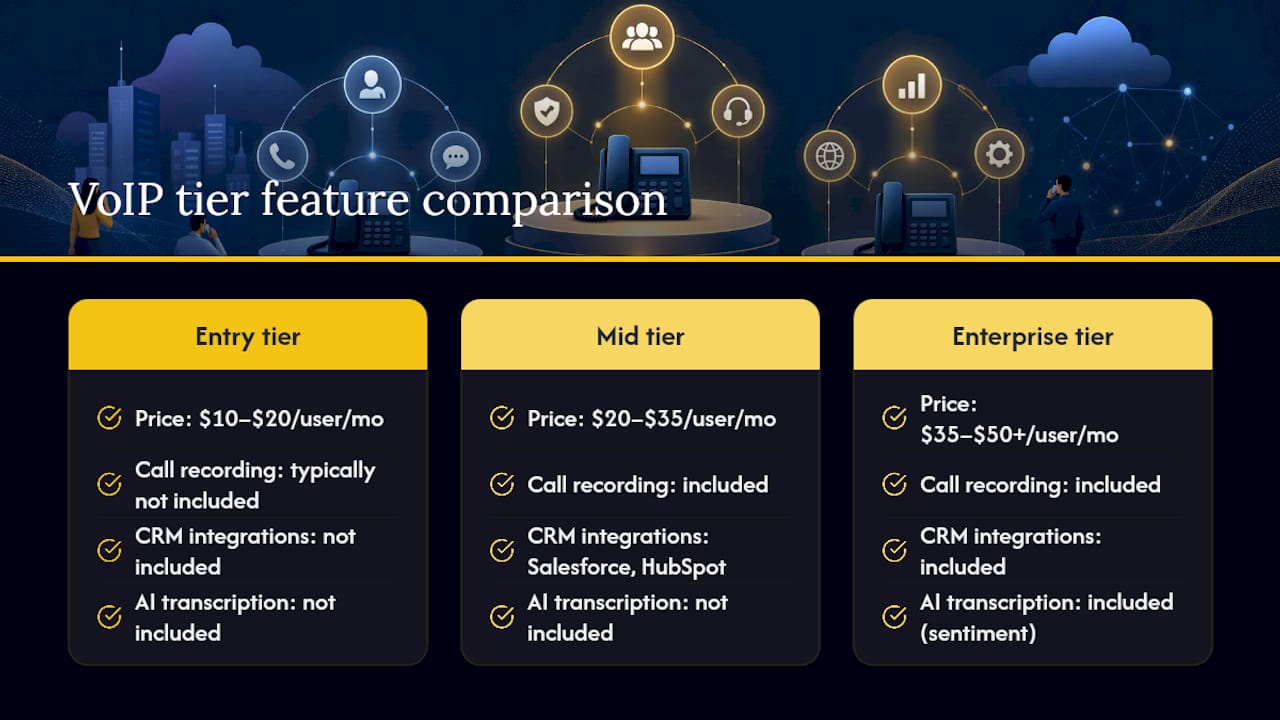
Enterprise tier ($35–$50+/user/month)
Layers in contact center tools, AI-powered transcription and sentiment analysis, advanced reporting, and omnichannel support (chat, SMS, social). Regulated industries or businesses with dedicated support teams typically need this tier.
A few add-ons appear across all tiers and are almost never included in the base price: toll-free numbers ($5–$15/month per number), international calling bundles ($10–$30/month), and additional call recording storage beyond the base allotment. Many providers now use a base-versus-add-on model where the headline price is low but essential features are add-ons, so always price the full feature set you need, not just the base plan.
What one-time and setup costs should you budget for?
One-time costs are where budgets get surprised. The real business phone system cost is often 20–40% higher than the advertised per-seat price after setup charges, overages, and regulatory surcharges are included. Plan for these categories before you request a quote.
Common one-time charges:
- Onboarding/setup fee: $0–$500 for cloud deployments; $500–$2,000+ for complex multi-site or PBX migration projects
- Number porting: $20–$50 per number; porting a large block of numbers can take 2–4 weeks
- Professional services: $75–$150/hour for custom call flow design, IVR scripting, or legacy system integration
- Hardware per unit: Desk phones $80–$300; conference room phones $200–$800; analog telephone adapters (ATAs) for fax lines $50–$150; headsets $30–$200
Network preparation:
- PoE (Power over Ethernet) switches if you are deploying physical phones: $100–$500 per switch depending on port count
- QoS (Quality of Service) router configuration: often included in professional services or a one-time IT labor cost
- Bandwidth upgrade if your current internet service cannot support concurrent call volume: $50–$200/month ongoing, not a one-time cost
| Scenario | Seats | Hardware | Setup/porting | Network prep | Total one-time estimate |
|---|---|---|---|---|---|
| Small office (softphones only) | 5 | $0 | $100 | $0 | $100–$200 |
| Small office (desk phones) | 5 | $500 | $100 | $100–$300 | $1,000–$2,000 |
| Mid-size (mix of phones) | 20 | $2,000–$6,000 | $200–$500 | $200–$500 | $1,500–$6,000 |
| Larger SMB (full deployment) | 100 | $8,000–$20,000 | $500–$2,000 | $500–$2,000 | $9,000–$20,000 |
Deployment timelines: A pure cloud softphone deployment for a small team can go live in 1–3 business days. A 20-seat deployment with desk phones, number porting, and custom call routing typically takes 2–4 weeks. A 100-seat multi-site deployment with legacy PBX integration can run 4–8 weeks. Self-install is realistic for remote-first teams using softphones; anything involving physical phones, porting, or complex routing benefits from a managed provider or paid installer.
How to estimate your total monthly VoIP cost
Use this formula to build a defensible monthly budget before you talk to any vendor.
- Start with base recurring cost: (per-user monthly price) × (number of users)
- Add monthly add-ons: toll-free numbers, international calling bundles, extra call recording storage, CRM connectors, premium support
- Amortize one-time costs: divide total one-time hardware and setup costs by 12 (for a 1-year view) or 36 (for a 3-year view) to get a monthly equivalent
- Add taxes and regulatory fees: multiply your subtotal by 1.15–1.25 to account for the typical 15–25% uplift from federal/state taxes, E911, and compliance surcharges
- Add expected overages: estimate international minutes, toll-free inbound, or SMS volume that exceeds your plan’s included amounts
Modeling one-time expenses amortized over 12–36 months produces comparable monthly totals and reveals more accurate total cost of ownership. A 3-year TCO calculator that models list prices plus hidden costs shows business VoIP typically runs $15–$50 per user per month once all fees are included, and reveals large multi-year differences between providers.
*Assumptions: small office uses softphones with $200 total one-time cost; mid-size uses 20 desk phones at $150 each plus $1,000 setup ($4,000 total one-time); larger SMB uses 100 phones at $150 each plus $5,000 setup ($20,000 total one-time). Add-ons reflect typical toll-free and recording costs at each scale.
What hardware and network specs do you actually need to budget for?
Hardware decisions have an outsized effect on your upfront costs. Getting this right early prevents expensive mid-deployment changes.
Softphones vs. desk phones vs. conference phones
Softphone apps on existing computers and mobile devices cost nothing in hardware. For most remote-first or hybrid teams, softphones are the most cost-effective path. Many businesses can avoid buying desk phones entirely by using softphone apps on existing devices, avoiding $80+ per physical phone. Dedicated desk phones ($80–$300 per unit) make sense for reception desks, shared workstations, or roles where staff spend most of their day on calls. Conference room phones ($200–$800) are worth the investment for any room used for regular client calls.

Headsets ($30–$200 per unit) matter most for call center agents, customer service staff, or anyone on calls more than two hours per day. A $50 USB headset is adequate for occasional use; a $150–$200 wireless headset pays for itself in productivity for heavy users.
Bandwidth planning
Poor latency or insufficient bandwidth will degrade call quality regardless of which provider or plan you choose; choosing the best website hosting for small business is essential to ensure reliable internet service that supports your VoIP needs. Plan for approximately 85–100 kbps per concurrent G.711 call, including overhead. That figure is per simultaneous call, not per user.
Not every user is on a call simultaneously. A 20-person office typically has 5–10 concurrent calls at peak. Size your bandwidth for peak concurrency, not total seat count.
PoE switches are required if you deploy physical IP phones without separate power adapters. A 24-port PoE switch runs $100–$400. QoS configuration on your router prioritizes voice traffic over data, preventing call drops during file transfers or video streams. Most modern business-grade routers support QoS natively; configuring it is typically a one-time IT task.
Pro Tip: If your team is remote-first and uses softphones, skip the desk phone budget entirely and redirect that money toward a faster internet connection or a backup LTE failover device. A $50/month LTE backup circuit protects call quality far more reliably than a $200 desk phone.
What risks and hidden costs should you plan for?
The biggest budget surprises in VoIP deployments are not the base price. They are the operational risks that translate into real costs when they materialize.
- Internet dependency. VoIP calls fail when your internet fails. A backup circuit (secondary ISP or LTE failover) costs $30–$100/month but prevents complete communication outages. Without it, a 2-hour internet outage means 2 hours of missed calls.
- E911 compliance fees. The FCC requires VoIP providers to offer E911 service, and providers pass those costs to customers as per-line fees of $0.30–$2.50/month. Multi-location businesses must also register physical addresses for each location to comply with Kari’s Law and Ray Baum’s Act.
- Security and compliance overhead. Businesses in regulated industries (healthcare, finance, legal) may need HIPAA-compliant call recording, FINRA-compliant retention, or encrypted storage. These features often require a higher-tier plan or a paid add-on, adding $5–$15 per user per month.
- Early termination fees. Annual or multi-year contracts often carry termination penalties of 50–100% of remaining contract value. Read the cancellation terms before signing.
- Price increases at renewal. Many providers increase per-seat pricing at contract renewal, sometimes by 10–20%. Negotiate a price-lock clause or a capped escalation rate upfront.
- Overage penalties. International calling, toll-free inbound minutes, and SMS volume overages can add unexpected charges to monthly invoices. Set usage alerts if your provider supports them.
- Training costs. Staff training on a new VoIP or UCaaS platform is a real cost. A simple softphone rollout may need only a 30-minute walkthrough. A full UCaaS deployment with call queues, CRM integration, and reporting dashboards can require 2–4 hours of training per team, plus ongoing refreshers.
Why VoIP typically costs less than a traditional landline
The financial case for switching from a legacy PSTN (public switched telephone network) or PBX system to hosted VoIP is straightforward for most SMBs.
- Lower monthly line costs. Traditional business landlines typically run $40–$60 per line per month through a local carrier, before long-distance charges. Hosted VoIP plans start at $15–$20 per user per month with unlimited domestic calling included.
- No PBX hardware maintenance. An on-premise PBX for a 20-person team can cost $14,500 or more upfront, plus ongoing maintenance contracts. Hosted VoIP eliminates that hardware entirely.
- Payback example. A 20-person team paying $50/line/month on legacy lines spends $1,000/month, or $12,000/year. Switching to a $25/user/month hosted VoIP plan costs $500/month, saving $6,000/year. Even with $5,000 in one-time migration costs, the system pays for itself in under 12 months.
- Qualitative ROI. Beyond the line-item savings, hosted VoIP enables remote work without call forwarding complexity, unifies voice and messaging in one platform, and eliminates most hardware maintenance overhead. These benefits are harder to quantify but consistently cited by SMBs that have made the switch.
For a deeper look at how UCaaS compares to legacy systems, this overview of why Ohio businesses are choosing managed VoIP covers the operational differences in plain terms.
How Mavericks Office Solutions simplifies VoIP budgeting for SMBs
Budgeting for a VoIP deployment gets complicated fast when you are managing hardware quotes, porting timelines, network assessments, and vendor SLAs across separate vendors. Mavericks Office Solutions handles all of it under one managed-services agreement.

As a managed UCaaS and VoIP provider, Mavericks Office Solutions bundles voice, IT support, and cybersecurity into a single predictable monthly cost. That means no surprise invoices from a separate phone vendor, no finger-pointing between your IT team and your carrier when call quality drops, and no offshore call center when you need help.
Key benefits for SMBs evaluating hosted VoIP options:
- Predictable monthly billing. Hardware, porting assistance, and ongoing support are bundled into a managed agreement, so your monthly cost is consistent and auditable.
- Local US-based help desk. Mavericks’ help desk averages a response time under 12 minutes, staffed by US-based technicians who know your environment.
- Network assessment included. Before deployment, Mavericks conducts a local network assessment to identify bandwidth gaps, QoS configuration needs, and hardware requirements, preventing the surprises that inflate post-deployment costs.
- Single vendor for IT and voice. Combining managed IT services with VoIP under one provider eliminates the coordination overhead that comes with managing separate IT and phone vendors.
- Scalable seat management. Adding or removing users as your team changes is handled through your managed agreement, with no penalty fees for reasonable adjustments.
To get an itemized quote and a network assessment for your location, visit Mavericks Office Solutions’ VoIP services page and request a consultation.
When to DIY and when to call a managed provider
The right answer depends on your team size, internal IT capability, and risk tolerance.
Self-install and softphones make sense when:
- Your team is under 10 people and fully remote
- You have a capable internal IT resource who can handle porting, QoS configuration, and user onboarding
- Your industry has no call recording compliance requirements
- You are comfortable managing vendor relationships and troubleshooting call quality issues independently
A managed provider like Mavericks Office Solutions makes sense when:
- Your team is 15+ seats, has physical office locations, or operates across multiple sites
- You handle regulated data (healthcare, finance, legal) that requires compliant call recording or retention
- You need predictable SLAs and cannot afford communication outages
- Your internal IT bandwidth is limited and you want voice support bundled with your existing IT management
Red flags during vendor selection:
- Add-on pricing is not itemized in the quote (ask for a sample invoice)
- The SLA does not define response time in writing, only “best effort”
- E911 registration process is vague or not addressed in the onboarding documentation
- Early termination fees exceed three months of contract value
- The vendor cannot provide a reference from a customer with a similar seat count and industry
At 25+ seats, negotiating multi-year commitments commonly reduces list prices by 20–40%. Always ask for that discount explicitly, even if the vendor does not offer it proactively.
The bottom line on VoIP phone system costs for your business
If you are running a growing SMB and still paying $40–$60 per line on legacy landlines, the math on switching to hosted VoIP is hard to argue with. The savings are real, the deployment timelines are manageable, and the feature gap between what you have now and what a mid-tier UCaaS plan delivers is significant.
Mavericks Office Solutions is the practical choice for Ohio-area SMBs that want all of that without managing it themselves. You get a single monthly bill covering voice, IT support, and cybersecurity, backed by a US-based help desk that picks up in under 12 minutes on average. No offshore call centers, no separate vendor for your phones, and no surprise invoices from a carrier you barely know.
For a transparent, itemized quote and a pre-deployment network assessment, visit the Mavericks Office Solutions VoIP page and start the conversation today.
Sources
These resources provide pricing data, calculators, and regulatory guidance you can use to verify the figures in this guide and run your own comparisons.
- How Much Does VoIP Cost? Prices & Hidden Fees 2026
- VoIP Cost: Pricing Guide & Best Providers
- Business VoIP Cost Calculator 2026 | 3-Year TCO
- Business Phone System Cost: 2026 Pricing & Fees Breakdown
For a transparent, itemized quote on a managed VoIP deployment for your business, contact Mavericks Office Solutions directly.