

Effective email security for business means deploying layered defenses that block phishing, spoofing, business email compromise (BEC), malware, and data exfiltration before they reach your team. The single highest-priority action you can take today is a three-part combination: configure SPF, DKIM, and DMARC authentication on your domain, enable multi-factor authentication (MFA) for every mailbox, and turn on your platform’s built-in advanced threat protection. According to Microsoft Security, a layered defense model is the recognized standard for protecting business email, and it starts with these fundamentals.
Start here — five actions you can take this week:
- Publish an SPF record and enable DKIM signing for your domain.
- Set DMARC to at least
p=none(monitor mode) and review daily reports. - Require MFA on every email account, starting with admin and finance roles.
- Enable your email platform’s anti-phishing and safe-links/safe-attachments policies.
- Brief your team on how to report suspicious messages before the next payroll cycle.
None of these require a large budget or a dedicated IT team. They do require deliberate action, and the cost of skipping them is measured in wire transfers and ransomware payments.
Table of Contents
- Why is email still the top attack vector for SMBs?
- What email threats are actually targeting your business?
- What technical controls does every SMB need in place?
- How do people and processes strengthen your technical defenses?
- What does a realistic SMB implementation plan look like?
- How do you choose between in-house, cloud-native, and managed email security?
- Why do most SMBs get more protection from a managed service?
- Key Takeaways
- Why layered defenses are the only approach that actually holds
- Mavericks Office Solutions protects your email and your whole environment
- Useful sources and further reading
Why is email still the top attack vector for SMBs?
Attackers target email because it is the one channel every employee uses, every day, with minimal friction. There is no firewall prompt, no VPN handshake, and no badge scan. A well-crafted message lands directly in front of a person who has been conditioned to act on it quickly.
The mechanics of an email attack follow a predictable path. A phishing message harvests credentials. Those credentials let an attacker log in as a legitimate user. From there, they move laterally across cloud apps, set up forwarding rules to intercept financial conversations, and eventually redirect a payment or deploy ransomware. The whole sequence can unfold faster than most SMBs can detect it. Microsoft’s research notes that attackers typically move laterally within roughly 72 minutes on average after initial access, which is why automated containment through XDR matters so much.
For SMBs specifically, the financial exposure from BEC is disproportionate. A single fraudulent wire transfer can represent weeks of revenue. Regulatory exposure compounds the damage when customer or employee data is exfiltrated, triggering breach notification obligations under state laws and sector-specific rules like HIPAA. Smaller organizations also tend to have fewer redundant controls, so one successful compromise can cascade quickly. Proofpoint’s research confirms that AI-powered attacks are increasingly bypassing traditional signature-based filters, making detection more difficult, which means the threat is getting harder to catch with legacy tools alone.
What email threats are actually targeting your business?
Understanding the threat taxonomy helps you prioritize controls. These are the attack types your team is most likely to encounter.
- Phishing: Mass-sent messages that impersonate a trusted brand (a bank, Microsoft, a shipping carrier) to steal credentials or deliver malware. Volume is the strategy; even a 1% click rate across thousands of messages pays off for attackers.
- Spear phishing: Targeted messages crafted for a specific person, often using details pulled from LinkedIn or a company website. The sender appears to be a colleague, a vendor, or an executive.
- Business email compromise (BEC): An attacker impersonates a CEO, CFO, or vendor to request a wire transfer, payroll redirect, or gift card purchase. No malware involved, which is why filters often miss it.
- Email spoofing: The visible “From” address is forged to look like a trusted sender. Microsoft’s anti-spoofing documentation explains how composite authentication evaluates SPF, DKIM, and DMARC together to detect both intra-org and cross-domain spoofing, and how spoof intelligence policies determine the final action on suspicious messages.
- Malware and ransomware delivery: Attachments (Office macros, PDFs, ZIP files) or links that download malicious payloads. Often paired with phishing to create urgency.
- AI-crafted attacks: Generative AI now produces phishing messages with perfect grammar, personalized context, and no obvious red flags. These bypass many rule-based filters. See how AI is reshaping the threat picture for a deeper look at the defensive gaps this creates.
- Account takeover (ATO): Stolen credentials used to log in as a real employee, set forwarding rules, and monitor financial conversations silently for weeks.
- Data exfiltration: Sensitive files, customer records, or financial data sent outbound via email, either by an attacker or an insider.
Warning signs employees should report immediately: unexpected links or attachments from known contacts, urgent requests for wire transfers or gift cards, reply-to addresses that differ from the display name, and any message asking them to disable security warnings or confirm credentials.
What technical controls does every SMB need in place?
The controls below form the technical foundation of a sound email security program. Each one addresses a specific attack path.
| Control | What it prevents | SMB deployment note |
|---|---|---|
| SPF (Sender Policy Framework) | Unauthorized servers sending mail as your domain | Publish a DNS TXT record listing all authorized sending IPs, including third-party senders like marketing tools and payroll platforms |
| DKIM (DomainKeys Identified Mail) | Message tampering and sender forgery | Enable in your email platform (Microsoft 365 or Google Workspace); rotate keys annually |
| DMARC | Spoofed messages reaching recipients; provides reporting | Start at p=none, review aggregate reports for 2–4 weeks, then move to p=quarantine and eventually p=reject |
| BIMI (Brand Indicators for Message Identification) | Brand impersonation in supported clients | Requires DMARC at enforcement; adds a verified logo in Gmail and Apple Mail |
| Secure email gateway / advanced threat protection | Phishing, malware, spam, BEC | Enable Microsoft Defender for Office 365 Plan 1 or an equivalent gateway; configure anti-phishing, safe links, and safe attachments policies |
| URL rewriting / time-of-click protection | Links that become malicious after delivery | Built into most advanced gateways; rewrites links and checks destination at click time |
| Attachment sandboxing | Zero-day malware in attachments | Detonates files in an isolated environment before delivery; adds seconds of latency but catches novel threats |
| Outbound DLP | Accidental or intentional data exfiltration | Define rules for PII patterns (SSNs, credit card numbers), financial data, and regulated content |
| TLS / message encryption | Interception in transit; sensitive content exposure | Enforce TLS for partner domains; use S/MIME or Office Message Encryption (OME) for sensitive external messages |
| MFA | Credential-stuffing and phishing-driven account takeover | Require for all users; use phishing-resistant methods (FIDO2/passkeys) for admin and finance accounts |
| Conditional access | Logins from unexpected locations or devices | Block or challenge sign-ins from unmanaged devices, unusual geographies, or outside business hours |
| XDR integration | Lateral movement after account compromise | Connects email signals to endpoint and identity telemetry; enables automated isolation of compromised accounts |
How SPF, DKIM, and DMARC work together
SPF tells receiving servers which IP addresses are allowed to send mail for your domain. DKIM attaches a cryptographic signature to each outgoing message so the recipient can verify it was not altered in transit. DMARC ties both together and tells receiving servers what to do when a message fails: monitor, quarantine, or reject. Google’s sender guidelines document a real-world case where DMARC deployment reduced impersonation attempts against a healthcare organization significantly within a week of going live.
Moving from p=none to p=reject is the goal, but the path matters. Before enforcing DMARC, you must enumerate every legitimate sender: your email platform, your CRM, your marketing automation tool, your payroll processor, and any SaaS app that sends on your behalf. Missing one means legitimate mail gets rejected.
Pro Tip: Before tightening DMARC to p=quarantine or p=reject, use a free DMARC reporting tool (such as dmarcian or MXToolbox) to review your aggregate reports for at least two weeks. Any legitimate sender not in your SPF record will show up as a failure, and you can fix it before enforcement blocks real mail.
Post-delivery protections and XDR
Even a well-configured gateway will occasionally let a sophisticated message through. Post-delivery remediation, the ability to remove a malicious message from every mailbox after it has been delivered, is a critical backstop. Platforms like Microsoft Defender for Office 365 support automated investigation and response (AIR) that can pull messages and disable compromised accounts without waiting for a human to act. Connecting email signals to endpoint detection and response through XDR means a suspicious login detected at the identity layer can trigger an automatic account suspension before the attacker reaches financial data.

How do people and processes strengthen your technical defenses?
Technology alone does not stop BEC. The attacker who sends a convincing CEO impersonation to your accounts payable manager is betting that your team has not been trained to verify unusual requests out of band. That bet pays off more often than it should.
Security awareness training that actually works
Most awareness programs fail because they treat training as a compliance checkbox. A one-time annual video does not change behavior. Effective programs run phishing simulations monthly, deliver short targeted lessons immediately after a simulated click, and measure outcomes in terms of risk reduction: click-through rates, credential submission rates, and repeat offenders. Completion rates tell you nothing about whether your team is safer.
Role-based training matters too. Finance staff need specific scenarios around wire transfer fraud and vendor impersonation. HR staff need training on W-2 phishing. Executives need coaching on why their accounts are the highest-value targets. A generic “don’t click links” module does not address those specific risks.
Policies and operational rules
A few written policies prevent a large category of incidents. Require a phone-based verification call (to a known number, not one in the email) for any wire transfer request over a defined threshold. Prohibit the use of personal email accounts for business communication. Maintain an approved sender list for vendors who regularly send invoices or payment instructions, and require a formal change-control process before updating any payment details. These rules cost nothing to implement and directly counter the most common BEC playbook.
Monitoring and alerting
Watch for these signals on a weekly basis: new inbox forwarding rules (especially ones that forward to external addresses), sudden spikes in outbound mail volume, DMARC aggregate report failures from unexpected sending sources, and failed MFA attempts on admin accounts. Most email platforms surface these in their admin consoles or security dashboards. Assign a specific person to review them, even if that person is your MSP.
Incident response for an email compromise
When you suspect an account has been compromised, speed is everything. Disable the account or force an MFA reset immediately. Use your platform’s post-delivery removal tool to pull any malicious messages the account may have sent internally. Pull the sign-in logs and mail flow logs to establish a timeline. Check for forwarding rules, delegated access changes, and any OAuth app grants the attacker may have added. If customer or employee data was accessed, engage your legal counsel to assess breach notification obligations. For structured guidance on the response process, data breach response training from Total Cyber Academy covers the tactical steps in detail.
The Canadian Centre for Cyber Security’s guidance recommends treating authentication, encryption, secure gateways, monitoring, and staff awareness as five equally weighted pillars. Skipping any one of them leaves a gap the others cannot fully compensate for.
What does a realistic SMB implementation plan look like?
This checklist is organized by time horizon. Assign each item to an owner before you start.
Days 0–30: Quick wins with high impact
- Audit your current SPF, DKIM, and DMARC records using MXToolbox or a similar DNS checker.
- Publish or correct your SPF record to include all legitimate sending sources.
- Enable DKIM signing in Microsoft 365 or Google Workspace.
- Set DMARC to
p=noneand configure a reporting mailbox or third-party reporting tool. - Enable MFA for all users; prioritize admin, finance, and HR accounts in the first 48 hours.
- Turn on Microsoft Defender for Office 365 Plan 1 (or your platform’s equivalent) and review default anti-phishing policies.
- Run a baseline phishing simulation to measure current click rates before training begins.
Days 30–90: Strengthen detection and policy
- Review two to four weeks of DMARC aggregate reports; add missing senders to SPF.
- Move DMARC to
p=quarantineonce all legitimate senders are confirmed. - Configure safe links and safe attachments policies with sandboxing enabled.
- Enable outbound DLP rules for PII and financial data patterns.
- Launch role-based security awareness training for finance, HR, and executive staff.
- Document and distribute the wire transfer verification policy.
Days 90–180: Enforce, monitor, and mature
- Move DMARC to
p=rejectafter confirming no legitimate mail is being quarantined. - Integrate email security alerts into a centralized dashboard or SIEM/XDR platform.
- Establish a monthly review cadence for forwarding rules, DMARC reports, and phishing simulation results.
- Evaluate whether your current toolset covers post-delivery remediation and automated account containment, or whether a managed service fills that gap.
- Review and update the incident response playbook based on any near-misses or actual incidents.
On cost: Microsoft 365 Business Premium includes Defender for Office 365 Plan 1 and is typically the most cost-effective starting point for SMBs already on Microsoft 365. Standalone email security gateways with DLP and sandboxing generally run in the range of a few dollars per user per month at the lower end, scaling up with feature depth. Managed email security services, where a provider handles configuration, monitoring, and response, add a monthly service fee but eliminate the need for internal expertise. The right tradeoff depends on your staff’s skill level and how much risk you are willing to carry in-house.
How do you choose between in-house, cloud-native, and managed email security?
The honest answer is that most SMBs are not well-served by a purely in-house approach. The tools are available, but the expertise to configure them correctly, monitor them continuously, and respond to incidents at 2 AM is not. That said, the right model depends on a few concrete factors.
Decision criteria
Staff skill level is the most important variable. Configuring DMARC enforcement, tuning anti-phishing policies, and investigating a BEC incident require specific knowledge. If your internal IT person manages 20 other priorities, email security will get the attention it deserves only after something goes wrong.
Regulatory requirements raise the stakes. If you handle protected health information (PHI), payment card data, or financial records, you need documented controls, audit logs, and a defensible incident response process. A managed provider with relevant compliance experience is often faster to deploy than building that capability internally.
Budget structure matters too. Cloud-native controls (Microsoft Defender, Google Workspace’s built-in protections) are included in licenses you may already pay for. A managed service converts a variable capital expense into a predictable monthly fee. For most SMBs, predictability is worth the premium.
Questions to ask any provider or internal team
- Does your solution include post-delivery remediation, and is it automated or manual?
- How do you handle a suspected BEC incident outside business hours?
- What does your reporting look like, and how often will we review it together?
- Are your response time SLAs contractually defined?
- What happens if a third-party sender breaks authentication after we enforce DMARC?
Red flags to watch for
Avoid any provider who promises zero false positives or 100% detection rates. No solution achieves that, and a vendor who claims otherwise is either misleading you or has not tested their product against modern AI-crafted attacks. Watch for hidden costs around post-delivery remediation (some vendors charge extra for message removal). Be cautious of opaque reporting that shows you a dashboard but does not explain what actions were taken or why. Gartner Peer Insights aggregates real user reviews across the vendor market and is a practical starting point for comparing operational experience before you commit to a platform.
Why do most SMBs get more protection from a managed service?
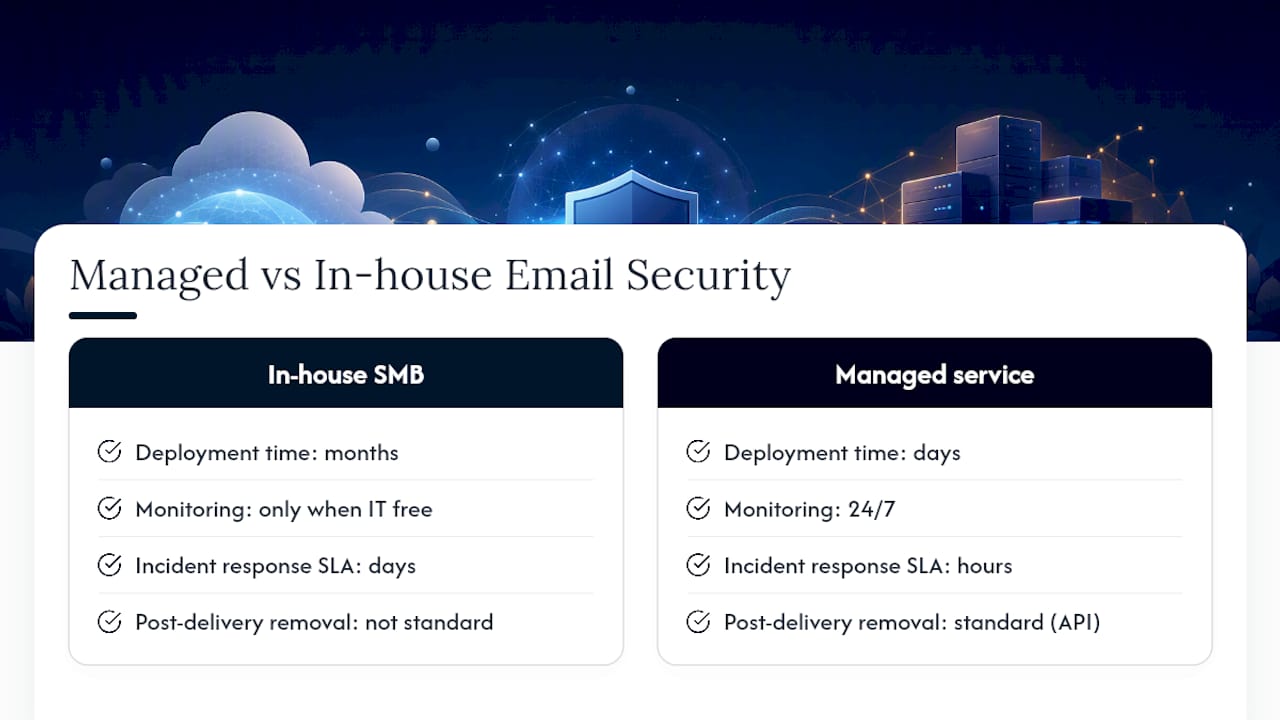
Speed is the clearest argument. A managed security provider can deploy authentication, gateway policies, and MFA across your environment in days, not months. They bring pre-built playbooks, existing tool licenses, and staff who do this work every day. For an SMB without a dedicated security team, that time-to-protect difference is significant.
The operational case is equally strong. Continuous monitoring means someone is watching your mail flow logs, DMARC reports, and sign-in anomalies around the clock, not just when your IT person has a free hour. When an incident occurs, a managed provider can contain it faster because they have the access, the tools, and the process already in place.
A quality managed email security service should deliver: a defined SLA for incident response (measured in hours, not days), post-delivery message remediation as a standard capability, monthly reporting that shows threat volume, blocked attacks, and simulation results, and a local support contact who knows your environment. Sophos Email highlights features like API-based post-delivery removal, phishing simulation, and AI/ML-based content analysis as markers of a mature platform, and these are reasonable benchmarks to apply when evaluating any managed offering.
When combined with managed detection and response that spans email, endpoint, and cloud identity, the coverage becomes genuinely comprehensive. Email signals feed into endpoint telemetry, which feeds into identity analytics, giving the provider a complete picture of an attack rather than an isolated alert.
Pro Tip: When contracting a managed email security provider, define the scope of post-delivery remediation in writing. Specifically, confirm whether message removal from all mailboxes is included in the base fee, how quickly it will be executed after a threat is confirmed, and who authorizes the action. Ambiguity here is where incident costs escalate.
Key Takeaways
Layered email security for business requires authentication (SPF, DKIM, DMARC), MFA, advanced threat protection, and continuous monitoring working together — no single control is sufficient on its own.
| Point | Details |
|---|---|
| Authentication is the foundation | Deploy SPF, DKIM, and DMARC in sequence; move DMARC to p=reject only after confirming all legitimate senders pass. |
| MFA stops most account takeovers | Require MFA for every mailbox; use phishing-resistant methods (FIDO2) for admin and finance accounts. |
| Post-delivery remediation matters | Ensure your platform or provider can remove malicious messages after delivery and contain compromised accounts automatically. |
| Training must be continuous | Monthly phishing simulations and role-based training reduce click rates; completion rates alone measure nothing useful. |
| Mavericks Office Solutions | Provides managed IT and cybersecurity services, including email security hardening and continuous monitoring, for SMBs that want expert coverage without building an internal security team. |
Why layered defenses are the only approach that actually holds
There is a persistent belief among SMB owners that a single tool, usually an antivirus or a spam filter, is enough to cover email threats. It is not, and the gap between that belief and reality is where most breaches happen.
The threat has changed. AI-crafted phishing messages now read like they were written by a colleague. BEC attacks carry no malware, so signature-based filters pass them cleanly. Account takeovers happen through legitimate login portals, not exploits. Each of these attack types bypasses a different layer of a single-tool defense. The only way to catch them reliably is to stack controls: authentication to stop spoofing, behavioral analytics to catch what signatures miss, MFA to block stolen credentials, and XDR to contain the damage when something does get through.
What I see most often with SMBs is not a failure of tools. It is a failure of configuration and follow-through. SPF records that were set up years ago and never updated to include new SaaS senders. DMARC stuck at p=none because no one reviewed the reports and moved it forward. MFA enabled for most users but not the CFO because “it was too inconvenient.” These gaps are not expensive to close. They just require someone to own the process and see it through.
The managed service model exists precisely because most SMBs do not have that person on staff. Outsourcing the configuration, monitoring, and response to a provider who does this every day is not a concession. It is a rational allocation of resources.
Mavericks Office Solutions protects your email and your whole environment
Mavericks Office Solutions functions as your outsourced IT department, which means email security does not sit in a silo. When you work with Mavericks, your Microsoft 365 environment gets properly hardened (SPF, DKIM, DMARC, Defender policies, MFA), your team gets phishing simulation and awareness training, and your mail flow is monitored continuously by a USA-based team with an average help desk response under 12 minutes. No offshore call centers, no ticket queues that stretch into next week.
The difference from a point-product purchase is that Mavericks connects email telemetry to endpoint and identity monitoring, so a suspicious login at 11 PM triggers a real response, not just an alert that sits unread until morning. If you are ready to close the gaps in your current setup, the right next step is a cybersecurity review with the Mavericks team. You will leave with a clear picture of where your email environment stands and a prioritized plan to fix what needs fixing. Reach out through Mavericks Office Solutions to schedule your discovery call.
Useful sources and further reading
These sources support the guidance in this article and are worth bookmarking for deeper technical detail.
- Microsoft Defender for Office 365 | Microsoft Security
- Anti-spoofing protection – Microsoft Defender for Office 365 | Microsoft Learn
- Email sender guidelines — Google Support
- What Is Email Security? Definition & Best Practices | Proofpoint US
- Email security best practices (ITSM.60.002) – Canadian Centre for Cyber Security
- Sophos Email
- Best Email Security Reviews 2026 | Gartner Peer Insights
- What Is Email Security? Definition & Best Practices | Microsoft Security
Recommended
- Best Business Password Manager for SMBs: 2026 Guide – Mavericks Office Solutions
- Small Business Cybersecurity: A Michigan Owner’s Playbook – Mavericks Office Solutions
- SaaS Security Controls for Ohio SMBs: 2026 Guide – Mavericks Office Solutions
- Microsoft 365 Backup: What Ohio SMBs Need to Know – Mavericks Office Solutions