

Endpoint detection and response (EDR) is the security layer that continuously monitors endpoint telemetry, identifies anomalous behavior, and gives your team the tools to contain and investigate threats before they spread. If you’re evaluating whether your organization needs it, the short answer is yes — especially if you’re running Windows servers, managing remote workers, or operating in a regulated industry like healthcare or finance.
Here’s what the decision comes down to:
- Adopt a prevention-first posture. Pair EDR with a strong endpoint protection platform (EPP) to reduce the volume of alerts your team must triage.
- Map detection coverage to MITRE ATT&CK. Any EDR you evaluate should show you exactly which techniques it detects and which it misses.
- Add managed detection and response (MDR) if you lack 24/7 SOC staffing. MDR is increasingly the preferred model for small and medium businesses that can’t staff a full security operations center.
- Budget realistically. Managed EDR typically runs $10–$20 per asset per month, depending on retention, SLA, and managed SOC hours.
For Ohio businesses, the stakes are rising. State legislation like HB 96 is pushing local governments and their vendors toward formal cybersecurity programs, and the threat actors targeting mid-market organizations are not slowing down.
Table of Contents
- What does endpoint detection and response actually cover?
- How EDR works: telemetry, detection, and response
- How does EDR compare to antivirus, EPP, MDR, and XDR?
- Attack scenarios your EDR should handle
- How to choose the right EDR solution or managed service
- Deploying EDR without disrupting your operations
- Why behavior-based detection matters more than ever
- What does EDR actually cost?
- Key Takeaways
- The real gap most SMBs don’t see until it’s too late
- Mavericksofficesolutions protects Ohio businesses with managed EDR
- Useful sources and further reading
What does endpoint detection and response actually cover?
EDR is not antivirus with a better dashboard. It’s a fundamentally different approach to endpoint security. Where traditional antivirus matches files against a database of known malware signatures, EDR watches behavior — what processes are running, what they’re doing, and whether that activity looks like an attack in progress.
The telemetry an EDR agent collects typically includes:
- Process and thread execution (parent-child relationships, command-line arguments)
- File and registry changes
- Network connections initiated by processes
- Memory injection and code execution patterns
- Script and shell activity (PowerShell, WMI, bash)
- Authentication events and privilege escalation attempts
- Application behavior and inter-process communication
EDR agents run on laptops, desktops, servers, cloud workloads, and increasingly on containers. BYOD and IoT devices are a harder problem — most enterprise EDR platforms require a managed agent, which limits coverage on unmanaged devices. That’s where XDR and network-layer controls fill the gap.
The boundary between EDR and adjacent tools matters. EDR covers the endpoint. A SIEM aggregates logs from across your environment. XDR extends detection across identity, email, and cloud layers. Understanding that boundary prevents you from expecting EDR to do work it was never designed for.
Pro Tip: Agent architecture matters more than most buyers realize. Kernel-mode agents offer deeper visibility but carry higher performance risk; user-mode agents are lighter but may miss certain memory-based attacks. Always ask vendors about agent footprint, CPU overhead, and tamper protection before committing to a platform.
How EDR works: telemetry, detection, and response

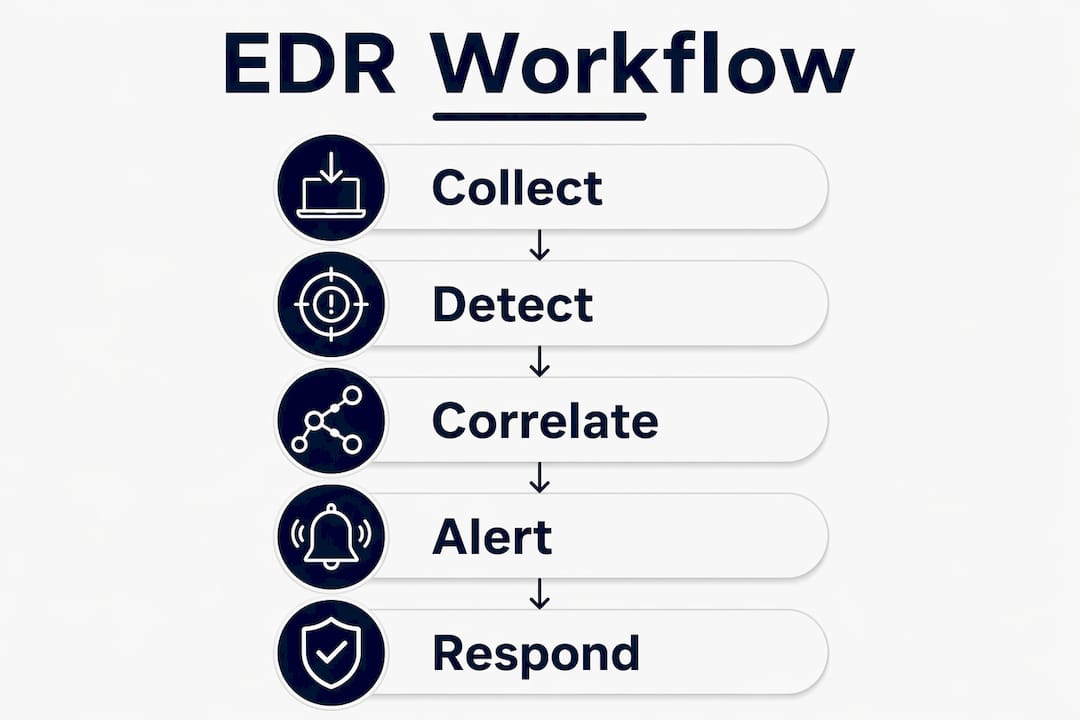
EDR operates in a continuous loop: collect, detect, correlate, alert, and respond. The quality of each step determines whether your team catches an attack in minutes or discovers it weeks later during a breach investigation.
| Capability | Purpose | Example Output |
|---|---|---|
| Telemetry collection | Continuous recording of endpoint activity | Process trees, network connection logs, file change events |
| Behavioral analysis (ML/heuristics) | Detect anomalous patterns without signatures | Alert: unusual parent-child process relationship |
| Signature and rules-based detection | Catch known malware and TTPs | Alert: known ransomware file extension pattern |
| Correlation and enrichment | Link related events into a single incident | Unified attack timeline across 12 endpoints |
| Threat hunting | Proactive search for hidden threats | Query: all endpoints running encoded PowerShell |
| Timeline reconstruction | Forensic root-cause analysis | Full attack chain from initial access to lateral movement |
| Automated containment | Isolate endpoint, terminate process | Endpoint quarantined within 90 seconds of confirmed threat |
| Rollback | Restore files to pre-attack state | Encrypted files recovered after ransomware containment |
Detection methods in modern EDR software combine machine learning models trained on behavioral baselines, rules mapped to MITRE ATT&CK techniques, and threat intelligence feeds that flag known indicators of compromise. The best platforms correlate these signals automatically, surfacing a single high-confidence alert instead of dozens of low-signal events.
Automated response is where EDR earns its keep in a resource-constrained environment. When a confirmed threat triggers a playbook, the system can isolate the endpoint from the network, terminate malicious processes, and notify your SOC — all without a human in the loop. Automated incident response playbooks can reduce mean time to discover and repair from days to minutes and cut alert volume by over 70%.
Pro Tip: Prioritize platforms that retain a multi-week to multi-month range of historical telemetry. Very short retention windows make it nearly impossible to investigate low-and-slow attacks where the initial compromise happened weeks before the attacker moved laterally.
How does EDR compare to antivirus, EPP, MDR, and XDR?
The terminology in endpoint security can blur together quickly. Here’s how each layer fits.
| Technology | Primary Strategy | Key Strength | Key Limitation |
|---|---|---|---|
| Signature-based AV | Prevention (known threats) | Low resource overhead | Blind to fileless and novel attacks |
| EPP (prevention-first) | Prevention + basic detection | Reduces attack surface, fewer incidents | Limited post-breach visibility |
| EDR (detection + response) | Detection, investigation, containment | Deep behavioral visibility, forensic logging | Requires triage resources or MDR |
| MDR (managed EDR service) | 24/7 managed monitoring and response | Covers SOC staffing gap | Ongoing cost, SLA dependency |
| XDR (cross-layer detection) | Unified detection across endpoint, identity, email, cloud | Reduces detection gaps across attack surface | Higher complexity, integration effort |
Signature-based antivirus fails against living-off-the-land attacks because attackers use legitimate system tools — PowerShell, WMI, certutil — rather than dropping malicious files. There’s no signature to match. EDR detects the behavior: an encoded PowerShell command spawned by a Word macro, for example, is anomalous regardless of whether the script itself is known malware.
EPP and EDR are complementary, not competing. A prevention-first platform that blocks the majority of threats at the gate means EDR has fewer incidents to triage, which directly reduces alert fatigue and improves SOC focus. Running EPP without EDR leaves you blind after a breach. Running EDR without EPP means your team drowns in alerts from threats that could have been blocked.
MDR makes sense when your team can’t staff a 24/7 SOC. The managed service provider monitors your EDR console, triages alerts, runs threat hunts, and escalates confirmed incidents. XDR extends that visibility beyond the endpoint — pulling in identity signals, email telemetry, and cloud activity to catch attacks that hop between layers, which is how most sophisticated intrusions actually work.
Attack scenarios your EDR should handle

Understanding how EDR responds to real attack patterns is the fastest way to validate whether a platform is worth deploying. Here are the scenarios that matter most.
Living-off-the-land (LotL) attacks. An attacker uses PowerShell or WMI to execute commands entirely in memory, leaving no file on disk. EDR detects this through process behavior: encoded command strings, unusual parent processes, and network connections initiated by scripting engines. Containment typically involves terminating the process and isolating the endpoint. Your investigation output should include the full command-line history and a process tree showing the attack chain.
Ransomware. EDR identifies ransomware through behavioral signals: rapid file renaming, encryption of large file sets, and shadow copy deletion. EDR can automatically isolate endpoints and, where rollback is supported, restore encrypted files to their pre-attack state. Vendor materials highlight automated rollback as a core differentiator for minimizing downtime.
Lateral movement via stolen credentials. After initial compromise, attackers use valid credentials to move across systems using tools like PsExec or RDP. EDR flags this through authentication anomalies: a service account logging into a workstation it has never touched, or an admin account active at 3 AM from an unusual source IP.
Fileless persistence. Attackers establish persistence through scheduled tasks, registry run keys, or WMI subscriptions — no executable dropped. EDR catches this by monitoring registry changes and scheduled task creation events in real time.
Data exfiltration. Large outbound transfers to unfamiliar destinations, especially from processes that don’t normally make external connections, trigger network-based behavioral alerts in EDR.
Pilot validation checklist for your proof-of-concept:
- Simulate an encoded PowerShell execution and verify the EDR generates an alert with full command-line context
- Run a ransomware simulation tool and confirm automated isolation fires within your target SLA
- Attempt lateral movement using a test credential and verify the EDR correlates the authentication event with prior endpoint activity
- Create a scheduled task via command line and confirm the EDR logs the registry and task scheduler changes
- Initiate a large file transfer to an external IP and verify a network anomaly alert is generated
How to choose the right EDR solution or managed service
Choosing an EDR platform is as much an operational decision as a technical one. The best detection engine in the world doesn’t help if your team can’t act on its alerts. Use this checklist when evaluating vendors.
- MITRE ATT&CK coverage. Ask for a documented mapping of which ATT&CK techniques the platform detects. Any vendor unwilling to share this is a red flag.
- Telemetry retention window. Confirm the default retention period and the cost to extend it. Thirty days is a minimum; 90 days is better for investigating slow-moving threats.
- Agent compatibility and performance. Test the agent on your actual hardware mix, including older endpoints. Measure CPU and memory overhead under normal load.
- False positive rate and triage tooling. Ask for real-world false positive rates from reference customers in your industry. Evaluate the alert triage interface directly.
- Playbook automation and SOAR integration. Confirm the platform supports automated response playbooks and integrates with your existing SIEM or SOAR.
- Forensic export capabilities. You need to be able to export timelines and indicators of compromise for legal, insurance, and regulatory purposes.
- Rollback capabilities. Not all EDR platforms offer file rollback. If ransomware resilience is a priority, confirm this feature is available and test it.
- Tamper protection. The agent must be able to protect itself from being disabled by malware running with elevated privileges.
- MDR staffing model and SLA. If you’re buying a managed service, ask specifically: who responds at 2 AM, what’s the escalation path, and what’s the guaranteed response time?
- Compliance and data residency. For HIPAA, PCI-DSS, or CCPA obligations, confirm where telemetry data is stored and whether the vendor provides compliance reporting.
- Pricing model transparency. Understand exactly what’s included in the base price and what triggers additional fees (extended retention, threat hunting, incident response hours).
Vendor questions worth asking in a demo:
- “Show me a real alert from a LotL attack and walk me through the investigation workflow.”
- “What happens if the agent is tampered with or uninstalled by malware?”
- “How do you handle a confirmed ransomware incident at 3 AM on a Sunday?”
Red flags: opaque telemetry (you can’t query raw data), retention under 14 days by default, no tamper protection, and vendors who can’t show you their MITRE ATT&CK detection map.
Pro Tip: During your proof-of-concept, run a timed tabletop exercise and at least one simulated attack. Measure actual detection and response times against the vendor’s SLA claims. The gap between marketing claims and real-world performance is often significant.
If you’re not sure whether your organization has outgrown a reactive IT model, the signs your business needs managed IT are usually visible well before a breach makes the decision for you.
Deploying EDR without disrupting your operations
A failed EDR rollout usually comes down to one of three things: agents deployed too broadly too fast, no baseline established before tuning, or no defined playbooks when alerts start firing. Here’s a deployment sequence that avoids those pitfalls.
- Scope your pilot. Select 50–100 representative endpoints across device types, OS versions, and user roles. Include at least one server.
- Verify backup and recovery. Confirm your backup solution is current before deploying any agent that can isolate endpoints.
- Establish a telemetry baseline. Run the agent in monitoring-only mode for 1–2 weeks before enabling automated response. This surfaces normal behavior patterns and reduces false positives after go-live.
- Integrate with your SIEM and identity sources. Connect EDR telemetry to your SIEM for correlation with authentication logs and network events. This is where cloud security integration becomes relevant if you’re running hybrid or cloud workloads.
- Tune prevention-first policies. Configure EPP policies before enabling EDR automated response. Block what you can at the prevention layer.
- Set retention and logging policies. Define your retention window upfront. Align it with your incident response and compliance requirements.
- Define incident playbooks and escalation paths. Document who gets paged for a confirmed ransomware alert, what the isolation decision authority is, and how you communicate with business stakeholders.
- Phase the full rollout. Expand from pilot to full deployment in waves, validating alert quality and agent performance at each stage.
- Document a rollback plan. Know how to uninstall agents cleanly if a compatibility issue emerges.
Post-deployment KPIs to track:
- Mean time to detect (MTTD): How long from initial compromise to first alert
- Mean time to respond (MTTR): How long from alert to containment action
- Incidents contained on endpoint: Percentage of incidents resolved without lateral spread
- False positive rate: Alerts investigated that turned out to be benign
- Threat hunting coverage: Number of proactive hunts completed per month
EDR without a managed SOC or dedicated triage resources often leads to overwhelmed teams and missed detections. If your team is already stretched, factor managed services into your deployment plan from day one.
Why behavior-based detection matters more than ever
The case for EDR isn’t theoretical. LotL attacks are a primary reason organizations are moving away from signature-only defenses. Attackers deliberately avoid dropping malicious files and instead misuse trusted system tools — PowerShell, certutil, mshta — because they know signature-based antivirus won’t flag them. Security experts consistently identify LotL techniques as a leading driver for adopting behavior-based detection.
The “visibility gap” is the practical consequence of relying on prevention alone. When EPP generates noise and security teams spend their time chasing false positives, real threats slip through. Analysts recommend combining prevention-first EPP with EDR to keep teams focused on high-priority incidents rather than alert triage. The comparison between AI-powered detection and traditional signature approaches shows clearly why behavioral and ML-based methods outperform static rules against modern threats.
Managed EDR services are typically priced at $10–$20 per asset per month, which covers continuous monitoring, threat hunting, and 24/7 SOC response for most SMB deployments.
EDR records behavioral data in real time and stores historical events for investigation, even when devices are offline. That forensic continuity is what makes root-cause analysis possible after a breach.
Pro Tip: For detecting low-and-slow campaigns — where an attacker maintains quiet persistence for weeks before acting — you need multi-week telemetry retention. Anything shorter and you’re investigating with incomplete evidence.
What does EDR actually cost?
Pricing for endpoint security solutions varies significantly based on whether you’re buying self-managed software or a fully managed service.
| Model | Typical Cost Range | Key Cost Drivers |
|---|---|---|
| Self-managed EDR (per agent/month) | $4–$12 per agent | Feature tier, retention window, number of endpoints |
| Managed EDR / MDR (per asset/month) | $10–$20 per asset | SOC hours, SLA, retention, threat hunting inclusion |
| Extended retention add-on | Varies by vendor | Days of retention beyond default, storage volume |
| Professional services (deployment) | Project-based | Scope, integration complexity, number of endpoints |
Budgeting considerations:
- SOC staffing cost is the hidden variable. Self-managed EDR looks cheaper until you factor in the analyst hours required to triage alerts. A single security analyst costs far more annually than a managed EDR contract covering hundreds of endpoints.
- Incident reduction ROI. Calculate the cost of a single ransomware incident (downtime, recovery, legal, regulatory fines) against the annual cost of managed EDR. The math typically favors the managed service.
- Contract minimums and onboarding fees. Many MDR providers require a minimum endpoint count and charge for initial deployment and integration. Ask about these upfront.
- Ohio compliance drivers. Ohio HB 96 requires political subdivisions to adopt formal cybersecurity programs, which creates a compliance-driven procurement case for endpoint security investments. Ohio businesses serving public-sector clients should factor this into their security planning.
For organizations with HIPAA, PCI-DSS, or CCPA obligations, compliance reporting capabilities are a cost factor too. Some platforms charge extra for audit-ready exports; others include them in the base tier. Confirm this before signing.
Key Takeaways
EDR is the detection and response layer that catches what prevention alone misses — and without it, fileless attacks, ransomware, and lateral movement go undetected until the damage is done.
| Point | Details |
|---|---|
| EDR detects what AV misses | Behavioral analysis catches fileless, LotL, and credential-based attacks that signature-based tools cannot see. |
| Prevention-first reduces alert load | Combining EPP with EDR means fewer incidents reach the detection layer, lowering false positives and analyst fatigue. |
| MDR fills the SOC staffing gap | Managed EDR at a monthly per-asset cost covers 24/7 monitoring without the cost of a full internal SOC. |
| Telemetry retention drives forensics | Retaining at least 30–90 days of endpoint telemetry is the difference between a complete investigation and a dead end. |
| Mavericksofficesolutions delivers managed EDR | Mavericksofficesolutions provides managed EDR, 24/7 monitoring, and a local U.S.-based help desk for Ohio SMBs. |
The real gap most SMBs don’t see until it’s too late
Most small and medium businesses in Ohio approach endpoint security the same way: they buy antivirus, maybe add a firewall, and assume they’re covered. The problem is that assumption is built on a threat model that’s at least a decade out of date.
The attacks targeting mid-market organizations today don’t look like the malware of 2012. They use your own tools against you. They move slowly, quietly, and deliberately. By the time a signature-based tool would flag anything, the attacker has already established persistence, mapped your network, and identified your backup systems.
What I’ve seen consistently is that the organizations that fare best after an incident are the ones that had telemetry. Not just alerts — actual recorded history of what happened on every endpoint, going back weeks. That’s what makes the difference between a two-hour investigation and a two-week forensic engagement that costs ten times more than the EDR contract would have.
The other thing worth saying plainly: EDR without operational support is not a security program. It’s a dashboard nobody watches. The technology is only as good as the process behind it. If your team doesn’t have the bandwidth to triage alerts, run threat hunts, and respond at 2 AM, then managed EDR is not a luxury — it’s the only version of this that actually works.
Ohio businesses also have a compliance angle that’s becoming harder to ignore. HB 96 is moving the goalposts for public-sector entities and their vendors. Getting ahead of that requirement with a documented, managed endpoint security program is a much better position than scrambling to demonstrate compliance after an incident.
Mavericksofficesolutions protects Ohio businesses with managed EDR
For Ohio SMBs that need real endpoint protection without building an internal SOC, Mavericksofficesolutions delivers managed cybersecurity services that include EDR deployment, 24/7 monitoring, threat hunting, and incident response — all backed by a local, U.S.-based help desk with an average response time under 12 minutes. No offshore call centers, no ticket queues that go nowhere.
Mavericksofficesolutions integrates managed EDR with SIEM, patch management, and vulnerability scanning as part of a complete managed IT services package. That means your endpoint security doesn’t sit in a silo — it feeds into a broader security posture that’s actively managed, tuned, and reported on. If you’re ready to move from reactive to proactive, schedule a security assessment or request an EDR pricing estimate today.
Useful sources and further reading
These are the primary references behind the claims and guidance in this article. Each one is worth bookmarking if you’re evaluating EDR platforms or building a security program.
- MITRE ATT&CK Framework — The definitive reference for adversary tactics, techniques, and procedures. Use it to evaluate EDR detection coverage and to structure threat hunting queries.
- IBM: EDR and Living-off-the-Land Attacks — IBM’s analysis of why LotL techniques require behavior-based detection and how EDR addresses the gap left by signature-only tools.
- Sophos: Endpoint Detection and Response Explained — Covers how EDR collects and retains telemetry, supports forensic investigation, and integrates with prevention-first EPP.
- Sophos: Prevention-First Posture and the Visibility Gap — Explains why combining EPP and EDR reduces alert fatigue and keeps security teams focused on high-priority incidents.
- Fortinet: Automation and Playbook-Driven Response — Research on how automated playbooks reduce mean time to repair and cut alert volume significantly.
- Managed EDR Pricing Benchmarks — Independent pricing analysis covering the $10–$20 per asset per month range for managed EDR services.
- Ohio HB 96 Cybersecurity Requirements — Overview of Ohio’s legislation requiring political subdivisions to adopt formal cybersecurity programs, with compliance timelines.
- Mavericksofficesolutions: Ohio Cybersecurity Planning Guide — Localized guidance for Ohio businesses on building a cybersecurity plan that addresses current compliance requirements and threat trends.