

Enable enterprise-wide multi-factor authentication (MFA) now, prioritizing phishing-resistant methods for admin and high-risk accounts. That single decision blocks the vast majority of account-compromise attacks and satisfies the most common cyber-insurance and compliance checkboxes in one move.
Here is where to start this week:
- Audit admin accounts. List every privileged account across your identity provider, Microsoft 365, email, and payroll systems.
- Turn on enforced MFA at the identity provider level. In Microsoft Entra, enable security defaults or configure Conditional Access to require MFA for all users.
- Pilot with a high-risk group first. Start with your IT team or finance staff, measure the support load, then expand.
CISA recommends enterprise-wide MFA and specifically highlights phishing-resistant methods, such as hardware security keys and platform biometrics, as the modern standard. Microsoft Entra ID is built into every Microsoft 365 subscription and gives you the controls to enforce this today. Many cyber-insurance underwriters now treat documented, enforced MFA as a baseline requirement, not a bonus, meaning a gap here can affect both your coverage eligibility and your claims.
Table of Contents
- What exactly is MFA, and how does it fit with SSO and passkeys?
- Why MFA matters for your business: risk, compliance, and insurance
- How do MFA methods rank by phishing resistance?
- How attackers bypass MFA, and what you can do about it
- What stops businesses from adopting MFA, and how do you get past it?
- How to implement MFA in your business: a step-by-step plan
- Microsoft 365 and Microsoft Entra: what to configure first
- Compliance and cyber-insurance requirements for U.S. businesses
- Your MFA action checklist: this week, this month, this quarter
- Key Takeaways
- The case for treating MFA as a managed program, not a one-time project
- Mavericksofficesolutions handles MFA rollout so you can focus on your business
- Useful sources and further reading
What exactly is MFA, and how does it fit with SSO and passkeys?
Multi-factor authentication requires a user to verify their identity using two or more distinct factor types before gaining access. The U.S. Small Business Administration breaks these into three categories: something you know (a password or PIN), something you have (a phone or hardware token), and something you are (a fingerprint or face scan). Requiring at least two of these categories is what makes MFA meaningfully stronger than a password alone.
A few terms come up constantly in business MFA conversations, and they are worth pinning down:
- 2FA vs. MFA: Two-factor authentication (2FA) is a subset of MFA. Both require more than one factor; MFA is the broader term and is used interchangeably in most vendor and compliance contexts.
- TOTP: Time-based One-Time Password, the six-digit code generated by apps like Google Authenticator or Microsoft Authenticator every 30 seconds.
- Push notification: A prompt sent to your phone asking you to approve a login, often with number-matching to prevent accidental approvals.
- Passkeys (FIDO2): Cryptographic credentials tied to a specific device or platform (like Face ID or Windows Hello). They cannot be phished because the secret never leaves your device.
- Hardware security keys: Physical devices (YubiKey is the most widely known) that plug into USB or tap via NFC. The strongest phishing resistance available.
Where MFA fits in your stack: MFA sits at the authentication layer, after a user enters credentials and before access is granted. Single sign-on (SSO) centralizes authentication across multiple apps through one identity provider, such as Microsoft Entra or Okta. MFA and SSO work together: enforce MFA at the SSO layer and you protect every connected app in one policy. Passwordless and passkey approaches go further, replacing the password entirely with a phishing-resistant credential, but they still count as MFA when combined with a device PIN or biometric.
For most SMBs, the practical starting point is enforcing MFA at the identity provider (Microsoft Entra, Google Workspace, or a standalone SSO tool) so that one policy covers email, cloud apps, and remote access simultaneously.

Why MFA matters for your business: risk, compliance, and insurance
Account takeover is the entry point for most ransomware attacks, business email compromise, and data breaches. An attacker who gains access to one admin credential can move laterally through your network, exfiltrate data, and lock you out, often within hours. MFA breaks that chain by requiring a second factor the attacker does not have.
The business case goes beyond avoiding downtime:
- Admin account protection: Privileged accounts are the highest-value targets. A compromised admin credential gives an attacker the keys to your entire environment.
- Remote access security: VPNs and remote desktop tools are common entry points. MFA on remote access closes one of the most exploited gaps.
- Regulatory alignment: PCI DSS requires MFA for access to cardholder data environments. HIPAA guidance strongly recommends it for electronic protected health information. SOC 2 auditors expect it. CMMC (for federal contractors) mandates it explicitly.
- Cyber-insurance eligibility: Many cyber-insurance policies now require documented, enterprise-wide MFA as part of underwriting. Lacking a documented MFA policy can affect your coverage eligibility and your ability to file a claim after an incident.
CISA advisories consistently identify weak or misconfigured MFA as one of the most commonly exploited misconfigurations in significant breaches. That is not a theoretical risk. It is a pattern playing out across businesses of every size, including small ones.
The ROI framing is straightforward: the cost of enforcing MFA across your organization is a fraction of the average cost of a ransomware recovery or a business email compromise event. Cyber-insurance premiums also tend to reflect your MFA posture, so documented enforcement can directly affect what you pay.
How do MFA methods rank by phishing resistance?
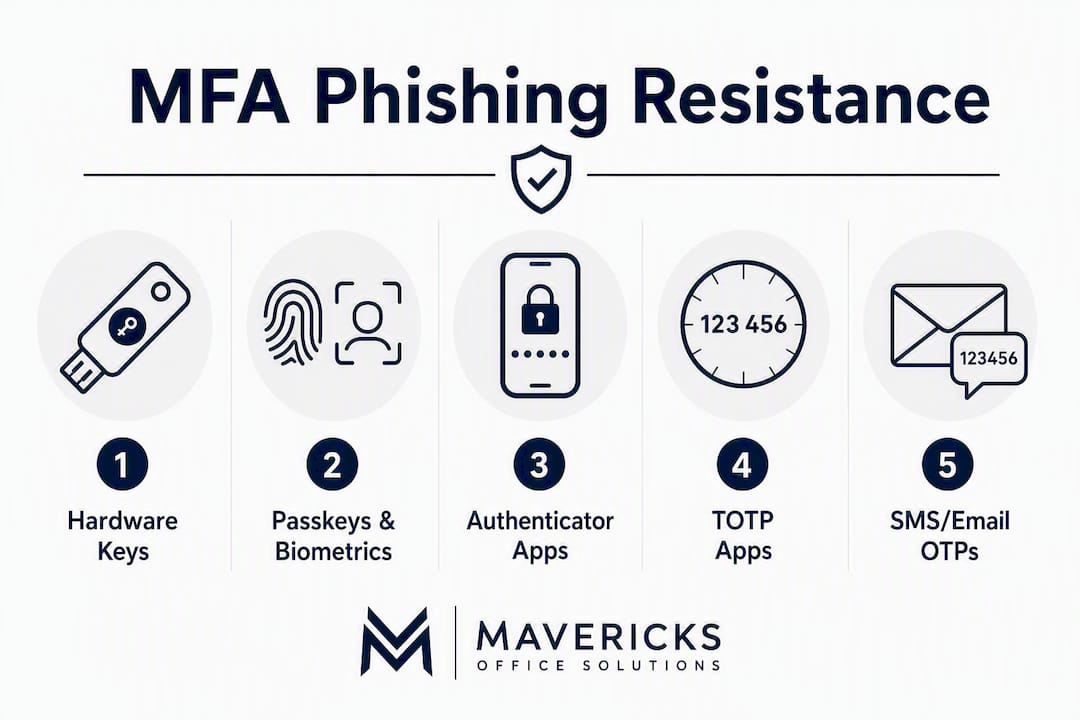
Not all MFA is equal. Here is a practical ranking from strongest to weakest, with notes on where each fits for an SMB:
1. Hardware security keys (FIDO2/WebAuthn)
Physical keys like YubiKey provide the strongest phishing resistance available. The cryptographic handshake is domain-bound, meaning a fake login page cannot intercept it. Best suited for IT admins, executives, and finance roles with access to critical systems. Physical security keys cost money to purchase, and most users need both a primary and a backup key.
2. Platform passkeys and biometrics
Face ID, Windows Hello, and Touch ID are FIDO2-based and phishing-resistant. They are built into devices your staff already owns, which makes rollout easier than hardware keys. Passkeys can reduce reliance on shared secrets and speed up logins, though not every business app supports them yet. A hybrid approach, passkeys where supported and authenticator apps elsewhere, is common and practical.
3. Authenticator apps with number-matching push
Microsoft Authenticator and Google Authenticator with number-matching push notifications are the sweet spot for most SMBs. Authenticator apps are budget-friendly, relatively secure, and easier to adopt than hardware keys for many teams. Number-matching requires the user to type a code shown on the login screen into the app, which defeats MFA fatigue attacks. This is the right starting point for general staff.
4. TOTP apps (without push)
Standard TOTP codes (Google Authenticator, Authy) are better than SMS but are still vulnerable to real-time phishing, where an attacker relays the code before it expires. Acceptable for lower-risk accounts; plan to upgrade high-risk roles.
5. SMS and email OTPs (fallback only)
SMS one-time passwords are vulnerable to SIM swapping and real-time phishing. Security guidance recommends treating SMS and email OTPs as fallback options while planning a roadmap toward FIDO2 or platform authenticators. Do not use SMS as the primary method for admin or finance accounts.
Pro Tip: Start your rollout with authenticator apps plus number-matching for all staff, then phase in hardware security keys for IT admins, finance, and executives during your next device refresh cycle. That two-stage path gives you a meaningful security improvement immediately without the complexity of a full hardware-key deployment on day one.
How attackers bypass MFA, and what you can do about it
MFA significantly raises the bar for attackers, but it does not make accounts invulnerable. Understanding the bypass techniques helps you build compensating controls.

MFA fatigue: Attackers send repeated push notification requests until a tired or distracted user taps “Approve.” This technique has been used in high-profile breaches. Number-matching push notifications and hardware keys both defeat it by requiring an explicit, context-aware action.
SIM swapping: An attacker convinces a mobile carrier to transfer your phone number to a SIM they control, intercepting SMS codes. This is why SMS OTP should not protect your most sensitive accounts.
Adversary-in-the-middle (AiTM) proxies: Phishing kits like Evilginx sit between the user and the real login page, relaying credentials and session tokens in real time. Standard TOTP and push MFA do not stop this because the attacker captures the authenticated session cookie. FIDO2 hardware keys and passkeys do stop it, because the cryptographic response is bound to the legitimate domain.
Session token theft: After a successful MFA login, attackers steal the browser session token from an infected device, bypassing MFA entirely for that session. Device posture checks and short session lifetimes limit the window of exposure.
Recovery channel weaknesses: Password reset flows that rely on SMS or unprotected email become the path of least resistance when MFA is enforced on the primary login.
The key insight from CISA advisories: Misconfigured MFA, not just absent MFA, is among the most commonly exploited weaknesses in significant breaches. Enabling MFA is necessary. Configuring it correctly, covering all admin accounts, closing recovery-channel gaps, and monitoring for bypass attempts, is what actually keeps you protected.
Mitigations that address these risks together: enforce phishing-resistant MFA for high-risk accounts, enable rate-limiting on authentication attempts, require device compliance checks before granting access, and monitor sign-in logs for anomalous patterns.
What stops businesses from adopting MFA, and how do you get past it?
The most common barrier is not technical. It is the perception that MFA will slow people down and flood the helpdesk with lockout calls. That concern is real, but it is manageable with the right rollout approach.
Typical roadblocks:
- Staff friction and resistance to change
- BYOD environments where personal devices are inconsistent
- Onboarding workload for new hires
- Temporary lockouts during enforcement
- Helpdesk capacity during the transition period
Practical solutions:
- Phased rollout: Start with IT and finance, then expand by department. Each wave gives you a chance to refine the process before it reaches the full organization.
- Role-based prioritization: Enforce strict phishing-resistant MFA for admins first. General staff can start with authenticator apps and upgrade later.
- Self-service recovery: Configure self-service password reset (SSPR) in Microsoft Entra so users can recover access without calling the helpdesk.
- Clear communication: Tell staff what is changing, why, and what they need to do before enforcement begins.
- Cost mitigation: Built-in authenticator apps cost nothing. Stagger hardware-key purchases to align with device refresh cycles. A managed service partner can absorb enrollment and helpdesk load during the transition.
Sample employee announcement (adapt as needed): “Starting [date], all accounts will require multi-factor authentication at login. You will need to install the Microsoft Authenticator app on your phone and complete a one-time enrollment before that date. Step-by-step instructions are attached. If you need help, contact [helpdesk contact]. This change protects your account and our business from unauthorized access.”
A short admin fallback policy example: designate at least one break-glass admin account with a hardware key stored securely offline, documented in your IT runbook, and tested quarterly. This account exists solely to restore access if the primary admin is locked out during enforcement.
How to implement MFA in your business: a step-by-step plan
A successful rollout follows a clear sequence. Skipping steps, especially the audit and recovery setup, is where most SMBs run into trouble.
Step 1: Audit and scope
Identify every account that needs MFA coverage: admin accounts, email, payroll, identity providers, VPN, and any cloud app with sensitive data. Map which identity provider controls access to which apps. Auditing privileged accounts and establishing break-glass recovery accounts prevents accidental outages and lockouts.
Step 2: Define your MFA policy
Decide which methods are allowed for which roles. Document exceptions (e.g., service accounts, shared accounts) and the process for granting them. Assign ownership: who is the security owner, who handles helpdesk escalations, and who is the exec sponsor.
Step 3: Set up recovery accounts
Before enforcing anything, provision at least one break-glass admin account with a hardware key or a documented recovery process. Store credentials securely offline. Test the recovery flow.
Step 4: Pilot with a high-risk group
Run a two-week pilot with your IT team or finance staff. Measure enrollment completion rate, helpdesk ticket volume, and user feedback. Fix friction points before the full rollout.
Step 5: Full rollout and enforcement
Set an enforcement date, communicate it clearly, and staff the helpdesk for the first week. Enforce MFA at the identity provider so it covers all connected apps. Business password managers that support TOTP and passkey storage can reduce friction for teams managing multiple credentials.
Step 6: Monitor and maintain
Review sign-in logs monthly. Check MFA coverage when new apps are added. Update your policy when new bypass techniques emerge. MFA is not a set-and-forget control; ongoing maintenance is what keeps it effective.
Rollout timeline and cost estimate:
| Milestone | Timeframe | Notes |
|---|---|---|
| Account audit and policy draft | Week 1 | IT admin + security owner |
| Recovery accounts provisioned | Week 1 | Break-glass setup, tested |
| Pilot group enrolled | Week 2–3 | IT and finance |
| Staff communication sent | Week 3 | Announcement + instructions |
| Full enforcement enabled | Week 4–6 | Phased by department |
| Hardware keys for high-risk roles | Month 2–3 | Align with device refresh |
| First MFA coverage audit | Quarter 1 | Log review, new app check |
Hardware security keys run roughly $25–$60 per user for high-risk roles. Authenticator apps are free. Helpdesk time during the enforcement week is the largest variable cost; a managed service partner can absorb much of that load.
Roles and responsibilities:
- IT admin: Configuration, enrollment support, break-glass accounts
- Security owner: Policy definition, exception approvals, audit reviews
- Helpdesk: Lockout recovery, enrollment assistance, first-week support
- Exec sponsor: Enforcement mandate, budget approval, staff communication
Microsoft 365 and Microsoft Entra: what to configure first
Microsoft 365 is the most common identity environment for U.S. SMBs, and all Microsoft 365 business subscriptions include Microsoft Entra ID Free with security defaults. Here is what to configure and in what order.
Step 1: Enable security defaults or Conditional Access
Security defaults are on by default in new tenants and enforce MFA for all users using Microsoft Authenticator. For more control, such as excluding specific accounts or requiring phishing-resistant methods for admins, you need Conditional Access, which requires Microsoft Entra ID P1 (included in Microsoft 365 Business Premium).
Step 2: Require MFA for all admin roles
Create a Conditional Access policy that targets all directory roles (Global Admin, Exchange Admin, etc.) and requires phishing-resistant MFA. This is the single highest-impact configuration change you can make.
Step 3: Configure emergency access accounts
Create two break-glass accounts excluded from Conditional Access policies. Use hardware keys for authentication. Store credentials in a physically secure location and audit access quarterly.
Step 4: Extend MFA to connected apps
If you use SSO to connect third-party apps (Salesforce, QuickBooks Online, your VPN), verify that MFA is enforced at the Entra level and that those apps honor the session policy. Check for legacy authentication protocols (SMTP AUTH, IMAP) that bypass modern MFA and disable them where possible.
Configuration verification checklist:
- All users enrolled in MFA (check Entra sign-in reports for gaps)
- No admin accounts excluded from MFA policies without documented justification
- Break-glass accounts provisioned and tested
- Legacy authentication protocols disabled or restricted
- Service accounts reviewed and documented (most cannot use interactive MFA; use managed identities or app registrations instead)
- MFA coverage confirmed for VPN and remote access
Pro Tip: In Microsoft Entra, run the “Authentication methods” report under Identity > Monitoring to see exactly which users have registered MFA and which methods they are using. This report is your fastest way to find gaps before enforcement begins.
Compliance and cyber-insurance requirements for U.S. businesses
MFA shows up explicitly or implicitly in every major U.S. compliance framework and in most cyber-insurance applications. Here is what each one expects:
- PCI DSS v4.0: Requires MFA for all access to the cardholder data environment and for all remote access. Non-compliance can result in fines and loss of card processing privileges.
- HIPAA: The Security Rule does not mandate MFA by name, but it requires access controls and audit controls that MFA directly supports. Most HIPAA-focused security assessors treat MFA as a practical requirement.
- SOC 2: MFA is a common control tested under the Logical and Physical Access Controls category. Auditors will ask for evidence of enforcement, not just a policy.
- CMMC (Cybersecurity Maturity Model Certification): Explicitly requires MFA for privileged accounts at Level 1 and for all accounts at Level 2. Required for any business contracting with the Department of Defense.
For cyber-insurance, underwriters typically ask for:
- A documented MFA policy covering all users
- Evidence of enforcement (sign-in logs, admin reports)
- Phishing-resistant MFA for privileged and remote access
- A process for handling exceptions and offboarding
CISA explicitly recommends phishing-resistant MFA as the modern standard. Businesses that document their MFA posture, including which methods are used, which accounts are covered, and how exceptions are managed, are better positioned both for insurance renewals and for post-incident claims. Insurers increasingly treat the absence of documented, enforced MFA as a material risk factor that affects both premiums and coverage terms.
This article provides general information about MFA and compliance frameworks. Confirm current requirements with the relevant regulatory body or a qualified compliance professional before making coverage or compliance decisions.
Your MFA action checklist: this week, this month, this quarter
| Timeframe | Task | Priority |
|---|---|---|
| This week | Audit all admin and privileged accounts | Critical |
| This week | Provision break-glass recovery accounts | Critical |
| This week | Enable security defaults or Conditional Access in Microsoft Entra | Critical |
| This week | Disable legacy authentication protocols | High |
| This month | Enroll pilot group (IT, finance) and measure support load | High |
| This month | Send staff communication and enrollment instructions | High |
| This month | Enforce MFA for all users at identity provider | High |
| This month | Verify MFA coverage for VPN and remote access | High |
| This quarter | Phase in hardware keys for admin and high-risk roles | Medium |
| This quarter | Review sign-in logs and MFA coverage report | Medium |
| This quarter | Document MFA policy for insurance and compliance reviewers | Medium |
| This quarter | Add new apps to SSO and verify MFA enforcement | Medium |
Success metrics to track:
- MFA enrollment rate (target: 100% of users within 30 days of enforcement)
- Helpdesk tickets related to MFA lockouts (should drop sharply after week two)
- Percentage of critical apps covered by enforced MFA
- Admin accounts with phishing-resistant MFA registered
Key Takeaways
Enabling enterprise-wide MFA, starting with phishing-resistant methods for admin accounts, is the single most effective step a U.S. small or medium business can take to reduce account compromise risk and meet cyber-insurance and compliance expectations.
| Point | Details |
|---|---|
| Prioritize admin accounts first | Privileged accounts are the highest-value targets; enforce phishing-resistant MFA there before expanding to all staff. |
| Rank methods by phishing resistance | Hardware keys and passkeys offer the strongest protection; authenticator apps with number-matching are the right starting point for most staff. |
| Audit before you enforce | Map every admin account and provision break-glass recovery accounts before turning on enforcement to avoid lockouts. |
| Document for insurers and auditors | A technical rollout is not enough; insurers and SOC 2 auditors require a written policy, enforcement logs, and periodic reviews. |
| Mavericksofficesolutions manages the full rollout | From policy definition and Microsoft Entra configuration to enrollment support and ongoing monitoring, Mavericksofficesolutions handles MFA as a managed service for SMBs. |
The case for treating MFA as a managed program, not a one-time project
Most SMBs treat MFA as a checkbox: turn it on, move on. That is exactly the gap attackers exploit. The businesses that get breached despite having MFA enabled almost always share the same profile: they enabled it for most users but not all admins, they left legacy authentication protocols open, or they never set up monitoring to catch failed MFA attempts and bypass patterns.
The real value of MFA is not in the initial configuration. It is in the ongoing enforcement: catching the new hire whose account was never enrolled, disabling the legacy protocol that opened a side door, updating policies when a new bypass technique emerges. That requires someone actively watching the environment, not just a setting that was toggled two years ago.
There is also a practical argument for phishing-resistant methods that most guides understate. Number-matching push notifications are a meaningful improvement over standard push, but they still depend on the user making a correct decision under pressure. Hardware keys and passkeys remove that decision entirely. For any account that could authorize a wire transfer, reset another user’s credentials, or access patient records, the question is not whether phishing-resistant MFA is worth the cost. It is whether the cost of not having it is acceptable.
The compliance and insurance angle reinforces this. Underwriters are not just asking “do you have MFA?” They are asking for logs, policy documents, and evidence of enforcement. A business that can produce a clean MFA coverage report, a written exception policy, and quarterly audit records is in a fundamentally different position than one that can only say “yes, we turned it on.”
Mavericksofficesolutions handles MFA rollout so you can focus on your business
Getting MFA right across your entire organization, every admin account, every connected app, every new hire, takes more than an afternoon. Mavericksofficesolutions acts as your outsourced IT department, handling the full MFA lifecycle from the first audit through ongoing monitoring, with a local, USA-based help desk that responds in under 12 minutes on average.
Here is what a managed MFA engagement with Mavericksofficesolutions looks like in practice:
- Policy and scoping: Define which accounts need phishing-resistant MFA, document exceptions, and align the policy with your insurance and compliance requirements.
- Microsoft Entra / identity provider configuration: Security defaults, Conditional Access policies, break-glass accounts, and legacy protocol lockdown.
- Enrollment support: Guided onboarding for your staff, including hardware-key provisioning for high-risk roles.
- Helpdesk coverage: Lockout recovery and enrollment questions handled by a team that knows your environment, not an offshore call center.
- Fractional CTO oversight: For businesses that need executive-level technology strategy, fractional IT leadership gives you a security owner without a full-time hire.
- Ongoing monitoring and audits: Monthly sign-in log reviews, coverage checks when new apps are added, and documentation ready for your next insurance renewal.
If you are ready to move from “we should do this” to “it is done and documented,” talk to the Mavericksofficesolutions managed IT team about scoping your MFA rollout.
Useful sources and further reading
Authoritative references for U.S. businesses implementing MFA:
- Require Multifactor Authentication | CISA: CISA’s primary guidance page for SMBs on enabling and prioritizing phishing-resistant MFA.
- Cybersecurity Best Practices | CISA: Broader CISA guidance on cybersecurity controls, including identity and access management.
- Strengthen Your Cybersecurity | U.S. Small Business Administration: SBA overview of MFA and foundational security steps for small businesses.
- Cybersecurity for Small Business | Federal Trade Commission: FTC practical guidance on protecting small businesses from common cyberattacks.
- Small Business Information Security: the Fundamentals | NIST: NIST interagency report covering foundational security program elements for small businesses in non-technical language.
- Microsoft 365 for Business Security Overview | Microsoft Learn: Microsoft’s documentation on security defaults, Conditional Access, and MFA configuration in Microsoft 365 and Microsoft Entra.
- MFA for Business: Benefits, Methods & Why It Still Matters | Huntress: Practical breakdown of MFA methods, bypass techniques, and SMB-focused implementation guidance from a security vendor.
- A Business Guide to Multi-Factor Authentication | Proton: Covers passkeys, TOTP, and hybrid MFA approaches with notes on business password manager integration.
Recommended
- Small Business Cybersecurity: A Michigan Owner’s Playbook – Mavericks Office Solutions
- SaaS Security Controls for Ohio SMBs: 2026 Guide – Mavericks Office Solutions
- Mavericks Office Solutions – Managed IT, Security, Print & VoIP for Ohio Businesses
- Application Whitelisting: A Practical Guide for Michigan IT Teams – Mavericks Office Solutions