

SIEM is the detection layer; SOAR is the response engine. Together, they close the gap between alerts and action. SIEM aggregates, normalizes, and correlates log data to answer “what happened and when”; SOAR takes those alerts and executes automated playbooks to contain threats faster than any analyst can manually. They are not interchangeable, and using both in tandem is best practice for reducing Mean Time to Detect (MTTD) and Mean Time to Respond (MTTR).
The short version for decision-makers:
- SIEM only: right for organizations that need centralized visibility, compliance logging, and a detection baseline before any automation.
- Add SOAR when: your SIEM is generating reliable, well-tuned alerts at volume and your analysts are spending hours on repetitive triage tasks.
- Both together: the standard for mature SOCs that want measurable reductions in MTTR and analyst workload.
Before you automate anything, run an alert-fidelity check in your SIEM. Automating on noisy alerts does not speed up response; it amplifies mistakes.
Table of Contents
- What does SIEM actually do for your SOC?
- Key benefits SIEM brings to your security program
- What does SOAR actually do for your SOC?
- Why SOAR reduces analyst workload and where it can go wrong
- How do SIEM and SOAR compare side by side?
- When should you choose SIEM, SOAR, or both?
- How should SIEM and SOAR integrate in your stack?
- Implementation checklist for a SIEM-to-SOAR project
- Which vendors should you consider for SIEM and SOAR?
- What SOC practitioners actually learn the hard way
- Key Takeaways
- The case for getting the sequence right
- How Mavericksofficesolutions helps you get SIEM and SOAR right
- Useful sources and further reading
What does SIEM actually do for your SOC?
Security Information and Event Management (SIEM) is the centralized nervous system of a security operations center. Gartner defines SIEM as technology that supports threat detection, compliance, and security incident management by collecting and analyzing event data from a wide range of sources.
In practice, a SIEM performs five core functions:
- Log aggregation: pulls raw event data from endpoints, firewalls, identity systems, cloud APIs, EDR platforms, and applications into a single repository.
- Normalization: converts logs from different formats (Windows Event Logs, syslog, JSON, CEF) into a consistent schema so correlation rules can work across sources.
- Correlation: applies rules and behavioral analytics to identify patterns that indicate threats, such as multiple failed logins followed by a successful one from an unusual location.
- Alerting: generates prioritized alerts when correlation rules fire, giving analysts a queue to investigate.
- Retention: stores event data for defined periods to satisfy audit and compliance requirements under frameworks like HIPAA, PCI-DSS, and SOC 2.
The typical log sources feeding a SIEM include endpoint telemetry from EDR tools, network firewall and proxy logs, Active Directory and identity provider events, cloud platform APIs (AWS CloudTrail, Azure Monitor, Google Cloud Logging), and application logs. Feeding SaaS application telemetry into your SIEM is increasingly important as more business-critical workloads move off-premises.
SIEM answers the forensic question: what happened, on which system, at what time, and in what sequence? That answer is what drives both incident investigation and compliance reporting.
Pro Tip: Before you consider adding SOAR, measure your SIEM’s alert fidelity. Track your false-positive rate per rule, the percentage of alerts that escalate to confirmed incidents, and the average analyst time per alert. If more than half your alerts are noise, tune your correlation rules first. Automating a noisy SIEM creates automated false remediation, not faster response.
Key benefits SIEM brings to your security program
A well-tuned SIEM gives your security team visibility across the entire infrastructure from a single console. That centralized view matters because threats rarely stay in one place; a compromised endpoint communicates outward, touches identity systems, and leaves traces in application logs. Without correlation, those traces look unrelated.

Compliance and audit logging is one of the most concrete SIEM benefits for U.S. organizations. HIPAA requires audit controls and activity monitoring for electronic protected health information. PCI-DSS mandates log collection, review, and retention for cardholder data environments. SOC 2 Type II audits expect evidence of continuous monitoring. SIEM provides the log retention and reporting those frameworks require, and many platforms generate compliance reports directly from stored event data.
Where SIEM struggles is alert volume. A mature deployment across a mid-size environment can generate hundreds of alerts per day. Without automation or careful tuning, analysts spend most of their time triaging low-confidence alerts rather than investigating real threats. This is the core driver of alert fatigue, and it is exactly the gap SOAR was designed to address.
Short use cases where SIEM delivers clear value:
- Threat hunting: analysts query historical event data to look for indicators of compromise that did not trigger real-time alerts.
- Suspicious login detection: correlation rules flag impossible travel, credential stuffing patterns, or off-hours privileged access.
- Centralized alerting: a single dashboard surfaces events from cloud, on-premises, and hybrid environments without requiring analysts to check multiple consoles.
SIEM affects MTTD directly. When correlation rules are well-tuned, the time between a threat occurring and an alert firing shrinks. The challenge is that SIEM stops at the alert. What happens next is a manual process unless SOAR is in the picture.
What does SOAR actually do for your SOC?
Security Orchestration, Automation, and Response (SOAR) takes the alerts your SIEM generates and acts on them. Gartner defines SOAR as technologies that enable organizations to collect security threat data and alerts from different sources and perform incident analysis and triage using a combination of human and machine power.
The three pillars of SOAR are:
- Orchestration: connects your security tools (SIEM, EDR, threat intelligence platforms, ticketing systems, firewalls) so they can share data and trigger actions across each other without manual handoffs.
- Automation via playbooks: prebuilt or custom workflows that execute a defined sequence of steps when a specific alert type fires, without waiting for an analyst to start the process.
- Case management: tracks the full lifecycle of an incident, from initial alert through investigation, containment, and closure, with a documented audit trail of every automated and manual action.
Where SIEM ingests raw logs, SOAR ingests processed alerts and threat intelligence. Its outputs are actions: quarantining a device, blocking an IP at the firewall, creating a ticket in ServiceNow, sending a Slack notification to the on-call analyst, or disabling a compromised user account in Active Directory.
A typical SOAR playbook for a phishing alert follows this sequence:
- Ingest the alert from SIEM.
- Extract indicators (sender domain, URLs, attachments).
- Enrich against threat intelligence feeds (VirusTotal, MISP, or a commercial TI platform).
- If indicators are confirmed malicious: quarantine the affected mailbox, block the domain at the email gateway, and open a case.
- Notify the analyst with enriched context and recommended next steps.
- Document all automated actions in the case record.
SOAR platforms integrate threat intelligence feeds, endpoint security, ticketing systems, and SIEMs to give automated actions richer context than any single tool can provide alone.

Why SOAR reduces analyst workload and where it can go wrong
SOAR was introduced specifically to address alert fatigue, the condition where analysts are so overwhelmed by alert volume that real threats get missed. The operational benefits are real and measurable.
- Fewer repetitive manual steps: enrichment, initial triage, and basic containment actions that previously took 20–40 minutes per alert can execute in seconds via playbook.
- Faster containment: automated quarantine and blocking actions run the moment a playbook triggers, not when an analyst gets to the ticket.
- Consistent execution: playbooks follow the same steps every time, eliminating the variation that comes from different analysts handling the same alert type differently.
- Audit trails: every automated action is logged with a timestamp, the triggering condition, and the result, which satisfies both internal governance and external compliance requirements.
Pro Tip: Start SOAR automation on high-volume, low-risk workflows: phishing triage, known-malware hash lookups, and IP/domain blocking based on confirmed threat intelligence. These workflows have clear decision logic, low blast radius if a playbook misfires, and high repetition volume. Save complex, high-impact actions (account deletion, network segmentation) for human-in-the-loop playbooks until you have confidence in your alert quality.
The caveat is significant. SOAR without a well-tuned SIEM can act on poor inputs and amplify problems. A playbook that quarantines endpoints based on a noisy alert rule will quarantine legitimate systems. Automation is only as reliable as the alerts feeding it. This is not a reason to avoid SOAR; it is a reason to sequence the work correctly.
Common SOAR use cases that deliver fast ROI:
- Phishing triage: extract, enrich, and contain in under two minutes.
- IP and domain blocking: automated firewall and DNS updates based on confirmed threat intelligence.
- Endpoint quarantine: isolate a device via EDR integration the moment a confirmed malware indicator fires.
- Vulnerability ticket creation: auto-generate and assign remediation tickets when a scan finds a critical CVE.
How do SIEM and SOAR compare side by side?
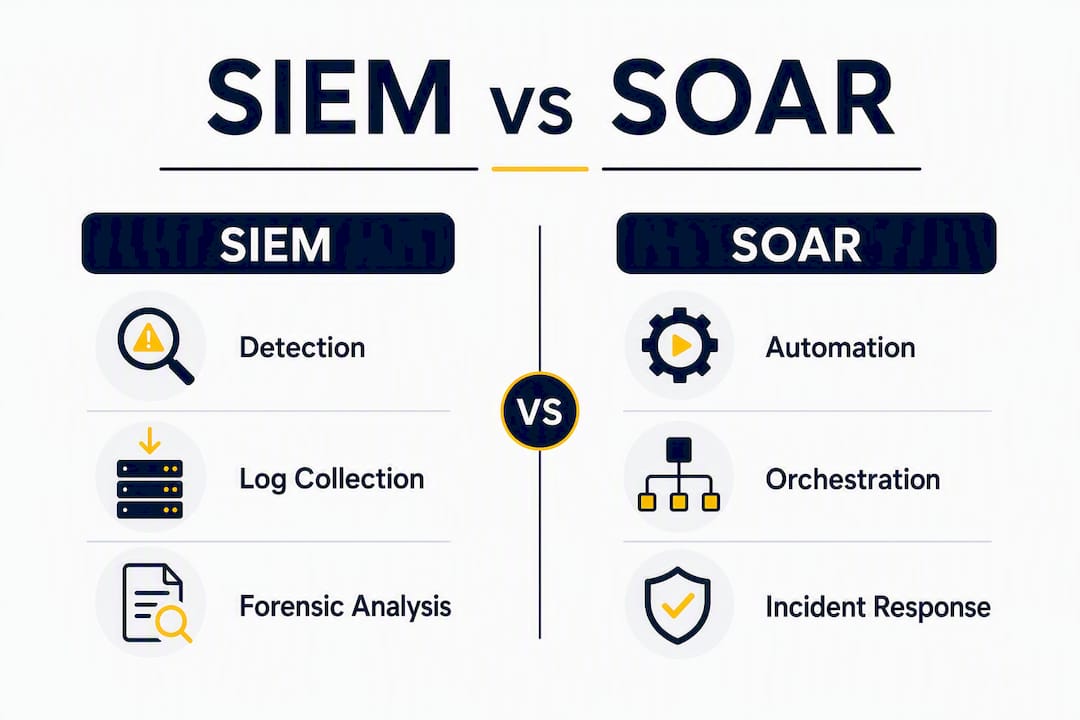
Think of it this way: SIEM is the eyes of your SOC; SOAR is the hands. One sees the threat; the other acts on it. The practical implication is that you need reliable eyes before you give the hands anything to do.
| Dimension | SIEM | SOAR |
|---|---|---|
| Primary function | Detection and visibility | Orchestration and automated response |
| Data ingestion | Raw logs, events, telemetry from endpoints, network, cloud, identity | Processed alerts, threat intelligence, enrichment data |
| Primary output | Alerts, dashboards, compliance reports, forensic timelines | Automated actions, case records, audit trails, tickets |
| Human involvement | High: analysts investigate and respond manually | Lower: analysts review automated actions and handle escalations |
| Compliance role | Log retention, audit reporting, regulatory evidence | Audit trails for response actions taken |
| Operational impact on MTTD | Direct: faster detection when rules are well-tuned | Indirect: enriched context can speed analyst confirmation |
| Operational impact on MTTR | Indirect: faster detection shortens total response time | Direct: automated containment dramatically reduces MTTR |
| Cost drivers | Ingestion volume, storage, licensing per data source | Playbook development, integration effort, maintenance hours |
| Scalability | Scales with log volume; storage costs rise with retention | Scales with playbook complexity; maintenance burden grows with coverage |
When both tools work together, the expected operational outcome is a measurable reduction in both MTTD and MTTR. SIEM tightens detection; SOAR compresses the time from alert to containment.
When each tool is the right primary answer:
- Choose SIEM first if you lack centralized log visibility, have compliance requirements, or have not yet established a reliable detection baseline.
- Choose SOAR when your SIEM is generating high-volume, well-tuned alerts and your analysts are spending significant time on repetitive triage.
- Deploy both when you have a mature detection layer and want to automate repeatable response workflows at scale.
- Consider an integrated suite (a platform with both SIEM and SOAR-like capabilities built in) when your environment is not highly complex and you want to reduce vendor management overhead.
SIEM excels at centralized event monitoring and forensic analysis; SOAR excels at coordination and automating repetitive incident response tasks. Neither replaces the other.
When should you choose SIEM, SOAR, or both?
The answer depends on where your organization sits on the security maturity curve. Buying SOAR before your SIEM is reliable is one of the most common and costly sequencing mistakes in security operations.
Maturity checkpoints before adding SOAR:
- You have a functioning SIEM with log sources from all critical systems onboarded.
- Your false-positive rate per alert rule is below a threshold your team has defined and measured.
- You have identified at least three to five high-volume, repeatable alert types that follow consistent decision logic.
- You have staff who can own playbook development and maintenance (this is a real ongoing commitment, not a one-time project).
- Your SIEM integrates with the tools SOAR will need to act on (EDR, firewall, identity provider, ticketing system).
Decision checklist by organization profile:
- Small IT team with compliance requirements (HIPAA, PCI-DSS): Start with SIEM. Centralized logging and compliance reporting deliver immediate value. SOAR adds complexity your team may not have capacity to maintain yet.
- Mid-size SOC with high alert volume: SIEM is already in place; the pain point is analyst time spent on repetitive triage. SOAR for phishing, known-malware, and IP-blocking workflows will have measurable impact within the first quarter of deployment.
- Enterprise with mature detection: Both tools are likely already in use. The priority is integration quality, playbook coverage, and continuous tuning rather than initial deployment.
Pro Tip: Your first SOAR playbook should be phishing triage. It is high volume, the decision logic is clear (malicious indicator = block and quarantine), the blast radius of a misfire is limited, and the analyst time savings are immediate and easy to measure. Use it as your proof-of-concept before expanding automation to higher-stakes workflows.
For smaller teams without in-house SOC capacity, managed detection and response options let you access SIEM and SOAR capabilities without building and staffing the full stack yourself.
How should SIEM and SOAR integrate in your stack?
SIEM and SOAR are most effective when they are connected bidirectionally, not just in a one-way alert feed. Here is how the architecture and workflow should be structured.
Architecture guidance:
SIEM sits at the data collection and correlation layer. It ingests logs from every source in your environment, applies correlation rules, and generates prioritized alerts. SOAR sits above SIEM at the orchestration layer. It subscribes to SIEM alerts, pulls additional context from threat intelligence and asset management systems, executes playbooks, and writes case records and action logs back to the SIEM or a separate case management platform.
Bidirectional integration means SOAR can also push enrichment data back into the SIEM, so future correlation has better context. It also means SIEM can receive status updates from SOAR cases, giving analysts a unified view of alert-to-resolution timelines.
Workflow sequence:
- SIEM fires an alert based on a correlation rule match.
- SOAR ingests the alert and triggers the appropriate playbook.
- Playbook enriches the alert with threat intelligence, asset data, and user context.
- Automated triage determines severity and whether the alert meets the threshold for automated action.
- Low-severity, high-confidence alerts proceed to automated containment (block, quarantine, ticket).
- High-severity or ambiguous alerts escalate to a human analyst with full enriched context pre-populated.
- Analyst reviews, approves or modifies the recommended action, and closes the case.
- All actions are documented in the case record and synced back to the SIEM.
Governance checklist for playbook management:
- Assign a named owner for each playbook who is responsible for accuracy and updates.
- Define a review cadence (quarterly at minimum) to catch playbooks that have drifted from current infrastructure.
- Require change-control approval before modifying any playbook that triggers automated containment actions.
- Test every new playbook in a staging environment with simulated alerts before promoting to production.
- Build rollback procedures into every playbook that takes a destructive action (account disable, network block, endpoint isolation).
- Include human approval gates for any action that affects production systems or user accounts at scale.
Endpoint detection and response telemetry is one of the richest inputs for both SIEM correlation and SOAR playbook triggers. Make sure your EDR platform is integrated at both layers, not just feeding raw logs to SIEM.
Implementation checklist for a SIEM-to-SOAR project
Deploying SIEM and SOAR is a project with real prerequisites, not a plug-and-play installation. The teams that get the most value from these tools are the ones that invest in data quality and playbook design before they go live.
Step-by-step implementation checklist:
- Inventory your log sources. Document every system that should feed the SIEM: endpoints, servers, firewalls, identity providers, cloud platforms, SaaS applications. Gaps in log coverage are gaps in detection.
- Normalize and validate data. Confirm that logs from each source parse correctly into your SIEM’s schema. Broken parsers produce silent gaps.
- Configure retention and compliance rules. Set retention periods per data type to meet your compliance requirements (PCI-DSS, HIPAA, SOC 2). Document the configuration for auditors.
- Tune correlation rules. Run your initial rule set for at least 30 days and measure false-positive rates per rule. Suppress or refine rules generating more noise than signal before connecting SOAR.
- Map integration points for SOAR. Identify which tools SOAR will need to act on (EDR, firewall, email gateway, identity provider, ticketing system) and confirm API access and credentials.
- Design playbook templates. Start with your three highest-volume alert types. Map the decision logic, required enrichment sources, automated actions, and escalation conditions for each.
- Build and test in staging. Run playbooks against simulated alerts in a non-production environment. Validate that every automated action produces the expected result and that rollback procedures work.
- Staged production rollout. Deploy playbooks in “observe” mode first (log what the playbook would have done without executing). Review results for one to two weeks before enabling automated execution.
- Establish metrics tracking. Baseline MTTD, MTTR, false-positive rate, and analyst hours per alert before go-live. Measure the same metrics at 30, 60, and 90 days post-deployment.
Staffing and roles:
- Playbook author: designs and documents playbook logic; typically a senior SOC analyst or security engineer.
- SOAR operator: monitors playbook execution, reviews automated actions, and handles escalations.
- Change-control owner: approves modifications to production playbooks.
- SOC analyst: handles human-in-the-loop escalations and complex investigations that automation cannot resolve.
Metrics to track and suggested cadence:
| Metric | What it measures | Review cadence |
|---|---|---|
| MTTD | Time from threat occurrence to alert generation | Monthly |
| MTTR | Time from alert to confirmed containment | Monthly |
| False-positive rate | Percentage of alerts that are not confirmed incidents | Weekly during tuning; monthly after stabilization |
| Analyst hours per alert | Manual time spent per alert type | Monthly |
| Playbook success rate | Percentage of playbook executions completing without error | Weekly |
Pro Tip: Run your first SOAR playbook as a canary: deploy it against a single, low-risk alert type in production with a human approval gate on every action. Let it run for two weeks. Review every decision the playbook made. Only after that review should you enable fully automated execution. This staged approach catches logic errors before they affect production systems.
Cloud security best practices for SMBs are worth reviewing when configuring cloud log ingestion into your SIEM, particularly for multi-cloud environments where log formats and API access patterns vary significantly.
SIEM costs center on ingestion volume and storage; SOAR costs center on playbook development and integration effort. Budget for both the initial build and the ongoing maintenance, which is a recurring operational cost, not a one-time project expense.
Which vendors should you consider for SIEM and SOAR?
The vendor landscape has shifted significantly. Several platforms now offer integrated SIEM and SOAR-like capabilities in a single product, which changes the build-vs-buy calculus for many organizations.
Representative vendor notes:
- Splunk: one of the most widely deployed SIEM platforms in enterprise environments. Splunk’s Security Operations Suite includes SOAR capabilities (formerly Phantom), making it a strong option when you want both detection and automation from a single vendor. SIEM and SOAR functionality is converging in some vendor suites, and Splunk is a leading example of that convergence. Licensing is ingestion-based, which can become expensive at scale.
- Microsoft Sentinel: a cloud-native SIEM built on Azure with built-in automation via Logic Apps, which provides SOAR-like orchestration without a separate product. Strong fit for organizations already in the Microsoft ecosystem. Pricing is consumption-based (per GB ingested), and the Logic Apps integration library is extensive.
- CrowdStrike: primarily known for its Falcon EDR platform, CrowdStrike has expanded into SIEM territory with Falcon LogScale and offers automated response capabilities within the Falcon platform. Its strength is endpoint telemetry quality and speed. Organizations that want tight EDR-to-response integration often find CrowdStrike’s native automation sufficient for endpoint-focused workflows.
- Palo Alto Networks: Cortex XSOAR is one of the most mature standalone SOAR platforms available, with a large playbook library and broad integration coverage. Palo Alto also offers Cortex XSIAM, which combines SIEM, SOAR, and XDR capabilities in an integrated platform. Strong fit for organizations that want enterprise-grade automation with extensive customization.
- SentinelOne: Singularity XDR provides detection and automated response at the endpoint and cloud workload level. It functions as an integrated detection-and-response platform rather than a traditional SIEM, which means it may reduce the need for a separate SOAR product in environments where endpoint and cloud coverage is the primary concern.
Evaluation checklist when selecting a vendor:
- Integration coverage: does the platform connect natively to your existing tools (EDR, firewall, identity, ticketing)?
- Playbook library: how many prebuilt playbooks are available, and how much customization do they require for your environment?
- Licensing model: ingestion-based, use-case-based, or per-endpoint? Model your actual data volumes before comparing list prices.
- Scalability: can the platform handle your projected log volume and playbook execution rate without performance degradation?
- Vendor support and professional services: what implementation support is available, and what does ongoing support cost?
Many modern SIEM vendors now include built-in automation or SOAR-like features, so evaluate whether an integrated product meets your needs before purchasing separate SIEM and SOAR tools. Separate tools provide better fit for complex, multi-vendor environments; integrated suites reduce management overhead for simpler stacks.
What SOC practitioners actually learn the hard way
The gap between how SIEM and SOAR work in theory and how they perform in production is where most projects run into trouble. The practitioners who get the best results share a few consistent lessons.
Common pitfalls to avoid:
- Automating before tuning. Deploying SOAR against an untuned SIEM is the single most common failure mode. Automated playbooks acting on noisy alerts generate false remediation actions, increase operational overhead, and erode analyst trust in the system.
- No playbook ownership. Playbooks without a named owner drift. Infrastructure changes, new tools get added, and the playbook logic that was accurate at deployment becomes wrong six months later. Assign ownership before go-live.
- Skipping production telemetry testing. Staging environments rarely replicate the full complexity of production log data. Always run canary tests with real production alerts before enabling automated execution.
- Underestimating maintenance. Operational playbook maintenance is an ongoing human task: teams must assign ownership, schedule reviews, and run tabletop and simulated incidents to keep playbooks accurate as infrastructure changes. This is not optional; it is the work that keeps automation reliable.
- Eliminating human oversight too early. Automation shifts analyst roles; it does not eliminate them. Analysts move from repetitive triage to reviewing automated decisions, handling complex escalations, and improving playbook logic. Teams that cut analyst headcount based on SOAR deployment projections often find themselves understaffed when edge cases surface.
An illustrative scenario: A mid-size security team onboards SOAR for phishing triage after six months of SIEM tuning. Before the pilot, analysts spent an average of 35 minutes per phishing alert on manual enrichment and triage. After deploying a phishing playbook with automated enrichment, indicator blocking, and mailbox quarantine, the same workflow completes in under three minutes for confirmed malicious alerts. Analysts shift their time to reviewing playbook outputs and handling the smaller volume of ambiguous cases that require judgment. MTTR for phishing incidents drops, and analyst capacity for threat hunting increases.
The lesson is not that SOAR is magic. It is that the six months of SIEM tuning made the SOAR deployment work.
Pro Tip: Schedule a tabletop exercise every quarter where your team walks through a simulated incident using your current playbooks. This surfaces logic errors, outdated integration assumptions, and gaps in escalation paths before a real incident exposes them. Treat it as a fire drill for your automation stack.
Avoiding AI and automation mistakes in cybersecurity is directly relevant here: the same principles that apply to AI-driven security tools apply to SOAR playbooks.
Key Takeaways
SIEM and SOAR are complementary tools: deploy SIEM first to establish a reliable detection baseline, then add SOAR to automate high-volume, repeatable response workflows and reduce MTTR.
| Point | Details |
|---|---|
| SIEM before SOAR | Establish a reliable detection baseline and tune alert fidelity before introducing any automation. |
| SOAR targets MTTR | Automated playbooks compress response time for repeatable workflows like phishing triage and IP blocking. |
| Playbook maintenance is ongoing | Assign named owners, schedule quarterly reviews, and run tabletop exercises to keep automation accurate. |
| Vendor convergence is real | Platforms like Splunk, Microsoft Sentinel, and Palo Alto Cortex XSIAM combine SIEM and SOAR in one product, reducing vendor complexity. |
| Mavericksofficesolutions | Provides managed cybersecurity, 24/7 monitoring, and playbook support so your team gets SIEM and SOAR value without building the full stack in-house. |
The case for getting the sequence right
There is a version of this conversation that gets skipped in most vendor presentations: the part where someone admits that SOAR is only as good as the detection feeding it. Vendors have a financial incentive to sell you both tools at once. The honest answer is that sequence matters more than speed.
The organizations that get the most out of SOAR are not the ones that deployed it first. They are the ones that spent real time in their SIEM, measuring alert fidelity, suppressing noise, and understanding which alert types actually represent threats. That work is unglamorous. It does not come with a launch announcement. But it is what makes the SOAR deployment reliable instead of a source of new operational problems.
There is also a staffing reality that gets underestimated. Playbook maintenance is not a set-it-and-forget-it task. Infrastructure changes. New tools get added. Threat actor techniques evolve. A playbook that was accurate when it was written can become actively harmful six months later if no one is reviewing it. The teams that treat playbook maintenance as a recurring operational commitment, not a one-time project, are the ones whose automation stays trustworthy.
The “eyes vs. hands” framing is useful, but it undersells the coordination required between the two. Your SIEM’s eyes need to be sharp before your SOAR’s hands start moving. And your hands need a human watching them, especially early on.
How Mavericksofficesolutions helps you get SIEM and SOAR right
Most security teams know what they need to do. The challenge is having the people, time, and expertise to do it consistently. Mavericksofficesolutions gives small and mid-size businesses a managed path to SIEM and SOAR value without requiring you to hire a full SOC team or manage the complexity in-house.
Mavericksofficesolutions provides 24/7 monitoring, a US-based help desk with an average response time under 12 minutes, and managed cybersecurity services that include detection tuning, playbook development, and ongoing automation maintenance. For organizations that need strategic guidance before committing to a platform, fractional CISO services provide executive-level security leadership on a part-time basis, so you get the right architecture decisions without the full-time cost.
The engagement model is straightforward: start with a readiness assessment to measure your current detection baseline and alert fidelity, identify the highest-value playbook candidates, and build a phased rollout plan that matches your team’s capacity. No offshore call centers, no generic playbooks copied from a template library.
If you are ready to move from reactive alerts to automated, measurable response, contact Mavericksofficesolutions to schedule your security readiness assessment.
Useful sources and further reading
- SOAR vs. SIEM: What’s the Difference? — TechTarget: clear functional definitions of both technologies with practical guidance on how they interact in a SOC environment.
- SIEM definition — Gartner Glossary: authoritative analyst definition of SIEM and its core capabilities.
- SOAR definition — Gartner Glossary: authoritative analyst definition of SOAR covering orchestration, automation, and response functions.
- SIEM vs SOAR: The Key Differences for Modern Security Teams — SecurityScorecard: practitioner-focused comparison with context on how both technologies strengthen overall security posture.
Recommended
- SaaS Security Controls for Ohio SMBs: 2026 Guide – Mavericks Office Solutions
- AI Models Just Hacked Another Company on Their Own — Why Cybersecurity Has Never Mattered More – Mavericks Office Solutions
- Endpoint Detection and Response: What IT Leaders Must Know – Mavericks Office Solutions
- Why Every Ohio Small Business Needs a Cybersecurity Plan in 2026 – Mavericks Office Solutions