

Accounts payable automation is software (or a software-plus-service approach) that converts invoice receipt, validation, approval, and payment into a fast, auditable digital workflow, replacing manual data entry with AI-driven processing and rule-based routing. For finance teams evaluating the investment, the bottom line is direct: automated AP workflows cut cost-per-invoice from a manual range of $8–15 down to roughly $2–4, and most mid-market organizations see full payback within 6–12 months.
- Cost reduction: Processing costs drop 60–80% once capture, matching, and approvals are automated. This reduces cost-per-invoice from $8–15 manually to $2–4 with automation.
- Touchless processing: Mature implementations reach 70–85% first-pass match rates, with human review reserved for exceptions.
- Faster close: Automated approval routing and real-time visibility compress month-end close cycles measurably.
If you are a finance leader or business decision-maker, the single most useful first step is to measure your current cost-per-invoice. That number becomes the baseline for every ROI conversation you will have with vendors.
Table of Contents
- What does accounts payable automation actually cover?
- Why manual AP is so costly and error-prone
- How does AP automation work from invoice to payment?
- Which AP tasks should you automate first?
- What measurable benefits can finance teams expect?
- Software vs. managed AP services: which path fits your organization?
- How to evaluate and choose AP automation software
- What vendor types are available for U.S. finance teams?
- What does a realistic AP automation implementation look like?
- Which metrics should you track, and how do you calculate ROI?
- How do you keep improving after go-live?
- How do you manage the people side of AP automation?
- What security and compliance requirements apply to AP automation?
- How does AP automation change finance team roles?
- Key Takeaways
- The part most AP automation guides get wrong
- Mavericksofficesolutions helps you connect AP automation to your broader IT infrastructure
- Useful sources and further reading
What does accounts payable automation actually cover?
AP automation refers to software that digitizes and orchestrates the entire invoice-to-pay cycle: invoice ingestion, data extraction, validation and matching, approval routing, payment execution, and ledger reconciliation. The scope matters because vendors use the term loosely.
Invoice-to-pay vs. procure-to-pay. AP automation starts when an invoice arrives. Procure-to-pay (P2P) extends upstream to purchase requisitions, purchase orders, and supplier onboarding. Many organizations automate AP first and expand to full P2P later.
AP automation vs. managed AP services. Software gives you the tools and the workflow engine. Managed AP services provide execution: a third-party team handles vendor enablement, exception resolution, and reconciliation on your behalf. Both paths lead to the same outcome; the right choice depends on your internal capacity.
Terms you will encounter in vendor documentation:
- OCR/IDP (Optical Character Recognition / Intelligent Document Processing): Technology that reads invoice images and extracts structured data fields.
- Touchless processing: An invoice that flows from receipt to payment with zero human intervention.
- 3-way match: Automated comparison of a purchase order, a goods receipt, and a supplier invoice.
- Vendor portal: A self-service interface where suppliers submit invoices, check payment status, and update banking details.
- Remittance: The payment detail record sent to a supplier confirming what was paid and why.
Why manual AP is so costly and error-prone
Manual invoice processing is slow, expensive, and difficult to audit. The problems compound as invoice volume grows.
- High cost per invoice: Manual processing averages $8–15 per invoice when you account for staff time, paper handling, and error correction.
- Long approval cycles: Paper-based or email-driven approvals routinely take 10–20 days, causing late-payment fees and missed early-payment discounts.
- Duplicate and erroneous payments: Without automated matching, duplicate invoices slip through, and keying errors go undetected until reconciliation.
- Limited spend visibility: When invoice data lives in email threads and spreadsheets, finance leaders cannot see committed spend in real time.
- Scalability limits: Adding invoice volume means adding headcount. There is no efficiency curve in a manual model.
According to NetSuite, 52% of AP teams still spend more than 10 hours a week processing invoices manually. That figure, from the Institute of Financial Operations and Leadership, illustrates how widespread the problem remains despite years of available technology.
Each pain point maps to a KPI your automation project should move: cost per invoice, invoice cycle time (receipt to payment), exception rate, and days payable outstanding (DPO). Establish these baselines before you talk to a single vendor.
How does AP automation work from invoice to payment?
The workflow follows five stages. Understanding each stage helps you evaluate vendor capabilities and set realistic expectations.

Stage 1: Invoice capture
Invoices arrive by email, EDI, supplier portal, or paper scan. An OCR/IDP engine reads the document and extracts header and line-item data: vendor name, invoice number, date, amounts, and tax fields. Modern AI-powered extraction achieves 90–95%+ accuracy on first pass, reducing manual data-entry time by roughly 80%.
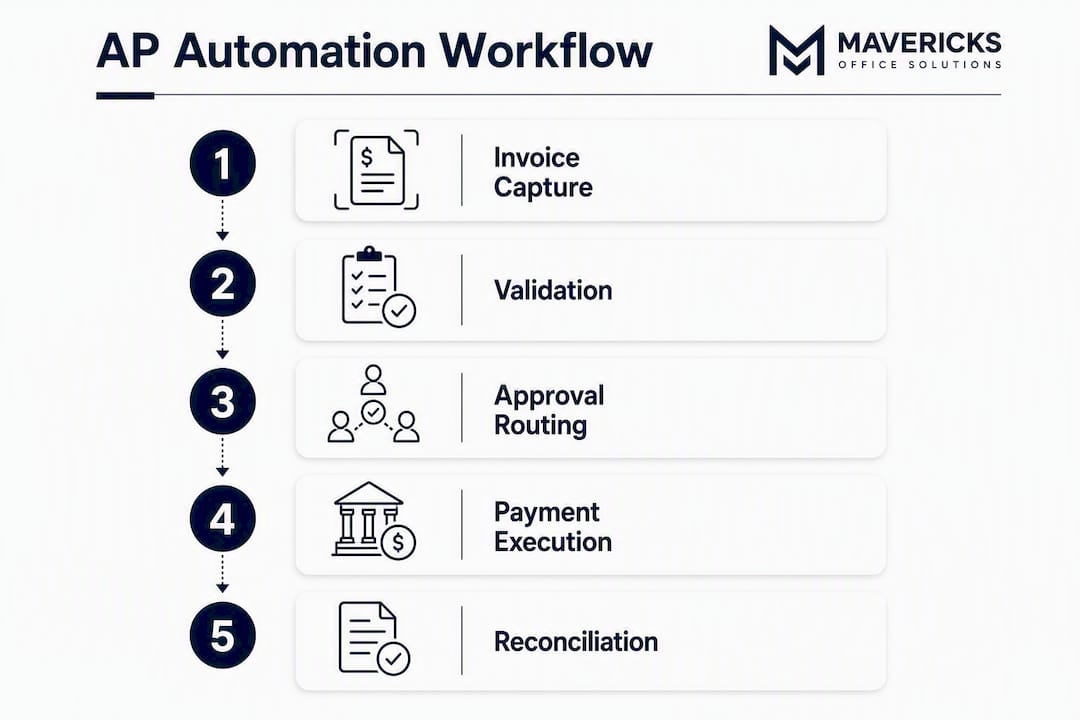
Stage 2: Validation and matching
The extracted data is validated against vendor master records and matched to open purchase orders and goods receipts. A 2-way match compares the invoice to the PO; a 3-way match adds the receiving document. Invoices that match within tolerance thresholds move forward automatically. Those outside tolerance are flagged as exceptions and routed to a human reviewer.
Stage 3: Approval routing
Matched invoices follow a configurable workflow: approvals route by cost center, dollar threshold, or business unit. Approvers receive notifications and can approve from a mobile interface. The system timestamps every action and enforces segregation-of-duties rules automatically.
Stage 4: Payment execution
Approved invoices are scheduled for payment via ACH, virtual card, wire, or check. Payment rails are selected based on vendor preference, discount terms, and cash-flow rules. Remittance details are sent to the supplier automatically.
Stage 5: Reconciliation
Completed payments post back to the general ledger. The system reconciles bank statements against payment records and flags discrepancies. Every transaction carries a full, timestamped audit trail.
A note on integration. Most AP automation platforms act as a middleware layer that connects to your existing ERP. You generally do not need to replace your core ledger to deploy AP automation. Modern solutions offer pre-built connectors for QuickBooks, Microsoft Dynamics 365, NetSuite, SAP, and Oracle Fusion, plus open APIs for custom integrations.
Which AP tasks should you automate first?
Sequencing matters. Automating everything at once creates change-management overload and makes it hard to isolate what is working.
- Invoice capture and data extraction. This is the highest-effort manual task and the fastest win. Eliminating keying errors alone justifies the investment for most organizations.
- PO matching and validation. Automating 2-way and 3-way matching removes the single largest source of approval delays and duplicate payments.
- Approval routing. Rule-based routing eliminates email chains and gives finance leaders real-time visibility into where invoices are stuck.
- Scheduled payments. Automating payment runs based on due dates and discount windows captures early-payment discounts that manual teams routinely miss.
- Bank reconciliation. Automated reconciliation closes the loop and feeds clean data into your month-end close.
Second-wave targets include touchless processing optimization (improving first-pass match rates above 85%), vendor self-service onboarding, tax treatment automation for cross-border invoices, and dynamic discounting programs.
Pro Tip: Start your pilot with a single cost center or a cohort of 20–30 vendors whose invoices are PO-backed and structurally consistent. This gives you a clean dataset to measure first-pass match rates and cycle-time improvements before rolling out to more complex invoice types.
What measurable benefits can finance teams expect?
The benefits of AP automation fall into four categories: cost reduction, speed, accuracy, and strategic capacity.
- Lower cost per invoice: From $8–15 manually to $2–4 with automation, typically a reduction of 60–80%.
- Faster approval cycles: Automated routing cuts approval time from days to hours for matched invoices.
- Early-payment discount capture: Visibility into due dates and discount windows lets treasury act on terms that manual teams miss.
- Audit readiness: Every action is timestamped and linked to a user, creating a tamper-evident audit trail that reduces fraud risk and simplifies regulatory reviews.
- Spend visibility: Real-time dashboards replace end-of-month spreadsheet reconciliations.
- Staff reallocation: AP automation frees finance staff from data entry so they can focus on cash optimization, vendor negotiation, and financial analysis.
AP automation benchmark metrics
| Metric | Manual baseline | Automated target |
|---|---|---|
| Cost per invoice | $8–$15 | $2–$4 |
| Invoice cycle time | 10–20 days | 3–5 days |
| Touchless processing rate | — | 70–85% (first pass) |
| Exception rate | 15–25% | 5–10% |
| Month-end close acceleration | Baseline | 25–40% faster |

Realistic first-pass match rates sit at 70–85% depending on PO discipline and invoice quality. Organizations with clean vendor master data and consistent PO usage reach the higher end of that range within the first year.
Software vs. managed AP services: which path fits your organization?
This is the decision most guides skip. The right answer depends on your team’s capacity and tolerance for change management.
| Decision factor | AP automation software | Managed AP services |
|---|---|---|
| Who owns execution | Your internal AP team | Third-party provider |
| Vendor enablement | Your team enrolls suppliers | Provider handles enrollment |
| Exception resolution | Internal staff | Provider’s team |
| Speed to value | 3–6 months post-implementation | Often faster; provider brings process |
| Control and visibility | High; you configure rules | Moderate; provider operates the workflow |
| Best for | Teams with AP staff and IT support | Teams with limited bandwidth or high exception rates |
| Cost model | Subscription or per-invoice fee | Typically per-invoice or percentage of spend |
Choose software when your AP team has capacity to manage vendor onboarding, your IT team can support integrations, and you want full control over workflow configuration.
Consider managed services when your team is small, your exception rate is high, you process invoices across multiple payment rails, or you need faster ROI without a long implementation cycle.
How to evaluate and choose AP automation software
Vendor selection is where most projects slow down. A structured checklist prevents scope creep and keeps demos focused.
- Map your current state first. Document invoice volume, invoice types (PO-backed vs. non-PO), current ERP, payment rails used, and your baseline cost-per-invoice. Vendors who cannot show improvement against your specific baseline are not the right fit.
- Confirm ERP and banking integrations. Ask for a pre-built connector list. Verify that your ERP version is supported, not just the product family.
- Evaluate data capture accuracy. Request a proof-of-concept using a sample of your actual invoices, including edge cases (handwritten, multi-page, non-English).
- Ask about touchless rate benchmarks. Vendors should be able to show you the touchless rates their customers achieve at your invoice volume and complexity, not just their best-case figures.
- Review exception handling. A system that flags 20% of invoices as exceptions and routes them to email is not much better than what you have now. Understand how exceptions are resolved and by whom.
- Assess security and access controls. Confirm role-based access, multi-factor authentication, data encryption at rest and in transit, and SOC 2 compliance. Privileged access management for AP platforms deserves the same rigor as any financial system.
- Clarify pricing. Per-invoice pricing scales with volume; subscription pricing is predictable. Understand what counts as a billable invoice and whether exceptions cost extra.
- Evaluate vendor services and roadmap. Ask about implementation support, training, and the vendor’s AI roadmap for improving match rates over time.
Pilot plan essentials:
- Define success criteria before the pilot starts (target touchless rate, cost-per-invoice reduction, cycle-time improvement).
- Use 60–90 days of real invoice data, not a curated sample.
- Include AP staff, IT, finance leadership, and at least one major vendor in the pilot group.
- Assign a project owner with authority to make configuration decisions.
Questions to ask during vendor demos:
- What is the average implementation timeline for an organization our size?
- What internal resources do we need to commit during implementation?
- What is your SLA for support tickets, and how do you handle integration failures?
- How do you improve touchless rates after go-live, and what does that process look like?
What vendor types are available for U.S. finance teams?
The AP automation market groups into four vendor categories. Understanding the categories helps you shortlist faster than reading 20 individual product pages.
ERP-integrated suites (examples: NetSuite, SAP, Oracle Fusion, Microsoft Dynamics 365) embed AP automation directly into the general ledger. The advantage is tight data consistency and a single vendor relationship. The trade-off is that AP functionality is often less specialized than a dedicated platform, and implementation timelines tend to be longer. Best for organizations already standardized on one of these ERPs and looking to extend existing investments.
AP specialist platforms (examples: Bill.com, Tipalti, Basware, HighRadius) are purpose-built for invoice processing, matching, and vendor management. They typically offer superior capture accuracy, richer vendor portal experiences, and faster implementation. They connect to ERPs via pre-built connectors rather than replacing them. Best for mid-market organizations that want best-in-class AP capability without a full ERP migration.
Payment-first platforms (Coupa is the most prominent example in this category) combine AP automation with payment rail optimization, virtual card programs, and rebate capture. Best for organizations where payment efficiency and working capital optimization are the primary drivers.
Global enterprise platforms (examples: SAP, Oracle Fusion, Coupa at enterprise scale) handle multi-country compliance, multi-currency processing, and complex approval hierarchies across large organizations. Implementation is substantial, but the compliance and scale capabilities are unmatched. Best for multinationals or rapidly scaling organizations with cross-border payment complexity.
Gartner’s AP invoice automation category is a useful starting point for understanding how analysts segment these vendors and what evaluation criteria matter most at each tier.
What does a realistic AP automation implementation look like?
Most implementations follow four phases. The timeline below assumes a mid-market organization (5,000–20,000 invoices per year) deploying a specialist AP platform on top of an existing ERP.
- Assessment (weeks 1–4). Document current AP processes, invoice types, ERP configuration, and vendor master data quality. Identify broken processes before you automate them. Automating a broken process digitizes the problem rather than fixing it.
- Configuration and integration (weeks 4–10). Configure the AP platform, build ERP connectors, set up approval hierarchies, and load vendor master data. This phase is where most projects run over schedule; allocate IT resources accordingly.
- Pilot (weeks 10–16). Run the pilot with a defined invoice cohort. Measure touchless rate, exception rate, and cycle time weekly. Adjust matching rules and approval thresholds based on results.
- Full rollout and continuous improvement (months 4–12+). Expand to all invoice types and vendors. Establish a monthly review cadence to track KPIs and improve match rates.
Cost considerations:
- Subscription fees typically range from per-user to per-invoice pricing; per-invoice models scale more predictably with volume.
- One-time setup and professional services fees vary widely; budget for them explicitly.
- Internal staff time during implementation is often underestimated. Expect 20–40 hours per month from AP, IT, and finance leadership during the configuration and pilot phases.
- Vendor enablement costs (communicating with suppliers, updating their invoice formats) are real and often overlooked.
Stakeholder RACI:
- AP team: Owns process documentation, exception rules, and vendor communication.
- Finance leadership: Approves success criteria, budget, and go/no-go decisions.
- IT: Owns integration architecture, security configuration, and uptime.
- Procurement: Provides PO data and supports 3-way match configuration.
- Vendors/suppliers: Must be enrolled and trained on the portal.
Common pitfalls and how to avoid them:
- Automating a broken process: Clean vendor master data and stabilize approval hierarchies before go-live.
- Poor vendor enablement: Assign a dedicated resource to supplier onboarding. Vendors who cannot submit invoices correctly will generate exceptions indefinitely.
- Integration blind spots: Test every ERP connector with real transaction data, not synthetic test cases.
- Skipping change management: AP staff who feel threatened by automation disengage. Involve them in pilot design and reframe their roles early.
Which metrics should you track, and how do you calculate ROI?
ROI for AP automation is straightforward to calculate once you have baseline data.
Core KPI formulas:
- Cost per invoice = Total AP operating cost ÷ Total invoices processed
- Touchless rate = Invoices processed without human intervention ÷ Total invoices processed
- Invoice cycle time = Average days from invoice receipt to payment approval
- Exception rate = Invoices requiring manual intervention ÷ Total invoices processed
- Early-payment discounts captured = Discount value captured ÷ Total available discount value
ROI calculation example:
Assume 10,000 invoices per year at a manual cost of $10 per invoice = $100,000 annual AP processing cost. After automation, cost drops to $3 per invoice = $30,000. Annual savings: $70,000. If the platform costs $20,000 per year (subscription plus amortized setup), net annual benefit is $50,000. Payback on a $25,000 implementation investment: approximately 6 months.
Sample before/after metrics
| Metric | Before automation | After automation |
|---|---|---|
| Cost per invoice | $10 | $3 |
| Annual processing cost (10K invoices) | $100,000 | $30,000 |
| Invoice cycle time | 10–20 days | 4 days |
| Touchless rate | — | 70–85% |
| Exception rate | 20% | 8% |
| Annual net savings (after platform cost) | — | $50,000 |
How do you keep improving after go-live?
Implementation is not the finish line. The organizations that get the most from AP automation treat it as a continuous improvement program, not a one-time project.
Set a monthly KPI review cadence covering touchless rate, exception rate, cost per invoice, and cycle time. When touchless rates plateau, investigate the root cause: it is usually vendor invoice quality, PO discipline, or matching rule configuration. Tighten tolerances incrementally rather than in large jumps that create exception spikes.
Vendor master data degrades over time. Schedule quarterly audits of vendor banking details, tax IDs, and contact information. A vendor portal that lets suppliers self-update their records reduces this burden significantly.
As your AP team’s manual workload decreases, redirect their capacity to higher-value work: cash-flow forecasting, early-payment discount programs, and vendor performance analysis. The strategic shift from data entry to financial analysis is where the long-term value of automation compounds.
Finally, stay current with your vendor’s product roadmap. AI-driven matching improves with model updates, and vendors who invest in their extraction engines will push your touchless rates higher over time without additional configuration work on your end.
How do you manage the people side of AP automation?
Technology is the easier half of any AP automation project. The harder half is getting your team to trust it and use it consistently.
Start by involving AP staff in the pilot design. When the people who process invoices every day help define the matching rules and exception workflows, they build ownership in the outcome rather than resistance to the change. Reframe their roles explicitly: automation handles the repetitive extraction and routing; they handle judgment calls, vendor relationships, and analysis.
Training needs to be role-specific. AP clerks need hands-on time with the exception queue and vendor portal. Finance managers need dashboard training and approval workflow orientation. IT staff need integration and security configuration documentation.
Communicate the “why” clearly and early. Teams that understand the business case (lower costs, faster close, better audit readiness) are more likely to flag problems constructively rather than work around the system. A short internal briefing before go-live, covering what changes and what stays the same, prevents most of the anxiety that derails adoption.
Expect a dip in throughput during the first 4–6 weeks post-launch. This is normal. Build it into your timeline so that leadership does not interpret early turbulence as failure.
What security and compliance requirements apply to AP automation?
AP automation platforms handle sensitive financial data, vendor banking details, and payment instructions. Security is not optional, and the controls you configure at implementation will determine your audit posture for years.
Access controls. Role-based access should limit who can approve invoices, release payments, and modify vendor banking records. Segregation of duties means the person who approves an invoice cannot also release the payment. Enforce multi-factor authentication for all users, especially those with payment release authority.
Data encryption. Confirm that the platform encrypts data at rest and in transit. Ask specifically about how vendor banking details are stored and who at the vendor can access them.
Audit trail integrity. Every action in the AP workflow should be timestamped, user-attributed, and immutable. This audit trail is your first line of defense in a fraud investigation or regulatory review. AP automation’s tamper-evident audit trail reduces fraud risk and strengthens regulatory defenses beyond what pure ROI math captures.
Compliance considerations. U.S. organizations subject to SOX (Sarbanes-Oxley) need documented approval hierarchies, segregation of duties, and access logs. Organizations in regulated industries (healthcare, government contracting) may face additional data residency and retention requirements. Confirm that your AP platform’s compliance certifications (SOC 2 Type II, ISO 27001) cover the specific controls your auditors require.
Vendor due diligence. Your AP platform vendor has access to your financial data and payment instructions. Review their security posture, subprocessor list, and incident response procedures before signing a contract. AI-driven AP tools introduce specific security risks that warrant the same due diligence you apply to any financial system.
This article provides general information about AP automation technology and is not legal, financial, or compliance advice. Confirm current regulatory requirements with a qualified professional or your organization’s legal counsel.
How does AP automation change finance team roles?
AP automation does not eliminate AP jobs. It changes what those jobs involve, and that distinction matters for how you communicate the project internally.
Roles that shrink: manual data entry, paper handling, email-based approval chasing, and manual reconciliation. These tasks are repetitive and low-value; removing them is the point.
Roles that grow: exception management, vendor relationship management, cash-flow analysis, and early-payment discount program oversight. These require judgment, communication, and financial acumen that automation cannot replicate.
New roles that may emerge: AP automation administrator (owns workflow configuration and vendor portal management), data quality manager (maintains vendor master data), and AP analyst (monitors KPIs and drives continuous improvement).
For small and mid-sized organizations, these expanded roles often do not require new hires. They represent a reallocation of existing staff time from low-value to high-value work. The finance leader’s job is to make that reallocation explicit, with updated job descriptions and performance metrics that reflect the new expectations.
Key Takeaways
AP automation reduces invoice processing costs by 60–80%, cutting cost-per-invoice from $8–15 to $2–4, and delivers payback within 6–12 months for most mid-market organizations.
| Point | Details |
|---|---|
| Baseline measurement first | Measure your current cost-per-invoice before evaluating any vendor; it is the foundation of every ROI conversation. |
| Touchless rate is the north star KPI | Target 70–85% first-pass match rates; the gap between your rate and that benchmark shows where to focus improvement. |
| Software vs. managed services | Choose software when you have internal AP and IT capacity; choose managed services when bandwidth or exception rates are high. |
| Clean processes before automation | Standardize vendor master data and approval hierarchies first; automating a broken process only makes the problem faster. |
| Mavericksofficesolutions for integration and security | Mavericksofficesolutions supports AP automation projects through managed IT, cybersecurity, and integration services for small and mid-sized businesses. |
The part most AP automation guides get wrong
Most articles on this topic treat AP automation as a software selection problem. Pick the right platform, configure the matching rules, and the savings follow automatically. That framing is incomplete, and it sets finance leaders up for disappointment.
The real constraint in most AP automation projects is not the technology. It is the quality of the data and processes the technology is asked to operate on. Vendor master records with duplicate entries, POs that do not match invoice line items, and approval hierarchies that exist on paper but not in practice will generate exceptions at a rate that overwhelms any efficiency gain. The platform becomes a more expensive version of the email inbox it replaced.
The organizations that achieve 80%+ touchless rates within the first year share one characteristic: they spent as much time cleaning up their processes before go-live as they spent configuring the software. That is not glamorous work. It involves conversations with procurement about PO discipline, with vendors about invoice format standards, and with department heads about approval authority. But it is the work that determines whether your automation project delivers the ROI in the benchmark table or ends up as a cautionary case study.
My advice to any finance leader starting this process: before you schedule a single vendor demo, spend two weeks auditing your vendor master data and mapping your current approval workflows. What you find will tell you more about your readiness for automation than any vendor’s sales pitch.
Mavericksofficesolutions helps you connect AP automation to your broader IT infrastructure
The savings from AP automation depend on one thing your software vendor cannot control: the reliability and security of the IT environment it runs in. Integration failures, access control gaps, and unsecured payment rails can erase efficiency gains quickly.
Mavericksofficesolutions works with small and mid-sized businesses to build the IT foundation that AP automation requires: secure ERP integrations, managed IT support with under-12-minute average response times, cybersecurity controls that protect vendor banking data and payment instructions, and document digitization support for organizations converting paper invoice workflows to digital. If your AP automation project needs a reliable IT partner for integration architecture, security configuration, or ongoing operational support, contact Mavericksofficesolutions for a discovery conversation and pilot scoping session.
Useful sources and further reading
These are the primary sources used throughout this guide. Each one offers additional depth on a specific aspect of AP automation.
- Gartner: Accounts Payable Invoice Automation Solutions — Analyst category definition and vendor evaluation criteria; useful for understanding how the market is segmented and what capabilities matter at each tier.
- NetSuite: Make the Business Case for AP Automation — ROI framing, payback timing, and the strategic case for shifting AP staff to higher-value work.
- NetSuite: 10 Key Benefits of AP Automation — Concise benefit summary with data on manual processing time; good for building an internal business case.
- Amazon Business: AP Automation Best Practices and ROI Insights — Practical implementation guidance with emphasis on process cleanup as a prerequisite for automation success.
Recommended
- UiPath vs Automation Anywhere for SMBs: 2026 Guide – Mavericks Office Solutions
- Copier Lease vs. Buy: Which Makes More Sense for Your Business? – Mavericks Office Solutions
- Unlocking Efficiency: How OCR Technology Enhances Xerox Copiers – Mavericks Office Solutions
- Privileged Access Management: 2026 Guide for Ohio IT Teams – Mavericks Office Solutions