

For most SMBs, the best business password manager is a business-grade platform deployed and actively managed by a qualified managed service provider (MSP). That combination gives you admin visibility, enforced MFA, SCIM-automated provisioning, and audit trails your auditors will actually accept — without putting the burden on an already stretched internal IT team. Mavericksofficesolutions handles exactly this kind of deployment for small and medium businesses, from initial pilot through company-wide rollout.
Why this approach works:
- Admin visibility and audit trails give IT full oversight of credential health across every employee account
- SCIM and SSO integration automates onboarding and offboarding, eliminating orphaned credentials when staff turns over
- Global MFA enforcement closes the single biggest credential attack vector for SMBs
- Browser extensions and mobile apps drive user adoption without friction
- Compliance readiness for SOC 2 and HIPAA requires documented controls that only business-grade tools provide
- Managed deployment through Mavericksofficesolutions means policy enforcement, monitoring, and a local help desk with an average response time under 12 minutes
Table of Contents
- Why does your SMB need a business-grade password manager?
- What admin and security features can you not skip?
- How should you evaluate vendors and what should you budget?
- How do you roll out a password manager with minimal friction?
- Should you manage this in-house or hire an MSP?
- What does implementation actually cost and how long does it take?
- What will auditors and regulators expect to see?
- Key Takeaways
- Why managed deployment is the right call for most SMBs
- Mavericksofficesolutions handles the deployment so you don’t have to
- Useful sources and further reading
Why does your SMB need a business-grade password manager?
Consumer password accounts and shared spreadsheets fail teams in three specific ways: no centralized ownership, no audit trails, and no policy enforcement. When an employee leaves, you cannot revoke their access to a shared Google Sheet of credentials. When an auditor asks for evidence of MFA enforcement, a personal account has nothing to show.
Business-grade tools give admins the ability to monitor credential health across the entire organization, enforce two-factor authentication globally, and identify weak or reused passwords before attackers do. Those capabilities are central to meeting compliance standards like HIPAA and SOC 2. Without them, you are not just less secure — you are unauditable.
The productivity case is equally clear. Password resets often account for up to 90% of routine help desk tickets, and a centralized manager can reduce that volume by as much as 90%. That frees your IT team to focus on work that actually moves the business forward.
What admin and security features can you not skip?
Every vendor will claim their product is enterprise-ready. These are the features that separate a real business tool from a consumer product with a team billing page:
- Admin console with centralized ownership. Admins must be able to reassign or revoke corporate credentials independently of an employee’s personal vault. Business vaults require centralized ownership so corporate assets stay under company control when someone leaves.
- SSO and SCIM provisioning. Integrations with Google Workspace and Microsoft Entra ID automate user lifecycle management. Without SCIM, manual provisioning is the most common cause of stalled rollouts.
- Global MFA enforcement. A policy-level toggle that forces all users onto multi-factor authentication, with no opt-out.
- Audit logs and reporting. Timestamped records of who accessed, shared, or changed credentials — required evidence for SOC 2 and HIPAA assessments.
- Breach monitoring. Credential health dashboards that surface weak or compromised passwords so admins can act before attackers do.
- Secure sharing with least-privilege controls. Role-based sharing that limits access to only what each user needs.
- Separated business and personal vaults. Employees keep their personal credentials private; admins control only the business vault.
How should you evaluate vendors and what should you budget?
The right vendor decision comes down to three questions: Does it integrate with your identity provider? Does it give you audit-grade logs? And does the pricing model scale without punishing you for growth?

When building your shortlist, ask vendors directly about SCIM provisioning support for your specific identity provider, data residency options if you operate in a regulated industry, and what is included in the base plan versus gated behind enterprise add-ons. SSO integration, in particular, is frequently an upsell on lower-tier plans.
Vendor evaluation checklist:
- Confirm SCIM support for Google Workspace or Microsoft Entra ID
- Verify audit log retention period and export format
- Ask whether SSO is included or requires an enterprise upgrade
- Clarify data residency: cloud or self-hosted deployment options
- Request a sample compliance evidence package (SOC 2 or HIPAA)
- Confirm support SLA and whether help desk access is included
Pricing for business plans typically runs per user per month, with most platforms requiring a minimum seat count. Hidden costs include SSO integration fees, professional services for SCIM setup, migration assistance, and end-user training. Enterprise roundups consistently flag the gap between entry-level and compliance-grade feature sets as the most significant procurement trade-off.
How do you roll out a password manager with minimal friction?
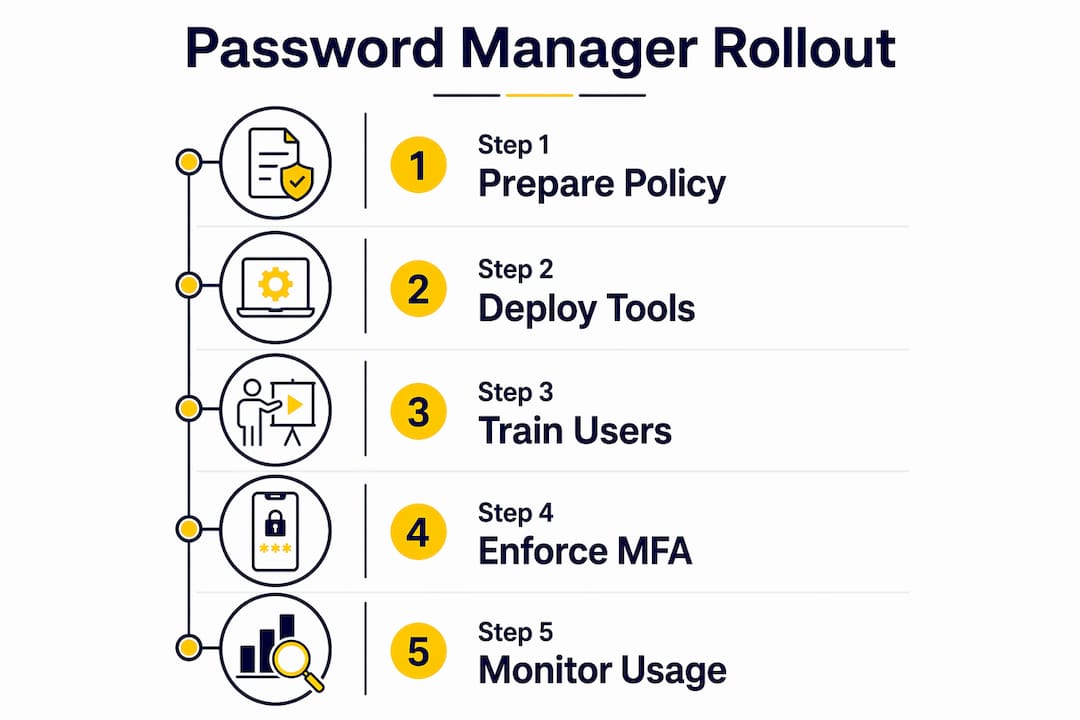
The fastest path to full adoption is a short pilot with one team, SCIM integrated from day one, and browser extensions deployed before the first training session. Skipping the pilot and going company-wide immediately is the most common mistake SMBs make.
- Weeks 1–2: Pilot setup. Select a 5–10 person team. Configure admin console, connect your identity provider via SCIM/SSO, and deploy browser extensions to pilot devices.
- Week 2–3: Pilot onboarding. Walk the pilot group through vault setup, autofill, and the mobile app. Collect friction points before scaling.
- Week 3–4: Policy tuning. Enable global MFA enforcement for the pilot group. Review audit logs and adjust sharing policies based on real usage.
- Weeks 4–8: Company-wide rollout. Provision remaining users via SCIM, run a 30-minute training session, and enforce autofill as the default.
Pro Tip: Pair the rollout with a mandatory MFA policy announcement from leadership. Adoption rates climb significantly when the directive comes from above IT, not just from the help desk.
User adoption, not feature set, is the biggest hurdle in SMB deployments. Browser extensions and mobile apps that work without friction are what close the gap between a tool employees tolerate and one they actually use.
Should you manage this in-house or hire an MSP?
SMBs with fewer than five IT staff, active compliance obligations, or high employee turnover should favor a managed service. The reason is straightforward: policy enforcement and incident response require consistent attention, and a single IT generalist handling 10 other priorities will let enforcement slip.
A qualified MSP should deliver:
- SCIM/SSO integration with your identity provider
- Admin policy configuration and ongoing tuning
- Monitoring and alerting on credential health and breach events
- Onboarding and offboarding workflows tied to HR processes
- Help desk coverage for password resets and vault access issues
- Audit log review and compliance evidence packaging
- Incident remediation when a breach is detected
Decision checklist for outsourcing:
- Few dedicated IT staff? Favor managed.
- Active SOC 2 or HIPAA audit cycle? Favor managed.
- High employee turnover? Favor managed.
- No existing identity provider integration? Favor managed.
Mavericksofficesolutions provides managed cybersecurity services that include password management deployment as part of a broader identity and access control program.
What does implementation actually cost and how long does it take?
Most SMB pilots run 2–6 weeks. Full company-wide rollouts typically take 4–12 weeks, depending on user count and the complexity of your identity provider integration.
| Milestone | Typical Duration |
|---|---|
| Pilot setup and identity provider connection | 3–5 business days |
| Pilot user onboarding and training | 1–2 weeks |
| Policy tuning and audit log review | 1 week |
| SCIM directory sync for full user base | 2–5 business days |
| Company-wide rollout and enforcement | 2–4 weeks |
Cost components to budget for:
- Per-user subscription (billed monthly or annually per seat)
- Professional services for SCIM/SSO configuration and migration
- End-user training (typically one 30-minute session per department)
- Optional self-hosted deployment for data sovereignty requirements
- Enterprise add-ons: advanced reporting, SSO, or privileged access modules
What will auditors and regulators expect to see?
Meeting basic auditor expectations requires four things: admin visibility, enforceable MFA, retained audit logs, and documented onboarding/offboarding tied to SCIM. Everything else builds on that foundation.
Auditor-ready checklist:
- MFA enforcement policy: Evidence = global policy screenshot and enforcement log showing 100% of users enrolled
- Vault ownership documentation: Evidence = admin console showing all corporate credentials assigned to company-owned collections, not personal accounts
- Audit log retention: Evidence = exported log showing access, sharing, and change events for the review period
- Offboarding procedure: Evidence = SCIM deprovision record showing credential revocation within one business day of termination
- Breach monitoring: Evidence = dashboard screenshot and alert history showing active monitoring
Copy-ready policy snippets:
- Password policy: “All corporate credentials must be stored in the company-managed vault; personal storage of business credentials is prohibited.”
- Vault ownership: “Corporate credential collections are owned by the IT administrator role; departing employees’ business vault access is revoked upon termination.”
- Incident response: “Any detected credential breach triggers immediate admin notification, mandatory password rotation, and an incident log entry within four hours.”
For a broader view of how SaaS identity controls fit into your compliance posture, the guidance on SSO and access governance applies directly here.
Key Takeaways
A managed deployment of a business-grade password manager, with SCIM/SSO integration and enforced MFA, is the most reliable path to credential security and compliance readiness for SMBs.
| Point | Details |
|---|---|
| Business plans are non-negotiable | Consumer accounts lack audit trails, policy enforcement, and centralized ownership required for teams. |
| SCIM/SSO from day one | Automating provisioning prevents orphaned credentials and is the top factor in rollout success. |
| Pilot before full rollout | A 2–4 week pilot with one team surfaces friction points before they affect the whole company. |
| Password resets drive ROI | Centralizing credential management can cut help desk reset tickets by up to 90%, freeing IT for higher-value work. |
| Mavericksofficesolutions as managed implementer | Mavericksofficesolutions deploys and operates password management as part of its managed IT services, with a local help desk averaging under 12 minutes response time. |
Why managed deployment is the right call for most SMBs
The conventional wisdom in password manager buying guides focuses almost entirely on feature comparisons. That framing misses the real problem for SMBs: it is not which tool you pick, it is whether anyone is actually enforcing the policies after go-live.
Most SMBs that deploy a password manager on their own see strong adoption in the first month, then watch it erode. MFA enforcement gets turned off because one executive complains. Offboarding steps get skipped during a busy quarter. Audit logs pile up unreviewed. The tool is running, but the security outcome it was supposed to deliver is not.
A managed approach solves this by making policy enforcement someone’s explicit job. When Mavericksofficesolutions manages a deployment, the admin console is monitored, offboarding is tied to HR workflows, and audit logs are reviewed on a schedule — not when someone remembers. The cybersecurity mistakes that lead to breaches are almost always process failures, not tool failures. That distinction matters for how you budget and who you assign ownership to.
Mavericksofficesolutions handles the deployment so you don’t have to
Password management done right requires more than a software license. It requires SCIM integration, policy enforcement, ongoing monitoring, and a help desk that responds when employees get locked out. Mavericksofficesolutions delivers all of that as part of a fully managed IT engagement, with a local USA-based help desk that averages under 12 minutes to respond — no offshore call centers, no ticket queues that stretch into the next business day.
The first engagement typically includes a pilot setup, identity provider integration via SCIM/SSO, and an admin policy baseline your team can hand directly to an auditor. If you are ready to move from a spreadsheet or a consumer account to a credential security program that holds up under scrutiny, schedule a managed IT assessment with Mavericksofficesolutions today.
Useful sources and further reading
- LastPass Business: Covers admin visibility, MFA enforcement, and compliance capabilities for HIPAA and SOC 2 evidence collection.
- Bitwarden Business: Detailed guidance on SCIM provisioning, vault ownership separation, and cloud vs. self-hosted deployment options.
- 1Password Teams and Small Business: Documents breach monitoring dashboards and credential health alerting for admin teams.
- NordPass Business: Quantifies help desk ticket reduction and productivity ROI from centralized password management.
- Gartner Peer Insights: Password Management Tools: Peer reviews of enterprise platforms including Keeper, Bitwarden, and ManageEngine — useful for procurement benchmarking.
- PCMag Best Business Password Managers: Annual testing of business-specific plans rated on admin tooling, ease of setup, and compliance features.
- PasswordManager.com Enterprise Roundup: Rates tools on onboarding speed, admin controls, and compliance-grade features — useful context for RFP conversations.
This article provides general information about business password management and is not a substitute for professional IT security or legal advice. Confirm current compliance requirements with a qualified professional for your specific situation.
Recommended
- Microsoft 365 Backup: What Ohio SMBs Need to Know – Mavericks Office Solutions
- Small Business Cybersecurity: A Michigan Owner’s Playbook – Mavericks Office Solutions
- SaaS Security Controls for Ohio SMBs: 2026 Guide – Mavericks Office Solutions
- Google Workspace vs Microsoft 365: Best Pick for Ohio SMBs – Mavericks Office Solutions