

What is privileged access management and why does it matter?
Privileged access management (PAM) is the cybersecurity discipline that secures, monitors, and controls elevated permissions — the admin, root, and service account credentials that can change system configurations, install software, or access sensitive data at scale. Think of these accounts as the master keys to your organization. PAM governs who holds them, when they can be used, and exactly what happens during each session.
The stakes are high. According to Palo Alto Networks’ Unit 42 research, 66% of social engineering attacks specifically target privileged accounts. Threat actors prioritize these credentials because a single compromised admin account can hand them the entire environment. Regulatory frameworks including HIPAA, PCI DSS, and NIST SP 800-53 all require demonstrable control over privileged access, making PAM both a security and a compliance necessity.
Key account types PAM governs:
- Local administrator accounts on workstations and servers
- Domain admin accounts with network-wide control
- Root accounts on Linux and Unix systems
- Service accounts running background processes and integrations
- API keys and SSH keys used by automated pipelines and CI/CD tools
- Third-party and contractor credentials with temporary elevated access
Table of Contents
- Types of privileged accounts you need to manage
- How does PAM differ from IAM and PIM?
- Core features and best practices for effective PAM
- How to implement PAM step by step
- Top privileged access management providers serving Ohio
- How to choose the right PAM provider for your organization
- Why PAM matters more than ever for Ohio small businesses in 2026
- Ohio and US regulatory compliance requirements tied to PAM
- Key Takeaways
- The case for treating PAM as a continuous discipline, not a project
- Mavericksofficesolutions brings PAM within reach for Ohio businesses
Types of privileged accounts you need to manage
Human privileged users are the most visible category: IT administrators, security engineers, database administrators, and contractors who need elevated rights to do their jobs. But non-human identities are just as dangerous, often more so, because they tend to accumulate permissions quietly over time.

Service accounts, API tokens, and CI/CD pipeline credentials frequently hold broad permissions that nobody reviews after initial setup. These are the “shadow accounts” that attackers love. A contractor finishes a project, their account sits dormant for months, and nobody notices until it shows up in a breach report. Cloud environments compound this problem because every AWS IAM role, Azure service principal, and Google Cloud service account is a potential attack path if left unmanaged.
On-premises, cloud, and hybrid environments each introduce their own privileged identity risks. A mature PAM program accounts for all three, not just the traditional Active Directory domain admin.
How does PAM differ from IAM and PIM?
These three terms overlap, and the confusion is understandable. Identity and access management (IAM) covers the broad population of all users: authentication, single sign-on, password management, and user lifecycle from onboarding to offboarding. PAM is a specialized subset of IAM focused exclusively on elevated permissions and session-level control.
Privileged Identity Management (PIM) sits closest to PAM. Where PAM governs the tools and processes for controlling privileged sessions, PIM focuses on identity lifecycle and time-bound role activation. Microsoft Entra PIM, for example, lets you require approval before a user can activate a Global Administrator role, with the elevation expiring automatically after a set window. PAM and PIM work together: PIM manages who can request elevation, PAM controls and records what happens once they have it.
In a Zero Trust architecture, all three layers are necessary. IAM verifies identity, PIM controls role activation, and PAM enforces least privilege at the session level.

Core features and best practices for effective PAM
Just-In-Time (JIT) access is the most impactful shift in modern PAM. Instead of leaving admin rights permanently active, JIT grants elevation only for a specific task and revokes it automatically when the task is done. If an attacker compromises an account between tasks, they find no standing privileges to exploit.
Essential PAM capabilities every organization should deploy:
- Credential vaulting: Encrypted storage with role-based access; users never see the actual password
- JIT access workflows: Time-bound elevation with automated revocation
- Session monitoring and recording: Real-time oversight with forensic audit trails
- Multi-factor authentication (MFA): Required on every privileged account, including legacy systems
- Automated password and SSH key rotation: Limits the lifespan of any stolen credential
- SIEM integration: Correlates privileged activity signals across the full network
- Separation of duties: Prevents any single account from holding unchecked authority
Session monitoring goes beyond logging. Advanced PAM systems use behavioral analytics to detect anomalies in real time and can terminate a suspicious session automatically before damage spreads.
Pro Tip: Start with your highest-risk accounts: domain admins, cloud console root accounts, and any service account with write access to production systems. Vault those credentials first, enforce MFA, and then expand the program. Trying to cover everything at once is the fastest way to stall a PAM rollout.
How to implement PAM step by step
A phased approach keeps the program moving without breaking production systems.
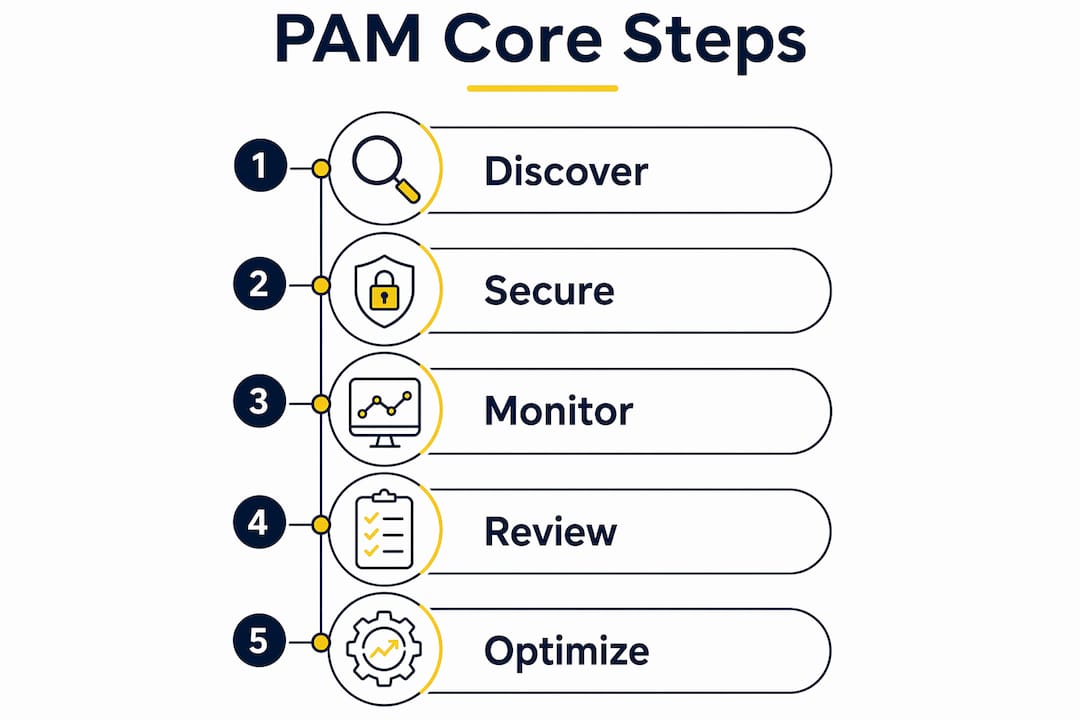
- Discover and inventory all privileged accounts. Scan Active Directory, local machines, cloud consoles (AWS, Azure, Microsoft 365), and network devices. Include service accounts and shared credentials. You cannot protect what you have not found.
- Set up the credential vault. Migrate all discovered privileged passwords into an encrypted vault. Rotate every password immediately after vaulting and revoke any credentials still stored in spreadsheets or shared documents.
- Define least privilege policies. Remove local admin rights from standard users. Map each role to the minimum permissions it genuinely requires.
- Deploy JIT access workflows. Build approval-based or policy-driven elevation requests so users get temporary access for specific tasks, not permanent standing rights.
- Activate session monitoring and audit logging. Every privileged session should be recorded and tied to a named identity.
- Schedule regular access reviews. Quarterly reviews of all privileged accounts catch stale contractor access and over-provisioned service accounts before attackers do.
- Integrate PAM with your broader security stack. Connect to your SIEM, secure remote access platform, and identity governance tools so privilege signals feed into your overall threat detection.
Top privileged access management providers serving Ohio
Ohio organizations have access to both nationally recognized PAM platforms and local managed service providers. The right choice depends on your team’s internal capacity, compliance requirements, and budget.
| Provider | Services offered | Specializations | Local presence and support | Customer ratings |
|---|---|---|---|---|
| CyberArk Software, Inc. | Credential vaulting, secrets management, endpoint privilege management, cloud entitlements | Enterprise-scale PAM, Zero Trust enforcement, DevOps secrets | National platform; enterprise support tiers | Widely recognized as an industry leader |
| BeyondTrust Corporation | PAM, Identity Threat Detection and Response (ITDR), secrets management, Cloud Infrastructure Entitlement Management (CIEM), secure remote access | Privilege-centric identity security, AI agent governance, cross-environment identity control | Ohio address verified; enterprise and mid-market support | Highly rated across enterprise security reviews |
| Mavericksofficesolutions | Managed IT and cybersecurity including PAM implementation, 24/7 monitoring, local help desk | SMB-focused PAM deployment, Zero Trust guidance, unified technology management | Ohio-based; average help desk response under 12 minutes | Local SMB clients; responsive, USA-based support |
CyberArk and BeyondTrust are built for large, complex environments with dedicated security teams to manage them. Mavericksofficesolutions fills a different need: Ohio small and mid-sized businesses that want PAM implemented and managed without building an internal security operations center.
How to choose the right PAM provider for your organization
Security features come first. Confirm the provider supports credential vaulting, JIT access, MFA enforcement, session recording, and SIEM integration. A PAM solution missing any of these is incomplete.
Key evaluation criteria:
- Compliance alignment: Does the platform produce the audit logs and session reports your specific frameworks (HIPAA, PCI DSS, NIST) require?
- Scalability and pricing: Transparent per-user pricing beats complex licensing with hidden add-ons. Confirm the model scales as your team grows.
- Local support and responsiveness: PAM incidents move fast. A provider with a local, USA-based help desk responds faster than one routing tickets offshore.
- Implementation support: Ask specifically how the provider handles the discovery and vaulting phase. That first step is where most programs stall.
- SMB fit: Enterprise platforms can be over-engineered for smaller teams. Cloud-native, agentless solutions reduce deployment complexity significantly.
Common pitfalls to avoid: copying an enterprise PAM architecture onto a 30-person team, skipping the discovery phase and missing shadow accounts, and delaying MFA enforcement because it feels disruptive. The disruption of a breach is far worse.
Why PAM matters more than ever for Ohio small businesses in 2026
Small businesses are not low-priority targets. Only 23% of small businesses feel very prepared for cyber threats, according to the U.S. Chamber of Commerce’s report. Attackers know this and actively exploit it. A single compromised admin account can trigger ransomware, data exfiltration, or a compliance violation that carries serious financial penalties.
Modern PAM solutions designed for SMBs are cloud-native and agentless, meaning no on-premises servers, no complex network changes, and no dedicated security team required to deploy them. Learn more from this step-by-step guide for SMBs on managing your online presence and reputation, which is crucial for SMB risk management. For Ohio businesses navigating HIPAA, PCI DSS, or NIST SP 800-171 requirements, PAM provides the audit logs, access controls, and session records that auditors specifically look for. Mavericksofficesolutions brings local cybersecurity expertise and 24/7 monitoring to SMBs that need enterprise-grade protection without the enterprise overhead.
Ohio and US regulatory compliance requirements tied to PAM
Several federal and Ohio-relevant frameworks directly mandate PAM controls, and non-compliance carries real consequences.
HIPAA Security Rule §164.312(a) requires covered healthcare entities to implement technical safeguards controlling access to electronic protected health information. Credential vaulting, MFA on admin accounts, and session audit logs all satisfy specific HIPAA requirements. Ohio has a significant healthcare sector, making this one of the most common compliance drivers for local PAM adoption.
PCI DSS 4.0 Requirements 7 and 8 mandate strict access control and authentication for any system touching cardholder data. Requirement 8 specifically calls for MFA on all administrative access and unique credentials per user, both core PAM functions.
NIST SP 800-171 Rev. 3 applies to federal contractors handling Controlled Unclassified Information. Requirements 3.1.6 and 3.1.7 directly address least privilege enforcement and preventing non-privileged users from executing privileged functions.
CIS Controls v8 Control 5 (Account Management) mandates privileged account governance as a foundational security practice, applicable to organizations of any size. Ohio businesses pursuing cyber insurance increasingly find that insurers require documented PAM controls before issuing or renewing policies.
Key Takeaways
Privileged access management requires credential vaulting, JIT access, session monitoring, and MFA enforcement to meaningfully reduce breach risk across any organization.
| Point | Details |
|---|---|
| PAM controls elevated permissions | Admin, root, and service accounts need stricter controls than standard user accounts. |
| JIT access eliminates standing privileges | Granting elevation only for specific tasks removes the permanent attack window attackers rely on. |
| SMBs face real risk | Only 23% of small businesses feel very prepared for cyber threats, making PAM adoption urgent for Ohio SMBs. |
| Compliance drives PAM adoption | HIPAA, PCI DSS 4.0, and NIST SP 800-171 all contain specific requirements that PAM directly satisfies. |
| Mavericksofficesolutions serves Ohio SMBs | Local managed IT and cybersecurity services with under-12-minute help desk response and 24/7 monitoring. |
The case for treating PAM as a continuous discipline, not a project
The most common mistake I see organizations make is treating PAM as a one-time deployment. They vault credentials, check the compliance box, and move on. Six months later, a new cloud service has a root account nobody enrolled in the vault, a contractor’s credentials are still active three weeks after their contract ended, and the JIT workflows were quietly bypassed because they slowed down a critical project.
Zero Standing Privileges is the right destination, but getting there requires discipline over time, not a single sprint. The organizations that do this well treat PAM the way they treat patch management: a continuous operational practice with scheduled reviews, clear ownership, and metrics that get reported to leadership. The shift toward cloud and remote work in 2026 only accelerates the need. Every new SaaS admin account, every cloud console root credential, and every CI/CD pipeline secret is a new privileged identity that needs governance from day one.
Mavericksofficesolutions brings PAM within reach for Ohio businesses
Ohio businesses that need PAM implemented and actively managed, without hiring a dedicated security team, have a direct path forward with Mavericksofficesolutions. As a local, Ohio-based managed IT provider, Mavericksofficesolutions handles the full scope: privileged account discovery, credential vaulting, MFA enforcement, session monitoring, and ongoing access reviews, all backed by a USA-based help desk that responds in under 12 minutes on average.
The difference from a national platform vendor is straightforward. You get a partner who knows your environment, responds when something goes wrong, and handles the operational work so your team can focus on the business. Whether you’re navigating HIPAA requirements, tightening controls before a PCI audit, or simply closing the privileged account gaps that keep your IT manager up at night, Mavericksofficesolutions has the local expertise to get it done. Visit mavericksofficesolutions.com/managed-it to start a conversation about securing your privileged accounts today.