

If you run a small business, the right move is to operate a default-deny firewall backed by a documented change-management process, or hand that responsibility to a managed IT provider offering 24/7 monitoring. That posture, laid out in NIST Special Publication 800-41r1, pairs rule specificity with lifecycle management so nobody forgets why a rule exists. Automating that process isn’t optional busywork either. FireMon reports that automated change workflows execute rule changes up to 90% faster than manual ticket chains, with built-in validation before anything goes live.
Here’s what to do in the next 15 minutes:
- Export your current firewall ruleset and scan for any “any-any” or “permit all” entries.
- Confirm every open port has a named business owner attached to it.
- If neither task feels doable in-house, contact a managed IT provider (Mavericks Office Solutions runs a local help desk that responds in under 12 minutes) and ask for a rule audit.
Key Takeaways
Firewall management works when default-deny policy, documented change control, and scheduled recertification operate together as one continuous process, not as separate one-time tasks.
| Point | Details |
|---|---|
| Default-deny is the baseline | Block everything first, then open only specific ports and addresses tied to a named business justification. |
| Rule order prevents shadowing | Place specific rules above general ones so broad entries never silently override precise ones. |
| Change management closes the loop | Every request needs validation, named approval, verification, and a recertification date to avoid rule decay. |
| Automation cuts response time | Automated workflows execute rule changes up to 90% faster than manual ticket processes. |
| Outsourcing solves the bandwidth gap | Mavericks Office Solutions provides 24/7 monitoring and a U.S.-based help desk with under 12-minute average response times. |
Table of Contents
- What Is Firewall Management for a Small Business?
- How Do You Build a Firewall Rulebase That Doesn’t Turn Into a Mess?
- What Does a Firewall Change Management Process Look Like?
- How Should You Monitor and Maintain a Firewall Day to Day?
- Should You Manage Your Firewall In-House or Outsource It?
- How Do You Handle Firewall Backups and Disaster Recovery?
- How Does Firewall Management Fit Into Your Broader Cybersecurity Strategy?
- What Skills Does In-House Firewall Management Actually Require?
- What Does Firewall Management Cost, and How Should You Budget for It?
- What Small Firewall Mistakes Cause the Biggest Problems?
- How Mavericks Office Solutions Handles Firewall Management for You
- Sources
What Is Firewall Management for a Small Business?
Firewall management for a small business means the ongoing work of configuring, monitoring, and revising the rules that decide which network traffic gets through and which gets blocked. It’s not a one-time setup. It’s a cycle: rules get created, they age, they get reviewed, and eventually they get retired or renewed. Most small businesses get the setup part right and then never touch it again, which is exactly how rulebases turn into liabilities.
Three deployment types cover almost every SMB scenario:
- Network appliance firewalls sit at the perimeter, inspecting traffic between your office network and the internet. These handle the bulk of the workload for a single-location business.
- Host-based firewalls run on individual servers or workstations, adding a second layer if the perimeter is ever bypassed.
- Cloud-native firewalls protect virtual networks (a VPC, for instance) when you run workloads in AWS, Azure, or similar platforms.
Placement matters as much as the type. A retail shop with one office needs perimeter protection and maybe host firewalls on point-of-sale systems. A company running a hybrid setup, with a branch office and cloud infrastructure, needs coverage at each boundary; otherwise, one unguarded edge undoes the rest. Manageability should factor into your choice too. A appliance with a clean web interface beats a technically superior one that requires a command-line expert on staff.
How Do You Build a Firewall Rulebase That Doesn’t Turn Into a Mess?
Start with default-deny. Block everything, then open only the specific ports, protocols, and IP ranges a service actually needs. A web server needs port 443 open to the world; it does not need every port open to every address. Palo Alto Networks’ rulebase guidance recommends placing specific rules above general ones, since firewalls process top to bottom and a broad rule near the top can shadow, and silently override, a more precise rule below it.
Follow this sequence when building or auditing a ruleset:
- Write specific rules first. Name the exact source, destination, port, and protocol rather than ranges or “any.”
- Order by specificity, not creation date. The narrowest match goes highest in the list.
- Tag every rule with an owner, a business justification, a creation date, and an expiration date.
- Remove any-any entries and replace risky patterns, like open management ports, with a VPN or access management controls instead, a fix Rackspace’s configuration guide recommends specifically for exposed admin ports.
- Set a recertification cadence. Annual review works for general rules; compliance-scoped rules need quarterly checks, per Infosecurity Magazine’s rule lifecycle analysis.
Pro Tip: If a rule owner doesn’t respond to a recertification request within your grace period, disable the rule automatically rather than leaving it active by default. Silence should never be treated as approval.
Quarterly housekeeping catches the small stuff: duplicate objects, rules nobody remembers writing, temporary access that never got revoked. Annual recertification catches the big stuff: whether the business justification still holds at all.
What Does a Firewall Change Management Process Look Like?
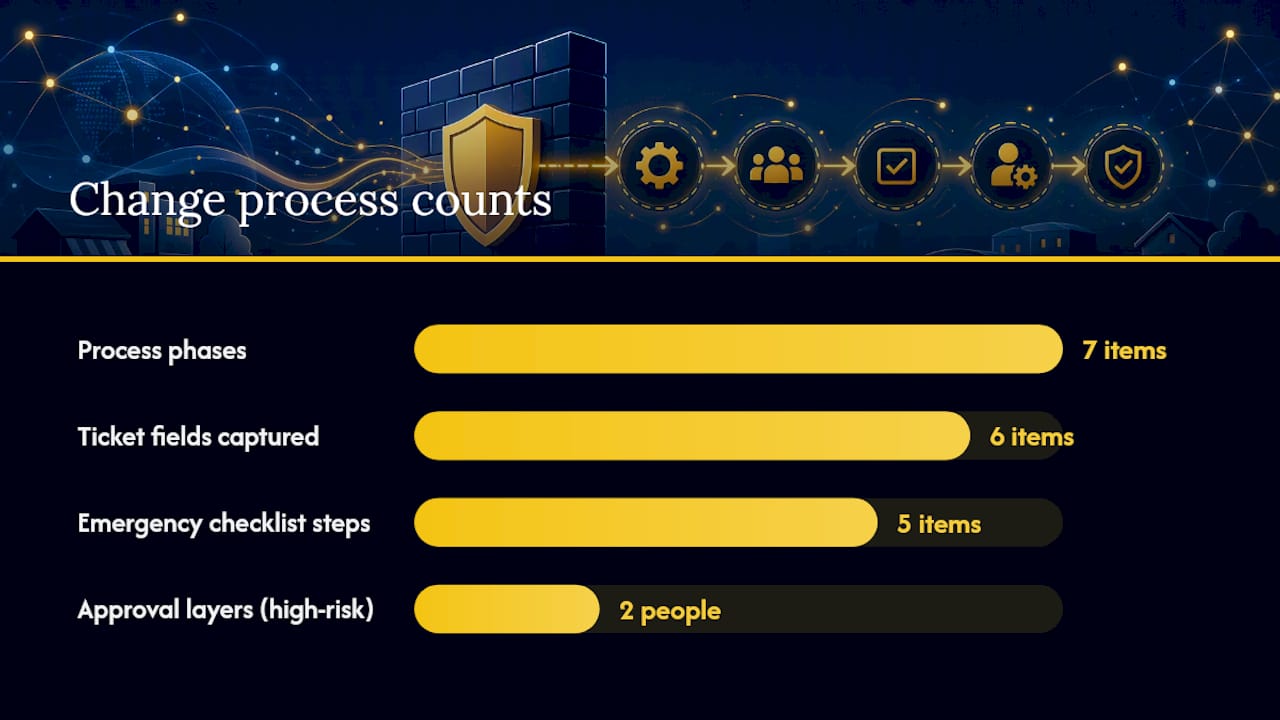
A defensible process treats every firewall change as a closed loop, not a favor granted over email. CyberX’s breakdown of change management ties each change to a business justification, a named approver, a verification step, and a scheduled recertification date, which is the structural difference between a security control and a habit of saying yes.
Seven phases make up that loop:
- Request. Someone submits a ticket, not a Slack message.
- Validate. IT confirms the request is technically sound and doesn’t conflict with existing rules.
- Approve. A person who did not submit the request signs off.
- Implement. The change goes live, ideally during a maintenance window.
- Verify. Someone confirms the change did what it was supposed to do and nothing else.
- Document. The rule gets tagged with owner, justification, and expiration.
- Recertify. On schedule, the owner reconfirms the rule is still needed.
Every ticket should capture the source, destination, service or port, business justification, expected duration, and data classification involved. That last field matters more than owners usually think. A rule touching customer payment data deserves tighter scrutiny than one opening a port for a printer.
Segregation of duties doesn’t require a large team. Even a two-person IT function can split requester and approver roles, and for higher-risk changes (opening inbound access, for example), loop in the owner or a manager as a second approval layer.
Automating this workflow speeds execution by up to 90% compared to manual processes, while enforcing validation checks before anything deploys and leaving an audit trail behind.
For genuine emergencies, keep a short checklist: document the reason, get verbal approval from a designated backup approver, implement the change, then complete the paperwork within 24 hours and schedule it for review at the next cycle.
How Should You Monitor and Maintain a Firewall Day to Day?
Monitoring is where most small businesses quietly fall behind, not because it’s technically hard, but because nobody owns it. A firewall generating logs nobody reads provides no more protection than one that’s turned off.
Daily and weekly habits matter most:
- Review logs for repeated denied connections from the same source, which often signals a scan or brute-force attempt.
- Set alerts for unauthorized configuration changes, so nobody quietly opens a port without a ticket.
- Watch for spikes in denial rates, which can indicate misconfiguration as easily as an attack.
Patch on a staged schedule rather than immediately pushing every update to production. Apply firmware updates to a test device or during a low-traffic window first, then roll out broadly once you’ve confirmed nothing broke.
Quarterly, run a validation pass: test that critical connections still work, simulate a few blocked flows to confirm the deny rules are actually denying, and pull a rule-usage report to flag anything sitting unused for months.
Pro Tip: Keep at least 90 days of firewall logs in cold storage, longer if you handle payment card or health data. Logs you deleted last week are the ones an incident response team always asks for first.
Should You Manage Your Firewall In-House or Outsource It?
The honest answer depends on four factors: staff skill, the number of firewalls you run, how often changes happen, and whether compliance requirements apply. A single-location shop with one firewall and rare change requests can often manage in-house with discipline. A business running multiple locations, cloud workloads, and monthly change requests usually can’t sustain that discipline without dedicated staff.
A managed provider worth hiring should offer:
- 24/7 monitoring with real alerting, not a dashboard nobody checks after hours.
- A documented change-management process with segregation of duties built in.
- Scheduled recertification, not a “set it and forget it” configuration.
- Regular reporting you can actually read, not raw log dumps.
Mavericks Office Solutions runs a managed IT operation built around a U.S.-based help desk, not an offshore call center, with an average response time under 12 minutes. Before signing with any provider, ask them directly: How do you handle emergency changes? What’s your recertification cadence? Can I see a sample change ticket?
How Do You Handle Firewall Backups and Disaster Recovery?
A firewall configuration you can’t restore quickly turns a routine hardware failure into an extended outage. Back up the full configuration, not just the rule list, every time you make a change and on a fixed schedule regardless. That means exporting settings, NAT tables, VPN configurations, and certificates, not just the access control list.
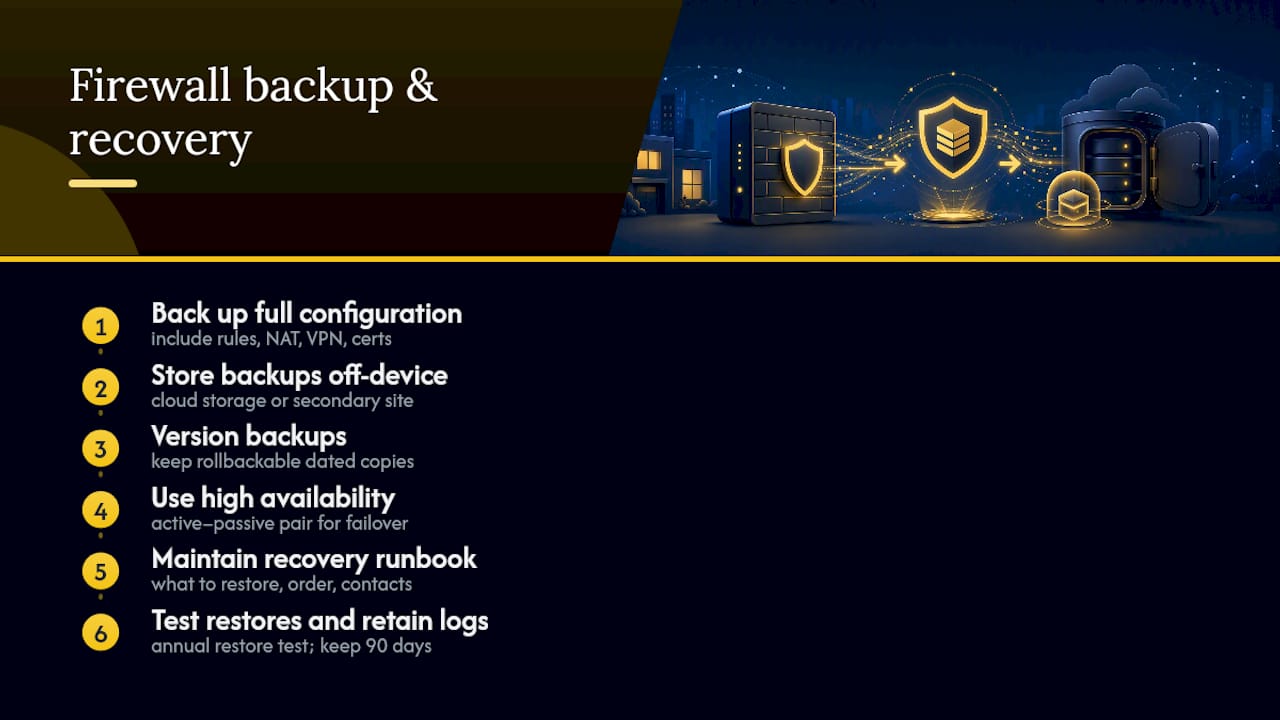
Store backups off the device itself. A configuration saved only on the firewall’s local storage disappears the moment that hardware fails or gets compromised. Keep at least one copy in a separate location, cloud storage or a secondary site, and version it so you can roll back to a known-good state if a recent change caused problems nobody noticed until now.
High availability doesn’t require enterprise budgets to matter. Even a basic active-passive pair, where a secondary device takes over automatically if the primary fails, prevents a single point of failure from taking your entire network offline during business hours. For businesses without redundant hardware, a documented recovery runbook (what to restore, in what order, who to call) closes most of that gap at a fraction of the cost.
Test the restore process at least once a year. A backup nobody has ever restored is a hope, not a plan. Log retention plays into recovery too. If an incident happens, investigators will want historical logs to reconstruct what happened before the failure, which is another reason the 90-day retention habit from your monitoring routine pays off twice.
How Does Firewall Management Fit Into Your Broader Cybersecurity Strategy?
A firewall is one control among several, and treating it as the whole strategy is a common and expensive mistake. It blocks unauthorized network traffic, but it does nothing if an employee’s credentials get phished or a laptop leaves the building unencrypted. NIST’s guidance frames firewalls as one layer within a broader policy framework, working alongside identity controls, endpoint protection, and monitoring.
Pair firewall rules with strong credential practices. Restricting network access by IP address means less if the account behind that connection uses a weak, reused password. A password manager built for business use closes that gap without adding friction for staff.
Endpoint protection fills another hole firewalls can’t cover. A firewall inspects traffic crossing a boundary, but it won’t catch malware already running on a device inside your network. Endpoint detection and response tools watch for that behavior directly on the machine, and pairing the two gives you visibility at both the perimeter and the endpoint.
Application whitelisting rounds out the picture by controlling what software can run at all, which matters most on point-of-sale systems and servers handling sensitive data. Together, these controls form layers: a firewall stops unauthorized connections, endpoint tools catch what slips past, and identity controls limit the damage if credentials get compromised anyway. None of them substitutes for the others. A small business that treats firewall management as its entire security posture is one phishing email away from finding out the hard way.
What Skills Does In-House Firewall Management Actually Require?
Running a firewall well requires less specialized knowledge than most owners assume, but it does require consistency, which is harder to staff than raw technical skill. The person responsible needs to understand basic networking (ports, protocols, IP addressing), read logs well enough to spot anomalies, and follow a change process even when it’s inconvenient.
Formal certifications help but aren’t strictly required for a small operation. Vendor-specific training on whatever platform you run (many manufacturers offer free or low-cost courses) covers most of what daily management demands. What matters more is discipline: someone who documents every change, checks logs on a schedule, and doesn’t grant “just this once” exceptions without a ticket.
The real risk isn’t a lack of technical skill. It’s a lack of dedicated time. Firewall management often gets assigned to whoever handles “IT stuff” alongside a dozen other responsibilities, and rule hygiene is the first thing that slips when someone’s overloaded. A rulebase reviewed once at setup and never again isn’t a failure of skill; it’s a failure of bandwidth.
If your in-house team can commit to weekly log reviews and quarterly rule audits, keeping firewall management internal is realistic. If those tasks keep getting pushed to “next week,” that’s a signal the workload has outgrown available staff time, not a sign anyone did anything wrong.
What Does Firewall Management Cost, and How Should You Budget for It?
Costs break into three categories: hardware or licensing, staff time, and the cost of getting it wrong. Hardware and software licensing are the most visible line item and the easiest to budget for since vendors publish pricing directly. Staff time is harder to quantify but often larger, especially once you account for training, ongoing monitoring, and the hours spent responding to change requests.
The cost of getting it wrong is the one most budgets ignore entirely. An overly permissive rule that leads to a breach costs far more in incident response, downtime, and reputational damage than any monitoring subscription would have. Compliance frameworks like PCI-DSS and ISO 27001 expect documented change processes specifically because unmanaged rule creep is a recognized breach vector, not a theoretical risk.
When budgeting, weigh the fully loaded cost of in-house management (hardware, staff hours, training, and the opportunity cost of an owner or IT generalist splitting attention across too many priorities) against a managed service’s flat monthly fee. For many small businesses, a predictable monthly cost that includes monitoring, change management, and recertification ends up cheaper than the hidden hours an internal team spends catching up on maintenance it postponed for months.
What Small Firewall Mistakes Cause the Biggest Problems?
One pattern shows up constantly: a rule gets created for a one-time vendor project, nobody sets an expiration date, and eighteen months later it’s still open with no one left at the company who remembers why. That orphaned rule sits there as an unmonitored door into the network, and it’s rarely found until an audit or, worse, an incident forces the question.
Three low-effort fixes solve most of what goes wrong in small business firewalls: enforce default-deny with real rule justifications, require an expiration date on every rule you create, and review the full list at least once a quarter. None of that requires enterprise budgets or a security team.
Solid firewall management isn’t about buying the fanciest hardware. It’s about consistency, applied by someone with the time to actually do it.
How Mavericks Office Solutions Handles Firewall Management for You
If rule hygiene, change tickets, and quarterly recertification sound like more than your team has bandwidth for, that’s precisely the gap a managed provider is built to close. Mavericks Office Solutions runs firewall management as part of its managed IT services: 24/7 monitoring, a documented change-management process with segregation of duties baked in, scheduled recertification, and reporting that tells you what changed and why.

The proof point that sets Mavericks apart from a typical outsourced arrangement is response time. Its help desk is staffed entirely in the U.S., not routed through an offshore call center, and answers in under 12 minutes on average. When a rule needs an emergency exception at 6 p.m. on a Friday, that speed is the difference between a contained issue and a weekend-long outage.
Onboarding is straightforward. Mavericks will ask for your current firewall make and model, a list of critical business applications and their port requirements, any compliance obligations you’re subject to, and the names of who should serve as rule owners and approvers. From there, the team builds your baseline ruleset and change process around what your business actually needs. If you’re ready to hand off firewall management to a team that treats it as a daily discipline rather than an annual chore, get in touch through the Cybersecurity page to start the conversation.
Sources
- NIST Special Publication 800-41r1
- Firewall Change Management | FireMon
- What Firewall Change Management Really Means – CyberX
- Palo Alto Networks — Security policy rulebase best practices
Recommended
- Small Business Cybersecurity: A Michigan Owner’s Playbook – Mavericks Office Solutions
- Best Business Password Manager for SMBs: 2026 Guide – Mavericks Office Solutions
- Application Whitelisting: A Practical Guide for Michigan IT Teams – Mavericks Office Solutions
- Why Every Ohio Small Business Needs a Cybersecurity Plan in 2026 – Mavericks Office Solutions