

A phishing training program is a continuous system, not a once-a-year slideshow. The real version combines multi-channel simulations, microlearning delivered the moment someone clicks, and a one-click reporting workflow, and it’s measured by how much your phish-prone percentage drops and how fast employees report suspicious messages. Get those pieces right and you have a program that changes behavior instead of just documenting compliance.
Two numbers matter more than any others when you’re building this: your phish-prone percentage (the share of employees who fail a simulation) and your report rate (the share who flag it instead). Vendor benchmarking and industry studies commonly show phish-prone percentage dropping from around 30% toward the low single digits when organizations run continuous simulation programs with targeted remediation, a shift that happens over months of consistent cadence, not a single training session.
If you’re starting from zero, here’s where to put your first 30 days:
- Run a baseline phishing simulation across the whole organization before changing anything.
- Deploy a one-click phish alert button in your email client.
- Set your initial metrics: click rate, report rate, and time-to-report.
- Segment your highest-risk roles (finance, HR, executives) for a faster simulation cadence.
Key Takeaways
A phishing training program only reduces risk when continuous simulations, moment-of-failure microlearning, and fast reporting workflows work together and get measured monthly.
| Point | Details |
|---|---|
| Start with a baseline | Run an unannounced simulation before launching any training to establish your true phish-prone percentage. |
| Reward reporting, not just penalize clicks | Positive reinforcement for reporting builds stronger long-term culture change than punitive remediation. |
| Track behavior, not completion | Click rate, report rate, time-to-report, and phish-prone percentage matter more than training completion counts. |
| Segment high-risk roles | Finance, HR, and executive staff need tighter simulation cadence and OSINT-informed spear-phishing scenarios. |
| Consider a managed path for lean teams | Mavericks Office Solutions runs simulation, triage, and remediation together with 24/7 monitoring and a US-based help desk. |
Table of Contents
- What Should a Phishing Training Program Include?
- How Do You Roll Out a Phishing Awareness Training Program?
- Which Metrics Actually Prove the Program Is Working?
- When Should You Automate or Outsource the Program?
- How Mavericks Office Solutions Runs This Playbook
- Where the Conventional Advice Falls Short
- A Faster Way to Get a Phishing Training Program Running
- Sources
What Should a Phishing Training Program Include?
A phishing training program earns its name only if it runs continuously and hits employees through more than one channel. Annual training modules satisfy a compliance checkbox but do almost nothing for behavior, which is why SANS Institute’s guidance on phishing awareness training pushes for ongoing simulation cycles paired with immediate remediation rather than a once-a-year event with a quiz at the end.
Here’s what belongs in a program built to actually move the needle:
- Continuous, multi-channel simulation. Email phishing is the baseline, but a modern program needs to simulate vishing (voice calls), smishing (text messages), and increasingly, deepfake audio or video scenarios impersonating executives. Attackers have moved past email, and your simulations need to follow.
- Immediate microlearning at the point of failure. When someone clicks a simulated phishing link, they should land on a two-minute lesson explaining exactly what tipped off the message as fake, right then, not in a training module scheduled for next quarter. SANS research on this approach finds that in-context coaching at the moment of failure produces far better retention than delayed remediation.
- One-click reporting integrated into email clients. A phish alert button inside Outlook or Gmail, tied to a documented triage service level agreement, gives your security team real signal instead of relying on someone remembering to forward a suspicious email to IT.
- Adaptive difficulty and role-based templates. Generic phishing templates get stale fast. Programs that use OSINT-informed spear-phishing scenarios targeted at high-risk groups like finance and executive staff produce more realistic testing than one-size-fits-all templates blasted to everyone.
- Administrative dashboards with exportable data. You need per-user risk scores, department-level views, and trend reports you can pull into a board presentation without manually rebuilding a spreadsheet every quarter.
Pro Tip: Build your reporting workflow before you launch your first simulation, not after. If employees report a phishing test and nothing visibly happens, they stop reporting real threats too.
The administrative layer is where most internally built programs fall apart. Tracking phish-prone percentage by department is simple in a spreadsheet for 20 people. It becomes unmanageable at 200, which is exactly when platforms with automated dashboards and CISA’s recommended verification workflows start paying for themselves. CISA’s own guidance centers on training employees to verify suspicious requests through a separate, known contact method rather than replying to the original message, a habit that only sticks with repeated practice.

How Do You Roll Out a Phishing Awareness Training Program?
Rolling out phishing awareness training works best as a five-stage sequence: baseline, segmentation, launch, remediation, governance. Skipping the baseline is the most common mistake security teams make, because without it you have no way to prove the program worked.
- Baseline measurement. Run an unannounced simulation before you tell anyone a program exists. This gives you your starting phish-prone percentage and shows you who already reports suspicious emails without prompting.
- Segmentation by role and exposure. Not every employee faces the same risk. Finance staff who approve wire transfers and executives whose names show up in public filings need tighter simulation cadence than a warehouse employee with no email-based approval authority.
- Launch with graduated cadence. Start simulations monthly for general staff and consider biweekly for high-risk segments. Vary difficulty so employees don’t just learn to spot your specific template style.
- Deploy the reporting workflow and document your triage process. The highest-value technical integration here connects your phish-alert button to your ticketing system and a fast triage queue, ideally with a one-to-four-hour service level agreement for initial investigation of reported messages.
- Build remediation as coaching, not punishment. Immediate microlearning after a failed simulation should feel like a quick correction, not a scolding. Escalation, such as a manager conversation or additional training, should reserve itself for repeat offenders after multiple failures, not a single mistake.
- Establish governance and reporting cadence. Decide upfront how long you retain simulation data, who can see individual results versus aggregate department data, and how often you brief leadership. Monthly operational reviews and quarterly executive summaries work for most mid-sized organizations.
A few operational details make or break this rollout:
- Route reported phishing emails to a dedicated queue, not a shared inbox that also handles general IT tickets.
- Reward reporting publicly (with consent) rather than only penalizing clicks privately.
- Give managers a plain-language explanation of what a “repeat offender” threshold means before you enforce one.
Behavioral programs that reward reporting instead of punishing every click build stronger long-term culture change, turning cautious employees into an early-warning network instead of people who quietly delete suspicious emails to avoid getting flagged.
Which Metrics Actually Prove the Program Is Working?
Five metrics tell you whether a phishing simulation program is working: click rate, report rate, time-to-report, phish-prone percentage, and a composite human risk score. Completion rates for training modules tell you almost nothing about actual behavior change, which is exactly why SANS recommends tracking behavioral outcomes instead of course completion.
- Click rate: the percentage of recipients who click a simulated phishing link. Track it per campaign and per department.
- Report rate: the percentage who flag the simulation using your report button. This should climb steadily as your program matures.
- Time-to-report: how long it takes an employee to report a suspicious message after receiving it. Faster times mean faster real-world containment.
- Phish-prone percentage (PPP): your overall failure rate across simulations, the single number most useful for trending over time.
- Normalized Reporting Score (NRS) and human risk score: composite metrics some platforms calculate to weigh reporting behavior against click behavior for a fuller risk picture.
Set your baseline in month one, then trend monthly for the first two quarters and quarterly afterward once your numbers stabilize. A single simulation with a small sample size can mislead you. Wait for at least three or four cycles before drawing conclusions about whether a specific department is genuinely improving or you just got a lucky campaign.
Realistic expectations matter here. Vendor benchmarking studies commonly show phish-prone percentage falling from roughly 30% toward the low single digits after sustained simulation plus targeted remediation, but that trajectory takes consistent months of work, not a single quarter.
For leadership conversations, translate the percentage improvement into risk language. If your click rate drops by half, you can reasonably argue your exposure to a successful phishing-driven breach drops as well. The IC3 2024 Annual Report documents phishing as one of the leading vectors behind reported cybercrime losses, and converting a percentage-point reduction in phish-prone rate into an estimated reduction in breach likelihood, then applying an average breach cost figure, gives you a conservative cost-avoidance number that lands with a board far better than a raw click-rate chart.
When Should You Automate or Outsource the Program?
Automation earns its place once your simulation volume outgrows what one or two people can manually schedule and grade. The tipping point usually shows up around 100 to 150 employees, where manual template selection and manual triage start eating hours you don’t have.
Automation-first platforms typically bring:
- Adaptive scheduling that varies simulation timing and difficulty without manual intervention
- AI-generated template variety that keeps scenarios from going stale
- In-the-moment coaching triggered automatically at the point of failure, rather than a manually assigned follow-up module
The trade-off is control versus convenience. Running everything in-house gives you full visibility into every template and every data point, but it also means your own staff hours go into scheduling, grading, and triage instead of higher-value security work. For small-to-medium businesses with lean IT teams, a managed phishing program often outperforms a poorly staffed internal one, largely because a managed provider brings scenario libraries and threat intelligence updates that a stretched internal team can’t maintain alone.
Whichever path you choose, prioritize integration with your existing SIEM, ticketing system, and identity platform. A phishing program that can’t feed reported incidents into your existing security stack creates a second silo instead of solving a problem.
Pro Tip: Ask any vendor how their platform routes a reported email into your existing ticketing system before you ask about template variety. Integration gaps cause more program failures than weak content ever does.
How Mavericks Office Solutions Runs This Playbook
Mavericks Office Solutions operates as an outsourced IT department for small and mid-sized businesses, and phishing training sits inside a broader managed cybersecurity practice rather than as a standalone product. That matters because triage, monitoring, and remediation only work when the same team owns all three.
In practice, that looks like:
- Running baseline and ongoing simulations, then routing every reported message through 24/7 monitoring instead of a shared inbox nobody watches overnight.
- Handling triage with a US-based help desk, with an average response time under 12 minutes, instead of an offshore queue that adds hours to every incident.
- Delivering microlearning and coaching as part of the same support relationship that already manages endpoints, patching, and network monitoring.
A managed provider is only as good as its response time and its willingness to show you the data behind its claims. Ask for actual average triage times, not marketing copy.
Before signing with any provider, ask for their documented average help desk response time, their reporting cadence, and a sample of the dashboard you’ll actually see.
Where the Conventional Advice Falls Short
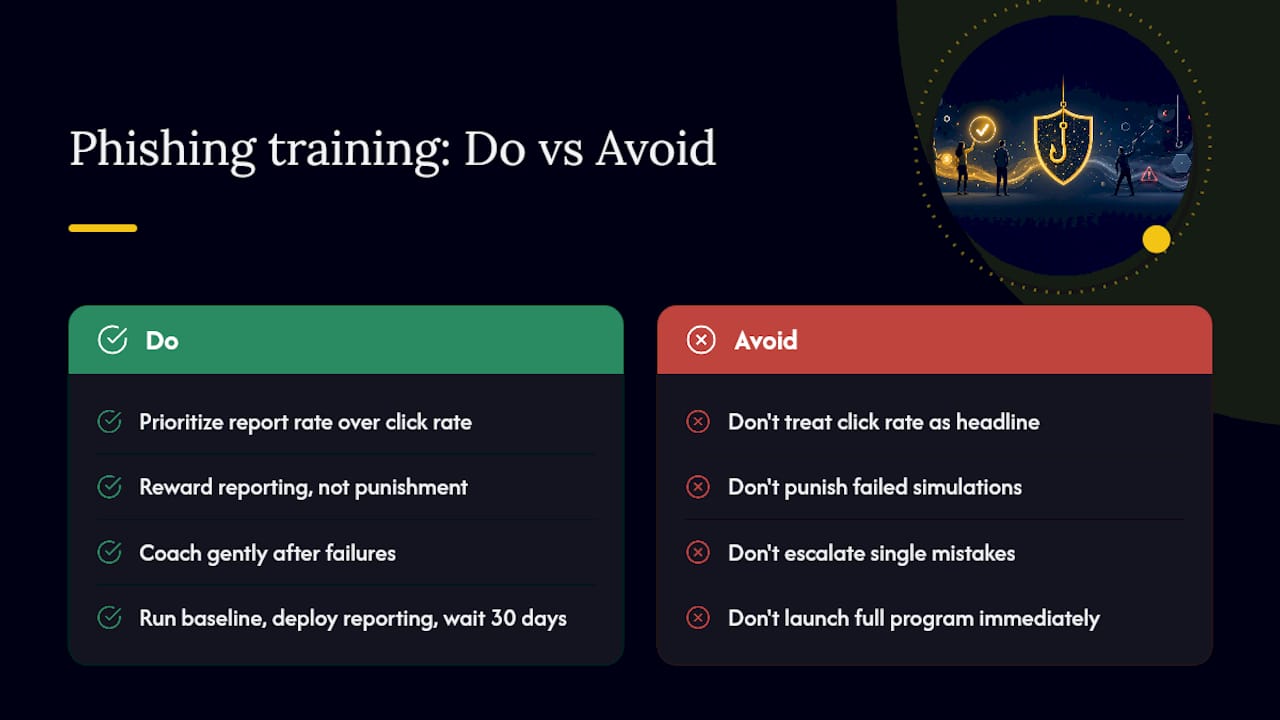
Most guidance on phishing training treats the click rate as the headline number, and that’s a mistake. Click rate tells you how many people fell for one specific simulation on one specific day. Report rate tells you whether your culture is actually shifting, and that number matters more over time, because a workforce that reports suspicious emails quickly gives your security team a functioning early-warning system regardless of how clever the next attack gets.
The other place conventional advice goes wrong is punitive remediation. Plenty of security teams still treat a failed simulation as a disciplinary event, and that instinct backfires. Employees who fear punishment stop reporting mistakes, including real ones, which is the opposite of what you want. Reward reporting, coach gently on failure, and reserve escalation for genuine repeat patterns.
If you’re starting from nothing, don’t try to build the full five-stage program in month one. Run your baseline, deploy the reporting button, and get thirty days of real data before you segment anything. Programs that try to launch fully mature on day one usually collapse under their own complexity within a quarter.
A Faster Way to Get a Phishing Training Program Running
Building this playbook internally takes real hours: scheduling simulations, writing microlearning content, wiring up a reporting button, and staffing triage around the clock. Mavericks Office Solutions runs the entire cycle as part of its managed cybersecurity services, pairing simulation and remediation with 24/7 monitoring and a US-based help desk that answers in under 12 minutes on average, not an offshore queue that leaves a reported phishing email sitting for hours.

That combination matters because triage speed is the whole point of a report button. A one-click alert that sits unread overnight doesn’t reduce your risk, it just adds paperwork. Mavericks folds phishing simulation, employee coaching, and incident triage into the same managed IT relationship that already handles your network monitoring and help desk support, so reported emails get investigated by the same team watching your systems in real time.
If you’re weighing whether to build this in-house or hand it to a managed partner, request a phishing program assessment from Mavericks Office Solutions and get a straight answer on what a pilot would look like for your team.
Sources
- Teach Employees to Avoid Phishing — CISA
- Phishing awareness training — SANS Institute
- IC3 2024 Annual Report — IC3
- Phishing Training 101: Building a Security-First Workforce — Adaptive Security
Recommended
- 7 AI Cybersecurity Mistakes Your Business Is Making – Mavericks Office Solutions
- Vendor Risk Management: A Practical Program Guide – Mavericks Office Solutions
- AI Models Just Hacked Another Company on Their Own — Why Cybersecurity Has Never Mattered More – Mavericks Office Solutions
- Why Every Ohio Small Business Needs a Cybersecurity Plan in 2026 – Mavericks Office Solutions