
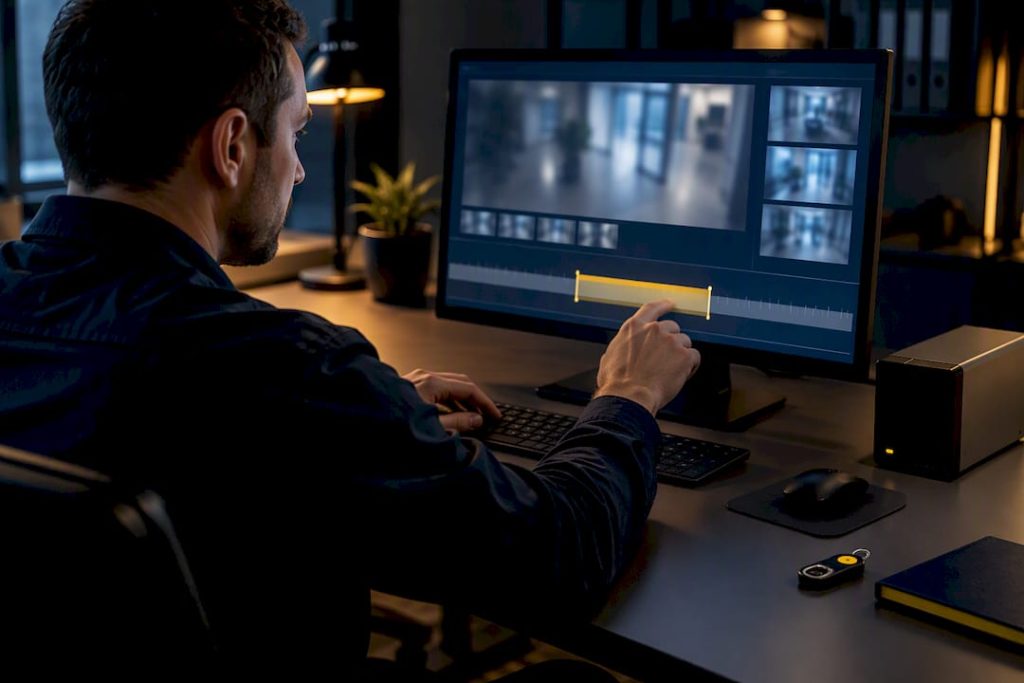
There is no single legal retention period for security footage. A defensible video retention policy classifies recordings by risk, keeps routine footage for the shortest window your operations can tolerate (often 30 to 90 days), and pairs that window with a written, auditable preservation and legal-hold process. Institutions like Princeton and the National Archives build their policies on exactly this structure.
TL;DR:
- Retention windows should be based on risk and purpose, typically ranging from 30 to 90 days for most operations, with longer periods only justified in high-security environments.
- Actual storage duration often falls short of configured settings due to factors like motion triggers, resolution, codec efficiency, and camera density, making real testing essential.
- Privacy laws restrict camera placement and retention, requiring notice, specific purpose, and legal review, especially under GDPR, CCPA, and state regulations; legal counsel should be involved early.
- Legal holds pause routine deletion, require documentation, designated custodians, secure export, and chain-of-custody records, with testing of export workflows before incidents occur.
- Building a sound policy involves camera inventory, risk-based classification, automated deletion, defined access controls, and regular review, with dedicated ownership to ensure compliance and effectiveness.
Table of Contents
- What Should a Video Retention Policy Actually Cover?
- How Do Storage Choices Change Your Real Retention?
- Do Privacy Laws Limit How You Record and Keep Footage?
- How Do You Preserve Footage Once a Legal Hold Starts?
- Building a Video Retention Policy Step by Step
- Who Should Own Retention Policy Governance?
- How Mavericks Office Solutions Puts This Policy Into Practice
- Why Retention Length Gets More Attention Than It Deserves
- Get Your Retention Policy Built and Tested
- Sources
- FAQ
What Should a Video Retention Policy Actually Cover?
A working video retention policy sorts footage into four buckets, and each one carries its own rules. Get the classification wrong, and you either burn storage money on footage nobody needs or, worse, delete something a court later asks for.
- Routine footage — everyday recordings with no known incident attached. This is the bulk of what your cameras capture.
- Evidence footage — clips tied to a known event: a theft, an accident, a workplace complaint.
- Regulated records — footage subject to an industry rule or public-records law, such as healthcare facilities or government buildings.
- Legal-hold footage — anything under an active preservation obligation, regardless of how it started.
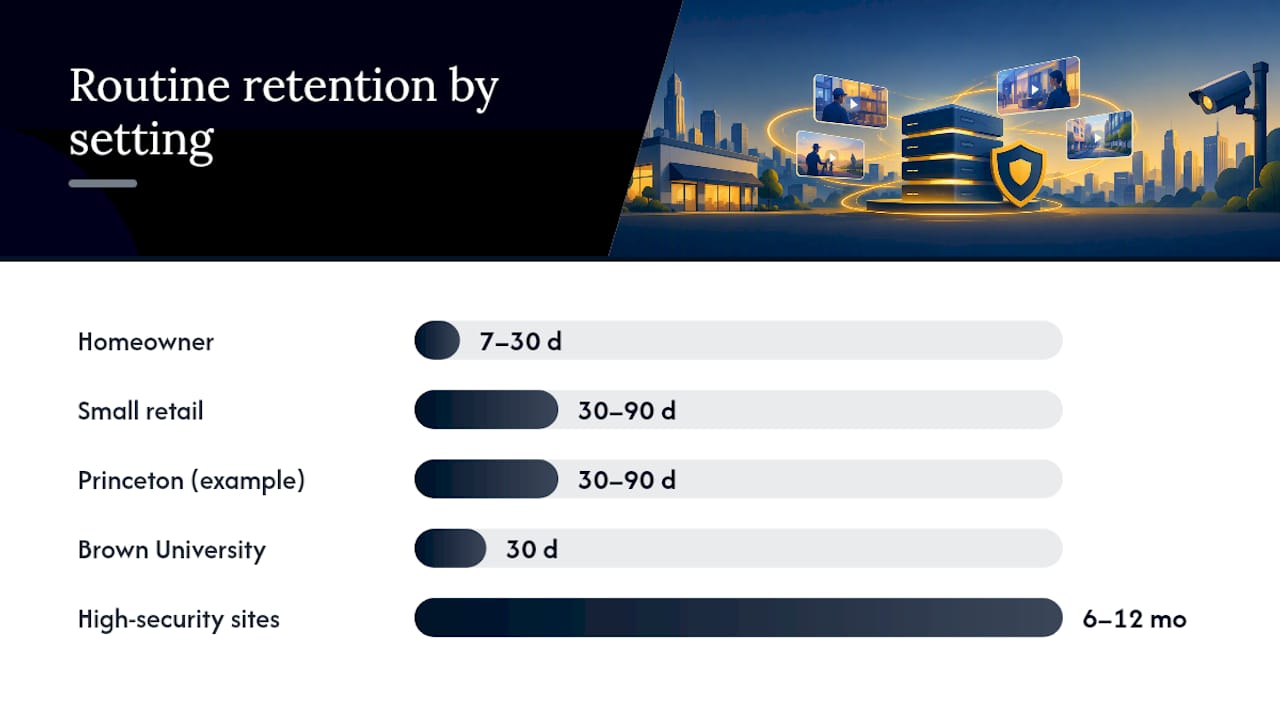
Routine retention ranges vary by setting for good reason. A homeowner’s system might reasonably hold 7 to 30 days. Systems/blog/how-long-do-security-cameras-keep-footage/), while a small retail operation often runs 30 to 90 days. Princeton’s own policy uses a 30 to 90 day range, while Brown University sets a flat 30 day standard for routine recordings. High-security sites, banks, and healthcare facilities frequently justify 6 to 12 months or longer.
A blanket “keep everything for 7 years” rule sounds cautious, but it rarely holds up. It multiplies storage cost, increases breach exposure, and does nothing to protect the one clip that actually matters if your export process fails. The right approach starts with a purpose and risk assessment for each camera group, then works backward to the shortest window that still meets legal, insurance, and operational needs.
How Do Storage Choices Change Your Real Retention?
The retention setting on your recorder and the retention you actually get are two different numbers. Most systems run on loop recording, overwriting the oldest footage once storage fills up. If your system is configured for 60 days but a busy week of motion events fills the drive in 45, that’s your real look-back window, not the number on the settings screen.
Several factors compress or extend that window:
- Motion versus continuous recording — motion-triggered capture stretches storage further but can miss slow-building incidents.
- Resolution and frame rate — 4K continuous footage eats storage many times faster than 1080p motion-only clips.
- Codec choice — H.265 compresses far more efficiently than older H.264 systems, often doubling effective retention on the same drive.
- Camera count and density — every additional camera divides the same storage pool further.
Statistic Callout: Cisco Meraki’s own Smart Retention documentation confirms that heavy-motion scenes can force the system to reduce resolution on older footage or shorten the retained window entirely, meaning a configured retention period is a target, not a guarantee.
For most small and medium businesses, a hybrid setup works best: local network video recorder (NVR) storage sized for the routine window, with cloud backup or archival export for anything flagged as evidence. If a location genuinely needs a longer look-back, the fix usually isn’t a bigger promise from the vendor. It’s sizing local storage correctly or exporting flagged clips to protected, unrelated storage before the loop catches up. Reviewing your camera system’s configuration against actual motion load, not just the sales sheet, is the only way to know what you’re really getting.
Do Privacy Laws Limit How You Record and Keep Footage?
Yes, and the limits show up in two places: where you can point a camera, and how long you can lawfully justify holding what it captures. The NARA assessment recommends that agencies centralize records management and involve a records officer early, precisely because privacy and retention decisions get made in the same breath.
A few guardrails apply almost everywhere:
- Avoid placing cameras in restrooms, locker rooms, or other areas carrying a reasonable expectation of privacy.
- Post notice where recording occurs, and limit footage use to the stated purpose.
- Treat employee monitoring as conditional, not automatic. Whether continuous workplace surveillance is permissible depends on the purpose, whether notice was given, applicable state law, and any union or employment contract terms.
- Loop in legal counsel before rolling out audio recording, since wiretap laws are often stricter than video rules.
State law varies enough that a policy written for one location may not hold up in another. Businesses operating in Ohio should check the state’s specific rules on security camera laws in Ohio, and those in Michigan should review security camera laws in Michigan before finalizing notice language or audio settings. Frameworks like GDPR and CCPA add another layer for businesses handling footage of European or California residents, generally requiring a stated purpose, a defined retention limit, and a path for data subject requests. When footage touches regulated records or is subject to public-records requests, get legal, HR, and your records team into the same conversation before you finalize retention windows, not after an incident forces the question.
How Do You Preserve Footage Once a Legal Hold Starts?
Retention and preservation are not the same thing, and confusing them is how businesses end up deleting the one clip an attorney needed. A legal hold pauses your routine deletion schedule for specific footage until the matter is resolved. Common triggers include an internal investigation, a subpoena, a formal complaint, or an insurance claim.
- Receive and document the request. Capture who is asking, why, and what date range or camera is in scope.
- Name a custodian. One person owns the hold from start to finish.
- Suspend automated deletion for the affected footage immediately, not after review.
- Export securely to storage isolated from the routine overwrite cycle.
- Log chain of custody, capturing camera ID, time zone, exact timestamps, exporter identity, file format, and checksums.
- Release in writing only when the matter is formally closed, and keep the hold record itself.
Pro Tip: A 90-day retention policy is worthless if nobody has a tested process for pulling and exporting a clip before it overwrites. Test your export workflow on a random day, not just during a real incident.
Building a Video Retention Policy Step by Step
A workable policy follows a set sequence rather than a single decision. Skipping the inventory step is the most common reason retention policies fail audits months later.
- Inventory every camera: location, recording path, owner, audio capability, and stated purpose.
- Group cameras by risk (routine, high-security, regulated) and assign each group a retention window.
- Configure automated deletion to match that window, then verify it actually executes.
- Build the hold and export workflow described above, with named responsibility.
- Restrict access by role and log every view, copy, export, and deletion.
- Schedule sample restores and a full policy review at least annually.
Minimum elements every written policy should include:
- Defined footage classes and their retention windows
- A named policy owner and evidence custodian
- The preservation-request and hold process
- Access control rules and an access log
- A documented deletion log
- A review and retest schedule
Who Should Own Retention Policy Governance?
A policy with no owner drifts within a year. Assign four roles explicitly: a policy owner who approves changes, an evidence custodian who manages holds and exports, a legal contact for hold decisions, and a system administrator who configures the actual settings.
Testing matters more than the paperwork. Pull a sample recording from the oldest day your policy claims to cover, confirm playback works, timestamps are accurate, metadata is intact, and the export process runs cleanly under real conditions, not just in a demo.
Statistic Callout: Brown University’s 30-day retention standard works specifically because it pairs a short window with strict, enforced access controls. Length alone was never the safeguard.
Keep deletion logs, hold records, retrieval test reports, and access logs on file, and set a trigger for re-review whenever camera count, storage vendor, or applicable law changes.
How Mavericks Office Solutions Puts This Policy Into Practice
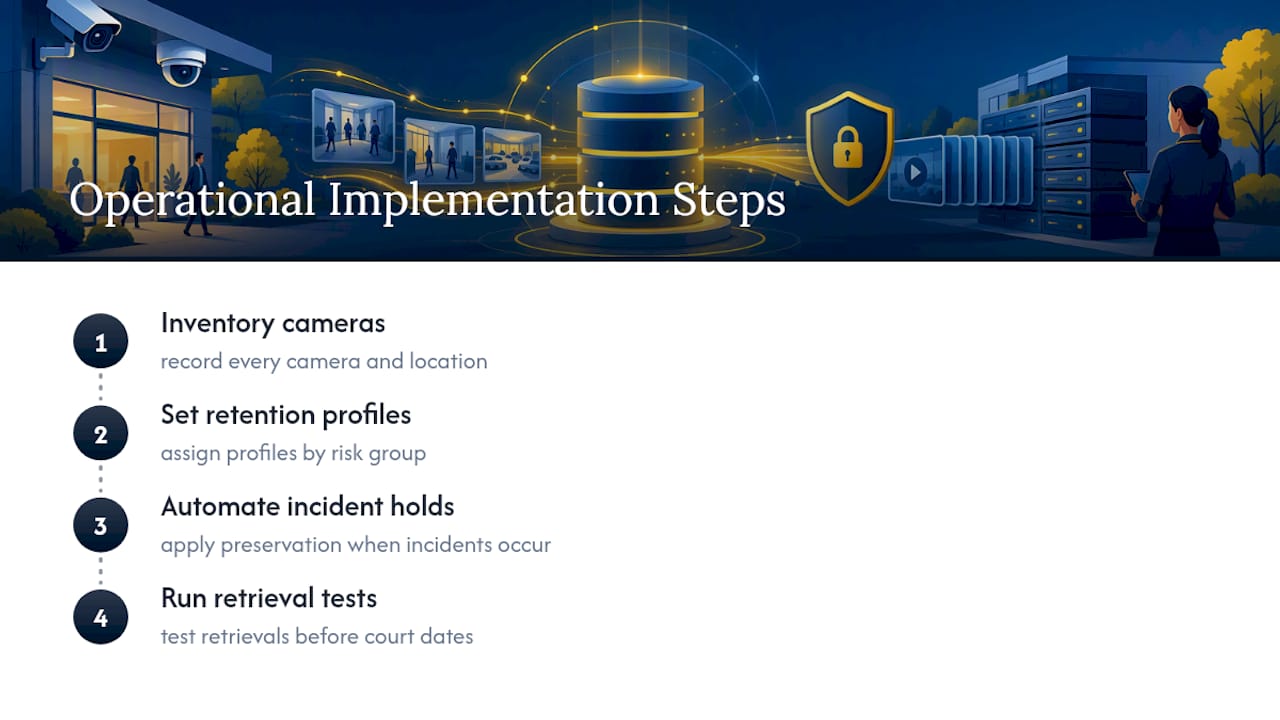
Turning a written policy into daily operations means someone has to inventory every camera, set retention profiles by risk group, automate holds when an incident hits, and run retrieval tests before a court date proves the system doesn’t actually work. That’s operational work, not a document exercise.
Mavericks Office Solutions handles that work as part of its managed IT and camera services, backed by 24/7 monitoring and a 100% USA-based, Ohio help desk with an average response time under 12 minutes. When an incident happens at 2 a.m., preservation can’t wait for a callback from an offshore support queue.
Why Retention Length Gets More Attention Than It Deserves
Most conversations about security footage retention obsess over the number: 30 days, 90 days, a year. That’s the wrong fixation. The research from Princeton, Brown, and NARA all points the same direction: the length of your routine window matters far less than whether your hold process actually works when tested.
A 90-day policy with no tested export path is weaker than a strict 30-day policy backed by a documented, rehearsed preservation workflow. Brown’s restrictive standard proves the point. Short retention paired with real access control and a working hold process beats a generous window with sloppy governance every time.
If you take one thing from this, take this: stop asking “how long should we keep footage?” and start asking “can we actually retrieve and preserve the right clip when it matters?” Most businesses have never tested that second question, and it’s the one that determines whether their policy survives contact with a real subpoena.
— Jeffrey
Get Your Retention Policy Built and Tested
Writing a video retention policy is one thing. Configuring cameras, automating deletion schedules, building the hold workflow, and actually testing retrieval is where most businesses run out of time or expertise. Some providers treat retention policy work as part of a broader technology stack, alongside cybersecurity, VoIP, and print management, offering a single point of contact rather than multiple vendors.

Our approach starts with a full camera inventory and configuration review, sets retention profiles by risk group, and builds the export and custody process before you need it during an actual incident. This work is supported by continuous monitoring and a USA-based help desk to handle preservation requests promptly at any time. If your current setup has never been retrieval-tested, that’s the first gap worth closing. Explore Cameras & Access Control to see how retention configuration fits into a managed camera system, or start with Managed IT Services to get your whole technology stack, including retention policy, reviewed together.
Sources
- Security Camera and Recording Retention Policy – Public Safety
- Smart Retention – Cisco Meraki Documentation
- Video surveillance assessment report (NARA)
- Security Camera Oversight and Recording Retention Policy | Brown University
FAQ
What Is the 7-Year Retention Policy?
There’s no universal law requiring 7-year video retention for most businesses. That figure gets repeated because it applies to certain regulated financial or healthcare records, not typical security camera footage, which usually falls under a 30 to 90 day routine window unless a legal hold applies.
How Long Do Businesses Keep Video Footage?
Most small and medium businesses keep routine footage for 30 to 90 days before it’s overwritten. High-security or regulated sites often extend that to 6 to 12 months, while footage under an active investigation or legal hold is preserved indefinitely until formally released.
Can My Employer Watch Me on Camera All Day?
It depends on purpose, notice, and your state’s law. Continuous workplace monitoring is often legal when there’s a stated business purpose and proper notice, but it can be restricted by state statute or an employment contract, so checking rules like Ohio’s security camera laws or Michigan’s equivalent matters before assuming either way.
How Far Back Can Video Surveillance Go?
That depends entirely on storage capacity and camera settings, not just the policy on paper. A system configured for 90 days can effectively deliver far less if heavy motion or high resolution fills storage faster, which is why testing actual retrieval matters more than the number in the settings menu.
Does Mavericks Office Solutions Help Set Up Retention Policies?
Yes. Mavericks Office Solutions configures camera systems, sets retention profiles by risk group, and builds the hold and export workflow as part of its Managed IT Services and Cameras & Access Control offerings, backed by 24/7 monitoring and a USA-based help desk.