

NIST CSF 2.0 is free, voluntary, and built to scale down to a five-person shop as easily as a Fortune 500 company. Your first move isn’t reading all 32 pages of the framework. It’s building a Current Organizational Profile for one narrow scope, such as email and customer data, and picking three priority outcomes to fix in the next 90 days. Start with phishing-resistant multifactor authentication, immutable backups, and patched internet-facing systems, focusing on a small set of priority outcomes.
TL;DR:
- Most small businesses should start by defining a narrow scope, such as email or customer data, and prioritize three to five cybersecurity outcomes within 90 days.
- The most impactful controls to deploy first include phishing-resistant multi-factor authentication, tested immutable backups, timely patching of internet-facing systems, endpoint detection, and network segmentation.
- The framework’s new Govern function emphasizes leadership accountability for cybersecurity strategy and vendor risk management, which is crucial for maintaining compliance pressures.
- Small businesses typically achieve initial improvements within a few months by focusing on a single cycle of profile building, gap analysis, and targeted control implementation, avoiding scope creep.
- Working with a managed IT provider enables small businesses to map existing services to the CSF, run quick discovery exercises, and sustain ongoing review cycles for continual cybersecurity improvement.
Table of Contents
- What Is the NIST CSF for Small Business, and What Changed in 2.0?
- How Does the NIST Cybersecurity Framework Apply to Small Businesses?
- The Five-Step Organizational Profile Quick-Start
- Which Controls Should Small Businesses Deploy First?
- Where Can You Get Official NIST CSF Templates and Tools?
- What’s a Realistic Timeline for Implementing NIST CSF 2.0?
- What Pitfalls Trip Up Small Businesses Adopting NIST CSF?
- How Do You Measure Progress After the First Implementation Cycle?
- How Should You Work With a Managed IT Partner on CSF 2.0?
- How Mavericks Office Solutions Helps You Implement CSF 2.0
- Using NIST CSF 2.0 With a Managed IT Partner
- Sources
- FAQ
What Is the NIST CSF for Small Business, and What Changed in 2.0?
The NIST Cybersecurity Framework describes cybersecurity outcomes, not specific products or configurations you’re required to buy. It tells you what a well-managed security program should accomplish and lets you decide how to get there, whether that’s an internal IT hire, a managed provider, or a mix of both. This matters for small businesses because it means the framework itself doesn’t demand enterprise budgets or dedicated security staff.
The 2.0 update, released as CSWP 29, added a sixth function: Govern. That single addition reshaped how the framework treats leadership accountability. The six functions now break down like this:
- Govern — leadership sets cybersecurity strategy, policy, and risk tolerance, including for vendors and supply-chain partners
- Identify — you know what assets, data, and risks actually exist in your business
- Protect — safeguards like MFA, backups, and access controls are in place
- Detect — you can spot a problem before it becomes a headline
- Respond — you have a plan when something goes wrong
- Recover — you can restore operations without paying a ransom or losing a client
Govern matters because it forces a decision most small businesses skip: who owns cybersecurity risk, and what’s the policy for vendors who touch your data. CSF adoption remains voluntary, but it’s increasingly baked into cyber insurance applications, client contracts, and vendor questionnaires. That’s how a “voluntary” framework becomes a practical requirement.
How Does the NIST Cybersecurity Framework Apply to Small Businesses?
Trying to apply CSF 2.0 to your entire operation on day one is how most small-business initiatives stall. Scope it down first: pick one business-critical area, like your email system and customer database, and work the framework against that slice before expanding.
CSF Tiers give you a second reference point once scope is set. They range from Partial, where cybersecurity is reactive and undocumented, to Adaptive, where risk management is continuous and data-driven. Most small businesses realistically aim for moderate cybersecurity maturity levels, such as Risk Informed or Repeatable, rather than the highest level in early stages. Trying to jump straight to the top tier is a common way SMBs burn out on the process before they finish it.
Here’s a practical way to sequence the decision-making:
- Define scope narrowly. “Everything” is not a scope. “Email, payroll data, and the customer CRM” is.
- Check your current tier honestly. Most SMBs start at Partial. That’s normal, not a failure.
- Decide who does the work. If you have no dedicated IT security staff, this is the point to bring in a managed IT provider or a fractional IT leader.
- Pull a Community Profile if one exists for your sector. It saves you from building outcome priorities from a blank page.
The Five-Step Organizational Profile Quick-Start
NIST’s own guidance for Organizational Profiles lays out a five-step process for turning the framework into an actual plan, not just a reference document sitting in a drawer.
- Scope and download the template. Grab the Organizational Profile template from NIST’s CSF Reference Tool and define what part of the business you’re profiling.
- Build your Current Profile. Document what you already do against each CSF outcome. Most SMBs find they’re already doing more than they think, just informally.
- Choose a Target Profile. Limit this to three to five priority outcomes. Trying to target all 106 subcategories in the CSF core at once guarantees you’ll finish none of them.
- Run the gap analysis. Compare Current to Target, then write an action plan with a named owner, a deadline, and one measurable indicator per item, such as setting measurable targets for key controls, for example, enabling MFA on privileged accounts within a defined timeframe.
- Implement in short sprints. Two to four week cycles work better than a single year-long project plan that nobody revisits.
Pro Tip: Keep your first Target Profile embarrassingly small. Three outcomes fully implemented beat fifteen outcomes half-finished, and it gives you a completed cycle to show leadership or an insurer.
The Small Business Quick-Start Guide, NIST SP 1300, was written specifically to walk owners through this exact sequence without needing a security background.
Which Controls Should Small Businesses Deploy First?
Not every CSF outcome carries equal weight for reducing actual risk. If you’re deciding where to spend limited time and budget, these five controls consistently show up as the highest-impact starting points, aligned with CISA’s mitigation guidance:
- Phishing-resistant MFA on privileged and high-risk accounts. Skip SMS codes where you can. Hardware keys or FIDO2 authentication close a gap that text-message codes leave wide open.
- Immutable, offline backups, tested for restoration, not just verified as existing. A backup you can’t restore in a real emergency isn’t a backup.
- Patching internet-facing systems, prioritizing known exploited vulnerabilities first. Managed cloud services can absorb much of this burden if in-house patching capacity is thin.
- Endpoint detection and response (EDR) or a managed detection service, paired with basic logging so you actually notice when something looks wrong.
- Network segmentation, keeping backup systems and sensitive data separate from the systems most exposed to the internet.
When you take this list to leadership or an insurance underwriter, frame it in dollars, not jargon. A single ransomware incident routinely costs small businesses far more in downtime and recovery than a year of MFA licensing and managed backups combined. Insurers increasingly ask about these exact five controls on renewal applications, which turns “nice to have” into “needed to keep coverage.” Setting up MFA correctly is usually the fastest of these five to deploy and the one most likely to stop an opportunistic attack cold.
Where Can You Get Official NIST CSF Templates and Tools?
Every resource here is free and comes straight from NIST or CISA, no account creation or purchase required.
- CSF 2.0 core publication — the full framework text, functions, and links to implementation examples and informative references.
- SP 1300 Small Business Quick-Start Guide — plain-language starting activities written specifically for SMBs.
- SP 1301 Organizational Profile guide — the five-step process and profile template referenced above.
- CSF Reference Tool — maps CSF subcategories to specific controls like SP 800-53.
- CISA StopRansomware Guide — a complementary mitigation checklist that pairs well with your Protect and Recover priorities.
What’s a Realistic Timeline for Implementing NIST CSF 2.0?
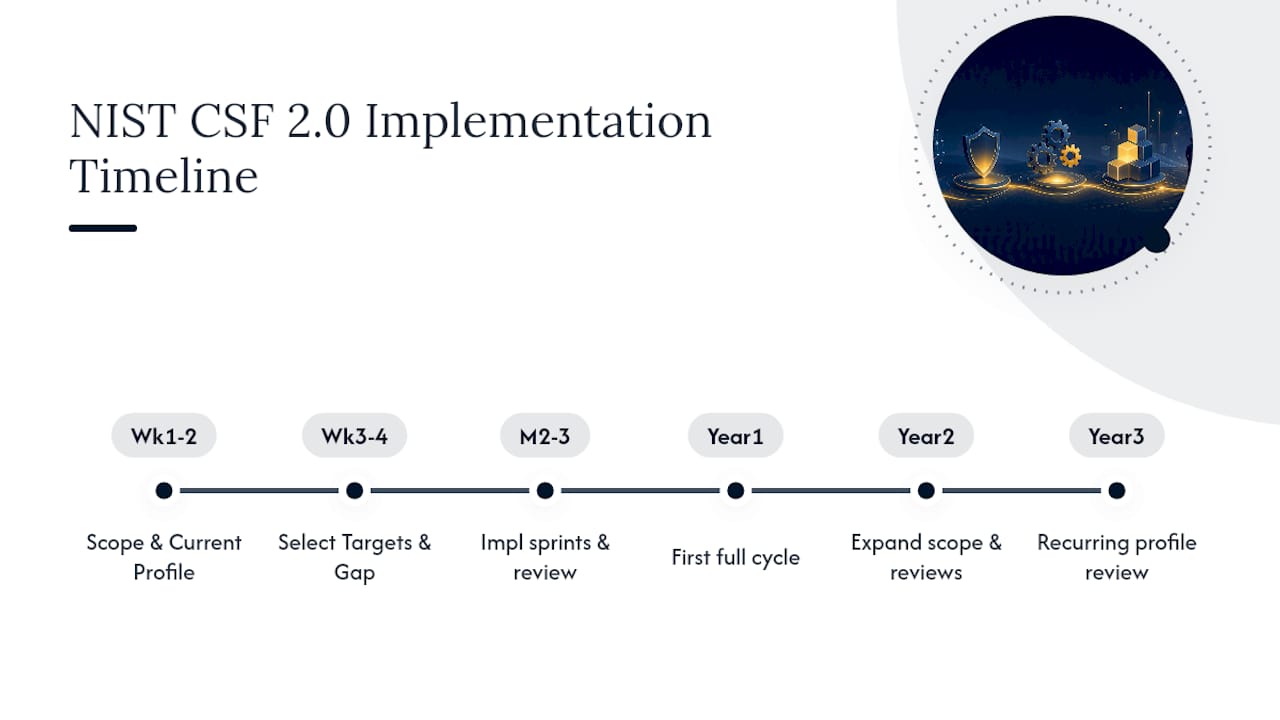
Most small businesses can complete an initial meaningful cybersecurity improvement cycle within a few months, not the multi-year rollout larger enterprises sometimes describe. Weeks one and two go to scoping and building the Current Profile. Weeks three and four go to selecting your three to five Target outcomes and running the gap analysis. That leaves roughly two to three months for actual implementation sprints on your prioritized controls, plus a short review at the end to confirm what’s done and what slipped.
Year one for most SMBs is really about establishing that first complete cycle, not chasing a top-tier maturity score. Expect to land somewhere between Partial and Risk Informed on the CSF Tier scale, with a documented Current Profile and a handful of controls actually deployed, not just planned. That’s a legitimate result, not a consolation prize.
Year two typically looks different. You expand scope beyond the initial narrow slice, add a second Target Profile for a new business area like vendor management or physical security, and start running quarterly reviews instead of one annual push. By year three, many small businesses have folded the profile review into a recurring calendar item, similar to a budget review, rather than treating it as a special project that needs re-justifying every time.
The biggest timeline killer isn’t lack of a plan. It’s treating the first cycle as a one-time compliance exercise instead of the start of a repeatable rhythm. Businesses that build the review cadence into existing meetings (a monthly ops review, a quarterly leadership check-in) sustain progress far better than those who schedule “cybersecurity” as its own separate, easily postponed initiative.
What Pitfalls Trip Up Small Businesses Adopting NIST CSF?
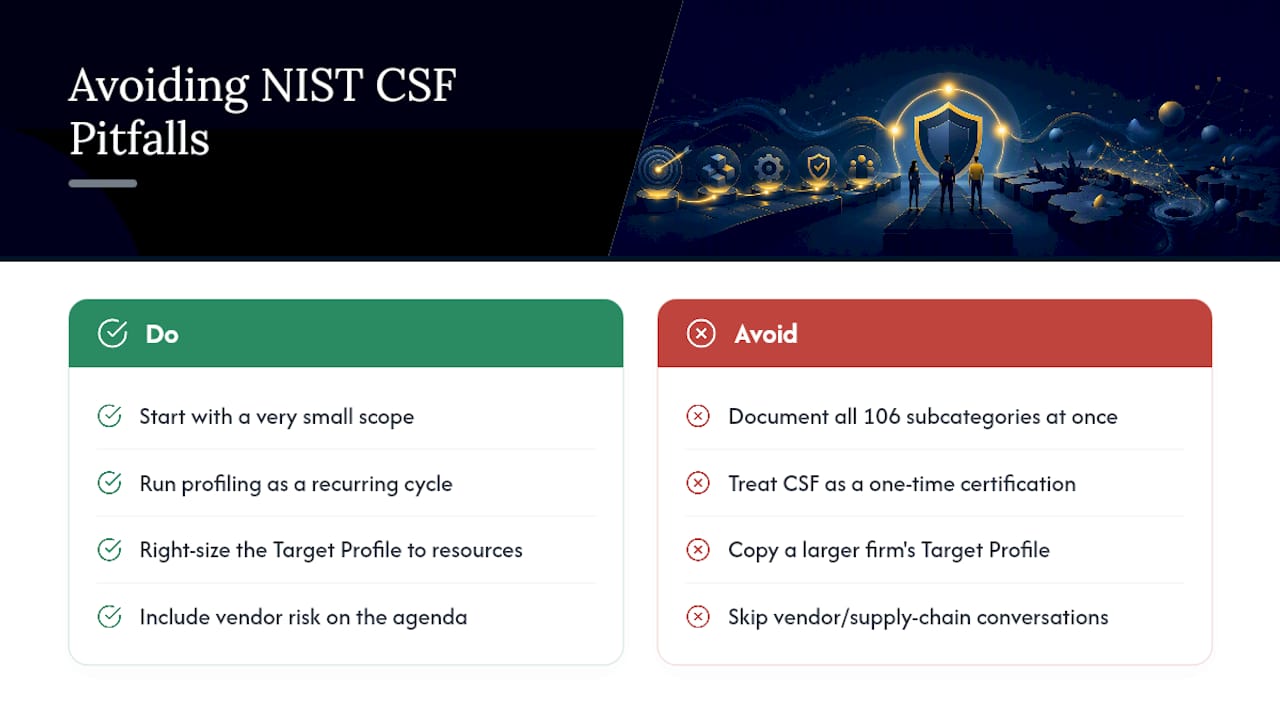
The most common failure point isn’t technical. It’s scope creep at the profiling stage. Owners sit down to build a Current Profile, realize the CSF core lists 106 subcategories across six functions, and try to document all of them before doing anything else. Momentum dies somewhere around subcategory forty.
A second pitfall is treating the framework as a one-time certification rather than an ongoing cycle. CSF has no pass/fail exam and no certificate to hang on the wall. Businesses that expect a finish line often abandon the effort once the initial excitement fades, leaving a half-built Current Profile in a shared drive that nobody revisits.
Resource mismatch causes a third common stumble. A five-person company doesn’t need the same Target Profile as a fifty-person company, but owners sometimes borrow a Target Profile built for a larger organization and then feel discouraged when they can’t staff it. Scaling the target to your actual headcount and budget matters more than matching some ideal maturity level.
Vendor and supply-chain blind spots round out the list. Small businesses often secure their own systems reasonably well but never ask basic security questions of the vendors and contractors who touch their data. The Govern function exists partly to close this gap, but it’s the piece most frequently skipped because it requires uncomfortable conversations rather than a technical fix.
The fix for all four is the same: keep the first cycle small, treat it as recurring rather than one-time, size the Target Profile to your actual resources, and put vendor risk on the agenda even when it’s an awkward conversation to start.
How Do You Measure Progress After the First Implementation Cycle?
Progress tracking works best when it’s tied to the same handful of KPIs you set during the gap analysis, not a fresh scorecard invented after the fact. If your Target Profile included “MFA on 100% of privileged accounts,” that percentage is your ongoing metric, checked monthly rather than assumed.
Three practical signals tend to matter more than a formal audit score. First, track how many of your prioritized controls are fully deployed versus partially deployed. A control that’s “in progress” for six months straight is really a stalled control, and that distinction should show up in whatever report leadership sees. Second, track backup restore test results, not just backup completion. A backup job that runs successfully every night is meaningless if nobody has confirmed the data actually restores. Third, track how many vendor or third-party risk conversations happened in the quarter, since this is the metric most likely to get skipped without a deliberate check.
Revisit your CSF Tier placement roughly every six months rather than every week. Cybersecurity maturity moves slowly enough that weekly tier reassessment mostly generates noise, while a semiannual check gives you enough runway to see real movement between Partial, Risk Informed, and Repeatable. When you do see movement, that’s your evidence for renewing the next Target Profile with a slightly wider scope, whether that’s adding a new business unit or tackling the vendor risk questions you deferred in year one.
How Should You Work With a Managed IT Partner on CSF 2.0?
Bringing a managed IT provider into your CSF 2.0 work goes smoother when you ask direct, function-based questions rather than generic ones. Eight worth asking: How do you handle Govern-level policy and vendor risk? How do you inventory assets for Identify? What’s your MFA and backup approach for Protect? What logging exists for Detect? What’s the incident response plan for Respond? How fast can you restore from backup for Recover? Can you map your services to my Target Profile? And how do you report progress against it?
A good discovery call should map deliverables directly onto your chosen outcomes, not sell you an unrelated bundle.
How Mavericks Office Solutions Helps You Implement CSF 2.0
You don’t have to build a Current Profile alone or guess which controls come first. A managed IT provider can serve as your outsourced IT department, aligning managed IT, cybersecurity, and leadership services directly to the CSF functions: Protect and Detect through managed monitoring, Respond and Recover through backup and incident planning, and Govern through guidance that supports policy decisions.

A typical starting point is a short discovery call to scope an initial Target Profile, followed by a pilot project on two or three priority controls, often phishing-resistant MFA and tested backups. If you’re ready to turn your Current Profile into an actual action plan, start with a conversation about Cybersecurity services or explore Managed IT Services to see how the full stack maps to your priority outcomes.
Using NIST CSF 2.0 With a Managed IT Partner
The framework works best as a shared document between you and whoever implements it, not a report you hand over and hope gets read. When Mavericks Office Solutions runs discovery with a new client, the goal is mapping existing services against a client’s Target Profile within the first conversation, not after weeks of back-and-forth. That mapping exercise alone often reveals which of the five priority controls, MFA, backups, patching, EDR, or segmentation, are already partially in place versus genuinely missing.
The businesses that benefit most from CSF 2.0 treat it as a living checklist that is regularly updated, rather than a static report from a one-time engagement.
— Jeffrey
Sources
- The NIST Cybersecurity Framework (CSF) 2.0
- NIST Cybersecurity Framework 2.0: Small Business Quick-Start Guide (SP 1300)
- Quick-Start Guide for Creating and Using Organizational Profiles (SP 1301)
- StopRansomware Guide (CISA)
FAQ
Is the NIST CSF Mandatory?
No, CSF 2.0 is voluntary at the federal level and not a legal requirement for private businesses. That said, insurers, larger clients, and some contracts increasingly reference it, so adoption can become a practical necessity even without a legal mandate.
Is NIST CSF Free?
Yes, the full CSF 2.0 publication and every supporting guide, including the Small Business Quick-Start Guide, are free to download from NIST with no account or purchase required.
What Cybersecurity Software Is Best for Small Businesses?
There’s no single best product, since CSF 2.0 is outcome-focused rather than tool-specific. Prioritize categories over brands: phishing-resistant MFA, immutable backup software, and an EDR or managed detection service cover the highest-impact outcomes first.
What Are the Cybersecurity Needs of Small Businesses?
Most small businesses need the same core outcomes as larger companies, just scoped smaller: strong access controls, tested backups, patched systems, some detection capability, and a basic incident response plan. Working with a managed IT provider, such as Mavericks Office Solutions, often covers these outcomes without requiring a dedicated in-house security hire.