

For most small and medium-sized businesses running a mix of legacy software and customer-facing apps, hybrid cloud is the smartest way to get public-cloud scalability without giving up control over sensitive data. It balances flexibility, cost, and security better than an all-private or all-public setup for most SMBs. Your next move: inventory your current workloads, or schedule an assessment with a managed IT provider before you sign anything.
TL;DR:
- Hybrid cloud allows SMBs to run sensitive data on private servers while leveraging public clouds for scalable, low-sensitivity workloads, optimizing costs and control.
- Successful migration requires a workload inventory, network assessment, compliance mapping, and clear cost and skills gap analysis before phased implementation.
- Starting with non-critical applications and verifying connectivity, latency, and backup security reduces risks and improves confidence before transitioning critical systems.
- Ongoing operational costs, monitoring, and management post-migration often exceed initial expenses, so continuous budget governance and disaster recovery testing are essential.
- Engaging a local managed service provider simplifies migration, ensures 24/7 support, and consolidates cybersecurity and backup needs, reducing budget and operational complexity.
Table of Contents
- What Is Hybrid Cloud SMB Strategy, Exactly?
- What Are the Core Benefits of Hybrid Cloud for SMBs?
- Public vs. Private vs. Hybrid: Which Fits Your Business?
- How Do You Assess Readiness Before Migrating?
- What Does a Hybrid Cloud Implementation Checklist Look Like?
- When Should You Bring in a Managed Service Provider?
- What Should Hybrid Cloud Cost and How Fast Is the Payoff?
- What’s the Honest Trade-Off Most SMBs Get Wrong?
- Ready to Plan Your Hybrid Cloud Move?
- Sources
What Is Hybrid Cloud SMB Strategy, Exactly?
Hybrid cloud means running some systems on your own servers (private cloud) and others through a public provider like Microsoft Azure or Amazon Web Services, with the two connected so data and applications can move between them when needed. A typical SMB example: your accounting or ERP system stays on a local server for control and speed, your customer-facing web portal runs in the public cloud to handle traffic spikes, and your backups replicate off-site to cloud storage automatically.
You’ll also see the term “cloud bursting,” which describes temporarily shifting workload overflow into the public cloud during demand spikes, then pulling it back once traffic settles. Microsoft Azure’s own definition frames hybrid cloud as exactly this: private and public environments working as one system rather than two separate silos.
What Are the Core Benefits of Hybrid Cloud for SMBs?
The business case for hybrid cloud comes down to four things decision-makers actually care about: elasticity, cost, security, and uptime. A retail business that sees holiday traffic spikes can scale its public-cloud storefront in hours instead of buying servers that may sit idle for extended periods. A healthcare practice can keep patient records on a private, tightly controlled system while running scheduling and billing tools in the cloud.
- Scalability on demand. Seasonal or bursty workloads scale in the public cloud without permanent hardware investment.
- Cost flexibility. You mix upfront capital spending on private infrastructure with pay-as-you-go operating costs in the cloud, smoothing out cash flow.
- Security and compliance control. Sensitive data stays on infrastructure you manage directly, while lower-risk workloads run in the public cloud. HP’s SMB guidance points to this split as one of the strongest arguments for hybrid over pure private cloud, which tends to cost more to maintain at scale.
- Better disaster recovery. Cloud-based backups and failover reduce the odds that one hardware failure takes your business offline.
Public vs. Private vs. Hybrid: Which Fits Your Business?
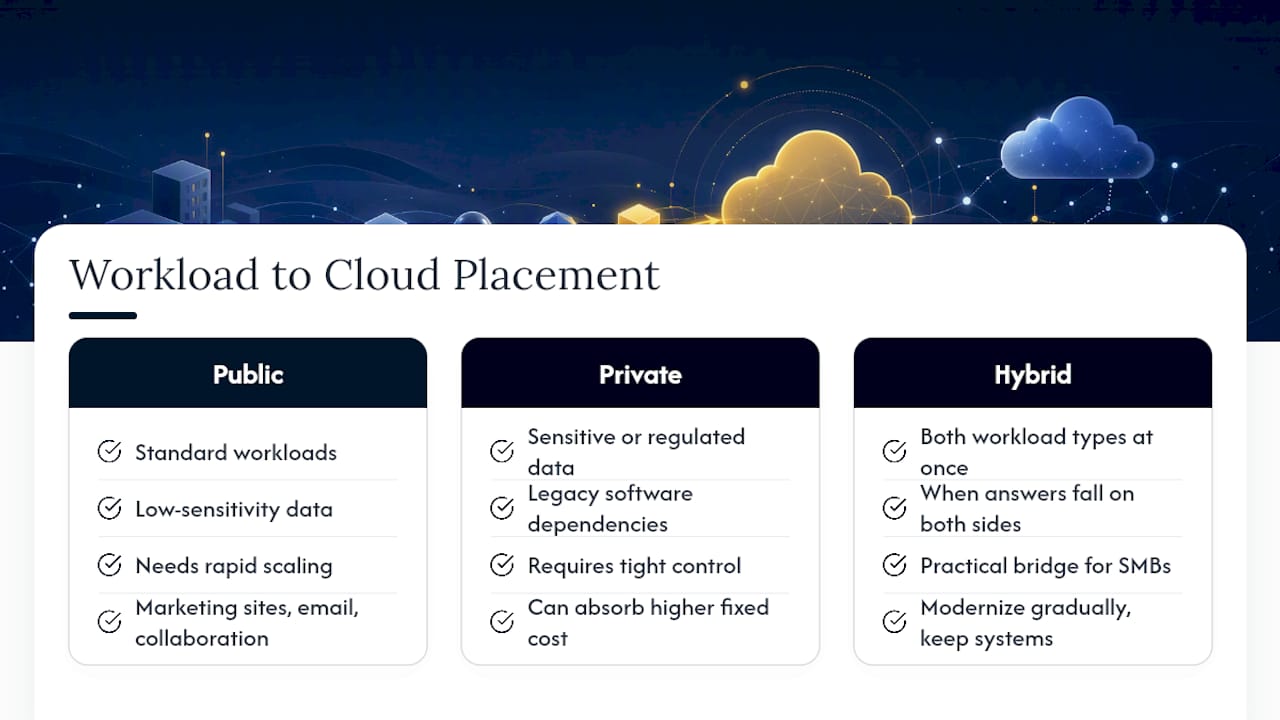
Public cloud makes sense when your workloads are standard, low-sensitivity, and need to scale quickly, think marketing sites, email, or collaboration tools that benefit from digital presence for SMB growth. Private cloud fits when data sensitivity, regulatory requirements, or legacy software dependencies demand tight control and you can absorb the higher fixed cost. Hybrid cloud earns its place when you have both kinds of workloads at once, which describes most SMBs more accurately than either extreme.
Run this quick check: does the workload handle regulated or highly sensitive data? Does it depend on old software that won’t run well in the cloud? Does demand for it spike unpredictably? A “yes” to the first two points toward private or hybrid; a “yes” to the third points toward public or hybrid. If your answers land on both sides, hybrid cloud is your practical bridge, letting you modernize gradually instead of ripping out systems that still work fine.
How Do You Assess Readiness Before Migrating?
Before committing budget, run a phased assessment. This is the same groundwork a managed IT provider would perform during a discovery engagement, and you can start much of it yourself.
- Inventory every workload and classify it by data sensitivity, latency needs, and cost profile. This single step usually reveals which systems are obvious public-cloud candidates and which need to stay private.
- Check network readiness. Confirm your bandwidth and connection stability can support the data flow between environments; this is frequently where hybrid projects stall.
- Map compliance and data residency requirements. Know where regulated data legally needs to live before you pick a provider or region.
- Estimate cost shape and skills gaps. Rough out what CapEx versus OpEx will look like, and be honest about whether your internal team has the bandwidth to manage a hybrid environment day to day.
Techaisle’s adoption research shows hybrid adoption already spans small and midmarket firms at meaningfully different rates by size, so don’t assume your peers have already solved this. Many haven’t.
What Does a Hybrid Cloud Implementation Checklist Look Like?
Once your assessment is done, move in phases rather than flipping a switch. Start with a low-risk, customer-facing application and run it for several weeks, tracking latency, error rates, and cost per transaction before you touch anything critical.
- Pilot first. Choose one noncritical workload, verify connectivity and real-world latency, and confirm the numbers match what you budgeted.
- Lock down backups. Move to cloud-native object storage with immutable snapshots so ransomware can’t encrypt your backup copies along with production data. Veeam’s guidance for SMBs treats immutable backups as a baseline requirement, not an upgrade.
- Centralize identity and encryption. One identity system across both environments prevents the password sprawl that creates security gaps.
- Turn on logging and monitoring. A basic SIEM setup gives you visibility into both environments from a single dashboard, which matters more once you’re managing two infrastructures instead of one.
- Apply cost governance. Set budget alerts and usage reviews early. Cloud bills that go unmanaged for even a few months are one of the most common reasons SMBs sour on hybrid cloud.
- Test your rollback plan. Know exactly how you’d revert a failed migration before you need to use it under pressure.
Pro Tip: Test your disaster recovery procedure before you need it for real. A DRaaS setup that hasn’t been tested is a guess, not a plan, and the worst time to find out it doesn’t work is during an actual outage.
For a deeper look at backup design specifically, Mavericks Office Solutions’s guide to surviving ransomware walks through immutable backup architecture in more detail, and the cloud migration checklist covers rollback planning step by step.
When Should You Bring in a Managed Service Provider?
Three signals usually mean it’s time to call in outside help: your IT staff is stretched too thin to manage two environments, you need genuine 24/7 monitoring coverage, or you’re under compliance pressure you don’t have in-house expertise to navigate. An MSP typically handles discovery and workload assessment, manages the actual migration, and then runs ongoing monitoring, patching, and backup verification once you’re live.
When evaluating any provider, check four things: their service-level agreement terms, average help desk response time, backup and recovery guarantees, and whether support is local or routed through an offshore call center. Mavericks Office Solutions runs a USA-based help desk with a fast average response time, a detail worth comparing against whatever provider you’re evaluating.
What Should Hybrid Cloud Cost and How Fast Is the Payoff?
A realistic pilot-to-full-migration timeline runs several months, depending on how many workloads you’re moving and how complex your compliance requirements are. Budget across three buckets: one-time migration and setup work, recurring cloud subscription costs, and ongoing management or MSP fees.
The payback shows up in a few measurable places: fewer hours lost to downtime, hardware refresh cycles you can push back or skip entirely, and productivity gains from employees no longer waiting on slow legacy systems. You’ll know the project is paying off when your cloud bill stabilizes month to month instead of climbing, and when your team stops treating backups as an afterthought.
What’s the Honest Trade-Off Most SMBs Get Wrong?
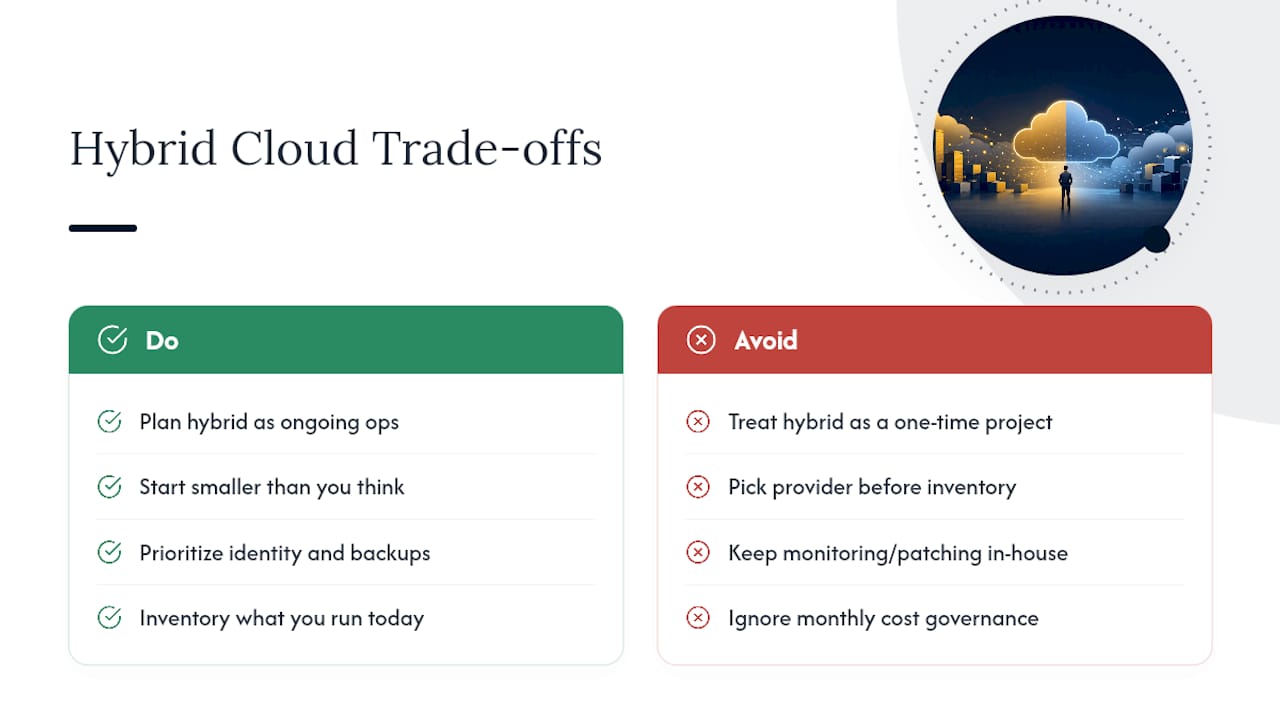
Most SMBs treat hybrid cloud as a one-time project instead of an ongoing operational commitment. The real cost isn’t the migration. It’s the monitoring, patching, and cost governance that continues every month after the pilot ends, and that’s exactly where budgets get blown.
Start smaller than you think you need to. Get identity management and backups right before you touch anything else, because those two pieces determine whether a ransomware incident is a bad afternoon or a business-ending event. Accept that noncore infrastructure, monitoring, patching, help desk work, belongs on a managed service, not on your own to-do list. Your first real task isn’t picking a cloud provider. It’s inventorying what you’re running today.
— Jeffrey
Ready to Plan Your Hybrid Cloud Move?
Consider engaging a single outsourced IT department instead of juggling a cloud vendor, a security vendor, and a backup vendor separately, which is where most SMB hybrid cloud budgets quietly get lost. Every plan typically starts with a real workload assessment, not a generic package, and runs through migration, monitoring, and backup verification under one contract with one point of contact.

That single-provider structure matters most during an incident: a ransomware attempt at 2 a.m. doesn’t wait for business hours, and Mavericks Office Solutions backs its managed IT services with a local, USA-based help desk that averages under 12 minutes to respond, not an offshore queue. If you’re weighing cybersecurity alongside your hybrid cloud plans, that’s worth folding into the same conversation rather than treating it as a separate project later.
Schedule a hybrid cloud readiness assessment with Mavericks Office Solutions and get a clear scope, timeline, and cost estimate before you commit to a migration.
Sources
- What is a Hybrid Cloud? | Microsoft Azure
- Why Small and Mid-Sized Businesses Should Use Hybrid Cloud
- Definitive data on Enterprise and SMB Hybrid Cloud adoption