

Recovery Time Objective (RTO) is how long your business can survive a system being down. Recovery Point Objective (RPO) is how much data you can afford to lose when that system comes back online. They sound similar, but a fast RTO with a loose RPO can still hand you a disaster: your servers might be back online in an hour, loaded with data from three days ago.
TL;DR:
- Shortening RTO demands automated failover solutions and hot standby infrastructure, which significantly increases operational costs for near-instant recovery.
- Tighter RPO requires more frequent backup and replication methods, often involving higher bandwidth and storage expenses, especially for real-time data protection.
- Accurate RTO and RPO targets depend on detailed business impact analysis, mapping critical processes, dependencies, and precise hourly loss costs.
- Regular testing of recovery procedures, including full failover drills, is essential to validate RTO and RPO claims and adjust targets as needed.
- Managing RTO and RPO effectively requires collaboration between business owners, IT teams, and vendors, with clear documentation and stakeholder approval.
Table of Contents
- What Is RTO and RPO? Definitions, Direction, and Ownership
- RTO vs RPO: What Each One Actually Drives
- How to Calculate RTO and RPO Using a Business Impact Analysis
- RTO RPO Examples by Workload Tier
- Replication, CDP, and Failover: The Technical Levers Behind RTO and RPO
- Testing and Validating Your Recovery Targets
- Balancing Recovery Cost Against the Cost of Downtime
- What Most Small Businesses Get Wrong About RTO and RPO
- Your Next 90 Days: A Recovery Objective Checklist
- Turn Your RTO and RPO Targets Into a Tested Recovery Plan
- Sources
What Is RTO and RPO? Definitions, Direction, and Ownership
RTO measures downtime tolerance: the maximum acceptable time between an outage and full restoration, typically expressed in minutes, hours, or days. RPO measures data-loss tolerance: the maximum acceptable gap between your last usable backup and the moment disaster strikes. Both are core metrics in business continuity and disaster recovery planning, and understanding RTO versus RPO starts with recognizing they point in opposite directions.
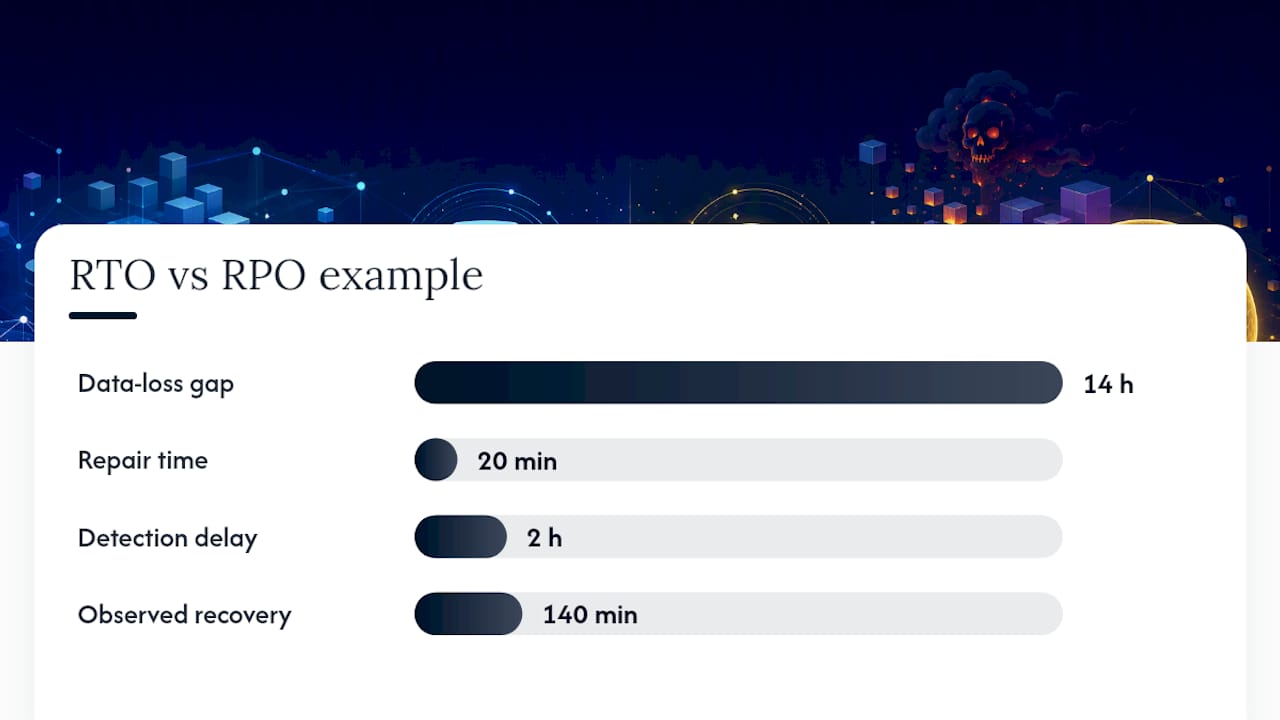
RTO looks forward from the moment of failure: how long until the application, server, or workload is functional again. RPO looks backward from that same moment: how far back in time your last clean backup or replica sits. If your CRM database goes down at 2:00 PM and your last backup ran at midnight, your actual data loss is 14 hours, regardless of how quickly the system itself comes back online.
People often confuse RTO with Mean Time to Repair (MTTR). MTTR measures the technical repair window for a specific fault. RTO is broader: it covers detection, decision-making, failover, data restoration, and validation before the business calls the workload “recovered.” A server might be repaired in 20 minutes, but if nobody notices the outage for two hours, your actual recovery time is closer to 140 minutes.
Ownership typically splits across roles:
- Application owners and business unit leaders define acceptable downtime and data loss based on revenue and compliance exposure.
- Backup and storage administrators own the technical mechanisms (backup frequency, replication) that determine achievable RPO.
- Infrastructure and DR teams own the failover architecture and automation that determine achievable RTO.
That division matters because a target set without technical buy-in is just a number on a slide. RTO and RPO only work when the people setting them and the people building toward them are the same conversation.
RTO vs RPO: What Each One Actually Drives
RTO and RPO pull on different levers, procurement decisions, and budget lines, even though they get lumped together in the same DR conversation.
RTO drives investment in standby infrastructure, orchestration tooling, and automated failover. Shortening RTO usually means paying for warm or hot standby environments, runbook automation, and load balancers that can redirect traffic within seconds. RPO drives investment in replication frequency and backup cadence. Tightening RPO means moving from nightly backups to continuous replication, which raises storage and bandwidth costs but shrinks the data-loss window to seconds or minutes.
These targets also shape contracts. A client SLA promising “four hours to restore service” is really an RTO commitment. A compliance requirement to retain financial transaction data with no more than five minutes of loss is an RPO commitment written into regulatory language.
A simplified way to separate the two:
- RTO influences: failover automation, standby capacity, network rerouting, application startup sequencing.
- RPO influences: replication method, snapshot frequency, backup retention, storage architecture.
- Both influence: insurance premiums, vendor SLAs, audit outcomes, and how a board reacts after an incident.
Confusing the two during budget planning is a common mistake. Spending heavily on failover automation does nothing for data currency if your backups still run once a day.
How to Calculate RTO and RPO Using a Business Impact Analysis
Setting RTO and RPO by gut feeling is how businesses end up with targets that are either wildly expensive or dangerously loose. The defensible path starts with Maximum Tolerable Downtime (MTD): the absolute outer limit before an outage causes damage the business cannot recover from, whether that is lost customers, contract penalties, or regulatory action.
From there, a Business Impact Analysis (BIA) maps every critical process, its dependencies, and the financial cost of losing it hour by hour. A BIA is the single most useful document you can produce before setting any recovery target, because it converts vague urgency into a dollar figure decision-makers can act on.
Follow this sequence to move from business risk to a defensible number:
- Identify critical processes. List every system that touches revenue, safety, or regulatory obligation.
- Quantify hourly downtime cost. Include lost sales, labor idle time, contractual penalties, and reputational exposure where you can estimate it.
- Map dependencies. A payment gateway might depend on an authentication service, a database, and a network path. Recovery order matters as much as recovery speed.
- Set MTD per process. Ask: at what point does downtime stop being an inconvenience and start being an existential problem?
- Translate MTD into RTO with buffer. RTO should sit comfortably inside MTD, never flush against it. If MTD is six hours, target an RTO of four.
- Set RPO based on data volatility and regulatory need. A transaction ledger needs a tighter RPO than a marketing content database.
- Get stakeholder sign-off. Finance, legal, and operations leaders need to agree the numbers reflect real business risk, not IT’s best guess.
Worksheet questions worth asking every department head: What breaks first if this system is down for an hour? A day? What is the cost of losing the last hour of data entered into this system? Who needs to approve the recovery before customers are notified?
Pro Tip: Run the BIA interview with finance in the room, not just IT. Downtime cost estimates from operations alone almost always undercount lost revenue and overtime labor.
RTO RPO Examples by Workload Tier
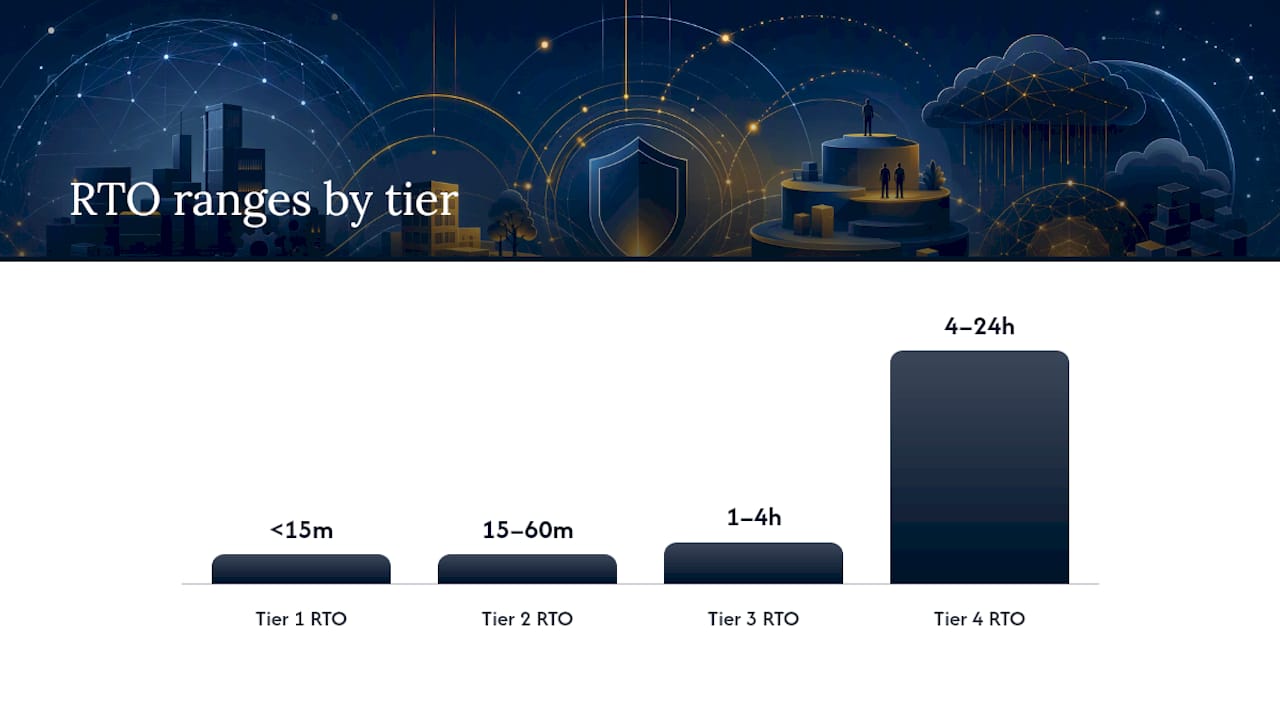
Most organizations sort workloads into four tiers, then assign RTO and RPO ranges that reflect how much damage an outage in that tier actually causes.
- Tier 1, mission critical: RTO under 15 minutes, RPO of 1 to 5 minutes. Think payment processing, e-commerce checkout, or authentication services where every minute down means lost transactions.
- Tier 2, business critical: RTO of 15 to 60 minutes, RPO in a similar range. CRM platforms and order management systems fall here: painful to lose, but customers tolerate a short delay.
- Tier 3, important but not urgent: RTO of 1 to 4 hours, RPO measured in hours. Internal analytics dashboards and reporting tools live here.
- Tier 4, low priority: RTO of 4 to 24 hours or more, RPO measured in a full day or longer. Development and test environments typically sit at this tier since losing a day of sandbox data rarely affects revenue.
These tier ranges reflect common industry practice, not a fixed rule; your BIA might justify tighter targets for a workload that looks unimportant on paper but touches a compliance deadline.
Near-zero targets belong only where the cost of downtime or data loss clearly outweighs the cost of near-continuous replication and hot standby infrastructure. A regional bakery’s inventory system rarely needs a five-minute RPO. A hospital’s patient records system almost always does.
Replication, CDP, and Failover: The Technical Levers Behind RTO and RPO
RPO is largely a function of how often data gets copied and how far that copy sits from the source. Synchronous replication writes data to a secondary location at the same moment it’s written to primary storage, driving RPO close to zero but demanding low-latency, high-bandwidth connections between sites. Asynchronous replication introduces a lag, often seconds to minutes, in exchange for lower cost and tolerance for greater distance between primary and backup sites.
Continuous Data Protection (CDP) captures every write as it happens rather than relying on scheduled backup windows, which is how organizations push RPO down toward seconds instead of hours. Traditional nightly or hourly backups still work fine for lower tiers, where an hour or a day of data loss is tolerable.
RTO depends more on failover architecture. Cold standby means spinning up infrastructure from scratch after a disaster, slow but cheap. Warm standby keeps a partially running environment ready to scale up. Hot standby runs a live, synchronized environment that can take over traffic almost immediately. Automation and documented runbooks matter as much as the infrastructure itself; a hot standby environment with no rehearsed failover procedure still produces a slow, error-prone recovery.
Common RTO bottlenecks show up in places engineers underestimate: DNS propagation delays, restore throughput limits on large databases, and dependency sequencing, where an application comes back online before the database or authentication service it needs is ready. Application-level practices like feature flags and targeted rollbacks also cut recovery time for deployment-caused incidents, since teams can disable a broken feature instantly rather than rolling back an entire release. Cloud platforms increasingly bake this thinking into tooling: AWS Resilience Hub can map RPO and RTO policies directly to cloud applications and estimate what it costs to close the gap.
- Sync replication: near-zero RPO, high infrastructure cost.
- Async replication: small RPO lag, lower cost, works over distance.
- CDP: near-continuous protection, ideal for volatile transactional data.
- Hot standby with automated failover: fastest RTO, highest ongoing cost.
Pro Tip: Test your restore throughput before you commit to an RTO number on paper. A 2-terabyte database restore that takes six hours on your actual hardware makes a one-hour RTO promise meaningless.
Testing and Validating Your Recovery Targets
A target you have never tested is a guess wearing a business case. Recovery Time Actual (RTA) is the measured time your team actually takes to restore a system during a real test, and it’s the number that either validates or exposes your RTO claim. Track RTA the same way every time: timestamp the failure trigger, timestamp full service restoration, and log every manual step in between.
- Run tabletop exercises quarterly. Walk through the failure scenario verbally with the response team, no systems touched, to surface gaps in the runbook.
- Run partial failover tests semiannually. Fail over a single application or database to confirm the mechanics work without disrupting production.
- Run full failover drills annually. Simulate a complete site loss and measure RTA against your documented RTO.
- Compare RTA to RTO after every test and revise the target or the architecture if there’s a persistent gap.
Ransomware changes the math. Recovery from a ransomware incident typically takes longer than a standard outage because you first need to confirm which backups are clean, isolate infected systems, and often preserve evidence for forensic investigation before restoring anything. Build extended RTO expectations into your ransomware-specific playbook, and keep at least one backup copy immutable and network-isolated so an attacker can’t encrypt or delete your recovery point along with production data.
Balancing Recovery Cost Against the Cost of Downtime
Shrinking RTO and RPO doesn’t cost more in a straight line; it costs more exponentially as you approach zero. Going from a 24 hour RTO to a 4 hour RTO might double your infrastructure spend. Going from 4 hours to 15 minutes can multiply it several times over, because you’re now paying for hot standby capacity, automated orchestration, and round-the-clock monitoring instead of a backup tape and a service contract.
The framework worth applying to every workload: plot the hourly cost of downtime against the cost of the infrastructure needed to hit a given recovery target. Somewhere on that curve, the two lines cross. Below that inflection point, tightening the target still saves more than it costs. Above it, you’re paying premium prices to protect against a risk that’s genuinely tolerable.
- Compare downtime cost per hour against annualized recovery infrastructure cost, not one-time setup cost alone.
- Revisit targets whenever a workload’s business role changes, not just on a fixed calendar.
- Put RTO and RPO numbers directly into vendor SLAs and internal runbooks, and require sign-off from both IT and business stakeholders before finalizing them.
Skipping governance is how a company ends up with a five-year-old DR plan built for a business that no longer looks anything like the one it’s protecting.
What Most Small Businesses Get Wrong About RTO and RPO
The most common gap isn’t technology, it’s documentation. A lot of small and midsize businesses have backups running but no BIA behind them, no clear map of which systems depend on which, and no evidence their backups actually restore cleanly. Untested backups are the disaster recovery equivalent of a fire extinguisher nobody has checked in five years.
Quick wins close that gap fast: raise backup frequency for your most critical datasets, write down the actual restore steps in a runbook instead of trusting memory, and schedule one partial failover test this quarter. A managed IT partner operationalizes these targets through continuous monitoring, documented runbooks, and scheduled DR testing, turning RTO and RPO from numbers on a page into something your team has actually rehearsed.
Pro Tip: Ask your IT team or provider for your last three backup restore test results. If they can’t produce them, you don’t have a backup strategy, you have a hope.
Your Next 90 Days: A Recovery Objective Checklist
Run a Business Impact Analysis, assign tiers to every critical workload, and schedule a real DR test within 90 days. Document the resulting RTO and RPO numbers in your SLAs and runbooks, not just in a planning deck. If you’re unsure where to start, loop in internal stakeholders first, then bring in outside help if the gaps look bigger than your team can close alone.
— Jeffrey
Turn Your RTO and RPO Targets Into a Tested Recovery Plan
Setting the right numbers is half the work; building the systems and discipline to hit them is the other half. Mavericks Office Solutions operationalizes RTO and RPO for small and midsize businesses that don’t have a dedicated disaster recovery team on staff, running the BIA, configuring backup and replication architecture, and executing the failover tests that turn a target on paper into a number you can trust.

That work includes managed BIA facilitation to identify your true recovery priorities, backup configuration tuned to each workload’s actual RPO need, scheduled DR testing to measure Recovery Time Actual against target, and 24/7 monitoring with a help desk that responds promptly when something goes wrong. If your backups haven’t been tested this year or your last DR plan predates your current systems, start with a DR readiness assessment through Managed IT Services and get a clear picture of where your actual recovery capability stands.
Sources
For deeper technical grounding, TechTarget’s comparison of RPO and RTO covers calculation methodology in detail, while SentinelOne’s overview of disaster recovery planning ties these metrics to formal standards guidance. Review both alongside your own compliance obligations before finalizing targets.
- RPO vs. RTO: Key Differences Explained With Examples | TechTarget
- Establishing RPO and RTO targets for cloud applications — AWS Blog
- RTO vs RPO: Key Differences for Modern Disaster Recovery | LaunchDarkly
- RTO vs RPO: Key Differences for Ransomware Recovery – N-able