

MFA fatigue attacks bombard a victim with repeated authentication prompts until they approve one out of exhaustion or confusion, and the fix is not more friction but better friction: phishing-resistant MFA backed by real-time detection. MITRE ATT&CK tracks this as technique T1621, and CISA names phishing-resistant MFA as the strategic destination, with number matching as the interim bridge while you migrate.
TL;DR:
- Watch for repeated prompts in a short window, especially after denials, outside business hours, or from unfamiliar IP addresses; review sign in history for 24 hours.
- Enable number matching while moving toward FIDO2 or WebAuthn security keys; also cap prompt volume, require challenge response, and block legacy authentication.
- Protect self service password reset and enrollment flows, and apply stronger conditional access to privileged accounts, because weak recovery can undo MFA safeguards.
- Pilot security keys with administrators, finance teams, and sensitive data handlers first; track prompt volume and denials, and explain changes before wider deployment.
- Deny and report unsolicited prompts, then change the password; if one was approved, revoke sessions, inspect recovery changes, and review subsequent account activity.
Table of Contents
- What is an MFA fatigue attack?
- How MFA fatigue attacks work
- Detecting MFA fatigue: logs, signals, and an investigation checklist
- Defensive controls: a prioritized mitigation roadmap
- Incident response: what to do after a suspicious or approved prompt
- How Mavericks Office Solutions supports MFA defense
- Why we prioritize phishing-resistant MFA and telemetry
- Put these defenses to work with Mavericks Office Solutions
- FAQ
- Sources
What is an MFA fatigue attack?
You may also hear this called push bombing or MFA spamming. All three names describe the same technique: an attacker who already has valid credentials triggers a flood of authentication requests, betting that you will tap “approve” just to make the notifications stop. The attack does not break the cryptography behind MFA. It exploits the person holding the phone.
Attackers typically work through whichever channel generates the loudest or most frequent prompt:
- Push notifications from authenticator apps, which arrive instantly and repeatedly
- SMS or automated voice calls requesting a one-time code
- Self-service password reset (SSPR) flows, which can be abused to trigger extra verification requests
- Legacy authentication endpoints that do not support modern challenge-response
The reason this works despite MFA being in place is simple. The attacker already has a correct username and password. MFA was supposed to be the second lock on the door, but a tired, distracted, or confused employee can still open it from the inside.
How MFA fatigue attacks work
Before the prompts start, attackers need a working credential pair. That usually comes from phishing, a credential-stuffing run against reused passwords, or a leaked-password dump purchased or scraped from a breach. Once they have a login that works, the mechanics are almost entirely automated: repeated sign-in attempts, scripted calls to authentication APIs, or abuse of SSPR endpoints that regenerate a push or code without the attacker ever touching an interactive session.
A typical sequence looks like this:
- The attacker obtains valid credentials through phishing, a leak, or stuffing against reused passwords.
- They initiate repeated authentication attempts, often scripted, against the victim’s account.
- Each attempt triggers a new MFA push, SMS code, or voice call to the legitimate user’s device.
- The victim, flooded with prompts (often at odd hours or in rapid succession) approves one to stop the interruptions.
- The attacker uses the approved session to access the account, and may pivot into SSPR or enrollment pages to add their own MFA method for persistence.
MITRE’s guidance on T1621 frames this as part of a broader identity attack chain, not an isolated nuisance, which is why detection has to look at credential access, prompt volume, and post-login behavior together rather than treating noisy notifications as the whole story.
Detecting MFA fatigue: logs, signals, and an investigation checklist
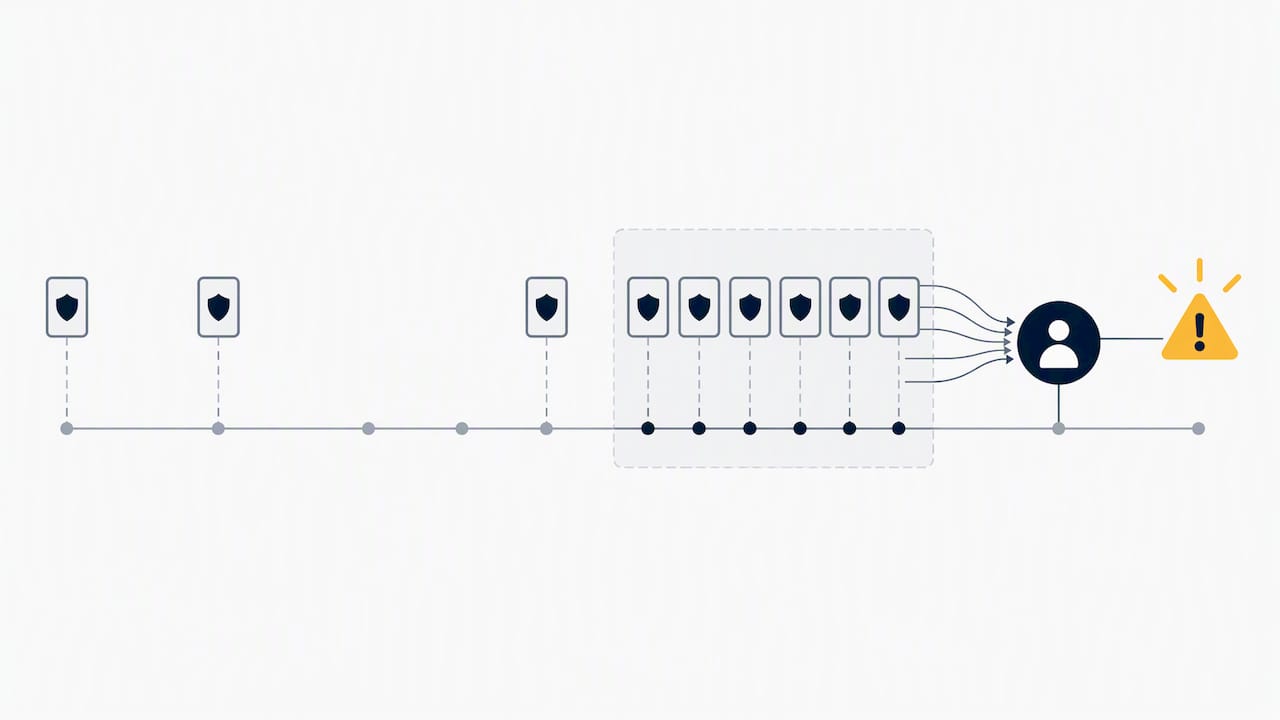
The attack leaves a trail before anyone approves anything. The pattern to watch for is volume and timing that does not match how a real user authenticates: several push prompts in a short window, a run of denied approvals followed by one acceptance, a spike in MFA-required sign-ins outside business hours, or a sign-in attempt from a source IP and geolocation that has never touched the account before.
Pull this telemetry from a few predictable places:
- Identity provider sign-in and audit logs, which show prompt frequency and approval or denial outcomes
- Risk detections and conditional access evaluation logs, which flag anomalous location or device signals
- EDR and privileged access management data, correlated against the same account and timeframe
When a pattern surfaces, pull the affected account’s full sign-in history for the prior 24 hours, confirm the source IP against known corporate ranges, and escalate to your security operations lead or managed detection provider before the user’s next login attempt.
Pro Tip: Set an alert threshold for multiple MFA prompts to a single account within a short time window; such volume almost never happens during normal use.
Defensive controls: a prioritized mitigation roadmap
The strategic destination is phishing-resistant MFA: FIDO2 and WebAuthn hardware security keys that cannot be approved by accident because they require physical possession and a cryptographic handshake, not a tap on a notification. CISA’s guidance on phishing-resistant MFA places this above every push-based method, and it is the right long-term target for any account that touches sensitive systems.
Getting there takes time, so a phased rollout works better than a single cutover:
- Immediate: turn on number matching for push-based MFA. Microsoft Entra enforces number matching for Authenticator push notifications as a built-in setting that end users cannot disable, and it closes the blind-approval gap without new hardware.
- Interim: rate-limit or cap the number of prompts an account can receive in a given window, require challenge-response push rather than a simple accept button, and restrict legacy authentication protocols that skip modern MFA entirely. OWASP’s MFA cheat sheet lists these as standard mitigations alongside monitoring.
- Program level: lock down SSPR and enrollment flows, since OWASP notes that a weak recovery path can undo an otherwise strong MFA setup, and give privileged accounts conditional access policies that go beyond what a standard employee account needs.
Pilot phishing-resistant MFA with your highest-risk groups first: administrators, finance, and anyone with access to sensitive data. Measure prompt volume and denial rates before and after, and tell users what is changing and why before you flip the switch. A practical SMB implementation guide walks through sequencing this rollout without disrupting daily work.
Pro Tip: Roll out number matching to a small pilot group of users for a brief period before enabling it organization-wide; it surfaces help desk questions early.
Incident response: what to do after a suspicious or approved prompt
Speed matters here more than almost anywhere else in security operations. If you receive an MFA prompt you did not request, deny it, report it through your organization’s security channel, and change your password immediately, even before anyone confirms whether the account was touched.
If a prompt was already approved, treat the account as compromised the moment you know:
- Revoke all active sessions and tokens tied to the account
- Force an immediate password reset
- Review recent MFA and recovery method changes for anything the attacker may have added
- Inspect post-login activity for mailbox rules, forwarding changes, or data access that should not have happened
Most identity providers include a built-in way to flag a push as fraudulent, which feeds directly into risk scoring and can trigger automatic conditional access restrictions on the account until someone reviews it. Use that reporting path every time, not just when something looks obviously wrong.
How Mavericks Office Solutions supports MFA defense
We build and manage the pieces this playbook depends on: managed IT services with 24/7 monitoring, cybersecurity programs that include MFA configuration, and fractional CTO guidance for businesses that need strategy without a full-time hire. Our work includes setting up number matching and Entra conditional access correctly.
For a step-by-step walkthrough, our Microsoft 365 MFA setup checklist covers configuration and recovery in about ten minutes.
Why we prioritize phishing-resistant MFA and telemetry
Push-based MFA was a real improvement over passwords alone, but it created a new failure mode: a tired employee tapping approve at 11 PM. Hardware keys remove that decision point entirely, and good telemetry catches the attempts that happen before anyone gets to decide anything.
Expect some pushback during rollout. Hardware keys add a step people are not used to carrying. Pilot your highest-risk accounts first, and let the data from that pilot make the case for everyone else.
— Jeffrey
Put these defenses to work with Mavericks Office Solutions
We handle ongoing tasks such as configuring number matching and conditional access, monitoring sign-in logs continuously, and responding promptly to suspicious activity.

Our relevant work includes:
- Managed IT services with proactive monitoring and a USA-based help desk
- Cybersecurity services covering MFA hardening, conditional access, and incident response
- A practical MFA guide for SMBs you can use to plan your own rollout
Request a security review through our cybersecurity page and we will walk through where your current MFA setup leaves gaps.
FAQ
How might you recognize that an MFA fatigue attack is happening?
The clearest sign is several MFA prompts hitting one account in a short window, often outside normal working hours, sometimes with a run of denials before one approval. Reviewing identity provider sign-in logs for repeated prompts tied to unfamiliar IP addresses confirms the pattern.
How do you prevent an MFA fatigue attack?
CISA recommends migrating to phishing-resistant MFA like FIDO2 hardware keys as the long-term fix, with number matching, prompt rate limits, and restricted legacy authentication as effective interim steps. Protecting SSPR and recovery flows closes a gap that otherwise undermines even strong MFA.
What are the four types of MFA?
Common MFA categories include something you know (a password or PIN), something you have (a hardware key or authenticator app), something you are (biometrics like a fingerprint), and somewhere you are (location-based signals used in risk scoring). Not every system uses all four, and phishing-resistant methods typically combine possession with cryptographic verification.
Is two-factor authentication no longer secure?
Two-factor authentication is still far better than a password alone, but not every implementation offers equal protection against push bombing and similar tactics. MITRE’s documentation on MFA request generation shows why push-based methods without number matching are the weakest link, while hardware security keys remain resistant to this style of attack.
Sources
- Multi-Factor Authentication Request Generation, Technique T1621 – Enterprise | MITRE ATT&CK®
- Implementing number matching in MFA applications (CISA fact sheet)
- How number matching works in MFA push notifications for Authenticator – Microsoft Entra ID | Microsoft Learn
- Multifactor Authentication – OWASP Cheat Sheet Series