

Phishing-resistant authentication means cryptographic credentials bound to the legitimate verifier: FIDO2/WebAuthn or PKI-based methods that cannot be phished, relayed, or replayed the way passwords and codes can. If you manage IT for a small or midsize business, the fastest path forward is a pilot: pick your SSO-protected high-value apps and your admin accounts first, then expand from there.
TL;DR:
- Phishing-resistant credentials bind to a specific verifier and prevent attackers from reusing or relaying authentication secrets, making them essential for high-assurance security.
- FIDO2 and WebAuthn generate site-specific cryptographic key pairs, with private keys never leaving the device, thereby preventing phishing and replay attacks by design.
- SMS, email OTPs, and push notifications lack origin binding and remain vulnerable to SIM swapping, man-in-the-middle interception, and man-at-the-end attacks.
- Implementing phishing-resistant MFA should start with privileged accounts, enforce attestation during enrollment, and involve phased rollouts supported by centralized enforcement through SSO.
- Quick response to suspected MFA compromise includes immediate device unenrollment, credential rotation, verified re-enrollment, and thorough review of sign-in logs to prevent breaches.
Table of Contents
- What phishing resistance actually means under NIST and CISA
- How FIDO2, WebAuthn, and PKI actually block phishing
- Why SMS, OTP, and standard push still get phished
- Building a rollout plan your team can actually execute
- Handling admin enforcement and suspected MFA compromise
- A quick checklist mapped to NIST’s assurance levels
- How Mavericks Office Solutions approaches phishing-resistant rollouts
- Get help rolling out phishing-resistant authentication
- Sources
- FAQ
What phishing resistance actually means under NIST and CISA
Phishing resistance is not a marketing label. It has a specific technical definition, and understanding it will save you from buying the wrong tool.
Under NIST SP 800-63-4, phishing resistance means a remote attacker cannot obtain a usable authentication secret or output by impersonating the verifier, even if the user is tricked into visiting a fake site. That single sentence rules out anything where a human types a code into a box, because a human cannot tell a cloned login page from the real one, but a cryptographic protocol can. NIST maps this requirement directly to its Authenticator Assurance Levels: AAL2 must offer at least one phishing-resistant option, and AAL3 requires phishing resistance plus a non-exportable private key and two distinct authentication factors.
CISA’s fact sheet on implementing phishing-resistant MFA reinforces the same point from an operational angle. The agency names FIDO and WebAuthn as the widely available phishing-resistant option for most organizations, and it is explicit that security should never depend on a user correctly spotting a fake domain. People get fooled. Cryptography does not.
Here is what falls short of that bar, regardless of how it is marketed:
- Passwords alone, no matter how long or complex
- SMS or voice-delivered one-time codes
- E-mail-based OTPs
- Manually typed authenticator app codes
- Standard push approval notifications without number matching
Each of these asks a user to make a judgment call or hand over a secret that a phishing kit can capture and replay in real time. That is the core distinction to carry into every vendor conversation: does the credential ever leave the device, and is it bound to the specific site requesting it? If the answer is no to both, it is phishing-resistant. If either answer is yes, it is not, no matter how many factors are stacked on top of it.
How FIDO2, WebAuthn, and PKI actually block phishing
The mechanics matter here because they explain why these methods work when everything else fails.
WebAuthn generates a unique public and private key pair for each website a user registers with. When you log in, the site sends a challenge, and your device signs it with the private key, which never leaves the hardware it was created on. The signed response is scoped to that site’s exact origin, so if a phishing kit clones your bank’s login page and captures the exchange, the signature it collects is useless anywhere else. There is nothing to relay, because the cryptographic proof only works for the origin that issued the challenge.
That origin binding is the entire trick, and it is why MDN’s WebAuthn documentation describes the protocol as resistant to both phishing and replay attacks by design rather than by policy.
In practice, you will choose between two authenticator types:
- Platform authenticators live inside a device, such as a laptop’s fingerprint sensor or a phone’s face unlock, and offer the smoothest user experience but tie the credential to that specific hardware.
- Roaming authenticators, like a USB security key, work across multiple devices and are easier to issue and revoke centrally, which matters for shared workstations or contractors.
For environments that already run smart-card infrastructure, PKI and PIV-style certificates remain a valid, high-assurance alternative to FIDO2. Government agencies and regulated industries have used these for years, and they satisfy the same verifier-binding requirement through a different mechanism: a certificate tied to a private key stored on a smart card or hardware token. The trade-off is administrative overhead. Certificate authorities, issuance workflows, and revocation lists take more specialized staff to run than a FIDO2 deployment layered onto an existing identity provider.
Attestation is worth understanding before you standardize on a device fleet. When an authenticator is provisioned, it can cryptographically prove its own make, model, and security properties, which lets you enforce policies like “only accept hardware-backed keys” rather than software-only implementations that offer weaker guarantees.
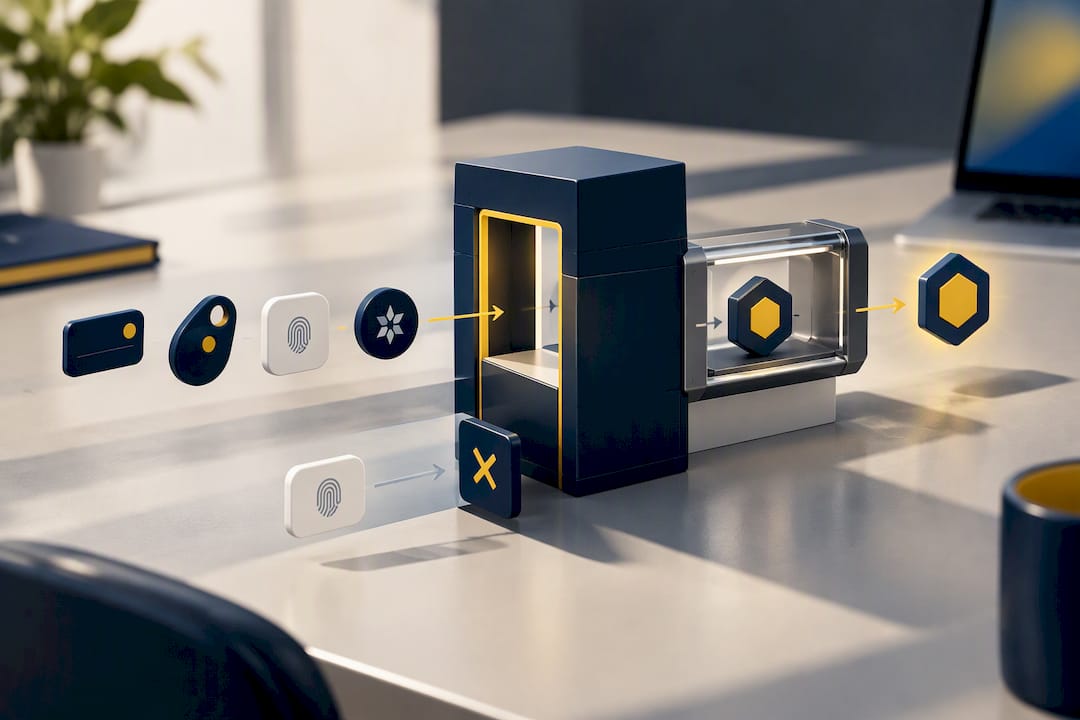
Pro Tip: Require attestation during enrollment so you can filter out software-based authenticators that don’t meet your assurance requirements before they ever get used.
Why SMS, OTP, and standard push still get phished
If your organization already uses MFA, you have made real progress, but not all MFA carries the same weight against a determined attacker.
Attackers have found reliable ways around every method that is not verifier-bound. SIM swapping lets an attacker convince a carrier to port your phone number to a new device, intercepting SMS codes outright. Flaws in the SS7 signaling protocol let sophisticated attackers reroute text messages without even touching the carrier’s customer service line. Push bombing floods a user with approval requests until fatigue or confusion leads to an accidental tap. Real-time phishing proxies, sometimes called adversary-in-the-middle kits, sit between the user and the real site, capturing whatever the user enters, including one-time codes, and relaying it instantly before it expires.
The common thread: none of these methods bind the authentication response to a specific origin. A code typed into any box works in any box, and a push notification approved on a phone does not verify which site actually requested it.
CISA’s guidance acknowledges that a full migration takes time, and it names one interim mitigation worth deploying now if you are not yet on FIDO2: number matching, where the user enters a code shown on the login screen into their authenticator app rather than tapping a bare “approve” button. It does not make push notifications phishing-resistant, but it meaningfully raises the bar against push bombing while your rollout is underway.
- Enable number matching on any push-based MFA still in production
- Monitor for repeated authentication prompts to a single user in a short window
- Flag new device enrollments from unfamiliar locations or IP ranges
- Track help-desk tickets for MFA reset requests, a common social-engineering entry point
Building a rollout plan your team can actually execute
A phishing-resistant rollout succeeds or fails on sequencing, not on the authenticator brand you choose. Trying to convert every application at once overwhelms both IT staff and end users, so prioritization has to come first.
- Inventory every application and note which ones support FIDO2/WebAuthn natively versus which ones only accept legacy MFA.
- Enforce phishing resistance for admin and privileged accounts first. These accounts carry the most damage potential if compromised, and they are usually the smallest group to convert.
- Centralize enforcement through your SSO provider wherever possible, since adding phishing-resistant authentication at the identity layer covers dozens of downstream applications without touching each one individually.
- Run a scoped pilot with a defined group, typically IT staff or a willing department, before expanding company-wide.
- Set measurable success criteria before you start: enrollment completion time, help-desk call volume, and authentication failure rate are the three numbers worth tracking from day one.
- Expand in waves, using pilot feedback to refine training materials and fallback procedures before each new group goes live.
USDA’s own FIDO deployment illustrates why the SSO-first approach matters in practice: centralizing identity let the agency extend phishing-resistant authentication to a large, varied user population without rebuilding authentication logic in every individual application.
Communication matters as much as the technical configuration. Tell users why the change is happening before their login screen changes, staff the help desk for a spike in enrollment questions during the first week of each wave, and document a clear fallback policy for people who lose a hardware key or change devices, so a lost token does not turn into a week of lockout.
Pro Tip: Pilot with your IT team first. They will surface edge cases like VPN client compatibility or legacy line-of-business apps before those problems reach a frustrated end user.
Handling admin enforcement and suspected MFA compromise
Administrator accounts deserve stricter rules than the rest of your organization, and most identity providers now let you build conditional access policies that require a FIDO2 key or certificate specifically for privileged roles, separate from the general user policy.
When you suspect an MFA method has been compromised, whether through a push bombing incident or a reported phishing attempt, speed and order matter:
- Unenroll the suspicious device or authenticator immediately to cut off any standing access.
- Rotate any credentials that may have been exposed during the incident, including session tokens, not just passwords.
- Re-enroll the user through a verified, high-assurance channel, such as an in-person help-desk visit or a supervised video call, rather than a self-service reset link.
- Review sign-in logs for the affected account across the prior 30 days to check for unauthorized access before the incident was caught.
Watch for early warning signs before an incident becomes a breach: new device enrollments from unfamiliar geographies, multiple failed authentication attempts followed by a success, or a user enrolling a second authenticator they did not request.
The recovery process itself is where assurance quietly erodes if you are not careful. A temporary adaptive control, like requiring extra verification for 24 hours after a reset, is reasonable. A permanent exception that lets a user bypass phishing-resistant authentication because “it was too much trouble to re-enroll” defeats the entire program.
A quick checklist mapped to NIST’s assurance levels
Use this as a working checklist rather than a compliance document, since your specific AAL target depends on the sensitivity of what you are protecting.
- Non-exportable private keys: hardware-backed storage, not software-only key generation, for anything targeting AAL3.
- Replay resistance: confirm your authenticator generates a unique response per authentication attempt rather than a reusable code.
- Authentication intent: require a deliberate user action, such as a touch or biometric prompt, rather than automatic approval.
- Anti-automation on enrollment: rate-limit and monitor new device registrations to prevent bulk fraudulent enrollment.
- Attestation at registration: verify the authenticator’s make and security properties before trusting it.
- Verifier binding by design: confirm the protocol you choose, per NIST’s authenticator guidance, scopes credentials to a specific relying party rather than a shared secret.
FIDO Alliance’s October 2025 deployment data shows organizations piloting passkeys have tracked enrollment success and help-desk call volume as their core rollout metrics, useful benchmarks to set your own pilot goals against rather than guarantees of identical results.
How Mavericks Office Solutions approaches phishing-resistant rollouts
Most small and midsize businesses do not have a dedicated identity engineer on staff, which is exactly the gap Mavericks Office Solutions is built to close. As your outsourced IT department, we handle SSO configuration, managed identity, and phishing-resistant enrollment as part of the same relationship that covers your broader managed IT services, so your admin accounts and high-value apps get prioritized without pulling your own team off other work.
Our cybersecurity practice pairs this rollout work with 24/7 monitoring, and our 100% USA-based help desk, with an average response under 12 minutes, means a lost security key or a failed enrollment during a pilot gets resolved the same day rather than sitting in a ticket queue.
— Jeffrey
Get help rolling out phishing-resistant authentication
Reading the standards is one thing. Getting a pilot running across your SSO provider, your admin accounts, and a fleet of security keys without derailing your team’s other work is another. Mavericks Office Solutions operates as your outsourced IT department, which means the same team that handles your managed IT services can also scope and run a phishing-resistant authentication pilot as part of your existing relationship, not a separate vendor to manage.

That matters most for the businesses this guide is written for: companies with lean IT staff who need admin accounts and critical applications protected now, not after a six-month internal project. Our cybersecurity services build phishing-resistant enrollment into ongoing monitoring and support, backed by a local, USA-based help desk that answers in under 12 minutes on average. If you are ready to move past SMS codes and push approvals, reach out to Mavericks Office Solutions to scope a pilot for your highest-value accounts.
Sources
- Authenticators — NIST SP 800-63-4
- Implementing Phishing-Resistant MFA — CISA
- Web Authentication: An API for accessing Public Key Credentials — W3C (WebAuthn)
- FIDO Passkey Index — FIDO Alliance (October 2025)
- Web Authentication API (MDN)
FAQ
Is Microsoft Authenticator considered phishing-resistant?
Microsoft Authenticator’s standard push approval is not phishing-resistant on its own, since it does not bind the approval to the requesting site’s origin. When configured with number matching, it becomes more resistant to push bombing, but CISA still treats number matching as a transitional mitigation rather than a phishing-resistant solution.
How do I require phishing-resistant authentication for administrators?
Most identity providers let you build a conditional access or authentication policy scoped specifically to admin or privileged roles, requiring a FIDO2 security key or platform authenticator before granting access. This should be enforced separately from, and ahead of, your general user population’s MFA policy.
How do I set up phishing-resistant MFA?
Start by inventorying which applications support FIDO2/WebAuthn, then enable it at your SSO provider so the setting covers multiple downstream apps at once. Pilot with a small group, typically admins or IT staff, track enrollment time and help-desk volume, and expand in waves once the pilot runs cleanly.
Are passkeys considered phishing-resistant?
Yes, passkeys are built on the WebAuthn standard, which scopes each credential to a specific site’s origin and keeps the private key on the user’s device. That origin binding is what prevents a cloned phishing site from capturing a usable login response.