

SD-WAN is the right choice for small businesses that have multiple sites, heavy cloud or VoIP usage, or need resilient broadband-backed connectivity. It delivers stronger uptime, faster application performance, and simpler network management than a traditional setup. If your business runs on one location with light cloud use, the payoff shrinks. Read on for deployment options, security must-haves, and a practical checklist before you sign anything.
TL;DR:
- SD-WAN offers the most value for businesses with multiple sites, high cloud or VoIP usage, and a need for resilient broadband connections.
- Deployment options include managed, cloud-managed, or self-managed, with support levels and costs varying accordingly.
- Security features like encryption, segmentation, and centralized policy enforcement are typically bundled but require validation before purchase.
- Costs consist of hardware, licensing, managed support, bandwidth, and setup, with ROI calculation depending on current outage costs and network complexity.
- A thorough vendor evaluation includes support SLAs, security parity, telemetry access, integration compatibility, and the willingness to run a pilot.
Table of Contents
- What is SD-WAN and how does it actually work?
- Benefits of SD-WAN for small businesses
- Deployment options: managed, as a service, or self-managed
- Security, SASE, and zero trust: what to check before you buy
- Costs, licensing, and how to estimate ROI
- How to choose an SD-WAN provider: a selection checklist
- Is your current network ready for SD-WAN?
- What SD-WAN adoption looks like for small businesses
- Why a managed approach often makes SD-WAN work better
- How Mavericks Office Solutions can help
- Sources
- FAQ
What is SD-WAN and how does it actually work?
SD-WAN, or software-defined wide area networking, is an overlay technology that steers traffic across broadband, LTE, and MPLS connections at the same time, instead of locking your business into one link type. A central controller and orchestration layer set the rules, while edge devices at each location carry them out in real time.
Policies get enforced centrally, so a rule you set once for voice traffic or a critical app applies everywhere, without touching every site by hand. Local internet breakout lets traffic headed to trusted cloud services exit directly at the branch, rather than routing back through a central data center first.
This is also where SASE comes in: SASE is a converged model that folds SD-WAN together with security services like a secure web gateway, cloud access broker, and firewall, according to NIST’s zero trust architecture guidance. That connection matters once you get to the security section below.
Benefits of SD-WAN for small businesses
The gains show up most clearly for businesses running multiple locations, cloud-based tools, or VoIP phone systems.
- Lower connectivity costs: blending affordable broadband with MPLS, or dropping MPLS entirely, often trims monthly circuit spend compared to an all-MPLS network.
- Better app and call performance: path steering and local breakout push cloud app and VoIP traffic over the best available link instead of forcing everything through a single congested path.
- Automatic failover: when one connection drops, traffic shifts to a working link without staff intervention, which keeps point-of-sale systems, video calls, and cloud tools online.
- Faster rollouts and easier management: new locations come online faster because policies push out from a single console instead of being configured device by device, and troubleshooting can happen remotely.
For a retail chain or a professional services firm with two or three offices, that combination often means fewer outage-driven support calls and a network that a lean IT team can actually keep up with.
Deployment options: managed, as a service, or self-managed
Small businesses generally choose from three models, and the right one depends on how much in-house networking expertise you have.
- Managed SD-WAN: a provider owns the appliances, monitoring, and support under a service level agreement. This fits lean IT teams that want predictable support without hiring network specialists.
- SD-WAN as a service: a cloud-managed model with consumption-based pricing and faster onboarding, appealing to businesses that want quick deployment without buying hardware outright.
- Self-managed or on-premises: your team controls configuration and troubleshooting directly, which offers more flexibility but demands skilled staff and ongoing maintenance time.
Whichever model you pick, ask about the same operational tradeoffs: what SLA backs the connection, what hours support is available, whether you get direct access to telemetry and reporting, and who is responsible for firmware and software upgrades. A managed model shifts nearly all of that off your plate, while self-managed keeps it in-house along with the control that comes with it.
Security, SASE, and zero trust: what to check before you buy
Most modern SD-WAN platforms bundle in security rather than treating it as a bolt-on, and understanding what is actually included protects you from gaps later.
SASE packages commonly bundle a next-generation firewall, secure web gateway, cloud access security broker, and zero trust network access, giving small businesses a single policy layer instead of a pile of disconnected tools, per NIST NCCoE’s SASE overview. CISA’s TIC 3.0 branch office guidance recommends keeping policy enforcement consistent across every link type and maintaining visibility into traffic at each branch, which is exactly what a well-configured SD-WAN and security stack should provide, according to CISA’s branch office use case.
Before you consolidate hardware around one vendor, run through a short validation list:
- Confirm traffic is encrypted in transit across every link type, not just the primary one.
- Check that segmentation keeps guest, voice, and business traffic separated.
- Verify policy changes apply centrally and consistently across all sites.
- Make sure your team gets direct access to telemetry and reporting, not just vendor-side dashboards.
A practical zero trust starting guide can help you map these checks to what you already have in place.
Pro Tip: Before retiring your standalone firewall, confirm in writing that the SD-WAN vendor’s integrated security features match your current policy set, feature for feature.
Costs, licensing, and how to estimate ROI
SD-WAN pricing usually breaks down into a handful of predictable buckets.
- Hardware: edge appliances at each site, either purchased or included in a subscription.
- Subscription or licensing fees: often billed per site, per Mbps, or as a flat as-a-service consumption rate.
- Managed service fees: monitoring, support, and SLA coverage if you choose a managed model.
- Bandwidth costs: the underlying broadband, LTE, or MPLS circuits themselves.
- Install and configuration: one-time setup, though this shrinks with cloud-managed models.
To build a simple ROI estimate, add up your current monthly WAN spend plus the estimated cost of past outages, then compare that total against the projected combined cost of new circuits, subscription fees, and any managed service charge. Businesses with one location and light cloud use often find the math does not favor SD-WAN, since there is little multi-link traffic to optimize and limited outage risk to insure against.
A converged SASE approach bundles SD-WAN with a full security stack in one service, according to NIST’s NCCoE materials, which can offset some standalone security licensing costs when the features genuinely overlap with what you already pay for.
How to choose an SD-WAN provider: a selection checklist
Use this sequence when you are comparing vendors or deciding between deployment models.
- Confirm the support model and SLA: ask exactly what response times and uptime guarantees are contractually backed, not just advertised.
- Check security feature parity: verify the bundled NGFW, SWG, or ZTNA components match or exceed what you use today.
- Ask about telemetry access: you should see real dashboards, not summary emails from the vendor’s team.
- Review onboarding and integration: confirm the platform works with your existing switches, firewalls, and phone system.
- Request a pilot: insist on testing at one high-value branch for 30 to 90 days, measuring failover behavior and app performance before a full rollout.
During provider calls, ask directly about pilot scope, how failover is tested, what telemetry you will actually see day to day, and what the escalation path looks like when something breaks at 2 a.m.
Watch for red flags: unclear or bundled pricing that hides true monthly cost, vague claims about “enterprise-grade security” with no specifics, no willingness to offer a pilot, or support that routes only through an offshore call center with no local escalation option.
Pro Tip: Treat the pilot as a real test, not a formality. If a vendor resists a 30 to 90 day trial on one branch, that hesitation tells you something.
Is your current network ready for SD-WAN?
Before adding SD-WAN, take stock of what you already have running. Start with your circuit inventory: how many broadband, LTE, or MPLS connections exist at each site, and what their actual measured speeds and reliability look like day to day, not just what the contract promises.
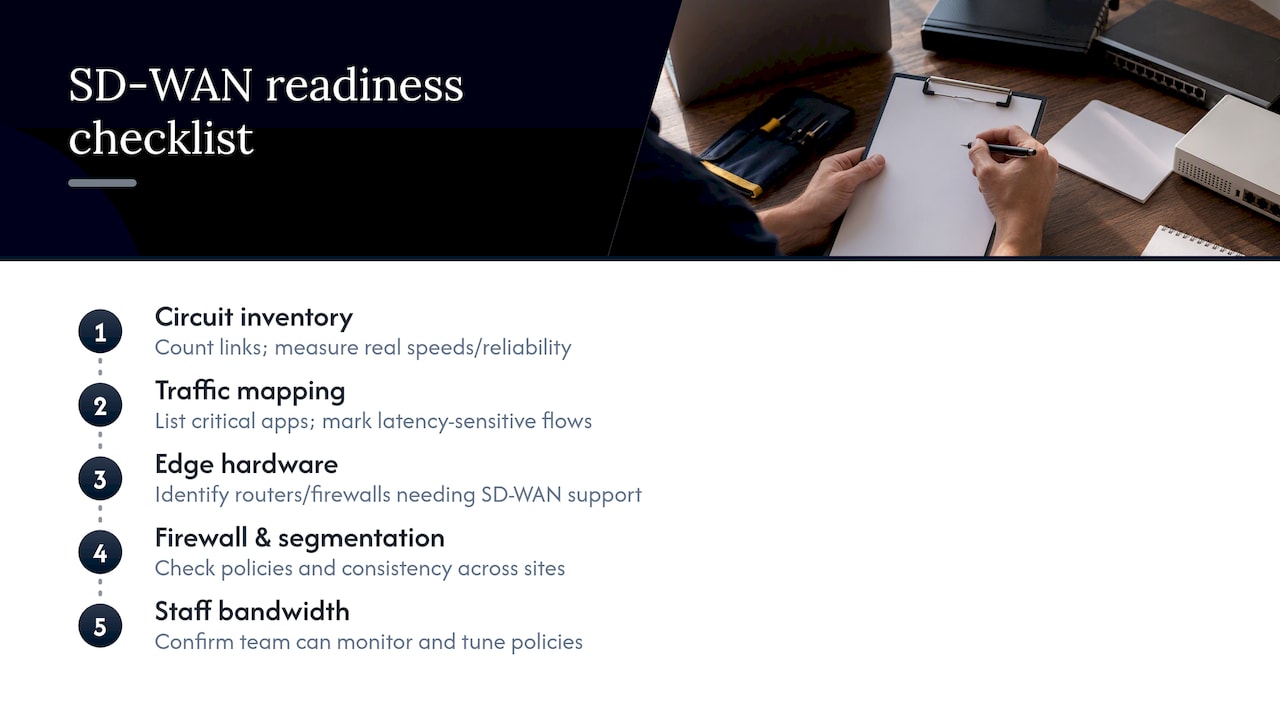
Next, map your traffic. List which applications matter most, cloud accounting software, VoIP, point-of-sale, video calls, and note which ones are latency-sensitive. SD-WAN’s path steering only helps if you know which traffic needs priority.
Check your edge hardware. Aging routers or firewalls without SD-WAN support will need replacement or an upgrade path, and that cost belongs in your budget from the start. A small office network setup guide can help you catalog switches, access points, and cabling before you bring a vendor in.
Review your firewall and segmentation setup as well. If your firewall management practices are inconsistent across locations, SD-WAN will expose that gap rather than fix it on its own.
Finally, be honest about staff bandwidth. If nobody on your team has time to monitor dashboards or tune policies, that points toward a managed or as-a-service model rather than self-managed, regardless of what the sales pitch promises.
What SD-WAN adoption looks like for small businesses
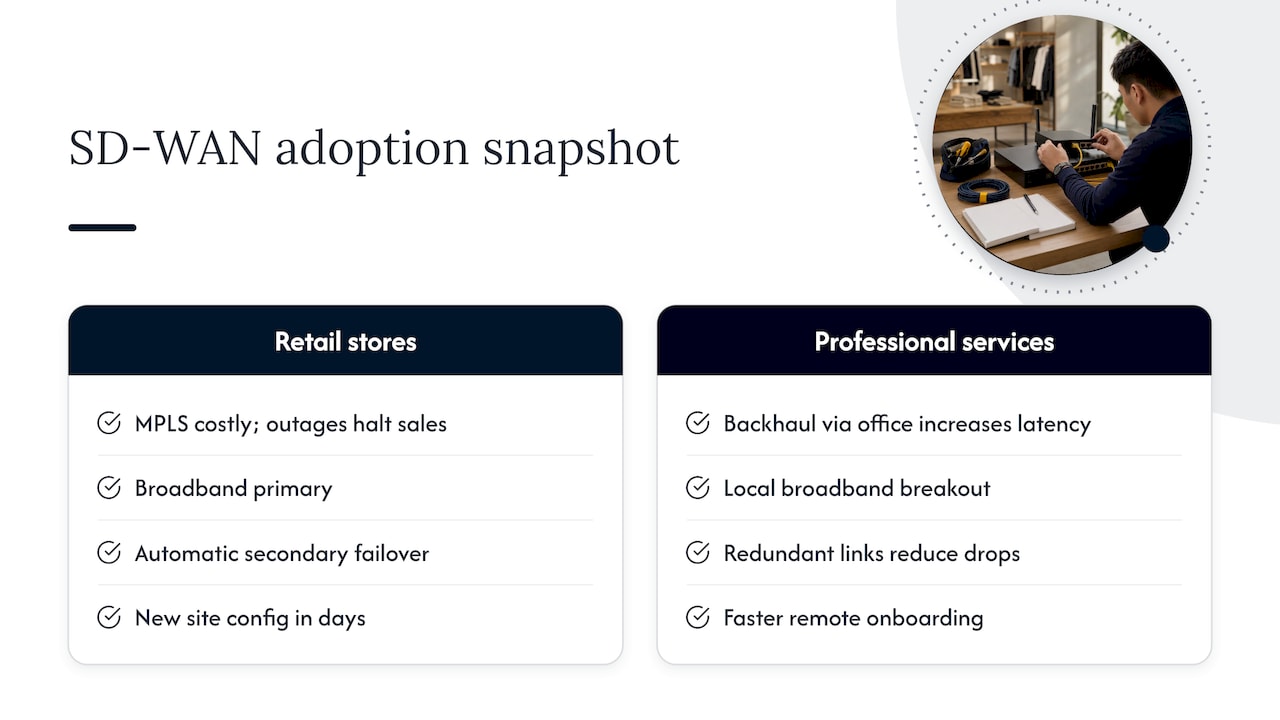
A multi-location retail business running point-of-sale systems, cloud inventory software, and VoIP phones at each store is a common profile for SD-WAN adoption. Before switching, this kind of business typically deals with MPLS circuits that are expensive to expand and slow to bring a new store online, along with outages that stall card payments the moment a single link drops.
After moving to SD-WAN, the practical shift is usually the same: broadband becomes the primary connection at each site, with automatic failover to a secondary link so a dropped connection does not stop sales. Centralized policy management means a new store location can be configured and brought online in days rather than weeks, since rules push out from one console instead of being rebuilt on-site.
A professional services firm with a growing remote workforce sees a different but related benefit. Cloud app traffic and VoIP calls route more directly through local breakout, cutting the lag that shows up when everything backhauls through a single office. In both cases, the businesses that benefit share the same traits: more than one site, meaningful cloud or VoIP dependence, or a workforce spread across locations that a single MPLS circuit was never built to serve well.
Why a managed approach often makes SD-WAN work better
A managed rollout typically follows a predictable path: assess the current network, run a pilot at one branch, phase in the remaining sites, then monitor and tune continuously rather than treating deployment as a one-time project. That last step matters more than most businesses expect, since traffic patterns and app usage shift over time.
Tools like a VoIP security checklist or a data loss prevention checklist give small businesses a way to validate that the security side of a converged deployment holds up, not just the networking side.
A local, USA-based help desk with fast response times matters most during the pilot phase, when failover behavior and app performance need real-time troubleshooting rather than a ticket that sits overnight. Businesses without in-house network engineers generally get more consistent results from a managed partner than from a self-managed rollout stretched thin across other IT priorities.
— Jeffrey
How Mavericks Office Solutions can help
Mavericks Office Solutions approaches SD-WAN the same way it approaches every part of your technology stack: as one piece of a fully managed IT department, not a standalone project you are left to configure alone. Our team pairs networking changes with the security, monitoring, and support you already rely on.

Here’s what that looks like in practice:
- Managed IT services that cover day-to-day network monitoring, patching, and troubleshooting.
- Cybersecurity services that validate your firewall, segmentation, and access policies alongside any SD-WAN deployment.
- Cloud hosting support for the apps that benefit most from local breakout and path steering.
- 24/7 monitoring backed by a local help desk with fast response times.
If you’re weighing a pilot at one branch or a full rollout across multiple locations, our managed IT services team can walk through an assessment and help you decide what fits. Request an assessment to see where your network stands today.
Sources
For readers who want the underlying guidance: NIST NCCoE’s zero trust architecture materials map SASE to SD-WAN, CISA’s TIC 3.0 branch office guidance covers branch security patterns, and Cisco’s deployment guide details direct cloud access workflows.
- Key companies in software-defined WAN solutions — Research and Markets
- Implementing a Zero Trust Architecture: High-level overview — NIST NCCoE
- TIC 3.0 Branch Office Use Case — CISA
FAQ
Is SD-WAN obsolete?
No, SD-WAN is not obsolete. It remains a widely deployed technology among vendors like Cisco, Fortinet, VMware, Versa Networks, Aryaka, and Cato Networks, according to market analysis of leading SD-WAN vendors, and it continues to evolve alongside SASE and zero trust architectures rather than being replaced by them.
What are the disadvantages of SD-WAN?
SD-WAN can be a poor investment for single-site businesses with light cloud usage, since there is little multi-link traffic to optimize and limited outage risk to justify the added cost. Self-managed deployments also require skilled staff for ongoing configuration and maintenance, and consolidating security features onto SD-WAN appliances needs careful testing to confirm real-world throughput holds up under full inspection policies.
What is the best way to set up a network for a small business?
Start by inventorying your current circuits, mapping which applications need priority, and checking whether your firewall and edge hardware support SD-WAN before choosing a deployment model. A small office network setup guide walks through the hardware and design decisions that should come before adding SD-WAN on top.
Who are the top SD-WAN vendors?
Leading vendors identified in 2025 market analysis include Cisco, Fortinet, VMware (VeloCloud), Versa Networks, Aryaka, and Cato Networks, each with different strengths in simplicity, security integration, or cloud-first optimization, according to Research and Markets’ vendor overview. The right fit depends on your business’s operational goals and in-house technical capacity rather than a single universal answer.
How much does SD-WAN cost for a small business?
Costs vary by hardware, subscription or licensing fees, managed service charges, and underlying bandwidth, and pricing shapes differ between per-site, per-Mbps, and as-a-service consumption models. Mavericks Office Solutions does not publish flat SD-WAN pricing, but businesses can request an assessment through its managed IT services page to get a cost picture specific to their network.