

You can keep your existing U.S. phone number when you switch providers. The process is called number porting, and federal rules protect your right to do it. The critical rules: keep your old service active until the cutover is complete, make sure every field on your authorization form matches your carrier’s account records exactly, and know that business ports take longer than consumer ports.
The Federal Communications Commission requires simple ports to complete within one business day, but real-world business ports with multiple lines, PBX systems, or mixed carriers typically take 7–14 days to complete, depending on account complexity and documentation accuracy. The Number Portability Administration Center (NPAC) is the national database that makes routing updates happen after your cutover. If you run into a carrier that refuses to cooperate without a valid reason, the FCC’s complaint process is your escalation path.
Three things that kill a port before it starts: canceling your old service early, submitting an LOA with fields that don’t match your Customer Service Record (CSR), and not knowing your account PIN or Billing Telephone Number (BTN).
Mavericksofficesolutions helps Ohio businesses manage complex multi-line ports, from CSR validation through cutover verification, so your phones stay on during the transition.
Pro Tip: Before you do anything else, call your current carrier and request your CSR in writing. It’s the single document that controls whether your port succeeds or gets rejected.
Table of Contents
- How do you start and complete a port, step by step?
- How long does number porting take, and what does it cost?
- Which numbers can you actually port, and what are the exceptions?
- What documents and account fields does the losing carrier validate?
- Why do ports get rejected, and how do you fix them fast?
- How do business ports differ from consumer ports, and how should you plan?
- What should you do if the losing carrier blocks or delays your port?
- Practitioner tips that reduce rejections and prevent call loss
- Key Takeaways
- Why the “just submit and hope” approach fails Ohio businesses
- Mavericksofficesolutions takes the porting risk off your plate
- Useful sources and further reading
How do you start and complete a port, step by step?
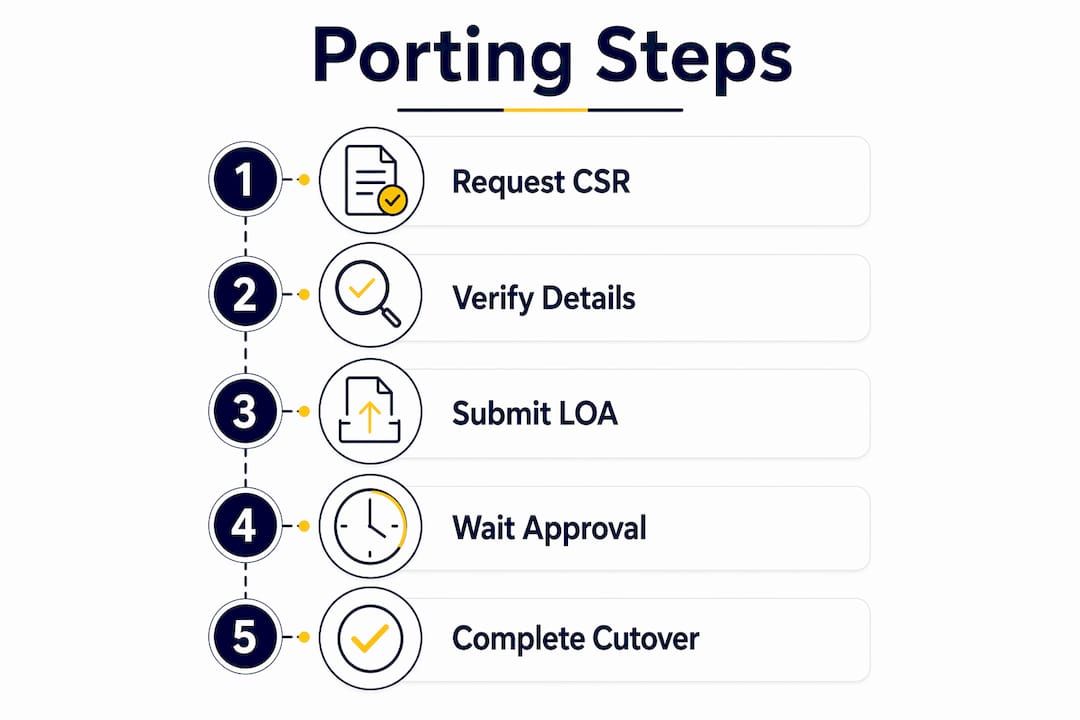
The number portability process follows a predictable sequence. Skipping steps is where most rejections happen.
- Collect your account documents. Pull a recent bill (no older than 30–45 days) and request your CSR from the losing carrier. The CSR is the authoritative snapshot of your account; if your bill and CSR disagree on any field, the CSR wins.
- Complete the Letter of Authorization (LOA). Copy-paste the legal name, service address, BTN, and account number directly from the CSR. Do not retype from memory. Include the authorized signer’s signature. For business accounts, the signer must be the person listed on the account.
- Submit to the gaining carrier. Send the signed LOA plus your recent bill or CSR. For business ports, request a port date approximately three weeks out to allow time for FOC interactions and pre-provisioning.
- Track the Firm Order Commitment (FOC). The gaining carrier submits a Local Service Request (LSR) through the clearinghouse. The losing carrier returns an FOC with a cutover window, or a rejection code. If you get a rejection code, correct only the flagged field and resubmit quickly.
- Coordinate cutover. For business ports, pre-stage your VoIP trunks and dial plans before the cutover window. Have a test plan ready: verify inbound calls, outbound calls, voicemail routing, and emergency services.
- Confirm NPAC propagation. After cutover, carriers update the NPAC with the new Local Routing Number (LRN). Until propagation completes, some upstream carriers may still route to the old carrier. Test both directions immediately and monitor for 30–60 minutes post-cutover.
Pro Tip: Use e-signatures to speed LOA authorization. Most gaining carriers accept them, and they create a timestamped document trail you can use if you need to escalate to the FCC.
Key documents to have ready before you submit:
- Signed LOA (authorized signer, exact legal name)
- Recent bill or CSR (≤30–45 days old)
- Account number and PIN/passcode
- BTN in 10-digit format
- Service address (no PO Box)
How long does number porting take, and what does it cost?
The FCC’s one-business-day rule applies to simple wireline-to-wireline and simple intermodal ports. Wireless transfers are often faster in practice. Business ports often take longer depending on account complexity and documentation accuracy, especially for multi-line, PRI, or mixed-carrier accounts.
| Port Type | Typical Timeline | Who Controls the Pace |
|---|---|---|
| Simple consumer wireless | A few hours | Gaining carrier + NPAC |
| Simple consumer landline | A couple of business days | Losing carrier FOC |
| Standard business port | 7–14 days | Both carriers + clearinghouse |
| Complex multi-carrier/PRI | Up to several weeks | Multiple losing carriers |
Where delays usually happen:
- LOA/CSR mismatch: Automated rejection restarts the clock.
- FOC negotiation: Losing carrier may push back the cutover window.
- Pre-provisioning gaps: New VoIP trunks or PBX routing not staged in time.
- NPAC propagation: Routing updates take time to reach all upstream carriers.
On fees: T-Mobile charges nothing to transfer your number in. Many carriers follow the same policy, though some charge port-out fees. Business ports may include project or provisioning fees from the gaining carrier or your managed service provider. Always confirm in writing before you start.
Which numbers can you actually port, and what are the exceptions?
Most U.S. mobile, landline, and interconnected VoIP numbers within the North American Numbering Plan (NANP) are portable. The right to port is protected by FCC rules, but there are real exceptions worth knowing before you invest time in the process.
Numbers that are generally portable:
- Active mobile numbers (from major carriers)
- Landline numbers (wireline and VoIP)
- Numbers currently on a VoIP platform like Google Voice (which require an unlock step)
Numbers that are difficult or impossible to port:
- Canceled or deactivated numbers. Once a number is deactivated, it cannot be ported. This is why keeping your old service active until cutover is non-negotiable.
- Some rural wireline numbers. Certain rural carriers hold state-granted waivers that limit porting obligations. Check with your gaining carrier before assuming portability.
- International numbers. Numbers outside the NANP are not portable into U.S. carrier systems.
- Google Voice numbers. Portable, but require an unlock step first. Unlocking costs $3 unless the number was originally ported into Google Voice from another carrier, in which case there is no charge.
- Numbers with pending transfers or port locks. Resolve any existing port requests or security locks before initiating a new one.
Pro Tip: Before submitting your LOA, ask your current carrier directly: “Is there a port lock, port protection feature, or pending transfer on this number?” T-Mobile’s Port Out Protection, for example, must be disabled before a transfer PIN can be generated.
What documents and account fields does the losing carrier validate?
Think of a port submission as a data-validation exercise. The losing carrier’s system compares your LOA fields against the CSR automatically. Any deviation triggers a rejection. There is no human reviewing whether you “meant” to write “LLC” or “L.L.C.”
| Required Field | Where to Find It | Common Mistake |
|---|---|---|
| Legal name | CSR (exact punctuation, suffixes) | Abbreviating terms or slight punctuation differences |
| Service address | CSR (no PO Box) | Using billing address instead of service address |
| BTN (Billing Telephone Number) | CSR or bill | Incorrect number reference |
| Account number | CSR or bill | Copying from memory instead of the document |
| PIN/passcode | Carrier portal or CSR | Confusing different types of PINs |
| Authorized signer | Account records | Unauthorized signatory |
The CSR vs. a bill distinction matters. Your bill is a formatted summary; the CSR is the raw account record the carrier’s validation system checks against. If those two documents show different punctuation on your business name, the CSR is correct and the bill is wrong. Request the CSR from the losing carrier in writing before you fill out a single field on the LOA.
Pro Tip: Copy-paste every field from the CSR into the LOA character-for-character, including legal entity suffixes (LLC, Inc., DBA) and punctuation. A single period or comma difference is enough to trigger an automated rejection.
Why do ports get rejected, and how do you fix them fast?
Common rejection causes include LOA/CSR mismatches, unauthorized signers, invalid account numbers, inactive numbers, unpaid balances, wrong PINs, and locked Google Voice numbers. The good news: the losing carrier returns a specific rejection code tied to the exact field that failed. You do not need to rework the entire order.
- Name mismatch: Pull the CSR, find the exact legal name, correct the LOA, resubmit.
- Address mismatch: Confirm whether the carrier uses billing address or service address. Use whichever the CSR shows.
- Wrong BTN or account number: Request the correct values from the losing carrier’s support line. Do not guess.
- Missing or wrong signature: Have the authorized account holder (not just any employee) re-sign the LOA.
- Inactive or canceled number: Reinstate the service before resubmitting. A deactivated number cannot be ported.
- Unpaid balance: Some carriers place a port lock when there is a past-due balance. Pay it, confirm the lock is removed, then resubmit.
- Wrong PIN: Distinguish between the account PIN and a transfer/port-out PIN. They are often different numbers.
Minor corrections restart the clock on your requested port date. For business ports, build buffer time into your planning specifically for one correction cycle. A pre-submission checklist run before you send anything to the gaining carrier catches most of these before they become delays.
Pre-submission checklist:
- LOA fields copied directly from CSR (not from memory or bill)
- Authorized signer confirmed against account records
- Service active and in good standing
- No port lock or port protection feature active
- PIN/passcode confirmed with losing carrier
- Recent bill or CSR attached (≤30–45 days)
How do business ports differ from consumer ports, and how should you plan?
A consumer port is usually one line moving from one carrier to another. A business port can involve dozens of Direct Inward Dial (DID) numbers, hunt groups, PRI circuits, fax lines, alarm circuits, and numbers served by multiple underlying carriers, all on a single bill. That complexity means business ports typically take 7–14 days to complete.
Key operational differences:
- Multiple underlying carriers. Numbers on the same bill may be served by different carriers. Each losing carrier requires its own LOA and returns its own FOC. Split those numbers into separate LOAs per underlying carrier before submitting.
- PBX and trunk pre-staging. New VoIP trunks, SIP configurations, and dial plans must be provisioned and tested before the cutover window opens. Waiting until after the FOC to start this work almost always causes downtime.
- Cutover window coordination. Schedule the cutover during low-traffic hours (early morning, weekend) and align your IT and telephony teams in advance.
Business port planning checklist:
- Request CSR for all numbers and map each DID to its underlying carrier.
- Identify numbers requiring separate LOAs (different underlying carriers).
- Set the requested port date at least three weeks out.
- Pre-provision VoIP trunks, SIP trunks, and dial plans on the new platform.
- Schedule a cutover window (four hours minimum) with IT and telephony teams.
- Notify staff of the cutover window and prepare a temporary call-forwarding message.
- Prepare a test plan: inbound calls, outbound calls, voicemail, emergency services.
- Confirm NPAC propagation post-cutover and monitor for 60 minutes.
Ohio businesses migrating to managed VoIP platforms benefit from having a single vendor handle CSR validation, LOA preparation, and cutover coordination rather than splitting that work across internal teams.
What should you do if the losing carrier blocks or delays your port?
Start with the rejection code. The losing carrier is required to return a specific code explaining why the port was denied. Correct that field and resubmit quickly to preserve your requested port date.
If the carrier refuses without a valid reason or repeatedly rejects a correctly submitted order:
- Collect your evidence: CSR screenshots, rejection codes, copies of submitted LOAs, and timestamps.
- Escalate internally first. Ask the losing carrier for a supervisor or their porting escalation team.
- If internal escalation fails, file a complaint with the FCC.
The FCC’s complaint process is available at fcc.gov/consumers/guides/filing-informal-complaint. Carriers are required to respond. Include your account number, the rejection codes you received, copies of your LOA and CSR, and a timeline of events. The FCC does not resolve complaints instantly, so use this path after provider escalation has failed, not as a first step.
For partial ports (some numbers transferred, others stuck):
- Reconcile the NPAC record for each stuck number with your gaining carrier.
- Verify inbound and outbound routing for each number individually.
- Request a snap-back or manual routing reconciliation from the gaining carrier if calls are routing incorrectly.
- Do not cancel the old service on any number until its port is confirmed complete.
Practitioner tips that reduce rejections and prevent call loss
The difference between a clean port and a two-week delay usually comes down to preparation, not luck. These practices come from how experienced porting teams actually work.
- CSR-first, always. Request the CSR before touching the LOA. Use it as the only data source for every field.
- Set conservative port dates for business migrations. Three weeks out gives you room for one FOC correction cycle and pre-provisioning without pressure.
- Stage a four-hour cutover window. Test inbound calls, outbound calls, voicemail routing, and 911 service within that window. Do not close the window until all tests pass.
- Monitor NPAC propagation actively. After cutover, some upstream carriers may still route to the old carrier until the NPAC/LRN update propagates. Keep the old service available for at least 30–60 minutes post-cutover as a fallback.
- Split LOAs per underlying carrier. If numbers on one bill have different underlying carriers, submit separate LOAs. A mixed submission will be rejected.
- Maintain a document trail. Keep the signed LOA, CSR, submission receipts, and FOC confirmation. You need these for FCC escalation if anything goes wrong.
Pro Tip: For dedicated business numbers used for SMS or messaging workflows, confirm with your gaining carrier that the number’s messaging capabilities will transfer intact. Some platforms require a separate registration step after the port completes.
Key Takeaways
Porting phone numbers in the U.S. requires keeping your old service active, matching every LOA field to your CSR exactly, and budgeting 7–14 days for business ports.
| Point | Details |
|---|---|
| Keep old service active | Never cancel your existing service until the cutover is fully confirmed. |
| CSR is the source of truth | Request the CSR first and copy-paste every field into the LOA character-for-character. |
| Timeline varies by complexity | Simple consumer ports complete in hours; business ports typically take 7–14 days. |
| Rejection codes are specific | The losing carrier flags the exact field that failed — fix only that field and resubmit. |
| Mavericksofficesolutions manages complex ports | Mavericksofficesolutions handles CSR validation, LOA prep, provisioning, and cutover verification for Ohio businesses. |
Why the “just submit and hope” approach fails Ohio businesses
Most porting guides treat the process as a form-filling exercise. It is not. It is a machine-validated data-matching exercise running against a carrier database that has no tolerance for approximation. The LOA is not a request; it is a structured query against the CSR, and the system either matches or rejects.
What most guides miss is the NPAC side of the equation. The port does not end when your new carrier says “it’s done.” It ends when the NPAC has propagated the new LRN to upstream carriers globally. Until that propagation completes, calls from certain networks will still route to your old carrier. Businesses that close the cutover window the moment their own test call goes through are the ones that get calls from clients saying “your number isn’t working” two hours later.
The other underestimated risk is the split-LOA problem. Ohio businesses with legacy phone systems often have numbers on a single bill that are actually served by two or three underlying carriers from past acquisitions and reseller agreements. Submitting one LOA for all of them guarantees a rejection. The only way to know is to request the CSR and read the underlying carrier field for each number.
For a business, the cost of a failed port is not just an inconvenience. It is missed calls, confused clients, and staff who cannot reach each other during a cutover window that was supposed to last four hours and stretched to four days. The managed IT approach exists precisely because this kind of technical coordination should not fall on a business owner who has other things to run.
Mavericksofficesolutions takes the porting risk off your plate
For Ohio businesses, a failed port is a real operational risk. Mavericksofficesolutions manages the entire number transfer process as part of its managed VoIP and UCaaS services, so you are not navigating rejection codes and FOC timelines on your own.
The process includes CSR validation before a single LOA is submitted, LOA preparation with character-level field matching, VoIP trunk and dial plan provisioning, cutover window coordination, and post-cutover verification against the NPAC. The help desk is U.S.-based with an average response time under 12 minutes, which means if something goes sideways during a cutover, you reach a real technician fast.
For businesses with complex multi-line environments, PRI migrations, or mixed-carrier accounts, Mavericksofficesolutions acts as the single point of accountability across every stage of the port. No offshore call centers, no hand-off gaps between vendors.
Ready to move your business phone system without the downtime risk? Contact Mavericksofficesolutions through the managed IT services page to discuss your port requirements and get a plan in place.
Useful sources and further reading
- FCC: Porting — Keeping Your Phone Number When You Change Providers — The primary regulatory reference for consumer and business porting rights, the one-business-day rule, and how to file a complaint.
- FCC: Filing an Informal Complaint — Step-by-step guidance on escalating a blocked or delayed port to the FCC.
- Google Voice: Port Your Number — Official instructions for unlocking a Google Voice number and porting it to another carrier, including the $3 unlock fee and exceptions.
- Google Fi: Transfer Your Number — Consumer timeline expectations for mobile and landline transfers, including the typical 3-hour window for mobile ports.
- TelcoBridges: Number Porting for ISPs and Carriers — Technical explainer on NPAC/LRN/LNP dip behavior, FOC coordination, and cutover verification for operators and IT teams.
- Viirtue: How to Submit a Business Number Port — Practitioner-level guide covering CSR-first workflows, LOA field matching, rejection codes, and business port timelines.
- Outreach Support: Phone Number Porting Process — Detailed rejection reason reference and guidance on split LOAs for numbers with multiple underlying carriers.