

Remote work security means protecting the identity, devices, networks, and data your team uses outside the office. If you only fix one thing this month, fix identity: enforce multi-factor authentication and bring every device under management. That single move closes the gap attackers exploit most, and it sets up the 30/90-day roadmap this guide walks through next.
TL;DR:
- Implement multi-factor authentication and manage all devices to drastically reduce the risk of credential theft and unauthorized access.
- Secure home networks by changing default router credentials, enabling WPA3, and isolating IoT devices on separate network segments.
- Conduct regular patching, deploy endpoint detection and response tools, and enforce device encryption to minimize vulnerabilities and detect breaches early.
- Prioritize identity and endpoint controls within the first 30 days, including enforcing MFA, standardizing VPNs, and building incident response plans.
- Track key metrics such as MFA adoption, patch compliance, and EDR coverage monthly to identify vulnerabilities and guide security improvements.
Table of Contents
- Common Remote Work Security Risks You’re Probably Underestimating
- Your Remote Work Security Checklist: Quick Wins to Long-Term Controls
- Zero Trust and Identity Controls: The Real Foundation of Remote Access Security
- Securing Home Networks and Endpoints: Routers, VPNs, and EDR
- Policies, Training, and Incident Response for Distributed Teams
- How Mavericks Office Solutions Puts This Roadmap Into Practice
- Where to Verify These Recommendations
- Why Most Remote Security Advice Gets the Sequence Backward
- Get a Security Roadmap Built for Your Business, Not a Generic Checklist
- Sources
Common Remote Work Security Risks You’re Probably Underestimating
Not every threat carries equal weight. Some cause a minor headache; others take down your operations for a week. Here’s where the real damage happens, ranked by how often it strikes and how badly it hurts when it does.
- Phishing and credential theft. This is still the most common way attackers get in. A convincing email tricks someone into typing a password into a fake login page, and from there the attacker has a legitimate account to move around inside. The IC3 tracks a steady stream of these reports every year, many tied directly to remote-work scams.
- Unmanaged personal devices and shadow IT. When employees use their own laptops or unauthorized apps to get work done, your security team loses visibility. You can’t patch, monitor, or contain what you don’t know exists, and that blind spot is exactly where lateral movement happens.
- Insecure home Wi-Fi and IoT devices. A smart thermostat or unpatched router sitting on the same network as a work laptop is an open door. Home networks rarely get the same scrutiny as corporate ones, which makes them a favorite initial foothold.
- Missing patches and outdated software. Known vulnerabilities get exploited fast, often within days of public disclosure. A laptop that hasn’t updated in three months is an easy target.
- Weak passwords and missing MFA. Reused or simple passwords remain a primary attack vector, and the NIST glossary defines several social-engineering techniques built specifically to harvest them.
- Insufficient endpoint telemetry. Without endpoint detection and response tools, an intrusion can sit undetected for weeks. Dwell time is the real cost driver in most breaches, not the initial entry point.
- Data leakage and poor backup discipline. Files saved locally, synced to personal cloud drives, or never backed up at all turn a routine incident into a business continuity crisis.
- Third-party access risks. Vendors and shared apps often carry standing credentials nobody reviews. A compromised vendor account can be just as damaging as a compromised employee account.
Your Remote Work Security Checklist: Quick Wins to Long-Term Controls
Trying to fix everything at once is how security projects stall. Sequence the work instead: cheap, high-impact fixes first, then medium-term projects, then the architectural investments that pay off over years.
Quick wins (this week):
- Turn on MFA for every account that supports it, starting with email and any cloud admin console.
- Roll out a password manager so employees stop reusing credentials across services.
- Restrict local admin rights so a single compromised login can’t install anything it wants.
- Enforce full-disk encryption on every laptop, including personal devices used for work.
30-day projects:
- Push router hardening guidance to every remote employee: change the default admin password, disable WPS, and enable a guest network for IoT devices. Total Defense documents this exact sequence, and it closes one of the most neglected attack paths in remote setups.
- Standardize VPN configuration with a kill switch enabled on mobile devices, so traffic never leaks if the tunnel drops.
- Build and enforce an approved device list. If it’s not on the list, it doesn’t touch company data.
60 to 90-day projects:
- Deploy single sign-on with conditional access rules layered on top.
- Roll out endpoint detection and response (EDR) across all managed devices, closing the telemetry gap that lets intrusions linger.
- Automate patching so updates happen on a schedule, not whenever someone remembers.
- Test your backups by actually restoring from them. A backup you’ve never restored is a guess, not a plan.
Long-term investments:
Zero Trust adoption doesn’t happen overnight, and it shouldn’t. Microsoft’s Zero Trust guidance recommends starting with your highest-value users and highest-risk apps rather than attempting a full re-architecture in one push. Layer in Secure Access Service Edge (SASE) or Security Service Edge (SSE) as your network footprint grows, and add Privileged Access Management to control who holds elevated permissions and for how long.
Pro Tip: Track three numbers monthly: MFA adoption rate, patch compliance percentage, and EDR coverage across devices. If any key metric falls below an appropriate threshold, that’s your next priority, not next quarter’s.
Zero Trust and Identity Controls: The Real Foundation of Remote Access Security
Perimeter security assumed everyone inside the office network was trustworthy. That assumption doesn’t hold anymore, and it never really applied to remote work in the first place. Zero Trust flips the model: verify every user and every device, every time, regardless of location. Microsoft’s guidance frames this correctly as limiting the blast radius of a compromise rather than pretending you can prevent every intrusion.
MFA is the entry point, but not all MFA is equal. SMS codes can be intercepted or socially engineered away from a user. Authenticator apps are better. Hardware security keys and FIDO2-based methods are markedly more resistant to account takeover and should be the default for anyone with access to financial systems, admin consoles, or sensitive client data.
Single sign-on (SSO) paired with conditional access turns identity into a real gatekeeper rather than a formality. Practical policy examples worth adopting:
- Deny access to sensitive applications from any device that isn’t enrolled in management.
- Require a compliant device posture, meaning current patch level and active disk encryption, before granting access to financial or client systems.
- Flag and challenge logins from unfamiliar locations or impossible travel patterns.
Device compliance checks matter as much as the login itself. A managed operating system version, current patches, and confirmed encryption status tell you the device asking for access is actually safe to trust. Get MFA deployment right and every other identity control becomes easier to enforce and easier to audit.
Securing Home Networks and Endpoints: Routers, VPNs, and EDR
Your employees’ home networks are now part of your attack surface, whether you’ve accounted for that or not. Start with the router, because it’s the device everything else connects through.
- Change the default admin credentials immediately. Attackers scan for factory-default logins constantly.
- Enable WPA3 where the hardware supports it, or WPA2 with AES encryption at minimum.
- Update router firmware regularly. Neglected router maintenance is one of the most common gaps in home-network defenses.
- Disable WPS, which offers an easy bypass around otherwise strong passwords.
- Set up a separate guest SSID for IoT devices, smart TVs, and personal gadgets, keeping them off the same network segment as work laptops.
For VPNs, require one for any connection to internal systems and configure a kill switch so traffic stops entirely if the tunnel drops. NIST SP 800-46r2 lays out the technical baseline for remote access controls in detail. Device-level VPN clients offer more granular control than router-level VPNs, though larger organizations increasingly look at Zero Trust Network Access (ZTNA) as a more flexible alternative that authenticates per application rather than opening a full network tunnel.
On the endpoint side, EDR deployment closes the visibility gap, disk encryption (BitLocker on Windows, FileVault on Mac) protects data if a device is lost, and automatic update policies keep the software layer current without relying on someone remembering to click “update.”
Policies, Training, and Incident Response for Distributed Teams
Technology controls only work if the people using them know the rules and follow them. Written policy has to cover the approved device list, acceptable use standards, remote access rules, and how data gets classified and handled.
- Build the policy foundation first. Define what devices, apps, and networks are approved before you try to enforce anything.
- Run phishing simulations quarterly. A documented email security checklist paired with regular simulated attacks keeps awareness sharp instead of stale.
- Set an onboarding security checklist. New hires should have MFA, device encryption, and VPN access configured before their first day, not weeks after.
- Document incident response steps. Isolation, access revocation, credential rotation, and restoration from backup should be written down, not improvised during an actual breach.
- Review access quarterly. Remove stale accounts and revoke third-party vendor access that’s no longer needed.
- Track two numbers to measure effectiveness: simulated phishing click rates and average incident response time. Both should trend downward over successive quarters.
How Mavericks Office Solutions Puts This Roadmap Into Practice
Building this program in-house takes real budget and dedicated staff most small and midsize businesses don’t have sitting idle. That’s the gap Mavericks Office Solutions fills as an outsourced IT department for SMBs.
- 24/7 monitoring paired with a USA-based help desk, with a fast average response time, so incidents get triaged quickly instead of waiting on an offshore queue.
- Managed EDR deployment and automated patching handled as ongoing operations, not one-time projects.
- MFA rollout and enforcement across accounts, backed by documented policy templates rather than ad hoc configuration.
- Backup deployment and restore testing built into standard service, closing the “we have backups but never tested them” gap.
The engagement path is straightforward: a security assessment establishes where your gaps actually are, a prioritized roadmap sequences the fixes the way this guide outlines, and managed operations keep those controls running day to day. Review the full cybersecurity services breakdown for specifics on what’s included.
Where to Verify These Recommendations
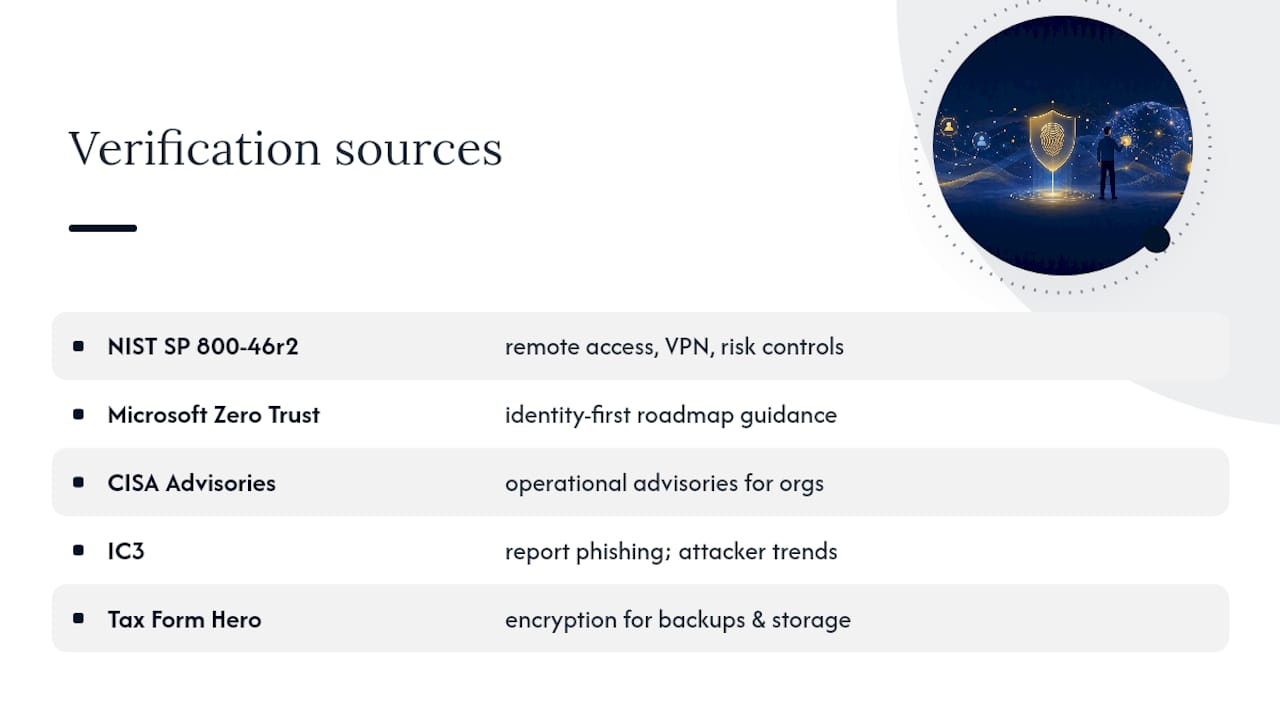
For technical depth beyond what any single guide can cover, a handful of sources carry real authority here. NIST SP 800-46r2 remains the definitive federal reference for remote access architecture, VPN configuration, and risk controls. Microsoft’s Zero Trust remote-work guidance is worth reading in full if you’re building an identity-first roadmap from scratch. CISA publishes ongoing operational advisories relevant to any organization, not just federal agencies, and the IC3 is where you report phishing and remote-work scams and see what’s currently trending in attacker tactics. For third-party app and cloud data protection specifically, Tax Form Hero’s data security overview covers encryption practices worth applying to your own backup and storage strategy.
Why Most Remote Security Advice Gets the Sequence Backward
Most guides on this topic list twenty controls with no ranking, which leaves a business owner staring at a checklist with no idea what to do Monday morning. The research is clear that identity controls, not network perimeter tools, stop the largest share of real-world compromises. That’s why MFA and managed endpoints belong at the top of any 30-day plan, not buried in a “long-term considerations” section.
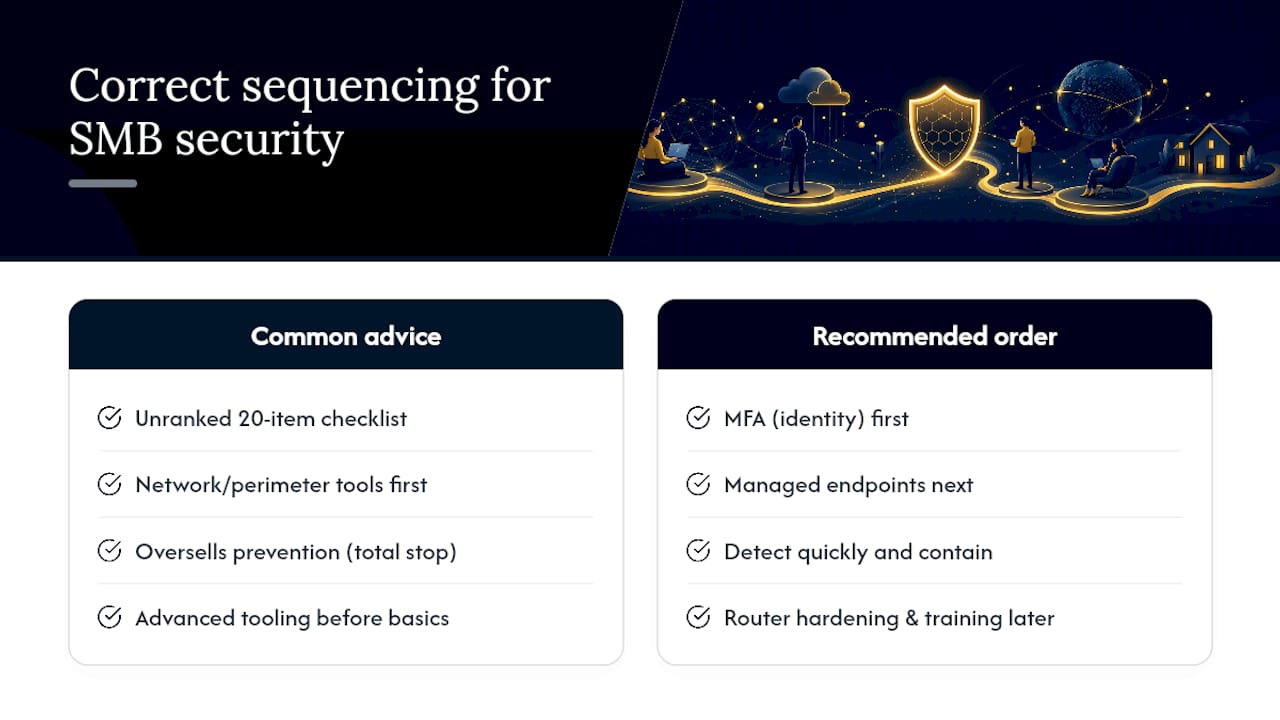
The conventional advice also oversells prevention. No control stack stops every intrusion, and pretending otherwise sets leadership up for false confidence. The better framing, and the one Microsoft’s own Zero Trust guidance uses, is resilience: assume something will get through eventually, and build controls that detect it fast and contain the damage. That’s a mindset shift as much as a technical one.
If you take one thing from this guide, prioritize identity and endpoint management before you spend a dollar on anything else. Router hardening and employee training matter, but they’re multipliers on a foundation that has to be solid first. Skipping straight to advanced tooling without that foundation is how well-intentioned security budgets get wasted.
— Jeffrey
Get a Security Roadmap Built for Your Business, Not a Generic Checklist
Reading a checklist is one thing. Implementing MFA across forty employee accounts, configuring conditional access policies, deploying EDR, and testing backups on a schedule is another job entirely, and most small businesses don’t have the internal bandwidth to do it right. Mavericks Office Solutions runs this as your outsourced IT department, so the roadmap in this guide becomes something your team actually executes instead of a document that sits in a shared drive.

Mavericks Office Solutions pairs 24/7 monitoring with a USA-based help desk that responds in under 12 minutes on average, meaning security incidents get real attention instead of sitting in an offshore ticket queue overnight. That combination of managed cybersecurity, backup management, and rapid response is built specifically for small and midsize businesses trying to close the exact gaps this article covers. If you’re ready to see where your current setup stands, request a cybersecurity assessment and get a prioritized roadmap built around your actual environment, not a generic template.
Sources
- security-adoption-scenario-remote-work – Microsoft
- NIST SP 800-46r2
- Securing federal networks – CISA
- Internet Crime Complaint Center (IC3)