

A visitor management system is a digital check-in and accountability platform that gives your front desk and security team a live roster of everyone on site. It replaces the paper logbook with ID capture, badge printing, and instant records, so you get faster check-ins, a defensible audit trail, and a roster you can pull up the moment an evacuation or compliance review demands one.
TL;DR:
- A visitor management system can integrate with access control and security platforms to automate badge expiration, verify identities, and streamline emergency reporting.
- Configuring data collection to only essential fields and testing emergency rosters before full deployment reduces risks during outages or drills.
- Support for role-based access, encryption, and SIEM integration is critical for maintaining security, privacy, and compliance during daily operations and emergencies.
- A phased rollout, including pilot testing, staff training, and incident drills, ensures system reliability and preparedness for real incidents.
- Outsourcing IT support for integration, monitoring, and troubleshooting offers faster resolution and safeguards system security in complex environments.
Table of Contents
- What Is a Visitor Management System and Who Uses It?
- How a Visitor Management System Works Day to Day
- Key Features and Benefits of a Visitor Management System
- Compliance and Emergency Accountability: What a VMS Actually Covers
- Rolling Out a Visitor Management System: A Practical Sequence
- How to Choose a Visitor Management System
- How a Managed IT Partner Supports Visitor System Integration
- Priorities That Actually Determine Whether a VMS Succeeds
- Getting Help With Visitor System Setup and Monitoring
- FAQ
- Sources
What Is a Visitor Management System and Who Uses It?
A visitor management system, often shortened to VMS, is software that replaces the sign-in sheet with a structured digital record of who enters your building, when, and why. You might also see it called a visitor sign-in system, guest check-in solution, or visitor registration system. They all describe the same basic job: capturing visitor identity, issuing a badge, and keeping a timestamped log that your team can search later.
Deployment shapes vary by building size and risk profile. A small office might use a single tablet kiosk at the front desk. A larger campus often layers in mobile QR check-in, so a visitor scans a code sent in their calendar invite and checks themselves in without waiting for staff. Hybrid setups combine both: self-service for routine guests, receptionist-assisted check-in for contractors, VIPs, or anyone flagged for extra screening. Some organizations keep a front-desk-assisted model entirely, using the software as a faster, more accurate version of the receptionist’s job rather than removing the receptionist altogether.
Several groups rely on the same system for different reasons:
- Facilities and security teams use it to know who is in the building during normal operations and emergencies.
- Reception and front-desk staff use it to speed up check-in and reduce interruptions from repeat questions.
- HR teams use it to track contractor and interview visits, sometimes tying records to background-check status.
- Healthcare administrators use it to screen and log visitors in and out of patient care areas, often with stricter data rules.
- Event and office managers use it to manage guest lists for one-off events without building a permanent badge program.
If your site has more than a handful of daily visitors, or any regulatory obligation to account for who is on premises, a VMS is worth evaluating regardless of industry.
How a Visitor Management System Works Day to Day
The visitor journey usually starts before anyone walks through the door. A host schedules a meeting, and the system sends a pre-registration link or calendar invite with a QR code attached. That single step does most of the heavy lifting: it pre-fills the visitor’s name and company, flags watch-list or no-fly conditions if your policy requires it, and tells the front desk who to expect and when.
On arrival, the visitor checks in through one of a few paths:
- Kiosk check-in. The visitor enters details on a tablet, snaps a photo if required, and a badge prints automatically.
- QR or mobile check-in. The visitor scans their pre-registration code, confirms details, and either skips the badge entirely or triggers a printed one at the desk.
- Receptionist-assisted check-in. Staff manually enter or verify the visitor’s information, useful for VIPs, contractors needing extra documentation, or sites that never fully automate the front desk.
- ID capture and badge issuance. The system scans or photographs a government ID when required, generates a time-limited badge with the host’s name and visit purpose, and timestamps the entry.
- Check-out. The visitor scans their badge, taps a kiosk button, or is checked out automatically when their scheduled visit window ends, closing the log entry.
None of this works in isolation, especially when integrated with an all-in-one business management platform that streamlines facility and visitor workflows. A visitor management system earns its keep through integrations. Connecting it to your access control system lets a printed badge unlock the correct door or elevator floor for the visit duration, then expire automatically. Connecting it to HR or Active Directory lets the system verify hosts, pull employee photos for badge matching, and flag terminated employees who should not be sponsoring visits. Connecting it to calendar systems (Outlook, Google Calendar) automates the pre-registration step so hosts never have to log in to a separate portal. Connecting it to a SIEM (security information and event management platform) means visitor check-in and check-out events become part of your broader security log, searchable alongside badge swipes and network activity during an investigation.
NIST guidance on applied cybersecurity recommends exactly this kind of integration, noting that siloed point solutions for check-in create data gaps, while tying visitor records into access control, HR directories, calendar systems, and SIEM gives security and compliance teams the unified data they need for audits and mustering.
Key Features and Benefits of a Visitor Management System
Every feature on a VMS procurement checklist should map to a measurable operational outcome. Here is how the core functions translate into value:
- Pre-registration and calendar integration cuts front-desk wait times and lets hosts stop manually escorting every guest.
- Badge printing with expiration limits how long a credential works, reducing the risk of a visitor badge being reused after the visit ends.
- ID capture creates a verifiable record tied to a real identity, which matters for audits and incident investigations.
- Watch-list and denial screening flags individuals who should not be granted access before they reach the lobby.
- Reporting and audit export turns months of check-in data into a searchable record instead of a stack of paper logs.
- Emergency mode and live roster access gives safety wardens an up-to-the-minute headcount during a fire drill or real evacuation.
Security and admin controls deserve their own line on any requirements list. Role-based access control (RBAC) limits who inside your organization can view or edit visitor records. Single sign-on (SSO) and multi-factor authentication (MFA) protect the administrative console the same way they protect any other business system. Encryption in transit, meaning TLS on every connection between kiosk, server, and integrated systems, keeps visitor PII from being exposed if network traffic is intercepted. NIST’s applied cybersecurity guidance specifically calls out RBAC, TLS, and MFA as baseline controls for any system handling personal data or triggering access events, and recommends forwarding logs to a SIEM for secure, centralized monitoring.
A visitor management system that integrates with access control and HR directories closes the data gaps that siloed check-in tools leave behind, according to NIST’s guidance on cybersecurity resilience. That unified record is what makes audit retrieval take minutes instead of a search through filing cabinets, and it is what shortens the front-desk interruptions that come from staff answering the same “who’s visiting today” question over and over.
Compliance and Emergency Accountability: What a VMS Actually Covers
Visitor accountability is not just a convenience feature. Under OSHA’s evacuation planning standard, employers are required to have documented procedures to account for all occupants, including visitors and contractors, after an evacuation. A paper sign-in sheet left at an unstaffed front desk does not meet that bar when the building is empty and the sheet is sitting on a desk no one can reach. A digital, device-accessible roster does.
CISA and the Interagency Security Committee’s Occupant Emergency Programs guidance goes a step further, stating that visitor management should be built into the facility’s broader Occupant Emergency Organization, with receptionists, floor wardens, and security staff given predefined roles for accounting for visitors during an incident. A live, mobile-accessible visitor roster lets a floor warden confirm headcount from outside the building, closing a gap that CISA’s occupant emergency guidance identifies in paper-based systems.
A compliance-ready configuration generally includes:
- TLS encryption on every connection between kiosks, servers, and integrated systems.
- Role-based access control so only authorized staff can view, export, or edit visitor records.
- Data minimization that limits collected fields to what a privacy risk assessment actually requires, rather than capturing every field the software offers by default.
- A documented retention and export policy that defines how long records are kept and who can pull them during an audit.
- SIEM forwarding so visitor check-in and check-out events show up alongside other security logs for correlation during an investigation.
Emergency features matter as much as day-to-day convenience. Look for an emergency mode that freezes new check-ins and surfaces a mustering-ready roster, off-site accessibility so a safety officer standing in a parking lot during a fire drill can still see who was in the building, notification triggers that alert designated staff the moment emergency mode activates, and post-event reporting that documents who was accounted for and when, which becomes your audit evidence. Businesses working through HIPAA-adjacent compliance requirements, such as those outlined in our guide to HIPAA compliance IT planning, will recognize this pattern: the controls that satisfy a health privacy audit look almost identical to the controls that satisfy an OSHA evacuation review.
Rolling Out a Visitor Management System: A Practical Sequence
A VMS rollout goes smoother when it follows a sequence rather than a single “flip the switch” launch day. Here is the order that tends to work:
- Scope the project and run a privacy risk assessment. Decide exactly which data fields you need (name, company, host, photo, ID number) and build a PII allowlist that blocks collection of anything beyond that list, across every intake point including any paper backup process.
- Design a pilot at one or two entrances. Pick a representative lobby or loading dock, not just the easiest one, so you catch integration problems before a full rollout.
- Test integrations under real conditions. Confirm the kiosk talks to your door controllers correctly, that badges expire on schedule, and that calendar invites generate working pre-registration links.
- Train front-desk and security staff. Cover both the routine check-in flow and the exception cases: a visitor without a smartphone, a contractor needing a long-term badge, a VIP who skips the kiosk entirely.
- Run an incident drill. Trigger emergency mode, pull the live roster on an off-site device, and have a warden do a physical sweep against that roster.
- Document an outage fallback. Decide how your team will check visitors in if the network or kiosk goes down, and how those paper records get reconciled into the digital system afterward.
- Set a review cadence. Schedule a recurring check on retention settings, access permissions, and audit log exports so compliance posture doesn’t quietly drift after launch.
Pro Tip: Run your first evacuation drill shortly after go-live to identify and fix issues promptly. Problems with off-site roster access or warden training show up fastest under drill conditions, when the stakes are low and the fix is cheap.
For organizations juggling hybrid office layouts alongside a VMS rollout, our piece on hybrid work technology priorities covers related deployment-model tradeoffs worth reading before you finalize kiosk placement and staffing levels.
How to Choose a Visitor Management System
Vendor evaluation should center on three things: security, integration depth, and support model, in that order. A visitor system that looks polished in a demo but can’t connect to your door controllers or forward logs to your security monitoring is going to create more work than it saves.
On the security and privacy side, confirm the vendor supports:
- RBAC and SSO/MFA for administrative access to visitor records.
- TLS encryption for all data in transit, including between kiosks and the cloud backend.
- Configurable data retention and export so you control how long records live and who can pull them.
- A documented data minimization option, letting you disable fields you don’t need rather than forcing you to collect everything the platform offers.
- API or webhook access to your access control, HR directory, and SIEM.
On pricing and support, vendors typically structure costs as per-seat, per-site, or hardware-plus-subscription, and each model suits a different footprint: per-seat pricing fits a single busy lobby, per-site pricing fits a multi-building campus, and hardware-plus-subscription fits an organization still deciding how many kiosks it needs. Ask directly about support hours, response time commitments, and whether support is staffed in-house or outsourced, since that detail affects how fast an integration problem gets fixed during a live incident.
Before signing, walk through these questions with your shortlist: How does the system behave during a network outage? What happens to visitor data if we cancel the contract? Can we export the full audit log in a standard format? Does the badge printer support time-limited, auto-expiring credentials? Who at your company owns the SIEM integration, and is that a configuration we control or one that requires a vendor ticket?
How a Managed IT Partner Supports Visitor System Integration
Getting a visitor management system to actually talk to your door controllers, directory, and security monitoring is where most rollouts stall. We handle the pieces that sit outside the VMS vendor’s scope: network segmentation so kiosk traffic doesn’t sit on the same segment as finance systems, SSO and MFA configuration for the admin console, and the API or webhook wiring that pushes check-in events to your SIEM and access control platform.
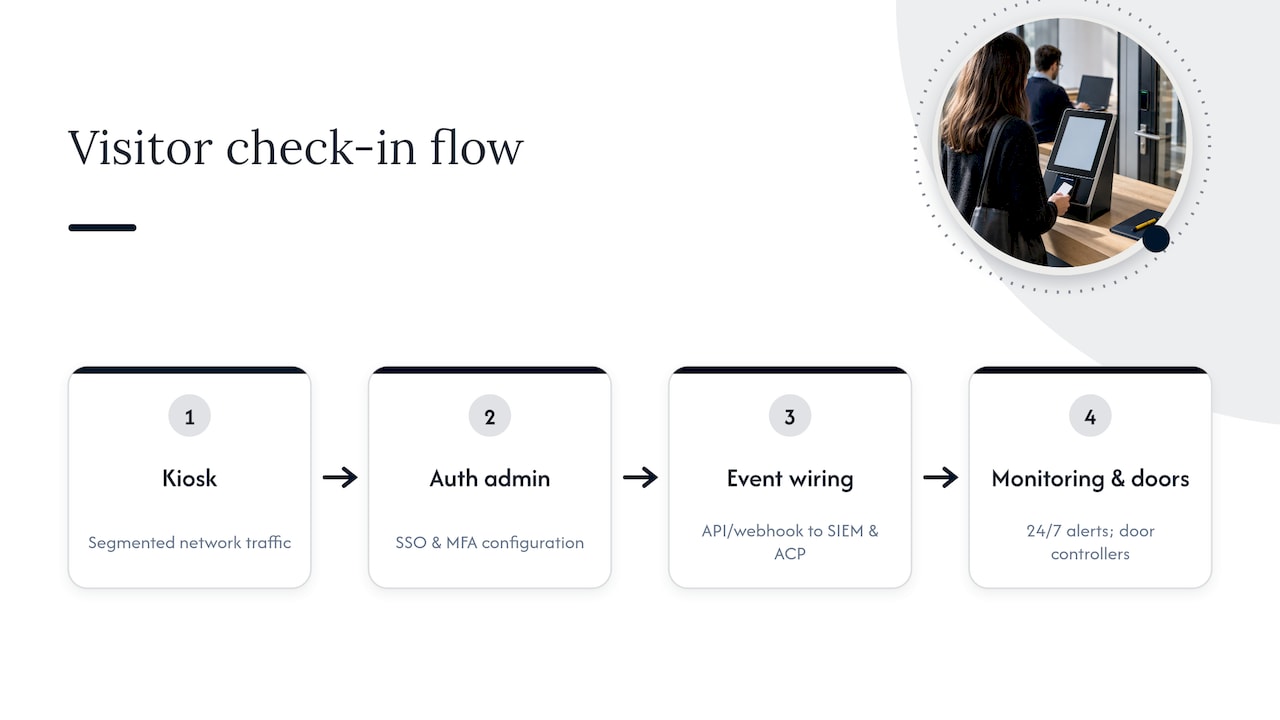
Once a system is live, the work doesn’t stop. Our cybersecurity services include 24/7 monitoring and incident escalation, so an unusual pattern in visitor logs gets flagged the same way an unusual login would. Our cameras and access control integration work covers the door-controller and badge-reader side of the equation directly.
Pro Tip: Ask whoever manages your network to document a change-control process for visitor form fields before launch. A field added without review is exactly how a PII allowlist quietly breaks.
Priorities That Actually Determine Whether a VMS Succeeds
Most VMS evaluations spend too long comparing feature lists and not enough time testing what happens when the network drops or the fire alarm goes off. A system with fifty features and no reliable integration to your door controllers will fail you exactly when you need it most.
Treat visitor data as a compliance asset you’re obligated to protect, not a marketing database to pad with extra fields. Collect only what a privacy risk assessment says you need, and configure that allowlist everywhere, including any paper backup process you keep for outages.
Then test it for real. A live roster that nobody has pulled up during an actual drill is a theory, not a safety control. Run the drill, time the reconciliation, and fix what breaks before an inspector or a real emergency does it for you.
— Jeffrey
Getting Help With Visitor System Setup and Monitoring
A visitor management system only delivers on security and compliance if the network, access control, and monitoring behind it are solid, and that’s the part most facilities teams don’t have the bandwidth to handle alone. We provide outsourced IT services for small and medium businesses, integrating visitor system work with network, security monitoring, and help desk support as part of a comprehensive technology solution.

What that looks like in practice:
- Integration work tying your kiosk or badge system into door controllers, directory services, and SIEM logging.
- 24/7 monitoring through our cybersecurity services, so unusual visitor activity gets flagged alongside network and endpoint alerts.
- A local, USA-based help desk with an average response time under 12 minutes, so a kiosk outage or badge printer failure gets resolved fast instead of sitting in an offshore ticket queue.
- Hardware and access control support through our cameras and access control services, covering the door-side half of the integration.
If you’re scoping a visitor system rollout and want the network, security, and support side handled by one partner instead of three vendors, start with our managed IT services page to see how an engagement is structured.
FAQ
What is a visitor system?
A visitor system, or visitor management system, is software that replaces a paper sign-in sheet with a digital record of who enters a building, when, and why. It typically handles pre-registration, check-in, badge printing, and check-out, and can connect to access control and security monitoring for a complete audit trail.
What are the key components of a management system?
A visitor management system generally includes pre-registration and scheduling, check-in (kiosk, QR, or receptionist-assisted), ID capture and badge issuance, check-out tracking, and reporting. Security components such as role-based access control, encryption, and integration with access control or SIEM platforms round out a compliance-ready setup, as recommended in NIST’s applied cybersecurity guidance.
Why should entry of visitors be controlled in a hospital?
Hospitals control visitor entry to protect patients, many of whom are immunocompromised or require restricted access to specific units, and to maintain an accurate record of who was present in case of an incident or infection investigation. A digital visitor log also supports the occupant accounting that OSHA’s evacuation standard requires during an emergency.
How many types of visitors are in security?
Security programs typically group visitors into categories such as guests or clients, contractors and vendors, interview candidates, and delivery or service personnel, each often assigned different screening and access rules. CISA and ISC’s occupant emergency guidance recommends mapping these categories into your broader emergency accountability plan so each type is accounted for consistently.
Sources
- Occupational Safety and Health Administration (OSHA)
- CISA / Interagency Security Committee — Occupant Emergency Programs (2024)