

The strongest defense against account takeover combines phishing-resistant multi-factor authentication, unique long passwords stored in a password manager, and active monitoring for unusual logins. If you suspect your account is already compromised, change your password immediately, sign out of every device, review email forwarding rules and connected apps, and contact your bank or report the incident when money or personal data is involved. NIST and CISA both back these steps, and we work with small businesses every day that need this exact playbook.
TL;DR:
- Phishing-resistant multi-factor authentication paired with unique long passwords significantly reduces account takeover risks, especially for high-value or administrative accounts.
- Attackers often maintain persistence through unrevoked OAuth tokens, forwarding rules, or compromised app access, which remain after password resets.
- Early detection relies on monitoring for unknown login locations, unexpected account activity, and unauthorized messages or file sharing, especially in business accounts.
- Businesses should deploy MFA for privileged accounts first, enforce least privilege, and regularly audit OAuth permissions and connected apps to prevent ongoing access.
- Continuous, routine auditing of connected apps, forwarding rules, and session activity is essential to maintaining layered defenses and stopping attackers from maintaining access.
Table of Contents
- How account takeover happens: attack vectors and persistence mechanisms
- Techniques and detectable indicators: realistic signals to watch for
- Who account takeover targets and why
- Consequences of account takeover for people and businesses
- How to prevent account takeover: practical steps for individuals
- How to prevent account takeover: controls for businesses
- How Mavericks Office Solutions helps SMBs prevent and recover from account takeover
- Why layered defenses and continuous auditing matter
- Get help securing your accounts before an attacker finds the gap
- FAQ
- Sources
How account takeover happens: attack vectors and persistence mechanisms
Most account takeovers start with something mundane: a reused password, a convincing email, or a phone call that sounds official. Attackers rarely need to break encryption when they can simply ask for your credentials or buy them from a breach dump.
Credential stuffing is the most common entry point. Attackers take username and password lists stolen from one breached site and test them against banking, email, and business accounts, betting that people reuse passwords. Phishing and spear-phishing remain close behind, with attackers impersonating IT departments, banks, or executives to harvest login details. Vishing, or voice phishing, has grown more sophisticated: callers posing as help desk staff talk employees into resetting passwords or approving login requests.
Multi-factor authentication helps, but it is not immune. Push bombing (also called MFA fatigue) floods a victim with approval requests until they tap “yes” just to make the notifications stop. SIM swapping lets an attacker hijack your phone number and intercept one-time codes sent by text. Even where MFA holds, attackers increasingly go around it entirely by abusing OAuth, the protocol that lets one app connect to another using your login. The FBI’s advisory on recent Salesforce-related compromises describes threat actors using vishing to trick employees into approving malicious connected apps, a technique that survives a password reset because the attacker never needed the password again once the app was authorized.
That persistence is the part people underestimate. A password change does not undo:
- A forwarding rule quietly set up to copy your email to an outside address
- A third-party app still holding an active OAuth token to your account
- An API key or session token issued before the breach was discovered
- Recovery information (a phone number or backup email) that was swapped to one the attacker controls
Until those are found and revoked, the attacker keeps a door open no matter how many times you change the lock.
Techniques and detectable indicators: realistic signals to watch for
Catching account takeover early depends on knowing what to look for and checking it on a schedule, not just when something feels wrong.
- Watch for password or security alert emails you did not trigger. A notice that your password, email, or phone number changed, when you did not make the change, is one of the clearest signs of compromise.
- Note login alerts from unfamiliar devices or locations. Most major platforms will flag a new device or an unusual country of origin.
- Look for messages or posts you did not send. Outbound spam from your email or social account usually means someone else is driving.
- Check for unexpected calendar invites, payment requests, or file-sharing notifications, especially in business email accounts.
On the administrative side, IT teams should watch for spikes in failed login attempts, abnormal API or OAuth activity, and session patterns that do not match normal work hours or locations. Microsoft’s analysis and other industry research point to multi-factor authentication as one of the most effective single controls against automated credential attacks, though its strength depends heavily on which type of MFA is deployed.
A quick, repeatable check takes three steps: review active email forwarding rules, audit which third-party apps have account access, and scan the list of currently signed-in devices or sessions. Doing this monthly catches most lingering compromises before they cause real damage.
Who account takeover targets and why
Attackers are not randomly guessing passwords for sport. Every takeover attempt serves a specific goal, and understanding that goal helps you prioritize which accounts need the strongest protection first.
- Financial accounts and payment methods are targeted for immediate cash-out, whether through wire fraud, fraudulent purchases, or draining stored balances.
- Email accounts are high-value because they usually control password resets for everything else you own.
- System administrators and IT staff hold privileged access that can unlock an entire network, making them a priority target for business-focused attacks.
- Finance and HR employees have access to payroll systems, vendor payment details, and employee personal data, all attractive for fraud or identity theft.
- Executives are targeted for business email compromise schemes, where a spoofed or hijacked account is used to authorize fraudulent wire transfers.
Both customer-facing and employee accounts matter strategically. A single compromised customer account can be used to commit fraud at scale, while one compromised employee account can become the foothold for a much larger breach.
Consequences of account takeover for people and businesses
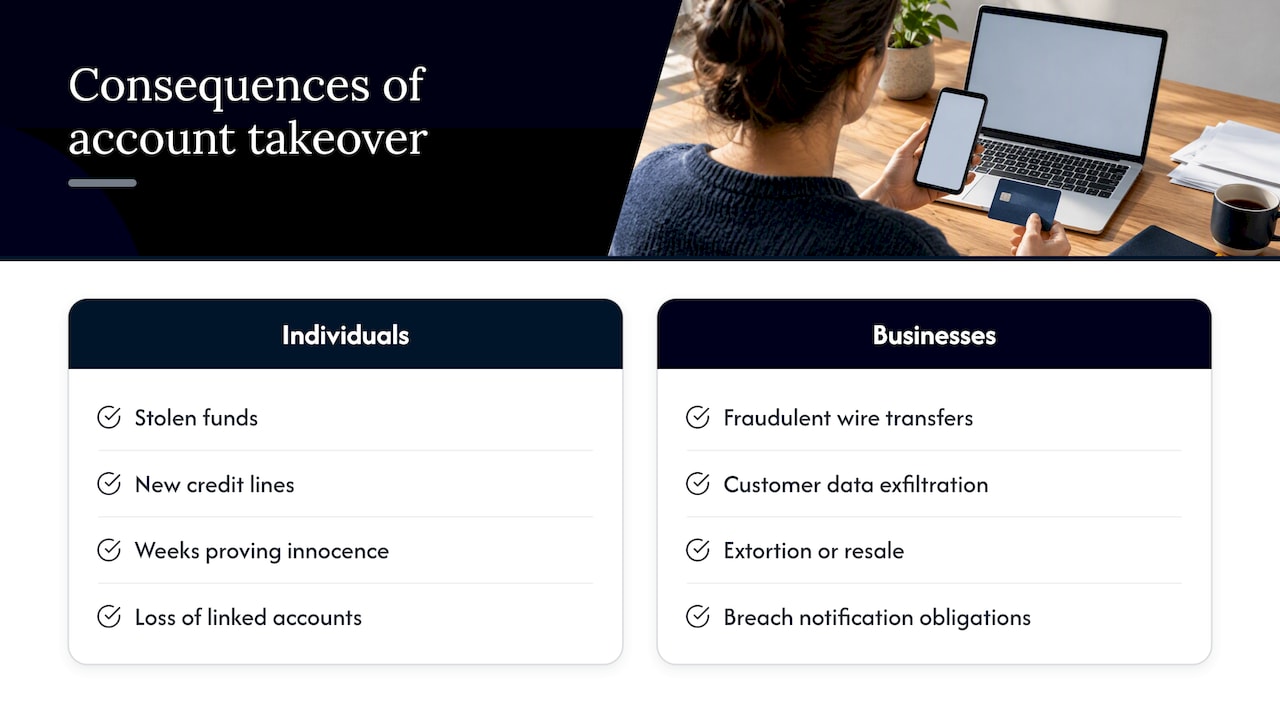
The damage from account takeover rarely stops at the account itself. For individuals, a hijacked account can mean stolen funds, new credit lines opened in your name, and weeks spent proving to banks and credit bureaus that the activity was not yours. Losing access to a primary email often cascades into losing access to everything tied to it, from social media to retirement accounts.
For businesses, the stakes scale up fast. A single compromised finance account can lead to a fraudulent wire transfer that is nearly impossible to reverse once it clears. Attackers who gain access to customer data may exfiltrate it for resale or hold it for extortion, triggering breach notification obligations and regulatory scrutiny. Operational disruption often follows: locked-out employees, frozen systems, and the staff hours needed to investigate and remediate.
The FBI’s Internet Crime Complaint Center tracks a steady stream of account takeover and business email compromise complaints each year, and the agency recommends reporting losses quickly, since fast reporting improves the odds of recovering stolen funds before they move through multiple accounts.
How to prevent account takeover: practical steps for individuals
You do not need to be a security professional to close most of the doors attackers rely on. A handful of habits, done consistently, eliminate the majority of takeover attempts.
Start with your passwords. NIST guidance recommends passwords of at least 15 to 20 characters when you create them manually, and a password manager makes that painless by generating and storing a unique one for every account. Reusing a password anywhere means a breach at one site can unlock accounts everywhere else.
- Use a password manager to generate and store unique, long passwords for every account you own.
- Enable phishing-resistant multi-factor authentication, such as a passkey or hardware security key, wherever a service offers it; CISA names this the gold standard over SMS codes or app-based push alone.
- Turn on login alerts for your email and financial accounts so you are notified the moment a new device signs in.
- Set a secure recovery contact, like a phone number or backup email only you control, and check it twice a year.
- Audit connected apps and forwarding rules on your email account every few months to catch anything you did not authorize.
- Keep your phone and computer patched, and use a biometric lock or PIN rather than leaving devices unlocked.
Pro Tip: If a service only offers SMS codes for MFA, use it rather than nothing, but switch to a passkey or security key as soon as the option appears.
If you ever do suspect compromise, the FTC’s recovery checklist walks through the same core sequence we recommend: change the password, sign out of all devices, enable two-factor authentication, check recovery information, remove any forwarding rules, and let your contacts know in case the attacker used your account to target them too.
How to prevent account takeover: controls for businesses
Individual habits matter, but a business needs layered, enforced controls that do not depend on every employee remembering best practices on a bad day. The following priorities can realistically be rolled out within a few weeks.
- Deploy phishing-resistant MFA for administrators and high-value accounts first. CISA recommends phasing in security keys starting with the smallest group of privileged users, such as system administrators, finance, and HR, before expanding to the rest of the company.
- Enforce least privilege and reauthentication for sensitive actions. OWASP’s authentication guidance recommends requiring a fresh login or MFA check before allowing changes like password resets, payment approvals, or permission escalations, not just at initial sign-in.
- Harden your support channels and call centers. The same FBI advisory on vishing-driven breaches shows that attackers often target help desk staff directly, so verification procedures and training for anyone who can reset a password or approve an app matter as much as technical controls.
- Centralize logging and watch for anomalies. Rate limiting and account lockout policies, tied to the account identifier rather than just the source IP address, cut down on credential stuffing without locking out legitimate users as easily; OWASP’s guidance covers how to tune these thresholds to avoid creating a denial-of-service risk.
- Audit OAuth and connected-app permissions on a regular schedule. This is the step most businesses skip, and it is exactly the persistence mechanism the FBI flagged in recent large-scale compromises.
When an incident does happen, a clear response plan keeps it from spreading:
- Remove the attacker’s persistence first: revoke OAuth tokens, rotate API keys, and disable any unfamiliar forwarding rules.
- Reset credentials for affected accounts and anything that shares a password with them.
- Notify affected customers without hyperlinks in the message, since the FTC warns that links in breach notifications can be mistaken for phishing or exploited by a second attacker.
- Report significant incidents to IC3 and the FTC, and loop in your bank immediately if funds moved.
Our password policy checklist and MFA implementation guide walk through these steps in more detail for IT teams building this out for the first time.
How Mavericks Office Solutions helps SMBs prevent and recover from account takeover
We built our cybersecurity services around the exact gaps that let account takeover happen in the first place. As a comprehensive outsourced IT department, we combine managed IT, cybersecurity, and 24/7 monitoring so the same team watching your network can also respond the moment something looks wrong, backed by a local, USA-based help desk.
- We roll out phishing-resistant MFA for administrators and high-value accounts following recommended phased approaches.
- We run OAuth and connected-app audits to find persistence mechanisms a password reset alone will not remove.
- We provide incident response and recovery support when an account or network may have been compromised.
- We build employee phishing and vishing training programs tailored to relevant roles vulnerable to attacks.
Our guides on choosing a business password manager and building a phishing training program that cuts risk go deeper into two of the controls that matter most.
Why layered defenses and continuous auditing matter
Training alone will not stop account takeover. People get tired, calls sound legitimate, and one distracted click undoes a year of security awareness sessions. What holds up under pressure is phishing-resistant MFA that cannot be phished away, paired with a habit of auditing connected apps and forwarding rules on a fixed schedule rather than waiting for a reason to look. The businesses that avoid repeat incidents are the ones that treat this audit as routine maintenance, not emergency response.
— Jeffrey
Get help securing your accounts before an attacker finds the gap
Most businesses do not find out their MFA setup has a gap, or that an old OAuth connection is still live, until something has already gone wrong. We offer a more direct path: our cybersecurity and managed IT services combine phishing-resistant MFA deployment, ongoing monitoring, and incident response under one team, backed by a local help desk that actually picks up the phone.

- We assess your current MFA coverage and identify accounts still relying on phishable methods.
- We audit connected apps and email forwarding rules across your organization for hidden persistence.
- We set up centralized monitoring so unusual login activity gets caught in hours, not months.
If you want a clear picture of where your accounts stand, request a security review from our cybersecurity team and we will walk you through what we find.
FAQ
What is the single best defense against account takeover?
Phishing-resistant multi-factor authentication, such as a passkey or hardware security key, is the control CISA names as the gold standard because it cannot be intercepted the way text message codes or push approvals can. Pairing it with a unique, long password from a password manager closes most of the remaining gap.
How do I know if my account has been taken over?
Common signs include a password change notice you did not trigger, login alerts from an unfamiliar device or location, and messages sent from your account that you did not write. The FTC’s recovery guide recommends checking your recovery email and phone number first, since attackers often change these to lock you out permanently.
Is SMS-based two-factor authentication safe enough?
SMS codes are better than no second factor, but CISA considers them phishable because attackers can intercept them through SIM swapping or real-time phishing pages. Use a passkey or hardware security key when the option is available, and fall back to SMS only when nothing stronger is offered.
What should a business do immediately after an employee account is compromised?
Revoke the account’s active sessions and any connected app or API tokens first, since a password reset alone will not remove them, then rotate credentials for anything that shared the same password. Report significant incidents to IC3 and notify affected customers without clickable links, following FTC guidance on avoiding secondary phishing risk during notification.
Can account lockout policies stop credential stuffing attacks?
Account lockout and rate limiting tied to the account identifier, rather than just the source IP, meaningfully slow down automated credential stuffing according to OWASP’s authentication guidance. The thresholds need careful tuning, since overly aggressive lockouts can be exploited to lock legitimate users out as a denial-of-service tactic.
Sources
- NIST — How do I create good passwords?
- CISA — Phishing resistant MFA is key to peace of mind
- OWASP Authentication Cheat Sheet