

Business email compromise (BEC) is a fraud in which a criminal poses as someone your business trusts, such as your CEO, a vendor or your bookkeeper, and uses email to get money or sensitive data out of you. There is often no malicious link and no virus. There is a believable message, a sense of urgency and a payment that looks routine. This guide explains how BEC works, shows what real attacks look like, separates BEC from ordinary phishing, and lays out the controls and response steps a small business can put in place now.
TL;DR
- BEC, also called email account compromise (EAC), tricks people into sending money or data by impersonating a trusted contact, often from a hijacked real mailbox.
- Businesses of every size are targeted, and the Secret Service’s July 2026 advisory cites IC3 data putting losses above $3 billion a year.
- The strongest single habit is verifying any new or changed payment instruction by calling a number you already have on file, never one from the email.
- Multi-factor authentication, mail forwarding rule checks and look-alike domain alerts close the most common technical doors.
- If money has moved, call your bank first, then the FBI and file an IC3 complaint, and do not report from the compromised email account.
Table of Contents
- What business email compromise actually is
- BEC examples: the scams you will actually see
- BEC vs. phishing: where the line falls
- Who gets targeted and what it costs
- How to prevent business email compromise
- How to detect a suspected BEC attack
- What to do if money has already moved
- Our perspective
- How Mavericks helps you close the BEC gaps
- A one-page BEC readiness checklist
- FAQ
- Sources
What business email compromise actually is
The Secret Service describes BEC as a sophisticated attack in which criminals impersonate trusted individuals to trick victims into transferring funds or sensitive information. It is sometimes called email account compromise. Attackers use social engineering, phishing or network intrusion to get into accounts, and once inside they can watch activity and then send fraudulent payment instructions at the moment they are most likely to be believed.
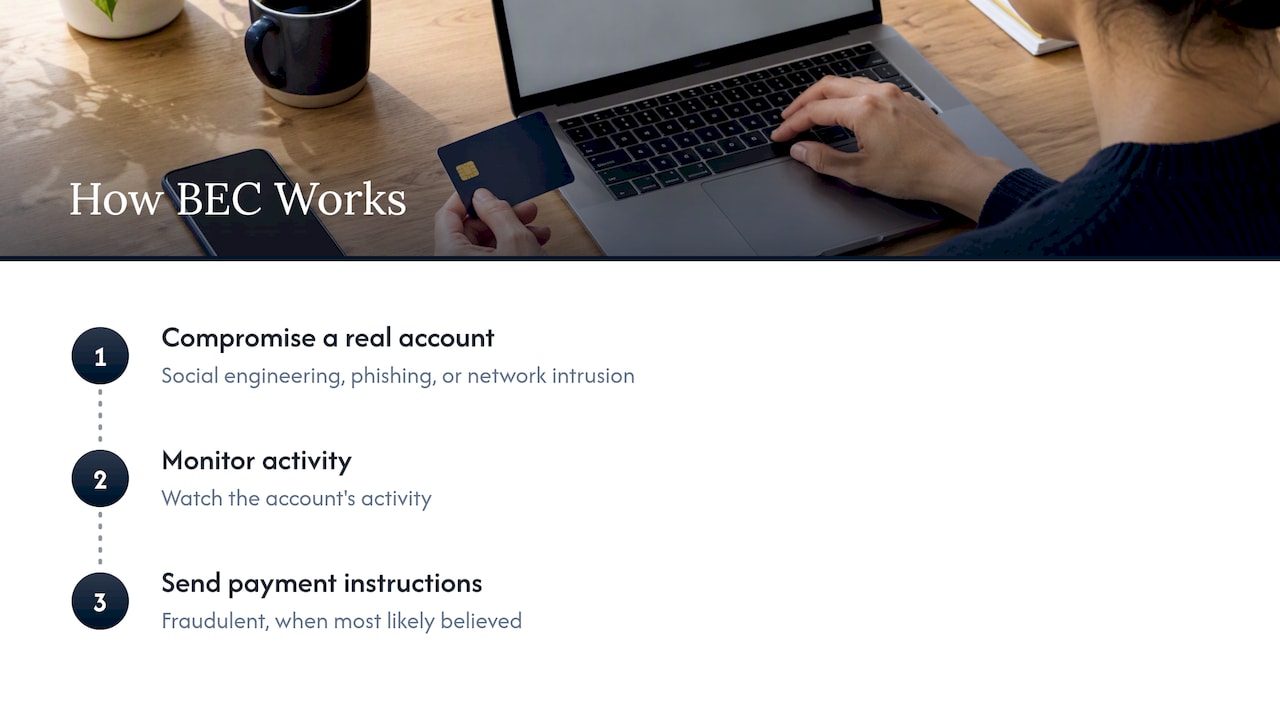
The FBI puts the core mechanic simply: scammers compromise legitimate business email accounts through social engineering or computer intrusion. That detail matters. When the message comes from a real account, the sender address looks right, the writing style matches and the thread history is genuine. Your spam filter has little to object to.
Why it works on careful people
BEC does not exploit software flaws. It exploits routines. Microsoft notes that BEC is hard to detect because attackers lean on human trust and predictable business processes. Invoices get paid on a schedule. Executives send short, urgent requests. Vendors occasionally change banks. An attacker who learns those habits only has to fit inside them.
FBI Special Agent Maxwell Marker has described BEC as relying on thorough research on the target, which is why these emails rarely have the typos and odd greetings people are trained to look for.
BEC examples: the scams you will actually see
Most readers searching for BEC examples want to recognize the pattern before it lands in their inbox. These are the versions small and mid-sized businesses meet most often. The tactics below come from the Secret Service and FBI material cited throughout this guide.
The executive request
An email arrives, apparently from the owner or a senior manager, asking an employee in accounting to send a wire or buy gift cards quickly and keep it quiet. The sender is traveling, in a meeting, or otherwise unreachable by phone. That claim is deliberate: the Secret Service notes that scammers create false urgency by saying they cannot be reached and pressure the victim to pay fast.
The vendor with new bank details
A supplier you pay every month writes to say its bank account has changed and the next invoice should go to the new one. Sometimes the attacker has broken into the vendor’s mailbox, so the message arrives inside an existing invoice thread. The FBI warns that sophisticated actors use malware to reach legitimate invoice conversations and time fraudulent requests so they do not raise suspicion.
The look-alike domain
The email looks like it came from a known contact, but the domain is one character off. The FBI gives the example of “.co” in place of “.com”. On a phone screen, where the full address is often hidden behind a display name, this is easy to miss.
The hijacked mailbox with hidden rules
After taking over an account, attackers frequently set up auto-forwarding so every reply reaches them, and they may claim bank problems to explain an unusual payment route. The Secret Service lists auto-forwarding and bank-issue claims among the common tactics. This is why checking mailbox rules is part of any investigation.
The information-seeking email
Not every BEC aims at a wire. Spearphishing messages that appear to come from a trusted sender can be used to coax out confidential information, such as employee tax forms, customer lists or login credentials, which are then used for the next attack.
A quick reference
| Scam type | What the email says | Red flag | First check |
|---|---|---|---|
| Executive impersonation | “Need this wire today, can’t talk” | Secrecy and unreachable sender | Call the executive on a known number |
| Vendor bank change | “Our account has changed” | New account on an existing invoice | Call the vendor’s number on file |
| Look-alike domain | Normal request from a near-identical address | One character off in the domain | Expand the full sender address |
| Account takeover | Request inside a real thread | Unusual timing or forwarding rules | Check mailbox rules and sign-in logs |
| Data request | “Send me the staff W-2s” | Request outside normal process | Confirm by phone or in person |
BEC vs. phishing: where the line falls
People often use the two terms interchangeably, and BEC does sit inside the wider family of phishing and social engineering. The practical differences are what make BEC more expensive.
- Targeting. Typical phishing goes out in bulk and hopes a few people click. BEC is aimed at a specific person or role, such as accounts payable, payroll or an executive assistant.
- Payload. Phishing often carries a malicious link or attachment. A BEC message may carry nothing but text, which is why attachment scanners miss it.
- Goal. Phishing often steals credentials. BEC steals money or data directly, though credential theft is frequently the first step that makes it possible.
- Preparation. The FBI’s description of BEC stresses research and sophisticated tradecraft compared with simpler scams.
The takeaway: phishing training is necessary but not sufficient. A team that has learned to avoid suspicious links still needs a payment verification process for emails that contain no link at all. Our guide to building a phishing training program covers the training side.
Who gets targeted and what it costs
The FBI says BEC scammers primarily go after businesses that work with foreign suppliers or regularly perform wire transfers, and that businesses of all sizes are targeted. A 15-person manufacturer in Ohio that pays freight, materials and subcontractors by wire fits that profile as well as a large enterprise does.
The Secret Service’s July 2026 advisory, citing the Internet Crime Complaint Center, calls BEC a leading cybercrime causing over $3 billion in losses annually. Those are reported losses, so the true figure is likely higher. For a small company, one misdirected invoice can equal a month of revenue, and wires are hard to claw back once the receiving bank has released the funds.

How to prevent business email compromise
BEC prevention works in layers: technical controls make account takeover harder, and process controls make a successful impersonation fail anyway. You need both.
1. Turn on multi-factor authentication everywhere email lives
The FBI lists setting up MFA among its core prevention steps. Start with every Microsoft 365 or Google Workspace mailbox, then extend to your accounting platform and bank portals. Prefer app-based or passkey methods over text messages where you can. Our 10-minute Microsoft 365 MFA setup walks through it, and the piece on MFA fatigue attacks explains why number matching alone is not the end of the story. For passkeys and app audits, see preventing account takeover.
2. Verify every payment change by a second channel
This is the control that stops the most losses. The FBI advises verifying payment requests or changes by calling the requester, using a secondary channel and a phone number you already know rather than one in the email. Write it into policy:
- Any new vendor, new bank account or changed instruction needs a call-back to a number from your own records.
- Payments above a threshold you set need two approvers.
- Nobody is exempt, including the owner. A rule the boss can waive by email is the rule an attacker will impersonate the boss to waive.
Finance teams that also want to tighten the document side can read about validating purchase orders before release, which shows how checks at the order stage catch mismatches before money moves.
3. Watch for look-alike domains
The FBI recommends intrusion detection rules that flag emails with extensions similar to your own domain. In practice, that means a mail-flow rule that tags or quarantines messages from near-matches of your company name, and an external-sender banner so staff see at a glance that a message did not come from inside. Also publish SPF, DKIM and DMARC records for your own domain so criminals cannot easily send mail that appears to be from you to your customers.
4. Audit forwarding rules and sign-ins
Hidden forwarding is how attackers keep watching after you reset a password. Review mailbox rules for any rule that forwards externally or deletes messages, and alert on new ones. Review unusual sign-in locations as well. Our email security checklist for SMBs gives the full list of settings to check.
5. Limit what you share publicly
The FBI also advises caution about information shared online. Staff directories with titles, out-of-office replies that announce travel and social posts about vendors give attackers the script. Trim what is not needed.
6. Protect the devices behind the inboxes
Malware on a laptop can hand over a mailbox without any password guessing. Modern endpoint protection catches the infostealers that feed BEC; see our overview of endpoint detection and response for what to look for. For the wider program, the Michigan owner’s playbook and our Ohio cybersecurity plan guide apply just as well to firms on either side of the state line.
How to detect a suspected BEC attack
Signs that something is wrong include a vendor who denies sending a bank change, a colleague who never wrote the urgent email, replies you never see, and customers receiving messages from you that you did not send. When you suspect an incident, the Secret Service advises that organizations monitor networks for suspicious activity, check email forwarding rules and engage IT response teams.
In practice that means:
- Reset the affected account’s password and sign out all sessions.
- Confirm MFA is on and remove any unfamiliar authentication methods.
- Look for external forwarding rules, hidden inbox rules and unfamiliar app consents.
- Review sign-in logs for the days before the suspicious message.
- Warn finance staff and key vendors, by phone, that email from the account should not be trusted until cleared.
What to do if money has already moved
Speed matters more than anything else. Follow this order.
- Call your bank right away. Ask it to contact the receiving institution and attempt a reversal. The Secret Service also says to request any Hold Harmless or Indemnification forms the bank requires.
- Contact the FBI and file an IC3 complaint. The FBI’s guidance is to call the FBI and file with IC3 regardless of the dollar loss.
- Do not use the compromised channel. The Secret Service stresses avoiding the compromised communication channel when reporting to law enforcement, so use a phone or a clean device and account.
- Preserve evidence. Keep the original emails with full headers, wire confirmations and a note of times.
- Call your IT provider and your insurer. Cyber policies often have notice deadlines, so read yours today rather than after an incident.
If your data may also have been exposed, you may have state notification obligations. Ask your attorney or your insurer’s breach coach about them.
Our perspective
We see the same pattern in small businesses across Ohio and Michigan: the money is rarely lost because someone was careless. It is lost because the process allowed one person to act on one email. A busy bookkeeper who gets a message that appears to come from the owner is behaving reasonably. The fix is to make the safe path the easy one.
That is why we push clients to treat BEC as a business-process problem with a technical layer, not the other way around. MFA, mail-flow rules and 24/7 monitoring shrink the odds that an account gets taken over, and they let us notice odd behavior, like a new forwarding rule at 2 a.m., before a fraudulent invoice goes out. Then the call-back rule means that even if an attacker gets in, a payment still has to survive a phone call to a number they do not control.
We also think owners should hear plainly that this is manageable. You do not need a full-time security team. You need a short list of controls, a written payment policy that applies to everyone, and a provider who answers the phone fast when something looks wrong. Our help desk is local and USA-based, with an average response under 12 minutes, because when a suspect email is sitting in an accountant’s inbox, minutes matter.
— Jeffrey
How Mavericks helps you close the BEC gaps
Mavericks Office Solutions runs as an outsourced IT department for small and medium-sized businesses. For BEC, that covers hardening your email tenant through our Microsoft 365 services, deploying MFA and monitoring under our cybersecurity program, and handling day-to-day support and 24/7 monitoring through managed IT services. If you are weighing providers, our 8-criteria scorecard shows what to ask. Contact us through our site for an email security review.
A one-page BEC readiness checklist
- MFA enforced on all email, banking and accounting logins
- Written call-back rule for any new or changed payment details
- Dual approval above a set dollar amount
- External sender banners and look-alike domain alerts
- SPF, DKIM and DMARC published for your domain
- Weekly or automated review of mailbox forwarding rules
- Phishing and payment-fraud training for finance and executive assistants
- Bank contact, FBI and IC3 steps printed and known before you need them
- A tested way to reach your IT provider by phone
FAQ
Is business email compromise the same as phishing?
Not exactly. BEC often starts with phishing, but it is targeted at a specific person and usually aims at a payment or sensitive data rather than a mass credential grab. Many BEC emails contain no link or attachment, so they slip past tools built to catch malicious content.
How can a small business prevent BEC?
Combine technical and process controls. Turn on MFA, watch for look-alike domains, audit forwarding rules, and require a phone call to a known number before changing any payment details. The call-back rule is the single most effective habit because it works even when the email looks perfect.
What should I do first if I sent money to a BEC scammer?
Call your bank immediately and ask it to contact the receiving bank to try to reverse the transfer. Then contact the FBI and file a complaint with IC3, whatever the amount. Use a phone or a clean device for this, not the email account that may be compromised.
Can small businesses really be targets?
Yes. The FBI says businesses of all sizes are targeted, with a particular focus on firms that make regular wire transfers or work with foreign suppliers. Attackers choose targets by payment habits, not company size, and smaller firms often have fewer approval steps.
Sources
- Public Advisory: Business Email Compromises, U.S. Secret Service, July 2026
- Business E-Mail Compromise, FBI
- Business Email Compromise, FBI common frauds and scams
- What is Business Email Compromise (BEC)?, Microsoft Security