

Mobile access credentials are digital keys that live on an employee’s smartphone or smartwatch and unlock doors in place of a plastic badge or fob. The phone talks to a reader over Bluetooth, NFC or ultra-wideband, and your administrator can issue or cancel the key from a dashboard in seconds. If you are weighing phone-as-key access for an office, clinic, shop or warehouse, this guide covers how it works, what it takes to deploy, where it goes wrong and how to roll it out without opening a security gap.
TL;DR
- A mobile credential is an encrypted digital key stored on a phone or wearable, not a photo of a card or a static number. It is read by a compatible reader over Bluetooth, NFC or UWB.
- The biggest security gain is lifecycle control: you can revoke a lost or departed employee’s key remotely, while a lost card can stay live until someone reconfigures the system.
- Check three things before you buy: reader support, phone compatibility, and whether the system uses a proprietary app or the new open Aliro standard.
- Treat the phone as part of your security perimeter. Screen lock, multi-factor authentication and device management matter as much as the door hardware.
- Many small businesses can run cards and phones side by side during the switch, which keeps risk low.
Table of Contents
- What mobile access credentials actually are
- How the phone and the door talk to each other
- Why small businesses are switching
- What can go wrong
- Aliro: why the standard matters to you
- Federal and regulated environments
- A practical rollout plan for a small business
- Our perspective
- Getting help with access control and IT together
- FAQ
- Sources
What mobile access credentials actually are
Think of a mobile credential as the digital version of the card in your wallet. Instead of a chip in plastic, the key is stored in your phone, tablet or watch and presented to a reader at the door. According to HID’s own FAQ, mobile IDs complement an existing access control solution: the credentials sit on the employee’s device rather than on a card or fob.
The same idea is already familiar from cars. A phone key in a Tesla communicates with the vehicle over Bluetooth and supports automatic locking and unlocking. Office doors are the same concept with a different lock.
People search for this under several names: mobile badging, phone as key, Bluetooth door access, digital keys. They all point at the same thing: your phone replaces the card.
It is not a copied card number
A common misconception is that a phone simply broadcasts the number from your old badge. It does not. HID’s documentation explains that mobile access relies on secure, encrypted exchanges between the credential on the device and the reader, so a plain static signal will not work. That difference is exactly why mobile credentials are harder to clone than many older proximity cards.
How the phone and the door talk to each other
There are three radio technologies you will see in product sheets:
| Technology | How it feels to the user | Typical use |
|---|---|---|
| NFC | Tap the phone on the reader | Main entrances, offices, doors where you want a deliberate action |
| Bluetooth Low Energy (BLE) | Phone is read from a short distance, often through an app | Gates, parking, longer read ranges |
| Ultra-wideband (UWB) | Hands-free entry that senses where the phone is | Premium or high-traffic doors, newer phones only |
The open Aliro standard, discussed below, uses NFC, BLE and UWB to support tap-to-open, hands-free entry and app-based interactions.
Where the key is stored
The safest approach is to keep the credential in the phone’s hardware-backed secure storage. Apple’s security documentation describes access keys in Apple Wallet as held in the Secure Element, so the sensitive data is not exposed in plain text. Apple also notes that when you use a wallet-based key, location or timing of access is not shared with the wallet provider.
The same Apple page describes Express Mode, which lets the phone open an NFC reader without a Face ID, Touch ID or passcode check on every tap. That is convenient at a busy front door. For a server room or a cash office, you may want the stricter setting that asks the person to authenticate first.
Why small businesses are switching
Faster onboarding and offboarding
With cards, a new hire waits for a badge and a departing employee might leave with one. With mobile credentials, an administrator sends an invitation and the key arrives on the phone. Security Industry Association coverage of mobile access lists remote, spontaneous granting and withdrawal of access among its main advantages, along with stronger security through multifactor authentication.
If you already run a structured onboarding checklist, adding the door key to it is easy. Our guide to IT onboarding for small businesses shows how to get accounts and devices ready before day one, and door access belongs on the same list.
Lost keys stop being a crisis
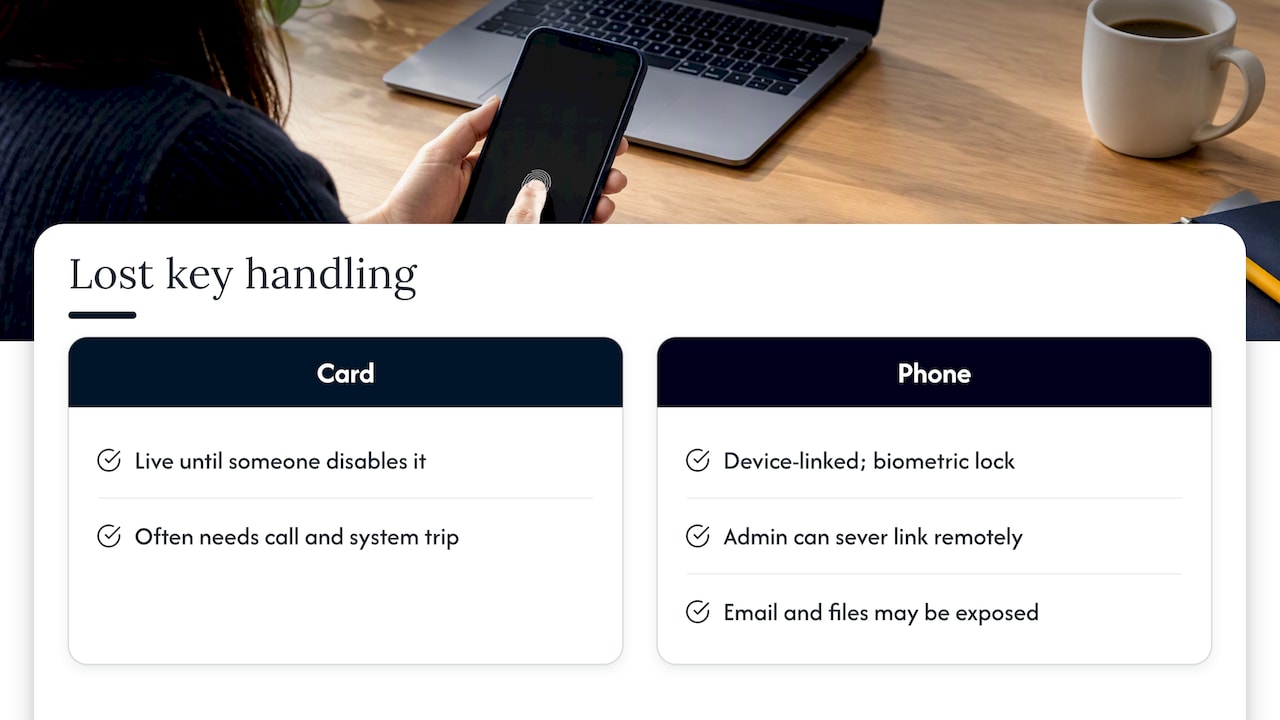
A lost card is a live key until someone disables it, and that often takes a call and a trip to the system. A lost phone is different. The credential can be tied to the device and its biometric lock, and an administrator can sever the link remotely. HID’s FAQ frames remote revocation and lifecycle management as a core security feature compared with cards that can stay active in the wrong hands until the system is reconfigured.
That cuts both ways, and it is worth saying plainly. If the phone is lost, you are not just missing a key. You may be missing a device that is signed in to email, files and business apps. Door access and device security have to be handled together.
Temporary access for contractors and visitors
Cleaners, electricians, delivery drivers and auditors all need short-term entry. Mobile credentials make time-boxed access practical without printing and collecting badges. Security leaders at the 2026 SIA GovSummit described this kind of just-in-time credentialing for employees, contractors and visitors as part of a more agile, Zero Trust-aligned approach to identity. That discussion was about federal agencies, but the principle scales down to a ten-person office.
If visitors are a big part of your day, pair the doors with a sign-in process. Our piece on a visitor management system covers why that matters for safety and evacuations.
Fewer plastic cards to buy and replace
Cards, fobs and printers all cost money, and replacements add up with turnover. Mobile credentials usually carry a per-user or per-credential fee on the software side instead, and pricing varies by platform, so ask for it in writing before you commit.
What can go wrong
Mobile access is not magic. These are the issues we would want you to plan for.
- Device compatibility. Phones differ in BLE and NFC performance across brands, operating systems and ages. A reader that works with last year’s phone may be inconsistent with an older one. Seam’s mobile access guide points to this gap and advises checking that readers and the access control system support the specific mobile protocol you plan to use, to avoid weak read ranges at doors.
- Proprietary versus open. Many systems still rely on a vendor’s own app and software kit. Others are moving toward open standards. Your choice affects how easy it is to change vendors later.
- Employees without a suitable phone, or who refuse to use a personal one. Keep cards or fobs as a fallback and decide the policy up front.
- Weak phone hygiene. A credential on a phone with no screen lock is only as good as the lock.
- One size fits nobody. Industry analysts quoted in the SIA Aliro discussion stress that you should match the method to the door: active, app-based authentication for high-security areas and passive walk-up entry for busy ones.
Aliro: why the standard matters to you
Until now, mobile credentials have mostly meant a different app for each building or system. The Connectivity Standards Alliance announced Aliro 1.0 on February 26, 2026 as a communication protocol and credential standard for unlocking doors from a smartphone or wearable. Its goal is interoperability: a credential that works across readers, locks and access systems from different manufacturers.
In the SIA Q&A with the Alliance’s CEO, Aliro is described as an open framework that lets phones, wearables, locks and readers work together securely across manufacturers. For a small business, the practical takeaway is simple: ask any vendor whether their readers support Aliro now or on a published roadmap. A yes does not make a product better on every count, but it lowers the odds that you are locked into one ecosystem five years from now.
Federal and regulated environments
If you do work for government agencies or in a regulated field, you may hear about Derived PIV Credentials. NIST’s practice guide on Derived PIV Credentials addresses a basic problem: stolen passwords are a primary source of breaches, and stronger identity proofing helps. The guide covers issuing derived credentials to mobile devices that cannot use a physical smart card reader. Most small businesses will never need this, but if a contract requires it, say so at the start of any access control project.
A practical rollout plan for a small business
Step 1: Map your doors and their risk
List every door, gate and cabinet you control. Mark each as low, medium or high risk. A front entrance with a receptionist is not the same as a server closet or a pharmacy storeroom. For high-risk doors, require the person to authenticate on the phone. For busy doors, tap-to-open is usually the right balance.
Step 2: Check your existing hardware
Many readers sold in recent years can read both cards and mobile credentials, which means you may not need to rip and replace. Others need new readers or a controller upgrade. Our overview of access control system types and when to outsource walks through the options, and our page on cloud access control is worth reading if you care about what happens to your doors when the internet drops.
Step 3: Survey the phones your team carries
Count iPhone and Android users, and note the oldest models and operating systems. Test a handful of devices at a real door before you buy for everyone. That is the cheapest way to catch the compatibility problems described above.
Step 4: Secure the phone itself
A mobile key raises the stakes on phone security. At minimum:
- Require a screen lock and biometrics on any device holding a credential.
- Turn on multi-factor authentication for the accounts that manage access, and for email and cloud apps. Our practical guide to MFA for business is a good place to start.
- Watch out for approval-prompt abuse. See our article on MFA fatigue attacks.
- Decide what happens when someone loses a phone: who gets the call, and how fast the credential is revoked.
- If staff work remotely, align door access with your remote access policy.
Step 5: Pilot, then expand
Start with one site or one team of five to ten people. Keep cards active during the pilot. Track failed reads, support tickets and what employees say. Then move the rest in waves and retire cards door by door.
Step 6: Write the policy
One page is enough. Cover who is eligible, whether personal phones are allowed, what happens when someone leaves, how lost devices are reported and how contractors are issued temporary keys.
Our perspective
We run IT for small and mid-sized businesses, and we see the same pattern with door access that we see with passwords: the technology is rarely the problem. The problem is that nobody owns the whole picture. The door vendor handles the readers, someone in the office handles phones, and nobody connects the two when an employee quits on a Friday.
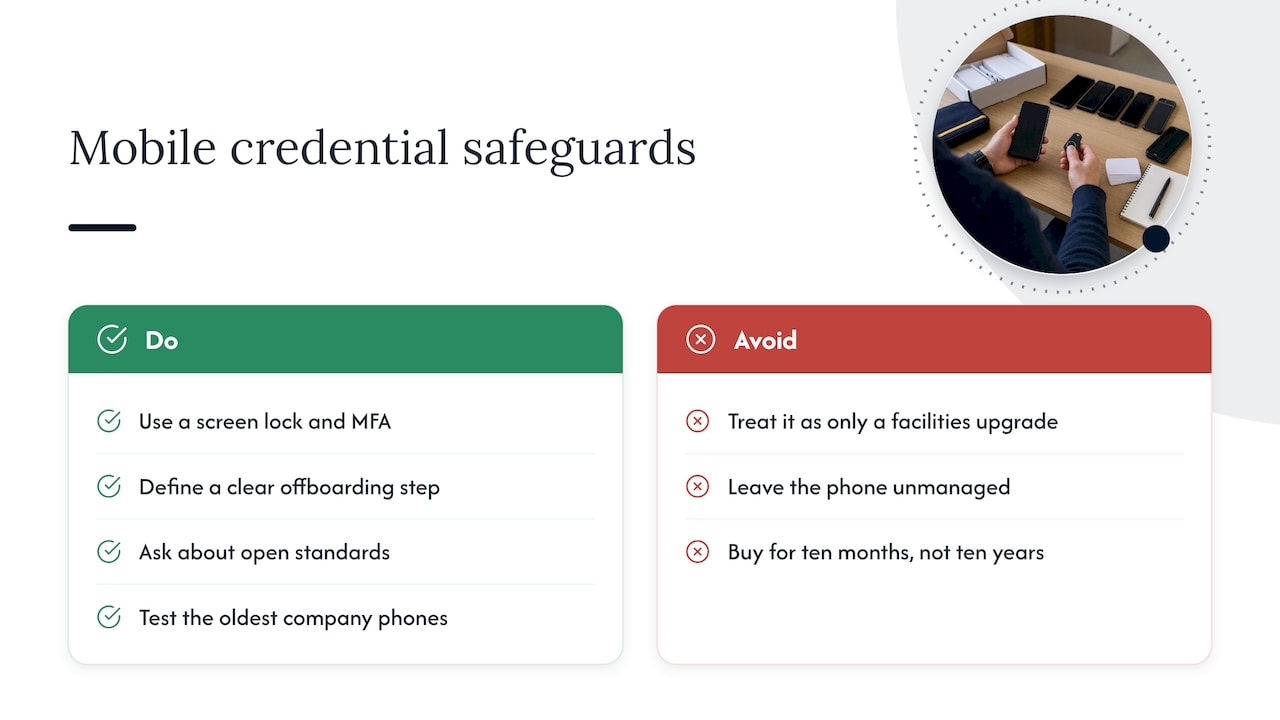
That is why we treat mobile credentials as an IT and security project, not just a facilities upgrade. The key lives on a device that also holds email, files and logins. If that device is unmanaged, you have moved your weakest link into your employees’ pockets. If it is managed, with a screen lock, MFA and a clear offboarding step, you have something better than a plastic card in almost every way.
Our advice is to buy for the next ten years, not the next ten months. Ask about open standards, make sure the system can keep cards as a fallback, and test on the oldest phones in your company. And whoever installs it, make sure someone answers the phone when a door will not open at 7:45 on a Monday. Our help desk is 100% USA-based and local to Ohio, with an average response time under 12 minutes, and that kind of responsiveness is what you want behind any system your team touches every morning.
— Jeffrey
Getting help with access control and IT together
If you want one team to look at doors, devices and accounts together, we can help. We provide cameras and access control alongside managed IT services and cybersecurity for small businesses in Ohio and Michigan, so the key on the phone and the security of the phone are planned as one project. Reach out through our site and we will start with a walkthrough of your doors and the devices your team uses.
FAQ
Can I use my phone as a HID card?
Yes, if your readers and software support mobile credentials. HID’s mobile access product stores digital IDs on the employee’s phone to complement an existing access system. You cannot simply copy a physical card’s number onto a phone, because mobile systems require an encrypted exchange with the reader.
Is Bluetooth door access secure?
It can be, when the credential is cryptographically provisioned and the phone is locked and managed. Security depends on the whole chain: the reader, the credential storage, the phone’s lock and how quickly you revoke lost devices. Weak phone hygiene is the most common gap.
Do mobile credentials work with Apple Wallet and Google Wallet?
Many systems now support wallet-based credentials, and Apple documents how access keys are stored in the Secure Element of an iPhone or Apple Watch. Support depends on your access control vendor and readers, so confirm it before you buy. Express Mode can let people tap without authenticating each time, which you may want to disable for sensitive doors.
What happens if an employee loses their phone?
An administrator can revoke the mobile credential remotely, which is the main advantage over a lost card. You should also lock or wipe the device through your device management tools, since the phone may hold business email and files. Write this step into your policy so everyone knows who to call.
Do I need new readers to use mobile access?
Sometimes. Many modern readers handle both cards and mobile credentials, but older proximity readers often cannot. Have an installer check your current readers and controller before you plan a budget.
Sources
- HID Mobile Access Frequently Asked Questions
- Tesla Model Y Owner’s Manual: keys
- Going Inside Aliro: A Q&A With Connectivity Standards Alliance President & CEO
- Apple Platform Security: Access using Apple Wallet
- Mobile Access Gains Ground in the Security Industry (SIA)
- The Future of Federal Identity: Insights From the 2026 SIA GovSummit
- Mobile Access (Seam documentation)
- Introducing Aliro 1.0 (Connectivity Standards Alliance)
- NIST: Derived Personal Identity Verification (PIV) Credentials